How to do I build a multi timeframe\symbol portfolio?
-
I have checked high and low on youtube and the internet on how to build a multi tf\symbol portfolio in fxdreema. in fact, searching "fxdreema portfolio" a lot of the search results contain my previous threads about this. Needless to say but there is pretty much nothing on learning material for constructing a portfolio in fxdreema. I've tried restructuring the portfolio in fxdreema (DRY) by "logically" using the same blocks but could not get it to work the way I want. I have a portfolio. It's a simple RSI-based system with over 200 iterations of this. @fxDreema and @roar suggested using arrays and variables to reduce the number of blocks. I still could not get it to work. here is how the portfolio works like this
https://fxdreema.com/shared/LP0IvbCbe
Group 1
H1 EURUSD RSI Level 30
Group 2
H2 GBPJPY RSI Level 35
Group 3
H3 CADCHF RSI Level 40
Group 4
H4 AUDNZD Rsi Level 35and so on. Each group is in its own universe. I have over 200 groups of specific TF\symbol combinations. The system has 2 entry conditions. 1. close above 200MA and condition 2. RSI level blow different levels. Once those 2 are met, robot goes long. nothing complicated. The way I currently have the portfolio constructed is causing MT5 to produce the error code 4806. Ive split the project into 2 different EAs and at first, it worked but after a few days, with no change in coding, the error returned. There are all kinds of videos on youtube on creating martingale, grid, single systems. but no portfolio construction videos!
Im at my wits end and asking assistance. I just need the framework on getting portfolios to work with fxdreema without throwing code. I have zero programming experience and managed to get this far and not giving up! I'm so close!
-
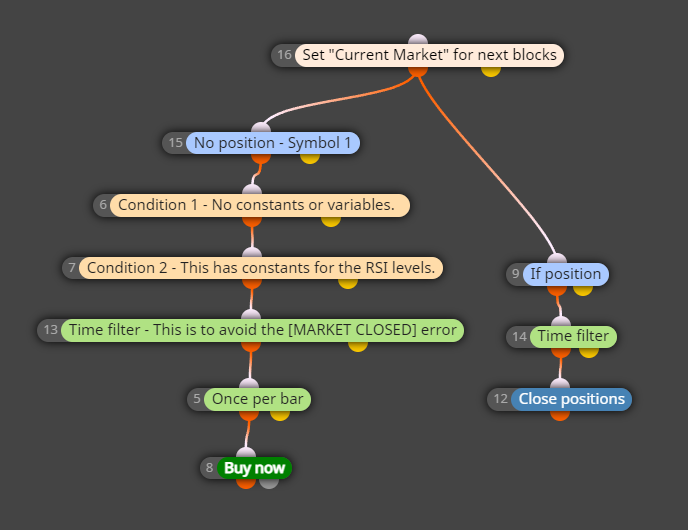
Just put the market loop on top. Dont use the other filters - symbol or group - in other blocks.
If you have special settings for each symbol, then you need an array.
-
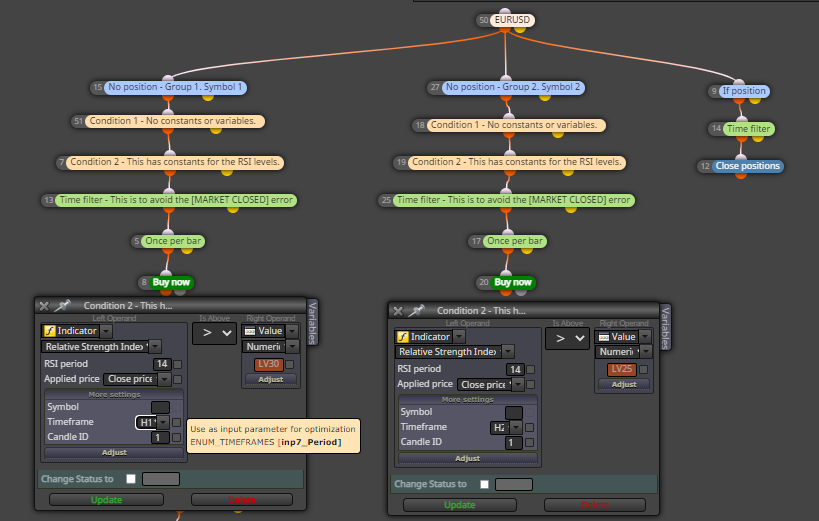
Ok, I removed all constants for symbols and groups. how about TF? is it okay to set in the blocks like in the picture? How about the constants? they are fixed per iteration. its just a RSI static level. The If position\close position blocks are global. its supposed to close any open position once it reaches a fixed price target. I could probably leave that disconnected because I have the setting within each of those blocks to watch all open positions, so I can probably disconnect it from the symbol block.
-
@gooseman so you have different RSI timeframes and different RSI levels for each symbol?
In that case, I would first record the RSI on all timeframes into their own variables, also record the currently selected market, and then do the symbol + RSI check in one big condition block.
For the syntax, && means "and", || means "or".This doesnt compile since I dont have all your variables, but I hope you get the idea
https://fxdreema.com/shared/D0LMD4HncTo avoid the unnecessary loading of all RSI timeframes for all symbols, you could first do a checkup for the correct TF for the selected symbol, but it is not strictly needed
-
@roar thats correct. different RSI timeframes and different RSI levels for each symbol.
Just to be clear, the big orange condition block replaced the RSI block and now it will check each market listing in the block. looks like it'll check symbol && RSI_H variables in the modify variable block. got that part. but how does it know to check the levels? I see the RSI TF variables in the variables block but nothing to draw a reference for the RSI levels.
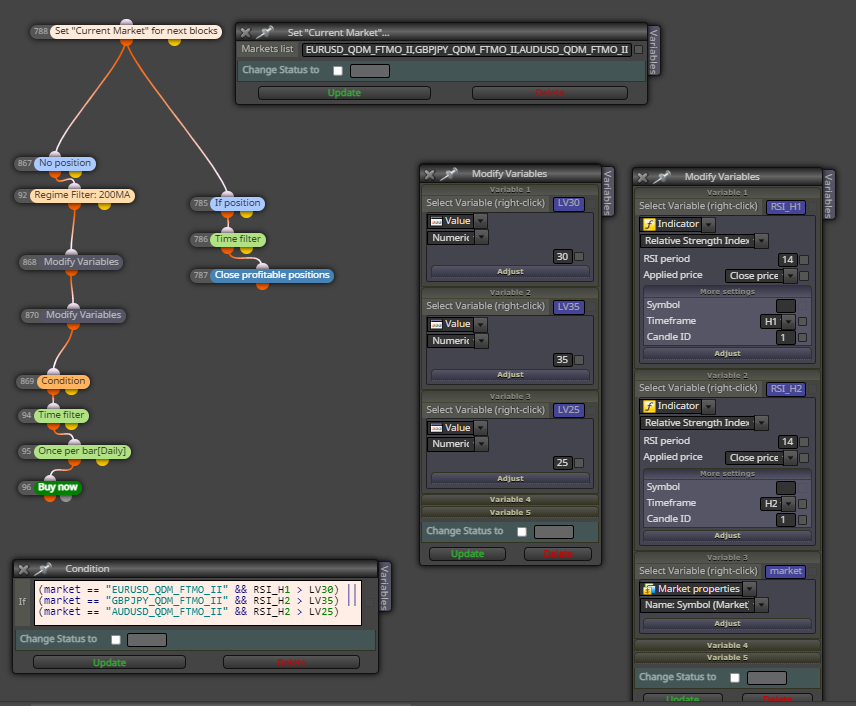
Ive created another modify variable block to include the RSI levels. also, markets variable. how does that work?
-
While tinkering with the project, I just realized that the first condition (candle close above 200 length moving average) does have to be on the same timeframe as the RSI.
If H1 EURUSD LV30 is on the H1 timeframe, the first condition has to be on the same timeframe.
-
@gooseman ok, if MA has a variable timeframe as well, its better to use slightly different structure.
- Start with the market selection loop
- Record the currently selected market into "market" variable
- Run a checkup in custom block: if market is this, set timeframe to this and set rsi target level to this
- Apply the found timeframe to every next block
- Run the MA and RSI conditions with the previously selected variable timeframes and target levels
Need small help? Tag me in your post
Need big help? https://www.fiverr.com/big_algo/automate-your-winning-strategy-in-mql4-or-mql5 -
@roar first thanks for the assistance. I have a little bit better understanding of how to use variables now. With your latest example, I changed symbols to my custom data and was able to get the system running. after that, I added more symbols and code but now facing an infinite sleep-detected error. I found an old post you had replied to regarding this and I checked the names in the market block and in the custom mql block. I checked my MT5 client and all my custom data is enabled. I suspect that it could possibly be an unnecessary repetition in the code? I am pretty sure this is where pipes || come into play here. I just don't know where to place them.
https://fxdreema.com/shared/sRgGL7lwe
if(market == "AUDCAD_QDM_FTMO_II") { TF = PERIOD_D1; rsi_target = 2; } if(market == "AUDJPY_QDM_FTMO_II") { TF = PERIOD_D1; rsi_target = 2; } if(market == "AUDJPY_QDM_FTMO_II") { TF = PERIOD_D1; rsi_target = 3; } if(market == "AUDUSD_QDM_FTMO_II") { TF = PERIOD_D1; rsi_target = 2; } if(market == "AUDUSD_QDM_FTMO_II") { TF = PERIOD_D1; rsi_target = 3; } if(market == "CADCHF_QDM_FTMO_II") { TF = PERIOD_D1; rsi_target = 2; } if(market == "CADJPY_QDM_FTMO_II") { TF = PERIOD_D1; rsi_target = 2; } if(market == "CADJPY_QDM_FTMO_II") { TF = PERIOD_D1; rsi_target = 3; } if(market == "EURAUD_QDM_FTMO_II") { TF = PERIOD_D1; rsi_target = 2; } if(market == "EURCHF_QDM_FTMO_II") { TF = PERIOD_D1; rsi_target = 2; } if(market == "EURCHF_QDM_FTMO_II") { TF = PERIOD_D1; rsi_target = 3; } if(market == "EURGBP_QDM_FTMO_II") { TF = PERIOD_D1; rsi_target = 2; } if(market == "EURGBP_QDM_FTMO_II") { TF = PERIOD_D1; rsi_target = 3; } if(market == "EURGBP_QDM_FTMO_II") { TF = PERIOD_D1; rsi_target = 4; } if(market == "EURGBP_QDM_FTMO_II") { TF = PERIOD_D1; rsi_target = 5; } if(market == "EURUSD_QDM_FTMO_II") { TF = PERIOD_D1; rsi_target = 2; } if(market == "EURUSD_QDM_FTMO_II") { TF = PERIOD_D1; rsi_target = 3; } if(market == "EURUSD_QDM_FTMO_II") { TF = PERIOD_D1; rsi_target = 4; } if(market == "GBPAUD_QDM_FTMO_II") { TF = PERIOD_D1; rsi_target = 2; } if(market == "GBPAUD_QDM_FTMO_II") { TF = PERIOD_D1; rsi_target = 3; } if(market == "GBPAUD_QDM_FTMO_II") { TF = PERIOD_D1; rsi_target = 4; } if(market == "GBPAUD_QDM_FTMO_II") { TF = PERIOD_D1; rsi_target = 5; } if(market == "GBPJPY_QDM_FTMO_II") { TF = PERIOD_D1; rsi_target = 2; } if(market == "GBPJPY_QDM_FTMO_II") { TF = PERIOD_D1; rsi_target = 3; } if(market == "GBPJPY_QDM_FTMO_II") { TF = PERIOD_D1; rsi_target = 4; } if(market == "GBPJPY_QDM_FTMO_II") { TF = PERIOD_D1; rsi_target = 5; } if(market == "NZDCAD_QDM_FTMO_II") { TF = PERIOD_D1; rsi_target = 2; } if(market == "NZDCAD_QDM_FTMO_II") { TF = PERIOD_D1; rsi_target = 3; } if(market == "NZDCAD_QDM_FTMO_II") { TF = PERIOD_D1; rsi_target = 4; } -
@gooseman why do you have the same symbol repeating multiple times there?
Need small help? Tag me in your post
Need big help? https://www.fiverr.com/big_algo/automate-your-winning-strategy-in-mql4-or-mql5 -
I have them repeating because that's what's in the portfolio.
Daily CADJPY rsi_target = 2
Daily CADJPY rsi_target = 3same system just different rsi_targets. I have many iterations of the system
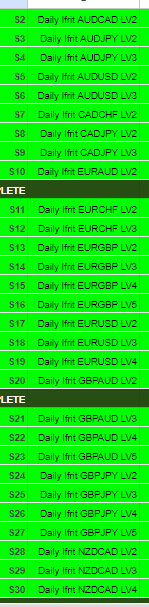
LV# is the same thing as rsi_targets.
-
@gooseman well if you have many targets for rsi, maybe there should be some variables, like tgt1 tgt2 etc, or an array... But it might be unnecessarily complicated that way.
Why do you need to check multiple levels in the first place? Surely, if RSI is not above 60, there is no need to check if RSI is above 70. So, we could just use the smallest target.
I'm not sure where the sleep loop error comes from, can't test with those symbols myself. Try some smaller list of symbols, maybe there is just some limit in the symbols loop (if so, there's another structure to do, of course hehe)
-
@roar It checks multiple levels because each lvl is considered to be its own asset in a portfolio context. so
Daily Ifrit EURCHF LV2
and
Daily Ifrit EURCHF LV3despite being the same system with different levels, they are 2 different assets. All assets were tested individually and now I am trying to bring them all together in a portfolio or 1 EA. each asset is independent from each other. Another way to explain this is if discretionarily traded 2 trend following systems. trend following system A, where it trades on Daily EURCHF only trend following system B trades on daily GBPJPY only. so you ask your programmer friend to code both systems and put them in a portfolio.
I also tried your example and just changed out the symbols for my customer symbol and it trades no errors. its when I add more symbols is when I receive the error
-
Ok splitting up the symbols seems to work so far.
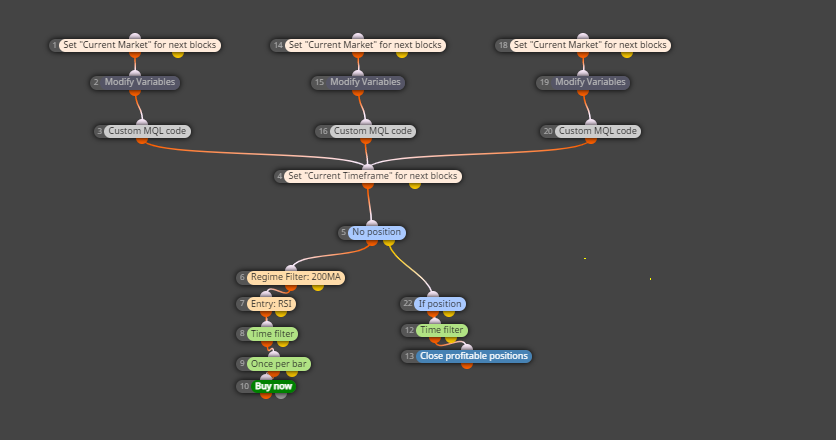
-
@gooseman that works. If you want to get fancy, you can put the symbols into an array and loop through that array. This might be easier managed version, as you can make the symbols list in excel. I have ran 2000+ symbols that way.
Check OnInit tabhttps://fxdreema.com/shared/VwmyF0FAd

Need small help? Tag me in your post
Need big help? https://www.fiverr.com/big_algo/automate-your-winning-strategy-in-mql4-or-mql5 -
@roar yea ill be taking the fancy approach because splitting the symbols the way I was doing, ended up throwing codes still. but I'm receiving compiling errors when trying to save the project. I have the blocks set in the on init tab also. please ignore the multiple market variables lol but those blocks are off. also I thought maybe it could be the Value set as numeric, so I switched it over to text and still received the compilation error.
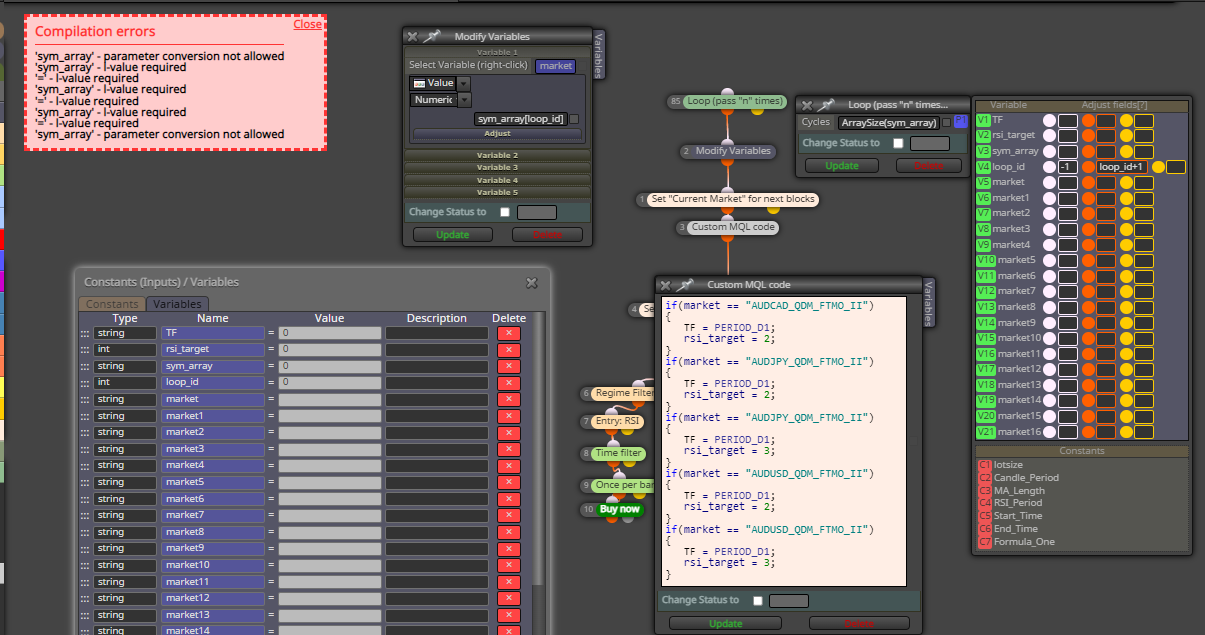
+1 for the fist of the north star meme lol
-
@gooseman the sym_array variable needs to be an array (stores multiple values at once). This is denoted in the variables list by putting square brackets after the name, like this
sym_array[]Need small help? Tag me in your post
Need big help? https://www.fiverr.com/big_algo/automate-your-winning-strategy-in-mql4-or-mql5 -
@roar Where exactly this array needs to be stored? I have added the brackets to the variable
https://fxdreema.com/shared/ikBvXHTSc
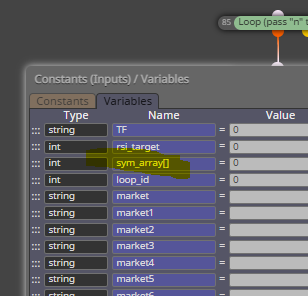
I was able to save with no compilation errors but when I test in MT5, I get

Looks like I need to tie in these custom sys_array just not sure how.
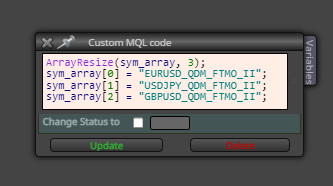
I've adjusted for differences in the data name. I just can't get the EA to tie in with my custom data. Please advise.
-
@gooseman the array just needs to be string datatype (not int), just as your individual market variables are.
Tip: when copying a shared project, you can download the .mq5 file and then import it back to your builder. You will get all variables automatically.
Need small help? Tag me in your post
Need big help? https://www.fiverr.com/big_algo/automate-your-winning-strategy-in-mql4-or-mql5 -
@roar yea my bad. that was an older snapshot I provided. I was hovering the mouse cursor over the variable to find the data type but your tip is much better, thanks for that.
https://fxdreema.com/shared/VwmyF0FAd
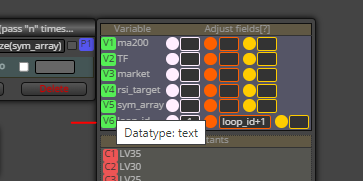
even with the data type correction, I am still receiving that symbol error. Seems like there's a disconnect somewhere.
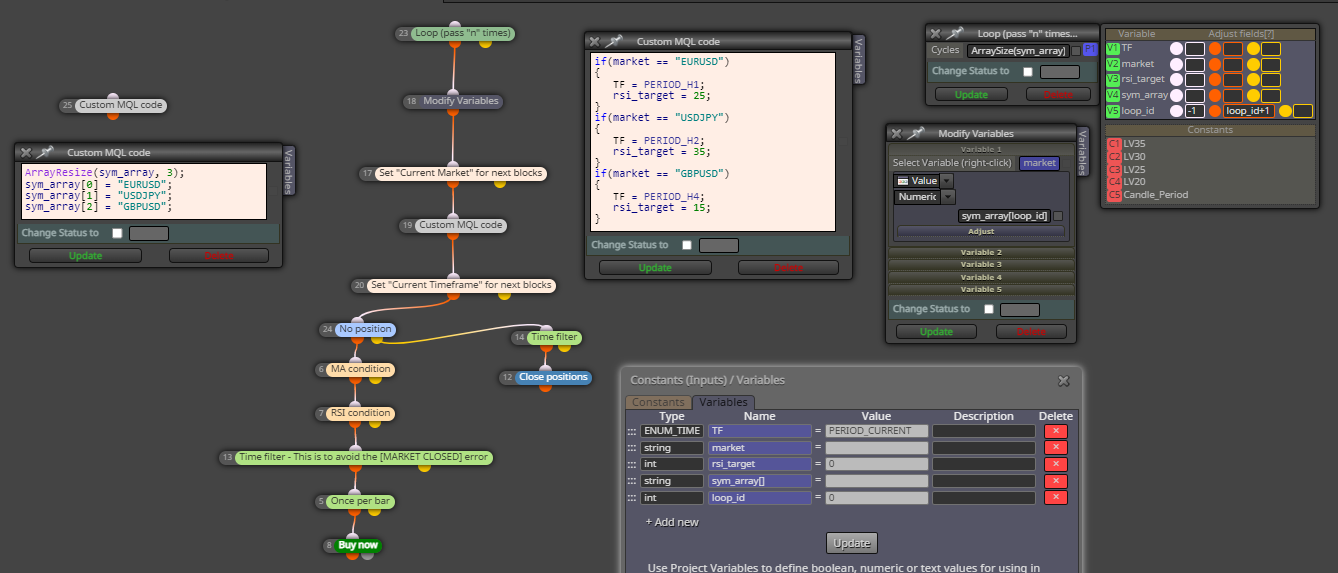
any ideas?
-
@gooseman where do you populate the array with symbols? If its block 25 in your screenshot, there must be some connection with that block - alone blocks never execute on fxdreema, they are essentially disabled. So you can just make a dummy connection to a pass block.
Also, the array populating must be done before the main system does its work, so its best to do it On Init
Need small help? Tag me in your post
Need big help? https://www.fiverr.com/big_algo/automate-your-winning-strategy-in-mql4-or-mql5