fxDreema

    • Register
    • Login
    • Search
    • Back to the main page
    • Categories
    • Recent
    • Tags
    • Popular
    • Search

    [Asking for help] Simple Automatic TP and SL with Modifiable Input using Manual Order

    Questions & Answers
    2
    23
    635
    Loading More Posts
    • Oldest to Newest
    • Newest to Oldest
    • Most Votes
    Reply
    • Reply as topic
    Log in to reply
    This topic has been deleted. Only users with topic management privileges can see it.
    • M
      mahesvararaja last edited by mahesvararaja

      Hello!
      I am a scalper and I want to create an EA that will help to automate TP and SL on each trade. I will enter the market with a stop order and I want the TP and SL to be modifiable.
      Is these blocks are right?
      Any help would be appreciated. Thanks in advance

      https://fxdreema.com/shared/HUrlU6j5d

      1 Reply Last reply Reply Quote 0
      • jstap
        jstap last edited by

        Sort of, but what is this modify doing?

        Learn fxDreema Without the Wait!

        My comprehensive book, available on Amazon, is packed with examples and invaluable insights to help you fast-track your learning journey.

        The paperback and hardback editions include MT4 & MT5 QR codes for easy access to all prebuilt projects and robots, including my latest gold trading robot!

        Don’t miss out

        Click here➡️ https://mybook.to/fxDreema to get your copy today!

        Enjoy! 😊

        1 Reply Last reply Reply Quote 0
        • M
          mahesvararaja last edited by

          Thanks for your response. The Modify Variables on block 2 intend to create dialogue box like this to edit the stop loss and take profit value on Modify Stops block 4. Am I on the wrong way regarding this?
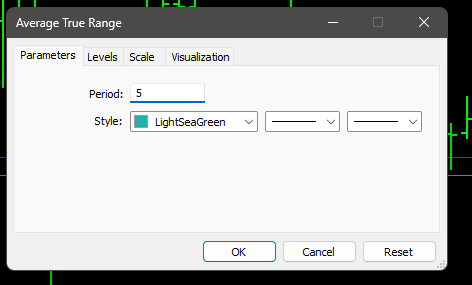
          image.png

          1 Reply Last reply Reply Quote 0
          • jstap
            jstap last edited by

            Does it work?

            Learn fxDreema Without the Wait!

            My comprehensive book, available on Amazon, is packed with examples and invaluable insights to help you fast-track your learning journey.

            The paperback and hardback editions include MT4 & MT5 QR codes for easy access to all prebuilt projects and robots, including my latest gold trading robot!

            Don’t miss out

            Click here➡️ https://mybook.to/fxDreema to get your copy today!

            Enjoy! 😊

            1 Reply Last reply Reply Quote 0
            • M
              mahesvararaja last edited by

              Finally I deleted the blocks 2 and exported with the .mq5 option. I imported it into the chart, fired up the algo trading, entered the market with a stop order but unfortunately no SL and TP were seen.
              The configuration box to configure TP and SL is there without the blocks 2.

              1 Reply Last reply Reply Quote 0
              • jstap
                jstap last edited by jstap

                My bad, I should have noticed this before, you need order created to act when you place an order - pink for each pending order to get the order to work with - modify stop block to add the stop

                All should work as needed then.

                Learn fxDreema Without the Wait!

                My comprehensive book, available on Amazon, is packed with examples and invaluable insights to help you fast-track your learning journey.

                The paperback and hardback editions include MT4 & MT5 QR codes for easy access to all prebuilt projects and robots, including my latest gold trading robot!

                Don’t miss out

                Click here➡️ https://mybook.to/fxDreema to get your copy today!

                Enjoy! 😊

                1 Reply Last reply Reply Quote 0
                • M
                  mahesvararaja last edited by

                  Relax, it is totally okay. I've update the blocks here.
                  https://fxdreema.com/shared/ELE0mEmDd
                  Again, I've exported in .mq5, however this block still not working tough.
                  I've try to reverse the order of first blocks (Order Created) with second (For each Pending Order) but still no luck.

                  1 Reply Last reply Reply Quote 0
                  • M
                    mahesvararaja last edited by

                    Updated the second block (For each Pending Order) configuration here https://fxdreema.com/shared/ngTh31mdb
                    but still not working.

                    1 Reply Last reply Reply Quote 0
                    • jstap
                      jstap last edited by

                      With digits in so many boxes you can't work out what's happening, strip this back to the basics, then once working change things

                      Learn fxDreema Without the Wait!

                      My comprehensive book, available on Amazon, is packed with examples and invaluable insights to help you fast-track your learning journey.

                      The paperback and hardback editions include MT4 & MT5 QR codes for easy access to all prebuilt projects and robots, including my latest gold trading robot!

                      Don’t miss out

                      Click here➡️ https://mybook.to/fxDreema to get your copy today!

                      Enjoy! 😊

                      1 Reply Last reply Reply Quote 0
                      • M
                        mahesvararaja last edited by mahesvararaja

                        I've remade the For each Pending Order blocks here
                        https://fxdreema.com/shared/obnq6ewlc
                        This one is working but with this kind of behaviour.

                        • 1st order created, no TP and SL lines created
                        • 2nd order created, TP and SL set on the 1st order according to the configuration in blocks 3.
                        • 3rd order created, TP and SL set on the 2nd order
                        • 4th order create, TP and SL set on the 3rd order
                        • and so on

                        Changing Loop direction to Oldest to Newest on For each Pending Order blocks produce this kind of results:

                        • 1st order created, no TP and SL lines created.
                        • 2nd order created, TP and SL set on the 1st order and 2nd order.
                        • 3rd order created, no TP and SL lines created.
                        • 4th order created, TP and SL set on the 3rd and 4th order.
                        1 Reply Last reply Reply Quote 0
                        • jstap
                          jstap last edited by

                          I am unsure, this looks like it would work. I would say go to the main page and ask admin

                          Learn fxDreema Without the Wait!

                          My comprehensive book, available on Amazon, is packed with examples and invaluable insights to help you fast-track your learning journey.

                          The paperback and hardback editions include MT4 & MT5 QR codes for easy access to all prebuilt projects and robots, including my latest gold trading robot!

                          Don’t miss out

                          Click here➡️ https://mybook.to/fxDreema to get your copy today!

                          Enjoy! 😊

                          M 1 Reply Last reply Reply Quote 0
                          • M
                            mahesvararaja last edited by

                            hmm. regarding the first case:
                            "1st order created, no TP and SL lines created
                            2nd order created, TP and SL set on the 1st order"
                            Because this blocks running on 'onTrade', is it possible that the 1st order is not recognised as an order (since there are no pending order before the 1st order) and therefore the 2nd order is considered as '1st order' by the EA?
                            I try to move the order checker to onTick but still no luck haha.

                            PS:
                            This is my first time using fxDreema so I still learning a lot here and there

                            1 Reply Last reply Reply Quote 0
                            • M
                              mahesvararaja @jstap last edited by

                              @jstap hey, somehow this one is works like a charm.
                              https://fxdreema.com/shared/TX9xRYQVd
                              Moving the blocks into onTick section and changing a the blocks a little.
                              Got to try it for a while before I mark this thread solved.
                              But anyway, thanks for helping me through this.

                              1 Reply Last reply Reply Quote 0
                              • jstap
                                jstap last edited by

                                That does surprise me, the problem I see with that is you cannot manually move the stop, because the EA will just move back. try this, ontrade turn a flag true if order opened, on tick check the flag if true change only 1 trade newest to oldest and turn the flag back off

                                Learn fxDreema Without the Wait!

                                My comprehensive book, available on Amazon, is packed with examples and invaluable insights to help you fast-track your learning journey.

                                The paperback and hardback editions include MT4 & MT5 QR codes for easy access to all prebuilt projects and robots, including my latest gold trading robot!

                                Don’t miss out

                                Click here➡️ https://mybook.to/fxDreema to get your copy today!

                                Enjoy! 😊

                                1 Reply Last reply Reply Quote 0
                                • M
                                  mahesvararaja last edited by

                                  Thanks for the insight @jstap. Yeah, you're right. The TP and SL feels like have a magnet on it hahaha.
                                  Anyway, already made some adjustment here
                                  https://fxdreema.com/shared/1e0CNK0be
                                  I guess this is working as intended. Still checking it live on the chart.

                                  1 Reply Last reply Reply Quote 0
                                  • jstap
                                    jstap last edited by jstap

                                    Doing this does this not sKip the 1st order?
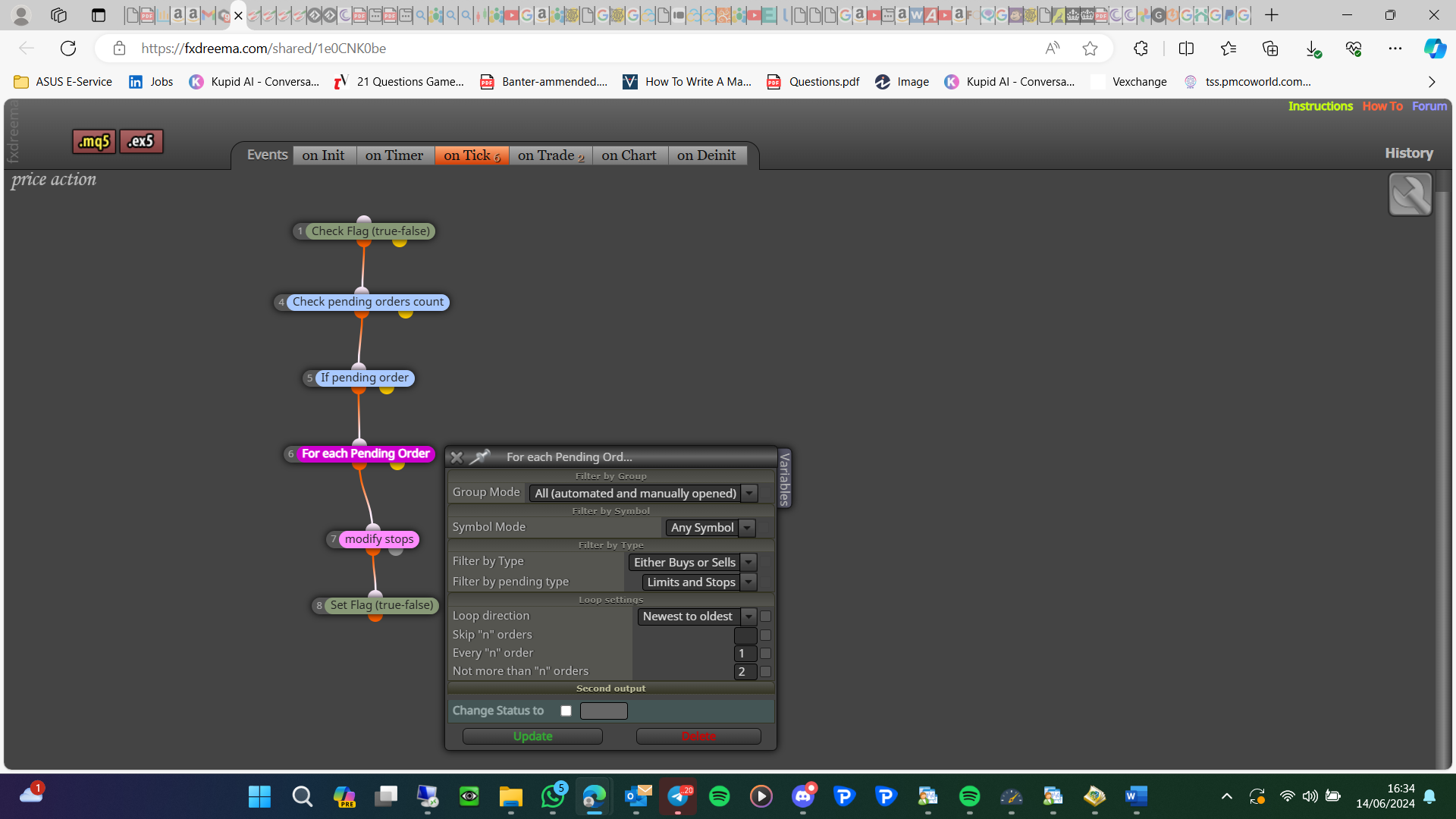
                                    image.png
                                    I think you just need this:
                                    image.png
                                    Let me know whether this works

                                    Learn fxDreema Without the Wait!

                                    My comprehensive book, available on Amazon, is packed with examples and invaluable insights to help you fast-track your learning journey.

                                    The paperback and hardback editions include MT4 & MT5 QR codes for easy access to all prebuilt projects and robots, including my latest gold trading robot!

                                    Don’t miss out

                                    Click here➡️ https://mybook.to/fxDreema to get your copy today!

                                    Enjoy! 😊

                                    1 Reply Last reply Reply Quote 0
                                    • M
                                      mahesvararaja last edited by mahesvararaja

                                      Changed the blocks to make it cleaner just as you suggest. However, as I am testing the EA, I refined my strategies also. Apparently, I need market order too haha. So I made a little adjustment here. I removed the value on 'every "n" order" but I think sometimes I need 2 or 3 stop orders so I put 3 on 'not more than "n" orders'.
                                      Here's the results. It works quite good IMO
                                      https://fxdreema.com/shared/eYzlewmgc

                                      1 Reply Last reply Reply Quote 0
                                      • M
                                        mahesvararaja last edited by

                                        Many thanks @jstap . Been testing this EA since yesterday. I guess it is safe to call it a day. I will mark this thread to solved if you don't have any suggestions anymore.

                                        1 Reply Last reply Reply Quote 0
                                        • jstap
                                          jstap last edited by

                                          That is all from me, any other problems though just ask.

                                          Learn fxDreema Without the Wait!

                                          My comprehensive book, available on Amazon, is packed with examples and invaluable insights to help you fast-track your learning journey.

                                          The paperback and hardback editions include MT4 & MT5 QR codes for easy access to all prebuilt projects and robots, including my latest gold trading robot!

                                          Don’t miss out

                                          Click here➡️ https://mybook.to/fxDreema to get your copy today!

                                          Enjoy! 😊

                                          1 Reply Last reply Reply Quote 0
                                          • M
                                            mahesvararaja last edited by

                                            hmm I noticed strange behaviour with https://fxdreema.com/shared/eYzlewmgc
                                            Sometimes opened order (true for all market order and pending order) closed by itself in a random fashion and I could not reproduce it (it happens randomly). Still trying to figure it out.


                                            1 Reply Last reply Reply Quote 0
                                            • 1
                                            • 2
                                            • 1 / 2
                                            • First post
                                              Last post

                                            Online Users

                                            R
                                            D
                                            M
                                            A

                                            17
                                            Online

                                            147.0k
                                            Users

                                            22.4k
                                            Topics

                                            122.6k
                                            Posts

                                            Powered by NodeBB Forums | Contributors