fxDreema

    • Register
    • Login
    • Search
    • Back to the main page
    • Categories
    • Recent
    • Tags
    • Popular
    • Search

    MT5 Close All Fast

    Questions & Answers
    7
    31
    2749
    Loading More Posts
    • Oldest to Newest
    • Newest to Oldest
    • Most Votes
    Reply
    • Reply as topic
    Log in to reply
    This topic has been deleted. Only users with topic management privileges can see it.
    • Z
      zentex74 last edited by

      MT5 has the Close All function which is fast, using "async" mode, faster than the fxdreema Close Position option.
      I am sure it requires custom code.

      I have seen some links, but not sure how to implement it in fxdreema. I got the error message that CTrade is unidentified but I am not sure how to resolve this since thsi si not a variable but a class.

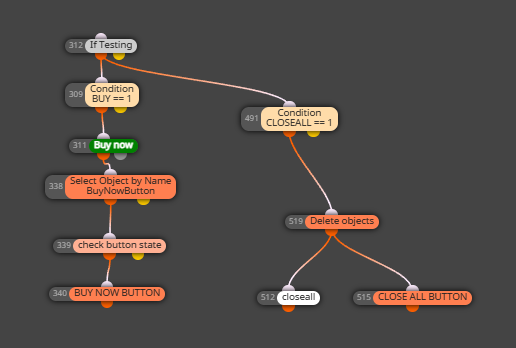
      This is a simple project I use to test.

      https://fxdreema.com/shared/A1rkQPnwd

      This is the discussion on the aync mode.
      https://www.mql5.com/en/forum/457067

      Any suggestion on how to implement it in fxdreema? I am not familiar with mql4 or 5.

      Thanks in advance

      1 Reply Last reply Reply Quote 0
      • jstap
        jstap last edited by jstap

        To get this working in FX you need to create a custom block:

        I have done that here: https://fxdreema.com/shared/GVIxc5AZ. But I haven't tested it, so I don't know if it works. You will need to set the condition to activate it

        This is how I created:
        in the 1st section (on tick in this case)
        {
        startTime = GetMicrosecondCount(); // Record start time
        sTrade.SetAsyncMode(true); // Enable asynchronous trade operations

        CloseAllPositions();                // Call function to close all positions
        PrintPerformance(startTime);        // Monitor performance
        

        }

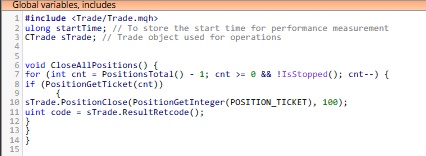
        In the global variables section:
        #include <Trade/Trade.mqh>
        ulong startTime; // To store the start time for performance measurement
        CTrade sTrade; // Trade object used for operations

        In the custom function section:
        void CloseAllPositions() {
        for (int cnt = PositionsTotal() - 1; cnt >= 0 && !IsStopped(); cnt--) {
        if (PositionGetTicket(cnt)) {
        sTrade.PositionClose(PositionGetInteger(POSITION_TICKET), 100);
        uint code = sTrade.ResultRetcode();
        Print("Close result code: ", IntegerToString(code));
        }
        }
        }

        void PrintPerformance(ulong startTime) {
        for (int i = 0; i < 100; i++) {
        Print("Elapsed time: ", IntegerToString(GetMicrosecondCount() - startTime), " microseconds. Open positions: ", IntegerToString(PositionsTotal()));
        if (PositionsTotal() <= 0) { break; }
        Sleep(100);
        }
        }

        Learn fxDreema Without the Wait!

        My comprehensive book, available on Amazon, is packed with examples and invaluable insights to help you fast-track your learning journey.

        The paperback and hardback editions include MT4 & MT5 QR codes for easy access to all prebuilt projects and robots, including my latest gold trading robot!

        Don’t miss out

        Click here➡️ https://mybook.to/fxDreema to get your copy today!

        Enjoy! 😊

        1 Reply Last reply Reply Quote 1
        • Z
          zentex74 last edited by

          Wow, this is great. Thanks!
          I have never used custom block before.
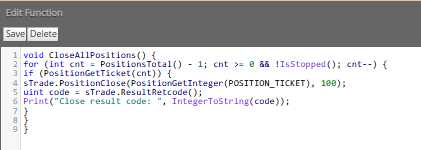
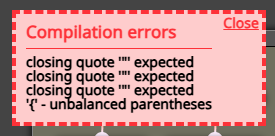
          When trying to compile, I got this message, I wonder what I did wrong.
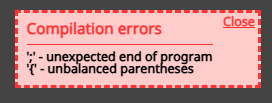
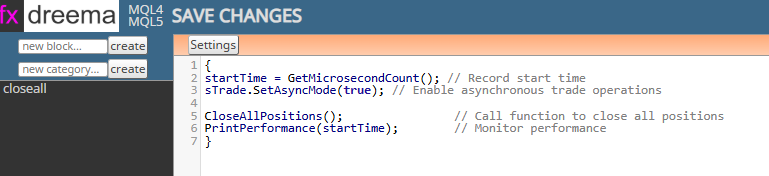
          image.png

          image.png
          image.png
          image.png

          1 Reply Last reply Reply Quote 0
          • jstap
            jstap last edited by

            I do not know, the link I put above compiles for me.

            You are using on MT5?

            Here is the code again

            on tick section:

            {
            startTime = GetMicrosecondCount(); // Record start time
            sTrade.SetAsyncMode(true); // Enable asynchronous trade operations

            CloseAllPositions();                // Call function to close all positions
            PrintPerformance(startTime);        // Monitor performance
            

            }

            In the global variables section::

            #include <Trade/Trade.mqh>
            ulong startTime; // To store the start time for performance measurement
            CTrade sTrade; // Trade object used for operations

            In the custom function section::

            void CloseAllPositions() {
            for (int cnt = PositionsTotal() - 1; cnt >= 0 && !IsStopped(); cnt--) {
            if (PositionGetTicket(cnt)) {
            sTrade.PositionClose(PositionGetInteger(POSITION_TICKET), 100);
            uint code = sTrade.ResultRetcode();
            Print("Close result code: ", IntegerToString(code));
            }
            }
            }

            void PrintPerformance(ulong startTime) {
            for (int i = 0; i < 100; i++) {
            Print("Elapsed time: ", IntegerToString(GetMicrosecondCount() - startTime), " microseconds. Open positions: ", IntegerToString(PositionsTotal()));
            if (PositionsTotal() <= 0) { break; }
            Sleep(100);
            }
            }

            Learn fxDreema Without the Wait!

            My comprehensive book, available on Amazon, is packed with examples and invaluable insights to help you fast-track your learning journey.

            The paperback and hardback editions include MT4 & MT5 QR codes for easy access to all prebuilt projects and robots, including my latest gold trading robot!

            Don’t miss out

            Click here➡️ https://mybook.to/fxDreema to get your copy today!

            Enjoy! 😊

            Z 1 Reply Last reply Reply Quote 0
            • Z
              zentex74 @jstap last edited by

              @jstap Yes, I am using mt5.

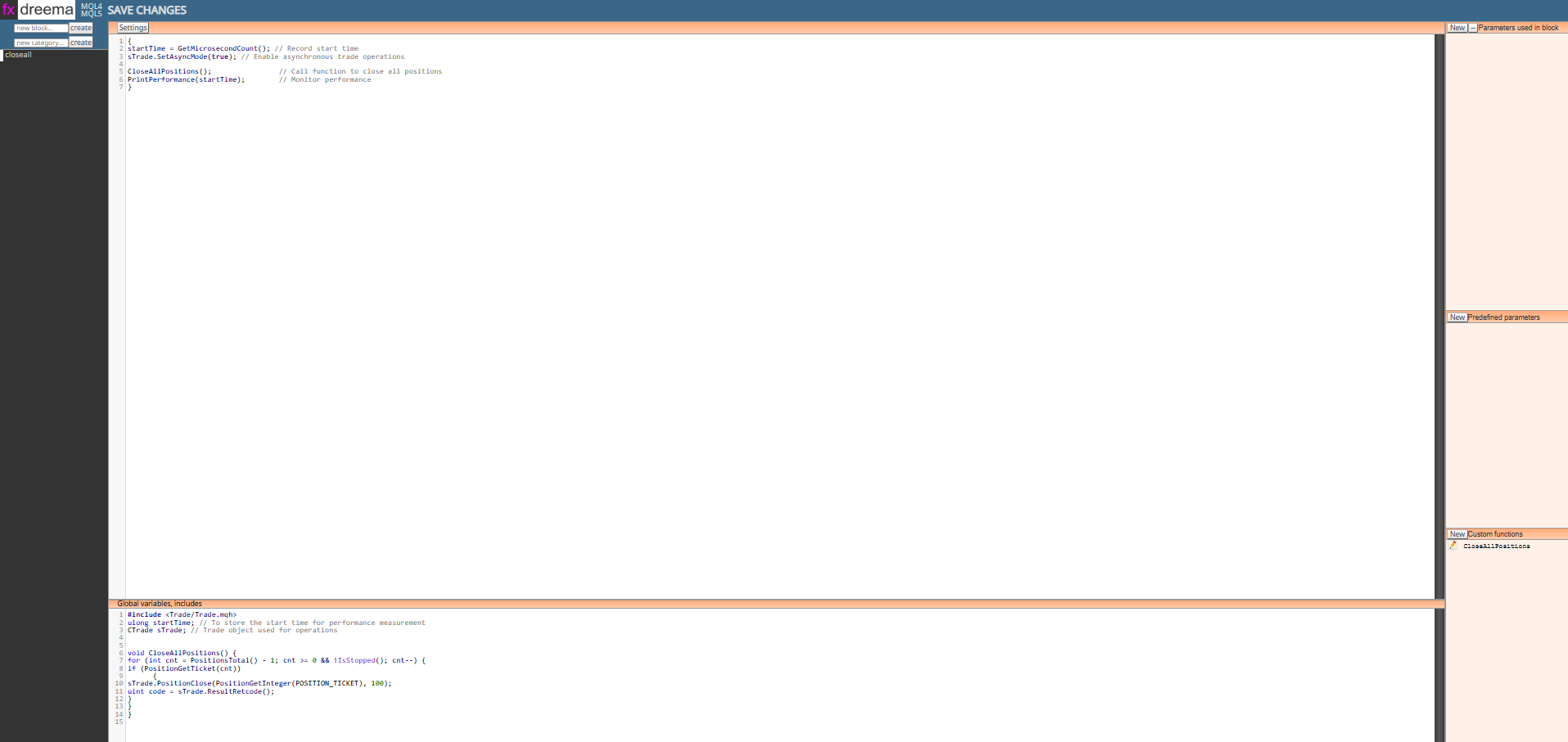
              May I ask where the tick section is? As in the image below, I see Settings ( I assume it is the tick you mention). I can see the Global Variables and Custom functions. Sorry, I have not used Custom Block before.
              3b3411b6-3498-4114-9cd9-7b5f15a6c990-image.png

              1 Reply Last reply Reply Quote 0
              • jstap
                jstap last edited by

                The 1st section (under settings) it is where the action code goes, I called it on tick for this but
                it depends on where the block is used.

                Learn fxDreema Without the Wait!

                My comprehensive book, available on Amazon, is packed with examples and invaluable insights to help you fast-track your learning journey.

                The paperback and hardback editions include MT4 & MT5 QR codes for easy access to all prebuilt projects and robots, including my latest gold trading robot!

                Don’t miss out

                Click here➡️ https://mybook.to/fxDreema to get your copy today!

                Enjoy! 😊

                Z 1 Reply Last reply Reply Quote 0
                • Z
                  zentex74 @jstap last edited by

                  @jstap Great! I made a mistake previously, thanks a lot, it works now.

                  However, it doesnt move to the next step, i.e proceed with the next block. I have tested a few times and can confirm thsi is the case.
                  Anything I need happening around that time, I have to put it in prarellel, so this is a workaround, but it is not perfect and may not work all the time, especially if the trades must be closed first. Example is in the image below or in this priject

                  https://fxdreema.com/shared/ds59n1pEc

                  Is there a way I can ensure it moves to the next block after the custom block is executed?
                  7e5f7be6-0e47-4dda-b8e5-caf4b440e389-image.png

                  1 Reply Last reply Reply Quote 0
                  • jstap
                    jstap last edited by jstap

                    Good point, I think you need to add ~next~ into the 1st section like this:

                    startTime = GetMicrosecondCount(); // Record start time
                    sTrade.SetAsyncMode(true); // Enable asynchronous trade operations

                    CloseAllPositions(); // Call function to close all positions
                    PrintPerformance(startTime); // Monitor performance

                    ~next~

                    Learn fxDreema Without the Wait!

                    My comprehensive book, available on Amazon, is packed with examples and invaluable insights to help you fast-track your learning journey.

                    The paperback and hardback editions include MT4 & MT5 QR codes for easy access to all prebuilt projects and robots, including my latest gold trading robot!

                    Don’t miss out

                    Click here➡️ https://mybook.to/fxDreema to get your copy today!

                    Enjoy! 😊

                    Z 1 Reply Last reply Reply Quote 1
                    • Z
                      zentex74 @jstap last edited by

                      @jstap Thanks a lot! It works

                      jstap VHV-Profit-Masters 2 Replies Last reply Reply Quote 0
                      • jstap
                        jstap @zentex74 last edited by

                        @zentex74 You are welcome

                        Learn fxDreema Without the Wait!

                        My comprehensive book, available on Amazon, is packed with examples and invaluable insights to help you fast-track your learning journey.

                        The paperback and hardback editions include MT4 & MT5 QR codes for easy access to all prebuilt projects and robots, including my latest gold trading robot!

                        Don’t miss out

                        Click here➡️ https://mybook.to/fxDreema to get your copy today!

                        Enjoy! 😊

                        E 1 Reply Last reply Reply Quote 0
                        • E
                          eaforexcenter_All @jstap last edited by

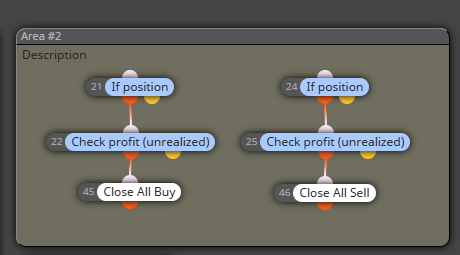
                          @jstap How to seperate close BUY/SELL position?

                          jstap 1 Reply Last reply Reply Quote 0
                          • jstap
                            jstap @eaforexcenter_All last edited by

                            @eaforexcenter_All Do you mean in this block?

                            Learn fxDreema Without the Wait!

                            My comprehensive book, available on Amazon, is packed with examples and invaluable insights to help you fast-track your learning journey.

                            The paperback and hardback editions include MT4 & MT5 QR codes for easy access to all prebuilt projects and robots, including my latest gold trading robot!

                            Don’t miss out

                            Click here➡️ https://mybook.to/fxDreema to get your copy today!

                            Enjoy! 😊

                            E 1 Reply Last reply Reply Quote 0
                            • E
                              eaforexcenter_All @jstap last edited by

                              @jstap yes. how to select CLOSE ALL BUY / CLOSE ALL SELL ?

                              1 Reply Last reply Reply Quote 0
                              • jstap
                                jstap last edited by

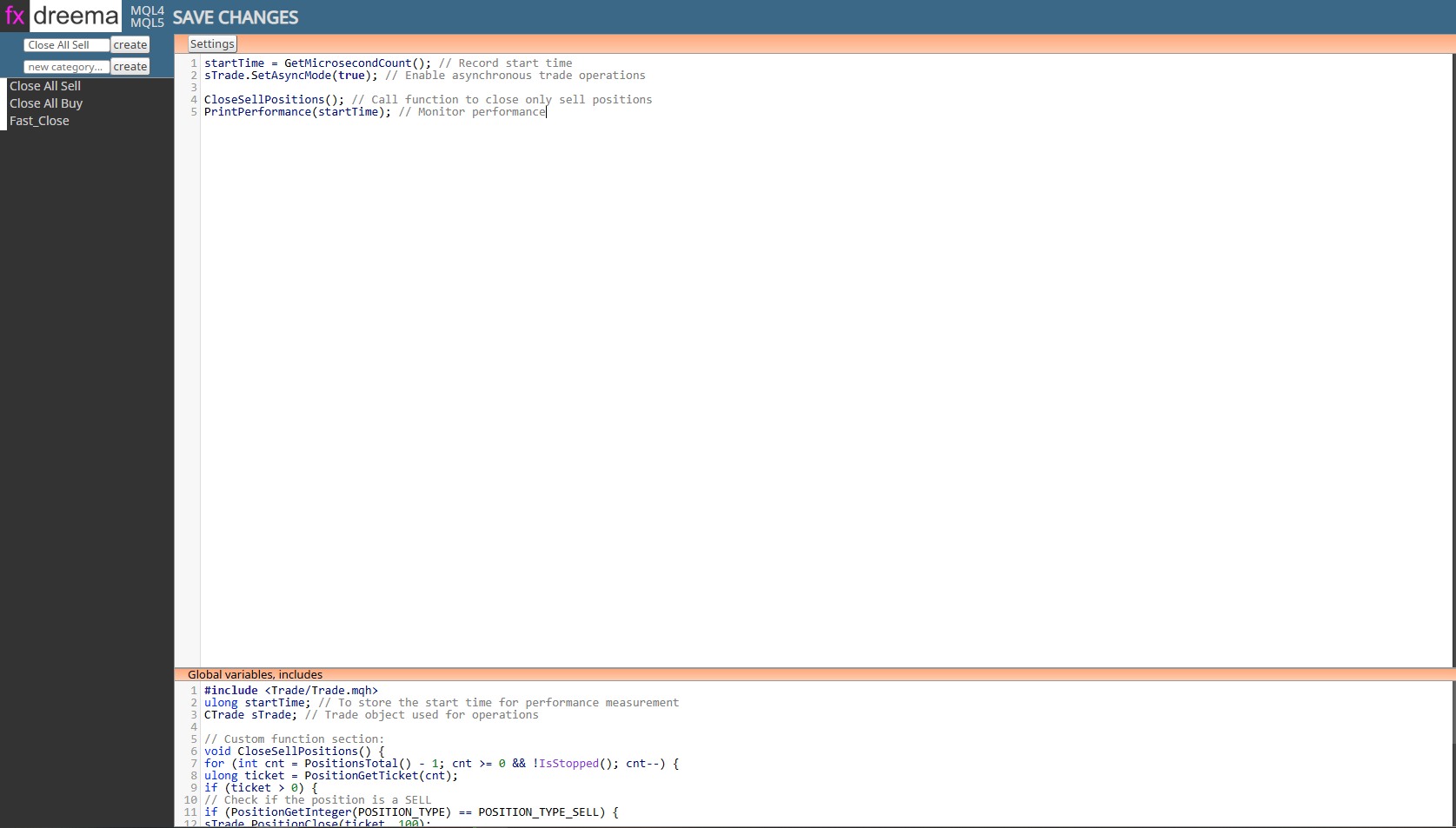
                                You will have to create 2 blocks, 1 to close buys, and 1 for sells, haven't tested but should work.
                                Buys:
                                // On tick section:
                                startTime = GetMicrosecondCount(); // Record start time
                                sTrade.SetAsyncMode(true); // Enable asynchronous trade operations

                                CloseBuyPositions(); // Call function to close only buy positions
                                PrintPerformance(startTime); // Monitor performance

                                // Global variables section:
                                #include <Trade/Trade.mqh>
                                ulong startTime; // To store the start time for performance measurement
                                CTrade sTrade; // Trade object used for operations

                                // Custom function section:
                                void CloseBuyPositions() {
                                for (int cnt = PositionsTotal() - 1; cnt >= 0 && !IsStopped(); cnt--) {
                                ulong ticket = PositionGetTicket(cnt);
                                if (ticket > 0) {
                                // Check if the position is a BUY
                                if (PositionGetInteger(POSITION_TYPE) == POSITION_TYPE_BUY) {
                                sTrade.PositionClose(ticket, 100);
                                uint code = sTrade.ResultRetcode();
                                Print("Close BUY result code: ", IntegerToString(code));
                                }
                                }
                                }
                                }

                                void PrintPerformance(ulong startTime) {
                                for (int i = 0; i < 100; i++) {
                                Print("Elapsed time: ", IntegerToString(GetMicrosecondCount() - startTime),
                                " microseconds. Open positions: ", IntegerToString(PositionsTotal()));
                                if (PositionsTotal() <= 0) { break; }
                                Sleep(100);
                                }
                                }

                                Sells:
                                // On tick section:
                                startTime = GetMicrosecondCount(); // Record start time
                                sTrade.SetAsyncMode(true); // Enable asynchronous trade operations

                                CloseSellPositions(); // Call function to close only sell positions
                                PrintPerformance(startTime); // Monitor performance

                                // Global variables section:
                                #include <Trade/Trade.mqh>
                                ulong startTime; // To store the start time for performance measurement
                                CTrade sTrade; // Trade object used for operations

                                // Custom function section:
                                void CloseSellPositions() {
                                for (int cnt = PositionsTotal() - 1; cnt >= 0 && !IsStopped(); cnt--) {
                                ulong ticket = PositionGetTicket(cnt);
                                if (ticket > 0) {
                                // Check if the position is a SELL
                                if (PositionGetInteger(POSITION_TYPE) == POSITION_TYPE_SELL) {
                                sTrade.PositionClose(ticket, 100);
                                uint code = sTrade.ResultRetcode();
                                Print("Close SELL result code: ", IntegerToString(code));
                                }
                                }
                                }
                                }

                                void PrintPerformance(ulong startTime) {
                                for (int i = 0; i < 100; i++) {
                                Print("Elapsed time: ", IntegerToString(GetMicrosecondCount() - startTime),
                                " microseconds. Open positions: ", IntegerToString(PositionsTotal()));
                                if (PositionsTotal() <= 0) { break; }
                                Sleep(100);
                                }
                                }

                                Learn fxDreema Without the Wait!

                                My comprehensive book, available on Amazon, is packed with examples and invaluable insights to help you fast-track your learning journey.

                                The paperback and hardback editions include MT4 & MT5 QR codes for easy access to all prebuilt projects and robots, including my latest gold trading robot!

                                Don’t miss out

                                Click here➡️ https://mybook.to/fxDreema to get your copy today!

                                Enjoy! 😊

                                E T 2 Replies Last reply Reply Quote 1
                                • E
                                  eaforexcenter_All @jstap last edited by

                                  @jstap Screenshot_9.png Screenshot_11.png Screenshot_12.png

                                  It error when i complied.

                                  1 Reply Last reply Reply Quote 0
                                  • jstap
                                    jstap last edited by

                                    Custom function is not global variables, there 1/2 way down on the right side, there are 3 sections and there all labelled on tick (for this) is the top section, custom functions is on the right, global variables is on the bottom

                                    Learn fxDreema Without the Wait!

                                    My comprehensive book, available on Amazon, is packed with examples and invaluable insights to help you fast-track your learning journey.

                                    The paperback and hardback editions include MT4 & MT5 QR codes for easy access to all prebuilt projects and robots, including my latest gold trading robot!

                                    Don’t miss out

                                    Click here➡️ https://mybook.to/fxDreema to get your copy today!

                                    Enjoy! 😊

                                    1 Reply Last reply Reply Quote 1
                                    • F
                                      fxdreemag1 last edited by

                                      How can i set group for fast close

                                      Thank you

                                      1 Reply Last reply Reply Quote 1
                                      • VHV-Profit-Masters
                                        VHV-Profit-Masters @zentex74 last edited by

                                        @zentex74 Hello friend, sorry for the question, could you please share the thread of the button that closes quickly, it does work, thank you very much for your help

                                        1 Reply Last reply Reply Quote 1
                                        • T
                                          toanbui8888 @jstap last edited by

                                          @jstap 599ea63f-9eb2-4108-8b06-c4616d462c31-image.png
                                          Hi. I got this error when creating 2 blocks: Close Buy and Close Sell.
                                          Can you help me fix it? thanks

                                          1 Reply Last reply Reply Quote 0
                                          • jstap
                                            jstap last edited by

                                            Not really, but you may be trying to call the same function in two blocks. If so, create a separate function with a different name and use in other block..


                                            Learn fxDreema Without the Wait!

                                            My comprehensive book, available on Amazon, is packed with examples and invaluable insights to help you fast-track your learning journey.

                                            The paperback and hardback editions include MT4 & MT5 QR codes for easy access to all prebuilt projects and robots, including my latest gold trading robot!

                                            Don’t miss out

                                            Click here➡️ https://mybook.to/fxDreema to get your copy today!

                                            Enjoy! 😊

                                            T 1 Reply Last reply Reply Quote 0
                                            • 1
                                            • 2
                                            • 1 / 2
                                            • First post
                                              Last post

                                            Online Users

                                            J
                                            F
                                            G
                                            O
                                            Z
                                            M
                                            W
                                            N
                                            G
                                            H

                                            27
                                            Online

                                            146.7k
                                            Users

                                            22.4k
                                            Topics

                                            122.6k
                                            Posts

                                            Powered by NodeBB Forums | Contributors