fxDreema

    • Register
    • Login
    • Search
    • Back to the main page
    • Categories
    • Recent
    • Tags
    • Popular
    • Search

    Stop the EA when positions are in progress and Start again after closed position.

    Questions & Answers
    3
    21
    2005
    Loading More Posts
    • Oldest to Newest
    • Newest to Oldest
    • Most Votes
    Reply
    • Reply as topic
    Log in to reply
    This topic has been deleted. Only users with topic management privileges can see it.
    • F
      fabiobioware last edited by

      Hello, I would like to block the operation of some blocks when the EA opens a buy or sell order.
      These blocks must be rehabilitated after the negotiation in progress is closed, whether it has touched take profit or stop loss.

      Can someone give me an example of how to do this?

      A 1 Reply Last reply Reply Quote 0
      • A
        ambrogio @fabiobioware last edited by

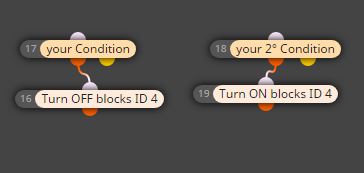
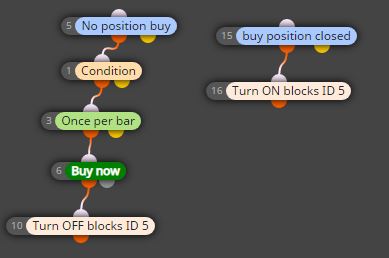
        @fabiobioware Hi, using a few controlling blocks?
        Just for example
        0_1585321782742_Cattura.JPG

        1 Reply Last reply Reply Quote 0
        • F
          fabiobioware last edited by

          https://fxdreema.com/shared/Dh2d8RpUb i create this, but

          what is complicated is to identify the following.
          When buying or selling immediately block.
          When the purchase or sale is completed, activate the blocks again.

          A 1 Reply Last reply Reply Quote 0
          • A
            ambrogio @fabiobioware last edited by

            @fabiobioware

            0_1585326226324_Cattura.JPG

            A 1 Reply Last reply Reply Quote 0
            • A
              ambrogio @ambrogio last edited by

              @ambrogio in this case you can use easily a "no trade block" only, but if you want to turn off other blocks shoul work my example

              1 Reply Last reply Reply Quote 0
              • F
                fabiobioware last edited by

                which block did you use for "buy position closed"

                1 Reply Last reply Reply Quote 0
                • F
                  fabiobioware last edited by

                  @ambrogio which block did you use for "buy position closed" ?

                  A 1 Reply Last reply Reply Quote 0
                  • A
                    ambrogio @fabiobioware last edited by

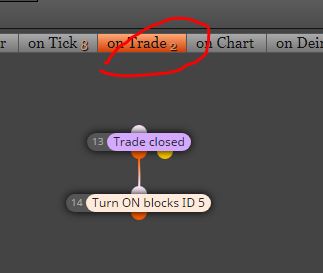
                    @fabiobioware apologize, my mistake. In on trade section
                    0_1585339636451_Cattura.JPG

                    1 Reply Last reply Reply Quote 0
                    • F
                      fabiobioware last edited by

                      it didn't work, I had to use it as follows.0_1585343054802_restartnegociations.PNG

                      A 1 Reply Last reply Reply Quote 0
                      • A
                        ambrogio @fabiobioware last edited by ambrogio

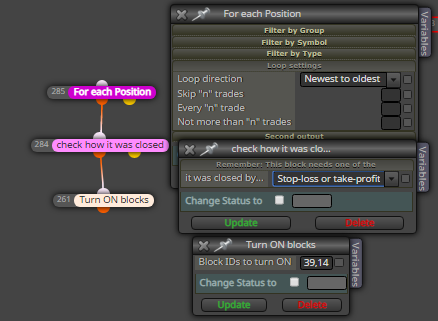
                        @fabiobioware try in this way : for each position => once per trade position => check how it was closed=> turn on
                        Otherwise, please upload your project

                        F 2 Replies Last reply Reply Quote 0
                        • F
                          fabiobioware last edited by

                          i wil try this and return here.

                          1 Reply Last reply Reply Quote 0
                          • F
                            fabiobioware @ambrogio last edited by

                            @ambrogio you have whatssapp, skype or telegram?
                            i need help, and best way to solve is show in real time my project running.

                            1 Reply Last reply Reply Quote 0
                            • F
                              fabiobioware @ambrogio last edited by

                              @ambrogio not working using this method. i wil try another methot after, thanks for your time.

                              1 Reply Last reply Reply Quote 0
                              • F
                                fabiobioware last edited by

                                Hi, @ambrogio not working fine.

                                Hello friends, @roar @l-andorrà it didn't work in any way that you guided me or that I tried.
                                I don't know if I'm doing it exactly the right way.
                                Explaining again what I want to do.

                                There is a "variable" block that obtains custom indicator values that mark tops and bottoms.

                                I need this block to work at some point and at other times it stops working.

                                The correct thing is the following:

                                1. When the EA is placed on the chart, the indicator has to locate a top and bottom and plot on the chart and then be disabled.
                                2. A buy or sell position is opened, and it happens when the candle crosses and closes above the top or bottom of this indicator.
                                3. When the position is closed, either by take profit or stoploss, or even manually, the "variable" block has to be rehabilitated and make a new calculation and then be closed again.

                                0_1585834632111_dynamicresistancesupport.mq5
                                Indicator used in project in UP

                                My project --> https://fxdreema.com/shared/XWGPklfxc

                                1 Reply Last reply Reply Quote 0
                                • l'andorrà
                                  l'andorrà last edited by

                                  Are all your block IDs correct? I see the trailing stop is programmed to happen BEFORE the buy/sell lauchers. Same for all blocks connected below block 1428. The flag one is suppoed to be executes the last of them all, once all lines have been drawn.
                                  (English) I will try to help everyone in these fxDreema forums. But if you want to learn how to use the platform in depth or more quickly, I can help you with my introductory fxDreema course in English at https://www.theandorraninvestor.eu.

                                  (Català) Miraré d’ajudar tothom en aquests fòrums d’fxDreema. Tanmateix, si vols aprendre a fer servir la plataforma amb més profunditat o més de pressa, t’hi puc ajudar amb el meu curs d’introducció a fxDeema en català a https://www.theandorraninvestor.eu/ca.

                                  (Español) Intentaré ayudar a todo el mundo en estos foros de fxDreema. Sin embargo, si quieres aprender a usar la plataforma en profundidad o más deprisa, te puedo ayudar con mi curso de introducción a fxDreema en español en https://www.theandorraninvestor.eu/es.

                                  F 1 Reply Last reply Reply Quote 0
                                  • F
                                    fabiobioware last edited by

                                    @l-andorrà said in Stop the EA when positions are in progress and Start again after closed position.:

                                    Are all your block IDs correct? I see the trailing stop is programmed to happen BEFORE the buy/sell lauchers. Same for all blocks connected below block 1428. The flag one is suppoed to be executes the last of them all, once all lines have been drawn.

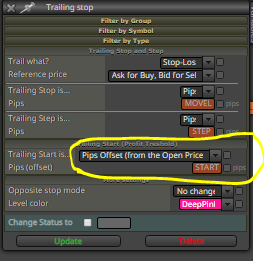
                                    0_1585852248194_traillingstop.PNG
                                    Hi @l-andorrà yes, all block ids are correct, my trailing stop
                                    this to start as soon as the price touches 150 pips above the price and drag it to 75 points and walk every 50 points.
                                    But my biggest concern is to activate or deactivate the block that updates the variable.

                                    l'andorrà 1 Reply Last reply Reply Quote 0
                                    • F
                                      fabiobioware @l'andorrà last edited by

                                      @l-andorrà I am not able to understand how to organize the stops and restarts of the variable, I did not understand what I meant by flag one, which block do you consider this flag one and where should it be placed? Can you give me an example or adjust this project of mine?

                                      1 Reply Last reply Reply Quote 0
                                      • F
                                        fabiobioware last edited by

                                        @fxdreema you can help here ?

                                        1 Reply Last reply Reply Quote 0
                                        • l'andorrà
                                          l'andorrà @fabiobioware last edited by

                                          @fabiobioware said in Stop the EA when positions are in progress and Start again after closed position.:

                                          @l-andorrà said in Stop the EA when positions are in progress and Start again after closed position.:

                                          Are all your block IDs correct? I see the trailing stop is programmed to happen BEFORE the buy/sell lauchers. Same for all blocks connected below block 1428. The flag one is suppoed to be executes the last of them all, once all lines have been drawn.

                                          0_1585852248194_traillingstop.PNG
                                          Hi @l-andorrà yes, all block ids are correct, my trailing stop
                                          this to start as soon as the price touches 150 pips above the price and drag it to 75 points and walk every 50 points.
                                          But my biggest concern is to activate or deactivate the block that updates the variable.

                                          There are no variables in this imaghe, but constants only. You will never be able to modify them. They are input partameters and that means they are and will always be fix. The only way they can be initialized is by creating true variables. I guess you don't know how to create the input parameters ands them making them reinitializable, maybe?

                                          (English) I will try to help everyone in these fxDreema forums. But if you want to learn how to use the platform in depth or more quickly, I can help you with my introductory fxDreema course in English at https://www.theandorraninvestor.eu.

                                          (Català) Miraré d’ajudar tothom en aquests fòrums d’fxDreema. Tanmateix, si vols aprendre a fer servir la plataforma amb més profunditat o més de pressa, t’hi puc ajudar amb el meu curs d’introducció a fxDeema en català a https://www.theandorraninvestor.eu/ca.

                                          (Español) Intentaré ayudar a todo el mundo en estos foros de fxDreema. Sin embargo, si quieres aprender a usar la plataforma en profundidad o más deprisa, te puedo ayudar con mi curso de introducción a fxDreema en español en https://www.theandorraninvestor.eu/es.

                                          1 Reply Last reply Reply Quote 0
                                          • F
                                            fabiobioware last edited by

                                            @l-andorrà said in Stop the EA when positions are in progress and Start again after closed position.:

                                            There are no variables in this imaghe, but constants only. You will never be able to modify them. They are input partameters and that means they are and will always be fix. The only way they can be initialized is by creating true variables. I guess you don't know how to create the input parameters ands them making them reinitializable, maybe?

                                            now I understand what you meant, yes they are constant, I put it in order to manually change my levels inserted in this place.

                                            Taking the opportunity to say that I was able to activate and deactivate what I wanted, I left the options to not look at stoploss or take profit and it worked.

                                            1 Reply Last reply Reply Quote 0
                                            • 1
                                            • 2
                                            • 1 / 2
                                            • First post
                                              Last post

                                            Online Users

                                            M
                                            L

                                            11
                                            Online

                                            146.8k
                                            Users

                                            22.4k
                                            Topics

                                            122.6k
                                            Posts

                                            Powered by NodeBB Forums | Contributors