fxDreema

    • Register
    • Login
    • Search
    • Back to the main page
    • Categories
    • Recent
    • Tags
    • Popular
    • Search

    Setting RSI and MA custom indicators

    Questions & Answers
    6
    23
    1460
    Loading More Posts
    • Oldest to Newest
    • Newest to Oldest
    • Most Votes
    Reply
    • Reply as topic
    Log in to reply
    This topic has been deleted. Only users with topic management privileges can see it.
    • L
      Lerumo last edited by

      Hi. I've uploaded MA and RSI custom indicators that I created on EA Builder. I want the EA to buy when the MA (period 1) crosses above the 20 RSI level (also period 1), and then sell when the MA (period 1) crosses below the 80 RSI level (also period 1). Are my settings correct here https://fxdreema.com/shared/DavRl8C6d ? (The EA is not opening any trades and is also not showing the MA or RSI levels on the Strategy Tester)

      1 Reply Last reply Reply Quote 0
      • B
        biztet last edited by

        Does your custom indicator have buffers?

        1 Reply Last reply Reply Quote 0
        • L
          Lerumo last edited by

          Yes, but how should they be connected? Here's the project, please have a look - https://fxdreema.com/shared/zEd4dRNgc

          1 Reply Last reply Reply Quote 0
          • jstap
            jstap last edited by

            You say yes but is this returning a usable value? Put the buffers into a comment block, and check the value can be used together

            Learn fxDreema Without the Wait!

            My comprehensive book, available on Amazon, is packed with examples and invaluable insights to help you fast-track your learning journey.

            The paperback and hardback editions include MT4 & MT5 QR codes for easy access to all prebuilt projects and robots, including my latest gold trading robot!

            Don’t miss out

            Click here➡️ https://mybook.to/fxDreema to get your copy today!

            Enjoy! 😊

            1 Reply Last reply Reply Quote 0
            • L
              Lerumo last edited by Lerumo

              The EA is not returning/reflecting any values at all - both on the Tester and demo account. By 'yes', I'm only confirming that the indicator's buffers can be seen on Fxdreema under "My indicators" - see snapshot below Screenshot 2024-05-28 110045.png
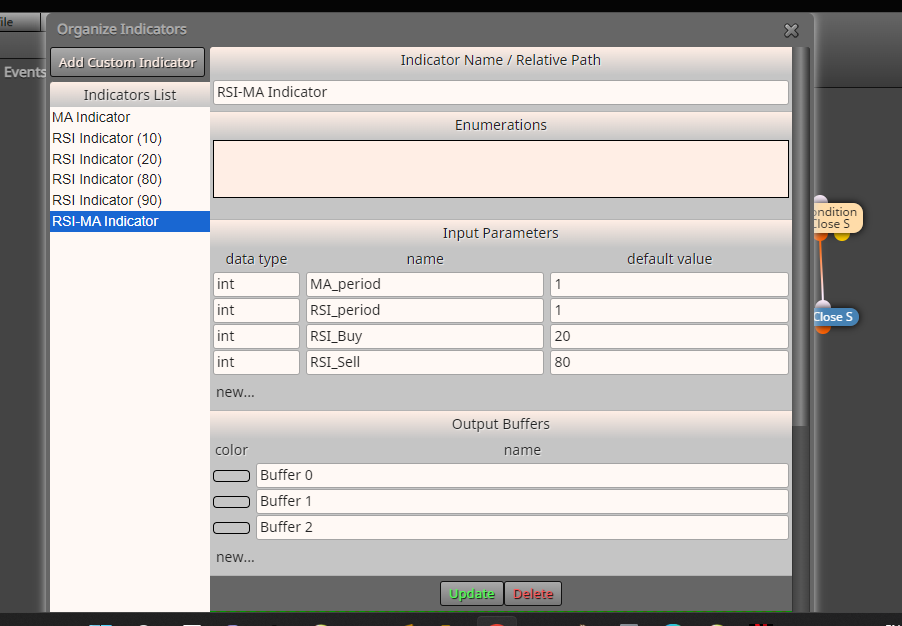
              Regarding the comment block, I've never used this before. Does this go directly under the condition block?

              1 Reply Last reply Reply Quote 0
              • jstap
                jstap last edited by

                A comment block can go almost anywhere, I put it above a block but it will not affect the block it is connected to actions, inside add the custom buffer's indicator.

                Learn fxDreema Without the Wait!

                My comprehensive book, available on Amazon, is packed with examples and invaluable insights to help you fast-track your learning journey.

                The paperback and hardback editions include MT4 & MT5 QR codes for easy access to all prebuilt projects and robots, including my latest gold trading robot!

                Don’t miss out

                Click here➡️ https://mybook.to/fxDreema to get your copy today!

                Enjoy! 😊

                1 Reply Last reply Reply Quote 0
                • G
                  GOMAT last edited by

                  how can i place opposite order

                  1 Reply Last reply Reply Quote 0
                  • jstap
                    jstap last edited by

                    On trade tab, the reason for placing opposite, place oposite

                    Learn fxDreema Without the Wait!

                    My comprehensive book, available on Amazon, is packed with examples and invaluable insights to help you fast-track your learning journey.

                    The paperback and hardback editions include MT4 & MT5 QR codes for easy access to all prebuilt projects and robots, including my latest gold trading robot!

                    Don’t miss out

                    Click here➡️ https://mybook.to/fxDreema to get your copy today!

                    Enjoy! 😊

                    1 Reply Last reply Reply Quote 0
                    • L
                      Lerumo last edited by

                      Sorry I was offline for the past few days. I tried using the comment block but still no values reflected on the chart and also no trades at all. Here's the link - https://fxdreema.com/shared/kdFw5rxsc

                      1 Reply Last reply Reply Quote 0
                      • jstap
                        jstap last edited by

                        On the on trade tab I mean something like the picture, only placing a trade rather than BE:
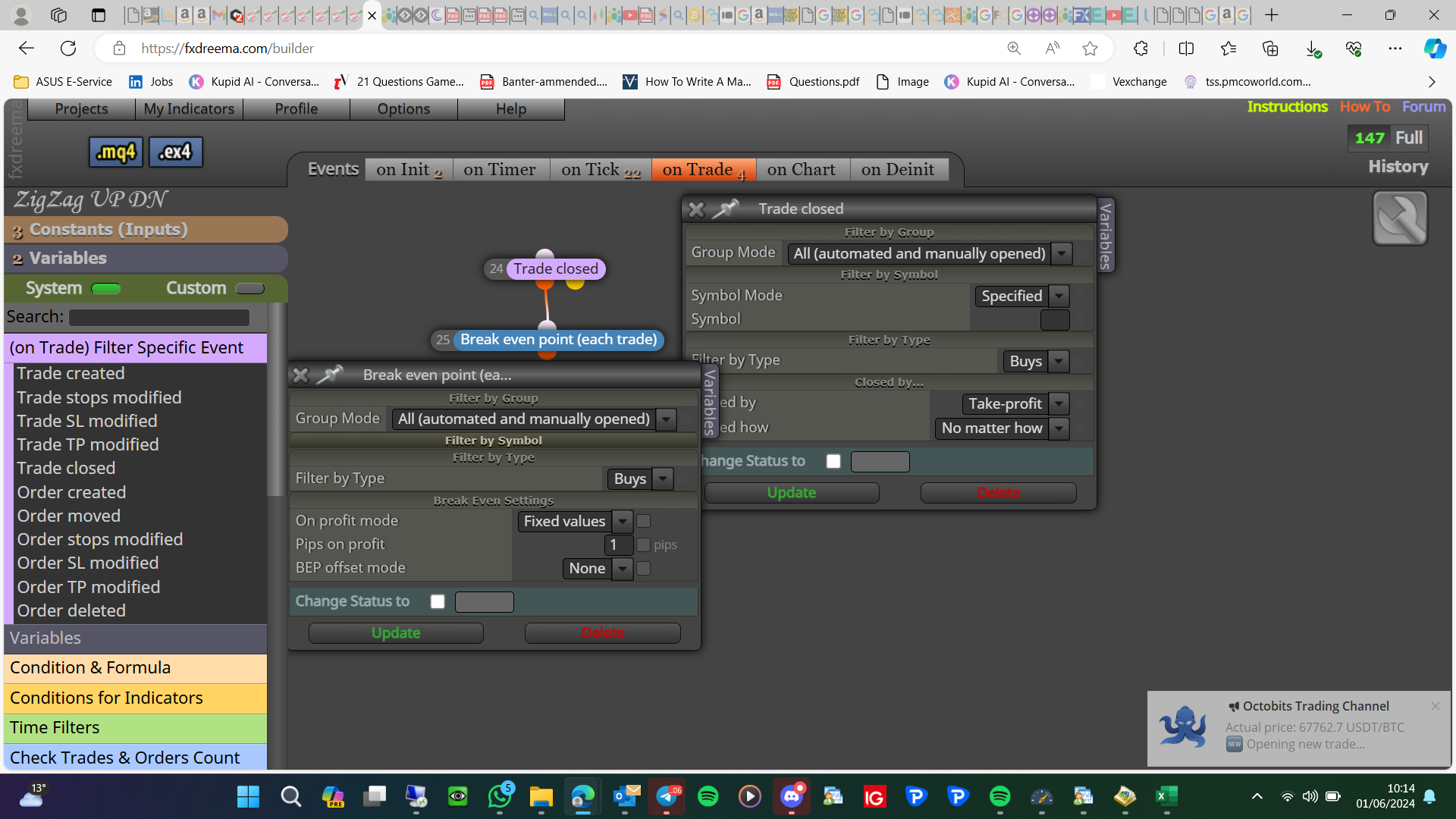
                        image.png

                        Learn fxDreema Without the Wait!

                        My comprehensive book, available on Amazon, is packed with examples and invaluable insights to help you fast-track your learning journey.

                        The paperback and hardback editions include MT4 & MT5 QR codes for easy access to all prebuilt projects and robots, including my latest gold trading robot!

                        Don’t miss out

                        Click here➡️ https://mybook.to/fxDreema to get your copy today!

                        Enjoy! 😊

                        1 Reply Last reply Reply Quote 0
                        • L
                          Lerumo last edited by

                          @jstap Did you mean to respond to @GOMAT? Not sure how the above relates to the comment block

                          1 Reply Last reply Reply Quote 0
                          • jstap
                            jstap last edited by

                            This is why we say to create a new question not add to someone else's, start a new question and I'll have a look.

                            Learn fxDreema Without the Wait!

                            My comprehensive book, available on Amazon, is packed with examples and invaluable insights to help you fast-track your learning journey.

                            The paperback and hardback editions include MT4 & MT5 QR codes for easy access to all prebuilt projects and robots, including my latest gold trading robot!

                            Don’t miss out

                            Click here➡️ https://mybook.to/fxDreema to get your copy today!

                            Enjoy! 😊

                            1 Reply Last reply Reply Quote 0
                            • L
                              Lerumo last edited by

                              I'm the author of the original question...

                              1 Reply Last reply Reply Quote 0
                              • L
                                Lerumo last edited by

                                @ambrogio Can you assist with the above? Here's the link - https://fxdreema.com/shared/kdFw5rxsc . I also attach the custom indicator I mentioned in my original post RSI-MA Indicator.mq5

                                A 1 Reply Last reply Reply Quote 0
                                • jstap
                                  jstap last edited by

                                  Put a label in the comment box to see what it receives, delete one and put all buffers together
                                  I would set buy/sell in the no position block while testing so as not to limit the actions.
                                  Once you have the values returned you will know if the indicator should work on your project

                                  Learn fxDreema Without the Wait!

                                  My comprehensive book, available on Amazon, is packed with examples and invaluable insights to help you fast-track your learning journey.

                                  The paperback and hardback editions include MT4 & MT5 QR codes for easy access to all prebuilt projects and robots, including my latest gold trading robot!

                                  Don’t miss out

                                  Click here➡️ https://mybook.to/fxDreema to get your copy today!

                                  Enjoy! 😊

                                  1 Reply Last reply Reply Quote 0
                                  • A
                                    ambrogio @Lerumo last edited by

                                    @Lerumo sorry, i think your custom indicator have some problems

                                    1 Reply Last reply Reply Quote 0
                                    • L
                                      Lerumo last edited by Lerumo

                                      @ambrogio Okay I've just used a different indicator for MT4 now; I downloaded this indicator and it has worked for others. Please see if it works on your end - https://fxdreema.com/shared/4IKIxUckd . Here's the MT4 indicator - alx_rsi_bands_ma.mq4

                                      l'andorrà A 2 Replies Last reply Reply Quote 0
                                      • l'andorrà
                                        l'andorrà @Lerumo last edited by

                                        @Lerumo Did you check if this indicator repaints? Never trust what others say about it. Check it on your project before moving on. If it repaints, the bot is doomed.

                                        (English) I will try to help everyone in these fxDreema forums. But if you want to learn how to use the platform in depth or more quickly, I can help you with my introductory fxDreema course in English at https://www.theandorraninvestor.eu.

                                        (Català) Miraré d’ajudar tothom en aquests fòrums d’fxDreema. Tanmateix, si vols aprendre a fer servir la plataforma amb més profunditat o més de pressa, t’hi puc ajudar amb el meu curs d’introducció a fxDeema en català a https://www.theandorraninvestor.eu/ca.

                                        (Español) Intentaré ayudar a todo el mundo en estos foros de fxDreema. Sin embargo, si quieres aprender a usar la plataforma en profundidad o más deprisa, te puedo ayudar con mi curso de introducción a fxDreema en español en https://www.theandorraninvestor.eu/es.

                                        1 Reply Last reply Reply Quote 0
                                        • A
                                          ambrogio @Lerumo last edited by

                                          @Lerumo said in Setting RSI and MA custom indicators:

                                          @ambrogio Okay I've just used a different indicator for MT4 now; I downloaded this indicator and it has worked for others. Please see if it works on your end - https://fxdreema.com/shared/4IKIxUckd . Here's the MT4 indicator - alx_rsi_bands_ma.mq4

                                          what is the problem with that indicator?

                                          1 Reply Last reply Reply Quote 0
                                          • L
                                            Lerumo last edited by

                                            Thanks everyone. I believe the issue was that the custom indicators don't show the relevant RSI levels (80, 20) by default. These levels are therefore not included as 'buffers' in the indicators; hence the EA can't read these levels and take action on the basis thereof. I'll look for a custom indicator that automatically displays the RSI levels and has them as buffers - or find out how to build one using EA Builder. Will try again and let you know if I have any issues. Thanks again


                                            1 Reply Last reply Reply Quote 0
                                            • 1
                                            • 2
                                            • 1 / 2
                                            • First post
                                              Last post

                                            Online Users

                                            N
                                            A
                                            T
                                            T
                                            Z
                                            E
                                            V
                                            M
                                            B

                                            21
                                            Online

                                            146.7k
                                            Users

                                            22.4k
                                            Topics

                                            122.6k
                                            Posts

                                            Powered by NodeBB Forums | Contributors