fxDreema

    • Register
    • Login
    • Search
    • Back to the main page
    • Categories
    • Recent
    • Tags
    • Popular
    • Search

    Operators as Variables

    Questions & Answers
    3
    6
    367
    Loading More Posts
    • Oldest to Newest
    • Newest to Oldest
    • Most Votes
    Reply
    • Reply as topic
    Log in to reply
    This topic has been deleted. Only users with topic management privileges can see it.
    • E
      ElvisTR last edited by ElvisTR

      Hello everyone,

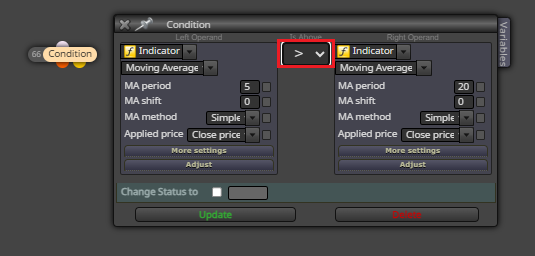
      Can I use operators like >,<,>=,<= as variables and use them in Condition blocks like in here?
      I tried creating string variables but whenever I pick a variable on the highlighted operator area and press "Update", the block reverts that change.

      Any help would be highly appreciated.

      8118766e-c2de-4618-b93b-09dff5a08b02-image.png

      1 Reply Last reply Reply Quote 0
      • jstap
        jstap last edited by

        You will have to create an enum then activate different blocks that do what you need

        Learn fxDreema Without the Wait!

        My comprehensive book, available on Amazon, is packed with examples and invaluable insights to help you fast-track your learning journey.

        The paperback and hardback editions include MT4 & MT5 QR codes for easy access to all prebuilt projects and robots, including my latest gold trading robot!

        Don’t miss out

        Click here➡️ https://mybook.to/fxDreema to get your copy today!

        Enjoy! 😊

        1 Reply Last reply Reply Quote 0
        • E
          ElvisTR last edited by

          Thank you @jstap for your alternative solution and yes, I can do that the way you suggested. However it'll lead me to create a lot of unnecessary extra blocks.
          Since the designer let's us to right-click on the area to pick a variable, I thought it was doable:
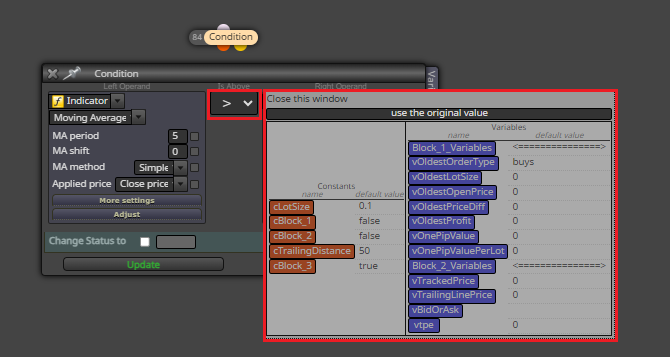
          image.png

          1 Reply Last reply Reply Quote 0
          • jstap
            jstap last edited by

            In years I have never seen anyone be able to do this, I have tried many ways, but what I said is the only way I think it is possible.

            Learn fxDreema Without the Wait!

            My comprehensive book, available on Amazon, is packed with examples and invaluable insights to help you fast-track your learning journey.

            The paperback and hardback editions include MT4 & MT5 QR codes for easy access to all prebuilt projects and robots, including my latest gold trading robot!

            Don’t miss out

            Click here➡️ https://mybook.to/fxDreema to get your copy today!

            Enjoy! 😊

            1 Reply Last reply Reply Quote 0
            • E
              ElvisTR last edited by

              This answer sums it all : )
              Thank you once again
              🙏

              1 Reply Last reply Reply Quote 0
              • C
                chrisbe last edited by

                @ElvisTR if you want to use the signs more flexible use the second condition block, where you can specify your variable and use && and || sign on multiple occasions, if that's what you intend to do

                1 Reply Last reply Reply Quote 0
                • 1 / 1
                • First post
                  Last post

                Online Users

                L

                6
                Online

                146.8k
                Users

                22.4k
                Topics

                122.6k
                Posts

                Powered by NodeBB Forums | Contributors