fxDreema

    • Register
    • Login
    • Search
    • Back to the main page
    • Categories
    • Recent
    • Tags
    • Popular
    • Search

    Trading GUI Not Entering Trades

    Questions & Answers
    4
    81
    6075
    Loading More Posts
    • Oldest to Newest
    • Newest to Oldest
    • Most Votes
    Reply
    • Reply as topic
    Log in to reply
    This topic has been deleted. Only users with topic management privileges can see it.
    • B
      Byens @Hits last edited by

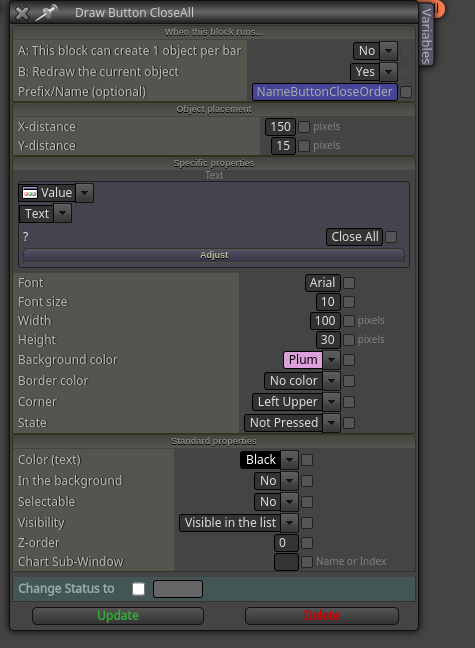
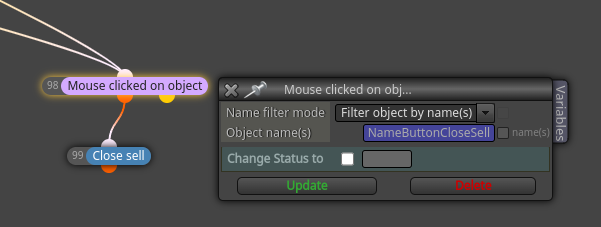
      @Hits you will need delete object by type and choose buttton type

      https://entrepreneurstart.pw | https://www.mql5.com/en/users/byens8199

      H 2 Replies Last reply Reply Quote 0
      • H
        Hits @Byens last edited by

        @Byens okay, but do you know why the pending orders won’t place?

        1 Reply Last reply Reply Quote 0
        • H
          Hits @Byens last edited by

          @Byens
          Okay, do you know why the pending orders button isn’t executing the pending orders?

          1 Reply Last reply Reply Quote 0
          • B
            Byens last edited by

            very strange that should work, so i have made exactly but i save button name in variable and it is working

            https://entrepreneurstart.pw | https://www.mql5.com/en/users/byens8199

            1 Reply Last reply Reply Quote 0
            • B
              Byens last edited by

              image.png

              image.png

              image.png

              https://entrepreneurstart.pw | https://www.mql5.com/en/users/byens8199

              1 Reply Last reply Reply Quote 0
              • H
                Hits last edited by

                Oh, also the button that places the pending orders isn’t working, when I add it to the chart it doesn’t place the orders.

                1 Reply Last reply Reply Quote 0
                • H
                  Hits last edited by

                  Does anyone know how I can fix it?

                  1 Reply Last reply Reply Quote 0
                  • H
                    Hits last edited by

                    How do I make my stoploss at break even without it putting a “-“ on mt5

                    1 Reply Last reply Reply Quote 0
                    • jstap
                      jstap last edited by

                      Use a breakeven block

                      Learn fxDreema Without the Wait!

                      My comprehensive book, available on Amazon, is packed with examples and invaluable insights to help you fast-track your learning journey.

                      The paperback and hardback editions include MT4 & MT5 QR codes for easy access to all prebuilt projects and robots, including my latest gold trading robot!

                      Don’t miss out

                      Click here➡️ https://mybook.to/fxDreema to get your copy today!

                      Enjoy! 😊

                      H 1 Reply Last reply Reply Quote 0
                      • H
                        Hits @jstap last edited by

                        @jstap https://fxdreema.com/shared/DMWjM9R4b
                        I did, and when I entered the trades the stoploss had a “-“

                        1 Reply Last reply Reply Quote 0
                        • jstap
                          jstap last edited by

                          your pips on profit is set to 0, change it to a greater number as this is how far from the open price it has to move before BE is activated, which means 0 will happen as soon as the trade is opened.

                          Learn fxDreema Without the Wait!

                          My comprehensive book, available on Amazon, is packed with examples and invaluable insights to help you fast-track your learning journey.

                          The paperback and hardback editions include MT4 & MT5 QR codes for easy access to all prebuilt projects and robots, including my latest gold trading robot!

                          Don’t miss out

                          Click here➡️ https://mybook.to/fxDreema to get your copy today!

                          Enjoy! 😊

                          1 Reply Last reply Reply Quote 0
                          • H
                            Hits last edited by

                            I want it to be when the trade opens. But when I do that it puts a dash “no stoploss”

                            1 Reply Last reply Reply Quote 0
                            • jstap
                              jstap last edited by

                              You have to account for broker spread price tick movement etc, change the number and see if it works, then reduce until you are happy.

                              Learn fxDreema Without the Wait!

                              My comprehensive book, available on Amazon, is packed with examples and invaluable insights to help you fast-track your learning journey.

                              The paperback and hardback editions include MT4 & MT5 QR codes for easy access to all prebuilt projects and robots, including my latest gold trading robot!

                              Don’t miss out

                              Click here➡️ https://mybook.to/fxDreema to get your copy today!

                              Enjoy! 😊

                              1 Reply Last reply Reply Quote 0
                              • H
                                Hits last edited by

                                Okay. Also if I wanted to do a break even button would I do the same thing I did to make the other buttons?

                                1 Reply Last reply Reply Quote 0
                                • jstap
                                  jstap last edited by

                                  Yes, I have done this many times.

                                  Learn fxDreema Without the Wait!

                                  My comprehensive book, available on Amazon, is packed with examples and invaluable insights to help you fast-track your learning journey.

                                  The paperback and hardback editions include MT4 & MT5 QR codes for easy access to all prebuilt projects and robots, including my latest gold trading robot!

                                  Don’t miss out

                                  Click here➡️ https://mybook.to/fxDreema to get your copy today!

                                  Enjoy! 😊

                                  1 Reply Last reply Reply Quote 0
                                  • H
                                    Hits last edited by

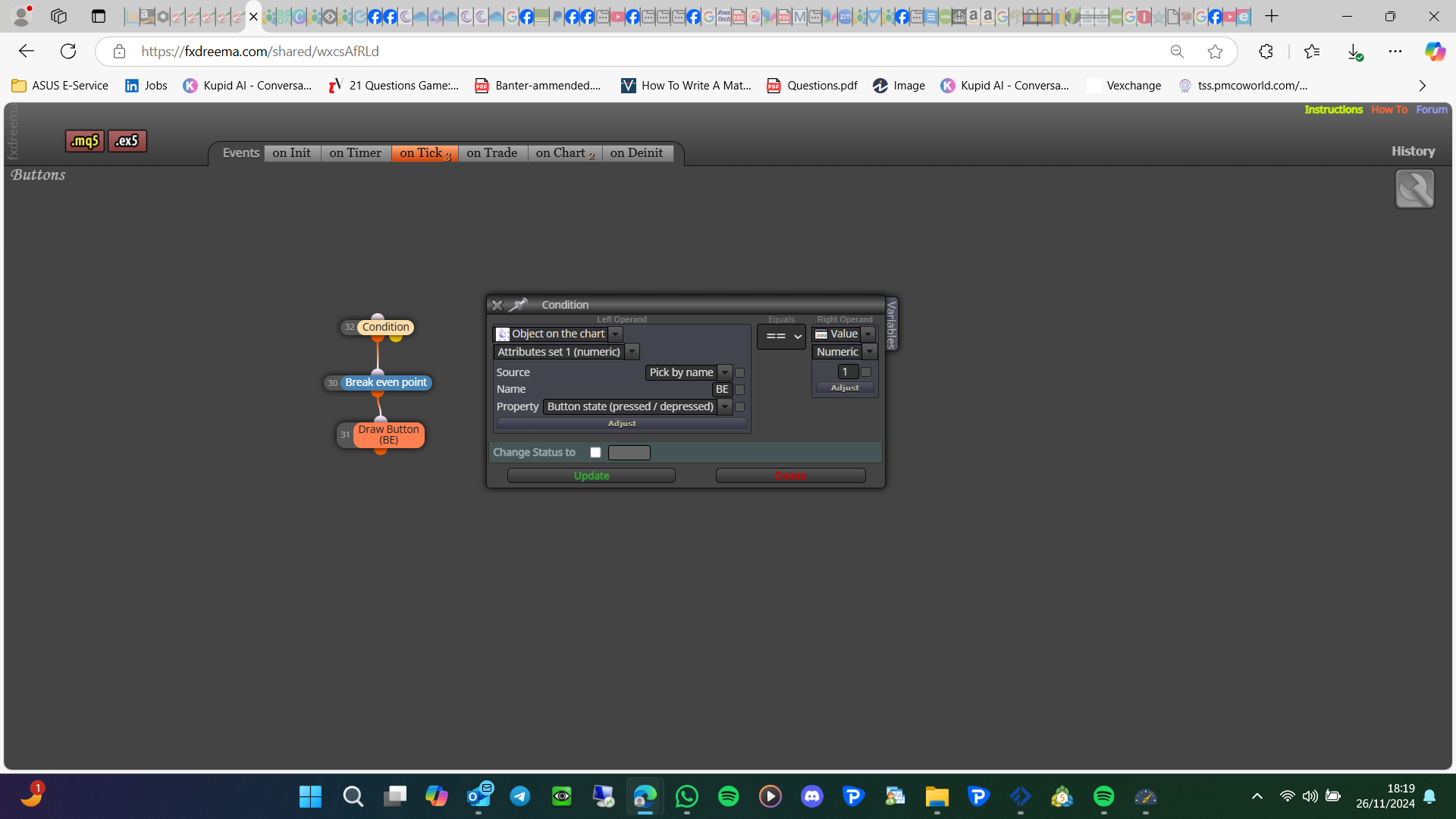
                                    Okay! So the break even point block needs to be on “on tick” so do I do a pass block and a draw button block on tick as well? And then mouse button clicked on object, and then a break even point block on “on chart”?

                                    1 Reply Last reply Reply Quote 0
                                    • jstap
                                      jstap last edited by jstap

                                      Every block needs to be connected to another so if it is by itself, it will need a pass block, and yes to re-drawing the button on tick.

                                      Learn fxDreema Without the Wait!

                                      My comprehensive book, available on Amazon, is packed with examples and invaluable insights to help you fast-track your learning journey.

                                      The paperback and hardback editions include MT4 & MT5 QR codes for easy access to all prebuilt projects and robots, including my latest gold trading robot!

                                      Don’t miss out

                                      Click here➡️ https://mybook.to/fxDreema to get your copy today!

                                      Enjoy! 😊

                                      H 1 Reply Last reply Reply Quote 0
                                      • H
                                        Hits last edited by

                                        Okay, and do I put a pass block then mouse button click on object, and then a break even point block on “on chart” or on tick?

                                        1 Reply Last reply Reply Quote 0
                                        • H
                                          Hits @jstap last edited by

                                          @jstap shared/wxcsAfRLd

                                          1 Reply Last reply Reply Quote 0
                                          • jstap
                                            jstap last edited by

                                            Switch off on chart, try this and see what happens:
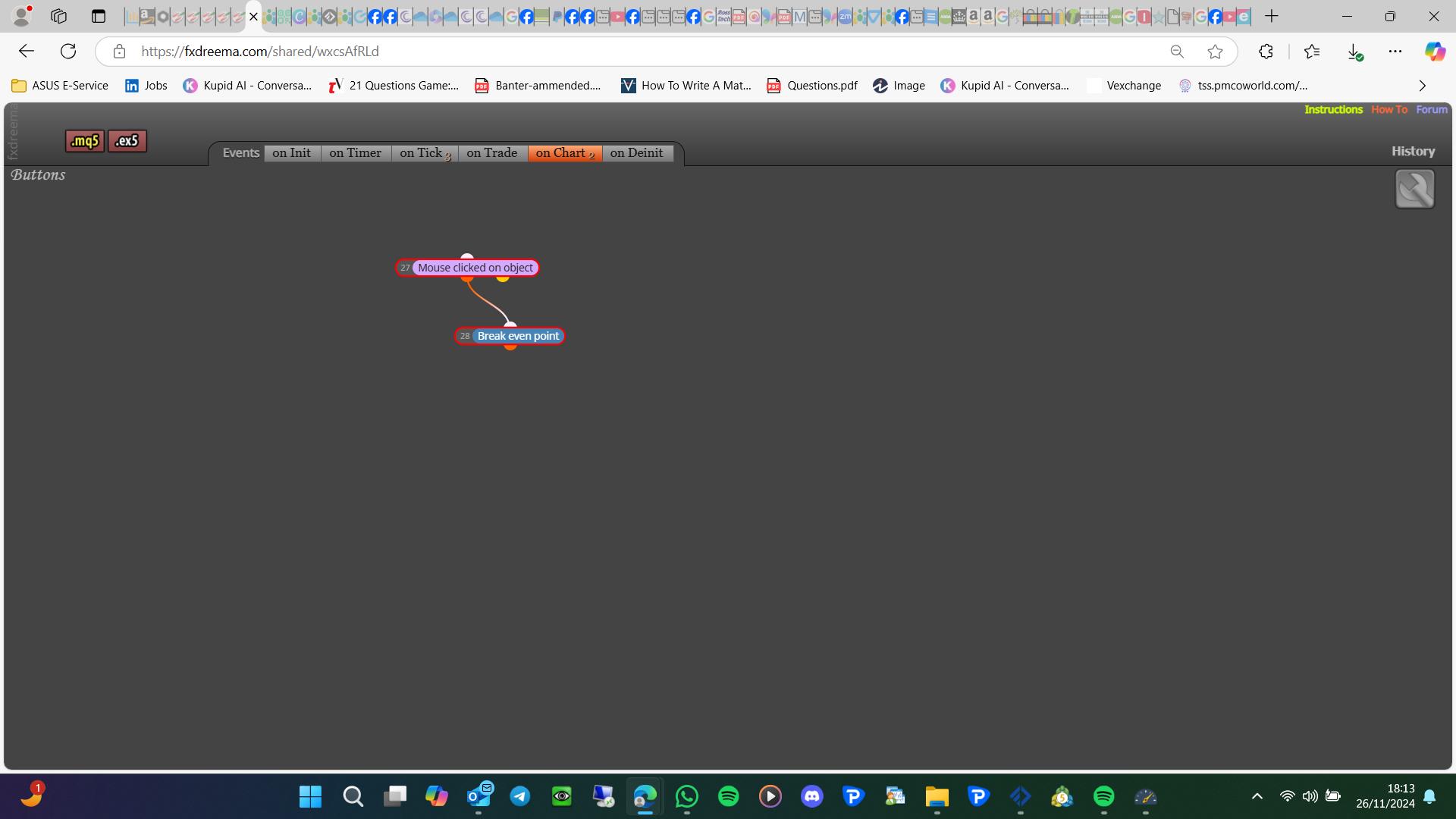
                                            image.png

                                            image.png

                                            Learn fxDreema Without the Wait!

                                            My comprehensive book, available on Amazon, is packed with examples and invaluable insights to help you fast-track your learning journey.

                                            The paperback and hardback editions include MT4 & MT5 QR codes for easy access to all prebuilt projects and robots, including my latest gold trading robot!

                                            Don’t miss out

                                            Click here➡️ https://mybook.to/fxDreema to get your copy today!

                                            Enjoy! 😊

                                            H 1 Reply Last reply Reply Quote 0
                                            • 1
                                            • 2
                                            • 3
                                            • 4
                                            • 5
                                            • 2 / 5
                                            • First post
                                              Last post

                                            Online Users

                                            S
                                            G
                                            L

                                            12
                                            Online

                                            146.7k
                                            Users

                                            22.4k
                                            Topics

                                            122.6k
                                            Posts

                                            Powered by NodeBB Forums | Contributors