fxDreema

    • Register
    • Login
    • Search
    • Back to the main page
    • Categories
    • Recent
    • Tags
    • Popular
    • Search

    Re-opening trade the next day

    Questions & Answers
    5
    17
    346
    Loading More Posts
    • Oldest to Newest
    • Newest to Oldest
    • Most Votes
    Reply
    • Reply as topic
    Log in to reply
    This topic has been deleted. Only users with topic management privileges can see it.
    • J
      jpsam last edited by jpsam

      Hi friends!, How do I use the "Turn On" block to resume trade the next day after closing trade with the "Turn Off" block when a certain condition is met? Thanks for the usual cooperation.

      J 1 Reply Last reply Reply Quote 0
      • jstap
        jstap last edited by

        Adds a shared link to see what you have done/are trying to do

        Learn fxDreema Without the Wait!

        My comprehensive book, available on Amazon, is packed with examples and invaluable insights to help you fast-track your learning journey.

        The paperback and hardback editions include MT4 & MT5 QR codes for easy access to all prebuilt projects and robots, including my latest gold trading robot!

        Don’t miss out

        Click here➡️ https://mybook.to/fxDreema to get your copy today!

        Enjoy! 😊

        1 Reply Last reply Reply Quote 0
        • J
          jpsam last edited by

          Ok, I will. Thanks

          1 Reply Last reply Reply Quote 0
          • J
            jpsam last edited by jpsam

            Here is the shared link for the EA I want to re-open a closed trade the next day, using "turn on" block after a condition is met. Thanks https://fxdreema.com/shared/SBKzTjJec

            l'andorrà 1 Reply Last reply Reply Quote 0
            • S
              sktsec last edited by

              Try:
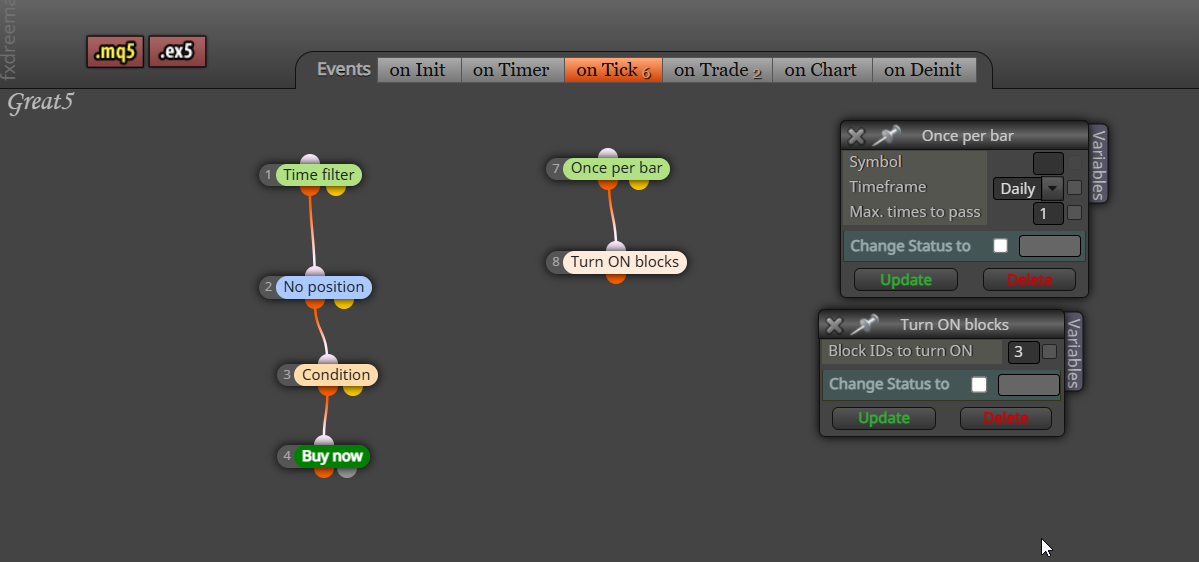
              Once a day -> Turn On

              1 Reply Last reply Reply Quote 0
              • l'andorrà
                l'andorrà @jpsam last edited by

                @jpsam As sktsec said, you need another separate blocks tree that needs to be executed BEFORE your current block tree with the blocks he recommends.

                (English) I will try to help everyone in these fxDreema forums. But if you want to learn how to use the platform in depth or more quickly, I can help you with my introductory fxDreema course in English at https://www.theandorraninvestor.eu.

                (Català) Miraré d’ajudar tothom en aquests fòrums d’fxDreema. Tanmateix, si vols aprendre a fer servir la plataforma amb més profunditat o més de pressa, t’hi puc ajudar amb el meu curs d’introducció a fxDeema en català a https://www.theandorraninvestor.eu/ca.

                (Español) Intentaré ayudar a todo el mundo en estos foros de fxDreema. Sin embargo, si quieres aprender a usar la plataforma en profundidad o más deprisa, te puedo ayudar con mi curso de introducción a fxDreema en español en https://www.theandorraninvestor.eu/es.

                1 Reply Last reply Reply Quote 0
                • J
                  jpsam last edited by

                  Sorry, I don't know the block sktsec recommended. I haven't seen his response even. Can you please help me with yours, even if it's a repetition. Thanks.

                  1 Reply Last reply Reply Quote 0
                  • jstap
                    jstap last edited by

                    image.png

                    Learn fxDreema Without the Wait!

                    My comprehensive book, available on Amazon, is packed with examples and invaluable insights to help you fast-track your learning journey.

                    The paperback and hardback editions include MT4 & MT5 QR codes for easy access to all prebuilt projects and robots, including my latest gold trading robot!

                    Don’t miss out

                    Click here➡️ https://mybook.to/fxDreema to get your copy today!

                    Enjoy! 😊

                    1 Reply Last reply Reply Quote 0
                    • J
                      jpsam @jpsam last edited by

                      @jpsam I want it to turn on the next day, not the next bar. To turn on next day, should I connect turn on block to the yellow output of block that was turned off, so that it turns on when the time in the time filter expires?

                      1 Reply Last reply Reply Quote 0
                      • jstap
                        jstap last edited by

                        You can do that or just leave on daily bar, this way it activates when the 1st tick of the day arrives

                        Learn fxDreema Without the Wait!

                        My comprehensive book, available on Amazon, is packed with examples and invaluable insights to help you fast-track your learning journey.

                        The paperback and hardback editions include MT4 & MT5 QR codes for easy access to all prebuilt projects and robots, including my latest gold trading robot!

                        Don’t miss out

                        Click here➡️ https://mybook.to/fxDreema to get your copy today!

                        Enjoy! 😊

                        1 Reply Last reply Reply Quote 0
                        • J
                          jpsam last edited by

                          Sorry sir, I am challenging your authority. I wish you understand me well. In the example blocks you showed on your reply post, there is no Turn Off block to switch buying when a loss is made. Just a recap: I want it to stop buying for the rest of the day once it makes a loss. With the help you gave me the previous day, the turn off block prevents another buying, but it should resume buying the next day when the condition is met, which is what I haven't succeeded. So, if I miss the "position closed" block, it can't close buying when a loss is made, and there won't be the need to resume the next day. It should only stop trading in case of a loss. It is not meant to just stop trading because of night or any other condition and reopen the next day. I need to make this clear, then you know where to bring in your expertise. However, I will try it again. Thanks a million time

                          J A 3 Replies Last reply Reply Quote 0
                          • J
                            jpsam @jpsam last edited by

                            @jpsam With this, what will stop it from trading again when a loss is made?

                            1 Reply Last reply Reply Quote 0
                            • J
                              jpsam @jpsam last edited by

                              @jpsam I have tried it exactly the way you suggested on the image example, but unfortunately, it didn't stop trading after a loss. Thanks very much for your willingness to help

                              1 Reply Last reply Reply Quote 0
                              • jstap
                                jstap last edited by

                                Everything I have showed you here and in PM works, so say what is not working and add your latest link to check why.

                                Learn fxDreema Without the Wait!

                                My comprehensive book, available on Amazon, is packed with examples and invaluable insights to help you fast-track your learning journey.

                                The paperback and hardback editions include MT4 & MT5 QR codes for easy access to all prebuilt projects and robots, including my latest gold trading robot!

                                Don’t miss out

                                Click here➡️ https://mybook.to/fxDreema to get your copy today!

                                Enjoy! 😊

                                1 Reply Last reply Reply Quote 0
                                • A
                                  ambrogio @jpsam last edited by ambrogio

                                  @jpsam said in Re-opening trade the next day:

                                  Sorry sir, I am challenging your authority. I wish you understand me well. In the example blocks you showed on your reply post, there is no Turn Off block to switch buying when a loss is made. Just a recap: I want it to stop buying for the rest of the day once it makes a loss.......

                                  the Turn Off block is just the one you have in "on trade" section

                                  I tested your project and it work fine.

                                  J 1 Reply Last reply Reply Quote 0
                                  • J
                                    jpsam last edited by

                                    Apollogies sir, I omitted the word "Not" in my post to you please. What I wanted to say is: "I am NOT challenging your authority", not the other way round. Forgive me; you have always helped me with solutions, and I would never challenge your authority. It is just now I am seeing the typo. please sorry and forgive me!

                                    1 Reply Last reply Reply Quote 0
                                    • J
                                      jpsam @ambrogio last edited by jpsam

                                      @ambrogio Sorry for that typo. I didn't mean to challenge your authority. From the result of my test, the EA turns off as intended but didn't turn on the following day. I am surprised you said you have tested it, and it works fine. If it turned on the next day, then there was a mix-up on my side. In the course of trying to make it work, I have made many changes and have probably done something wrong somewhere. I will check and get back to you.
                                      Thanks for your willingness to help.

                                      1 Reply Last reply Reply Quote 0
                                      • 1 / 1
                                      • First post
                                        Last post

                                      Online Users

                                      J
                                      H
                                      E
                                      C
                                      M
                                      O

                                      10
                                      Online

                                      146.7k
                                      Users

                                      22.4k
                                      Topics

                                      122.6k
                                      Posts

                                      Powered by NodeBB Forums | Contributors