New options
-
Hi,
I really appreciate the great work you've done with FXDreema — it's an excellent platform for developing EAs visually.
I’d like to suggest a useful feature that would greatly enhance flexibility for advanced users: the ability to add custom preprocessor directives directly within the platform, such as:
#property(for defining EA or indicator properties)#include(to include external.mqhlibraries)#resource(for embedding images, sounds, etc., for example uploading an image and using it in the Draw Image block)
These directives are essential when trying to expand or integrate advanced MQL5 features into FXDreema-generated code. Currently, there doesn’t seem to be a way to inject these lines at the top of the generated
.mq5file from within the platform.Even a simple text box in the project settings that allows users to insert custom lines before
OnInit()/OnTick()would already be extremely useful.Additionally, it would be very helpful to have support for defining custom functions (e.g. user-defined
voidfunctions) directly within FXDreema, so they can be reused across blocks and called from different parts of the logic. This would significantly improve code organization, readability, and scalability for larger projects.Would you consider adding these options in a future update?
Thank you again for your continuous support and for creating such a great tool!
Best regards
-
This is true, a lot of this you can use/add in a custom block creation.
-
@jstap That’s true — custom blocks are very useful for logic.
However, some things cannot be done with custom blocks:
#resourcemust be declared at the global preprocessor level, so it can’t be used or defined via custom blocks (which means images/sounds can’t be embedded this way).- Custom blocks also can’t define true reusable
void(or other) functions — they only generate inline code. - The same limitation applies to
#propertyand#include, which must appear at the very top of the.mq5file.
So while custom blocks cover many cases, they don’t replace proper support for preprocessor directives or custom function definitions.
-
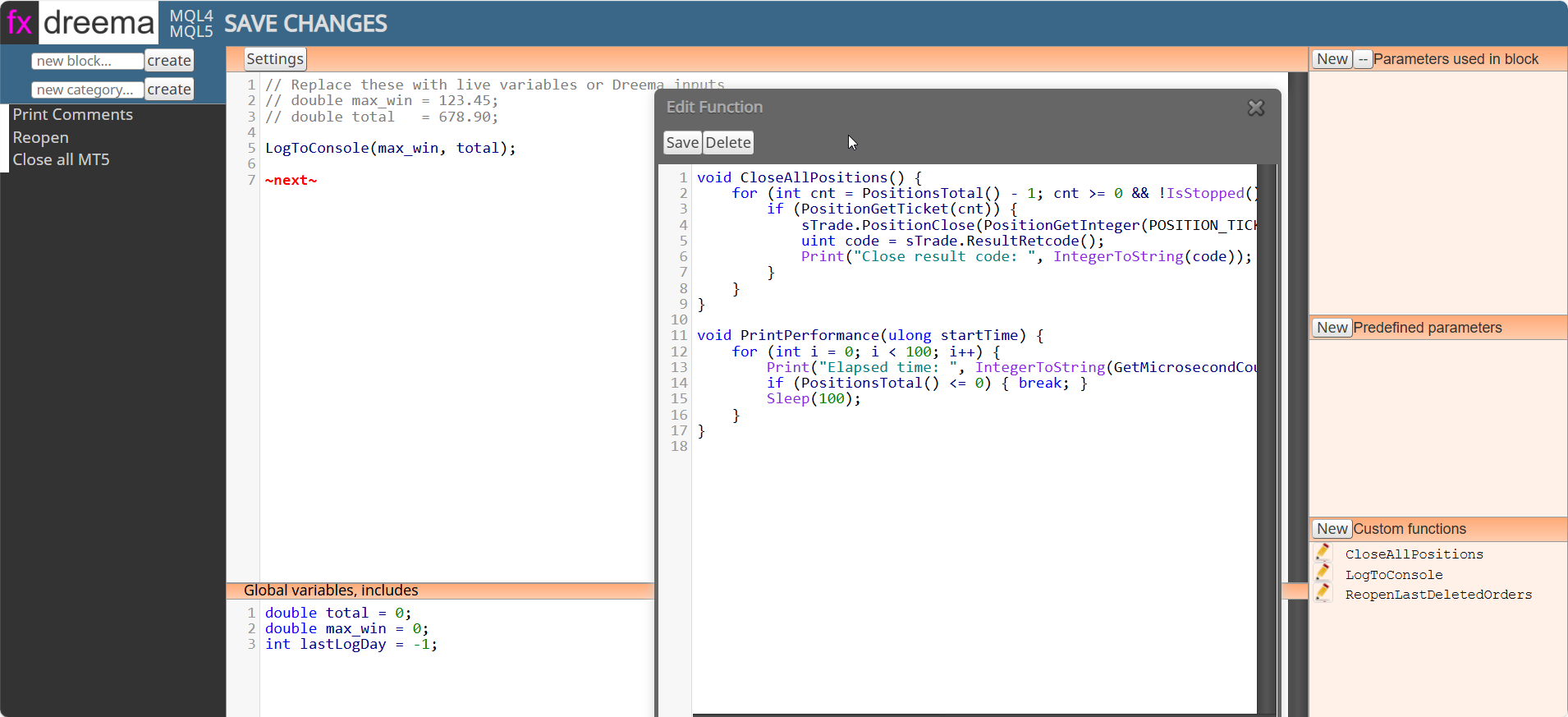
No they don't, in line is what is used in custom code. Creating a custom block can use custom functions, global variables, includes etc. You can see some in this picture:
-
What I mean is that there is no dedicated feature to define a standalone void function once and then simply call it anywhere in the code.
In practice, especially in Custom Code blocks, logic has to be inlined or tied to block-generated code. There’s no clean, user-controlled place to define reusable functions.
And if you want to add things like #resource, #include, or other preprocessor directives, there’s also no guaranteed global header section where these can be safely defined and managed.
That’s the limitation I’m referring to.
-
That is why I said I agree, I don't think admin will add to the current block setup, so creating a block is the only possible way for now.
-
@Dr-Amiin You can try to contact the admin directly and let him know. I agree with jstap. I'm not optimistic on the admin making any changes like that on the custom block area of the platform, but hey, you never know.


