Use Adjust field with Constant or Variables
-
Hello,
I read the post about this topic but I didn't reach any solution.
I want to use the field adjust but with a variable or even a constant.
I tried to define the variable/constant (as double) and then write in the adjust field:
+VarName pips
VarName pips
+VarName@pips
+(VarName)@pips+VarName pips (defined as string)
+VarmameSome compilation errors appears every time or don't make any change in the tests at all.
How can I solve it?
Have I to use toDigits() function ??
Thank you,
David -
I tried the very first variant +VarName pips and it works for me. It turns the value of 10 to 0.001 for EURUSD
-
Hello,
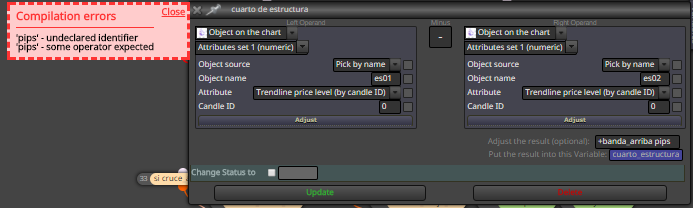
When I use +ConstantName pips i get compilation errors.
Compilation errors
'pips' - undeclared identifier
'pips' - some operator expectedScreenshot (banda_arriba is the constant):
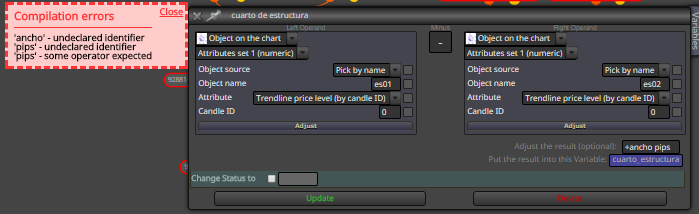
When I use +VariableName pips i get compilation errors, as well:
Compilation errors
'ancho' - undeclared identifier
'pips' - undeclared identifier
'pips' - some operator expectedScreenshot (ancho is the variable):
I don't know what I'm doing wrong...
Thank you in advance for your help.
David
-
@fxDreema
Hello,
I tested with +VarName pips and it didn't work...should it work either with variables or constants?
thank you,
David -
I had the same problem. What you will have to do in the adjust box is put +ConstantName pips just like you did with +banda_arriba pips, but in your constants value box, only put a value such as 15. If I were to guess, you are putting pips in the value box after your number. I hope this helps