ATR related lot size?
-
Hello,
I am relatively new to the site so please excuse me if this has been answered, I have looked for a post like this but can not find it.
I am looking to determine a lot size for each entry using the ATR value. The calculation looks like this
ATR value x 1.5 = x
100/x= lot sizeI have tried to used the Custom Value/Indicator/Adjust options on a pending order but I can not get it to open the correct size trade.
If anyone could help that would be great!
Cheers
-
You need to use a variable in the calculation, follow these steps:
-
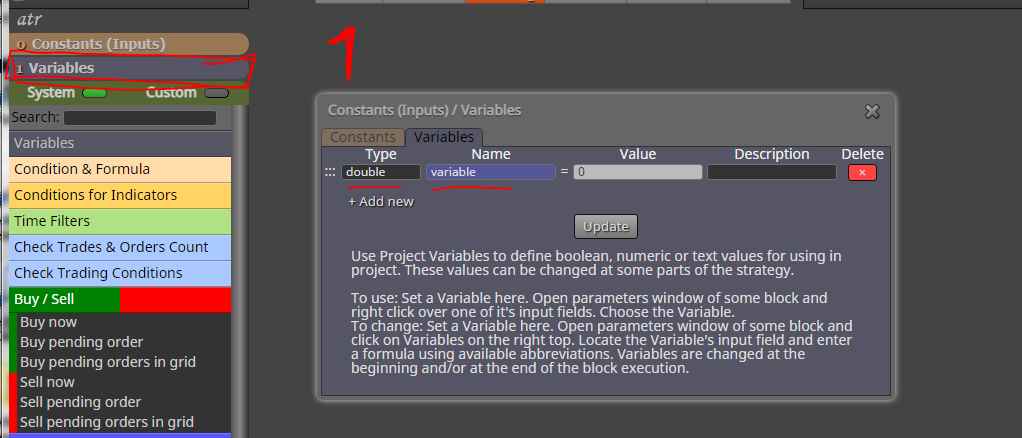
Create the variable (you can choose the name, I just used "variable"):
-
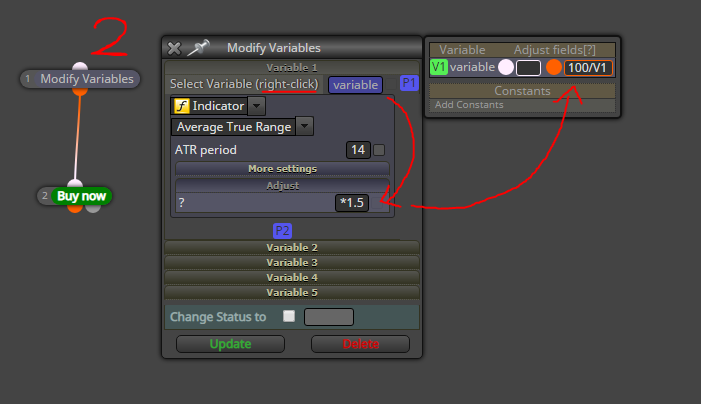
Modify your variable with "modify variables" block. Right-click in the field to select your variable. Put ATR in there, and then "adjust" the value by multiplying by 1.5. Then adjust the variable a second time, "variable" becomes 100/"variable"
-
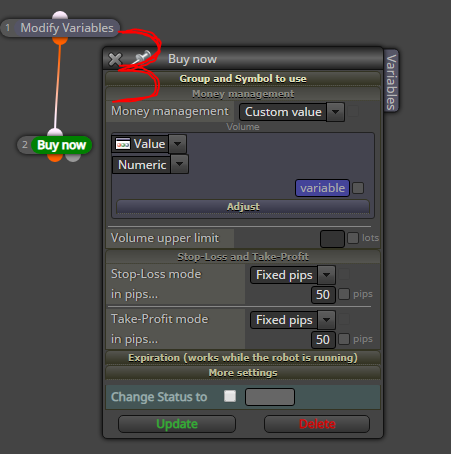
Use a variable lot size, again by right-clicking the field:
Need small help? Tag me in your post
Need big help? https://www.fiverr.com/big_algo/automate-your-winning-strategy-in-mql4-or-mql5 -
-
Awesome! Thank you so much. I love learning this stuff so I really appreciate your time.
So we are basically creating a variable, doing the calculation then inserting the variable to where I need it!
The only thing that I am sticking with is the adjusting the variable a second time. I am unsure how I get that box up to do the second adjustment.
Thank you once again
-
Hey Buddy,
I found a way to adjust the second time. Add a pass block, is that what you suggested I do?
https://fxdreema.com/shared/CZ6xDk7Sc
Cheers
-
Okay apologies for the updates, I found the tab to press to adjust the Variable again. Im just learning so there are stupid questions galore and commentaries of fumbling around!
Cheers
-
@frewster
Yeah the adjust variables thingy pops up when you click the tab. You're a very fast learner, it took me a year to learn this lol
The white box means adjusting before the main block does its work,
and the orange (or yellow) box is adjusting after the main block does its work. So, in this case we want to use the orange adjust -
By the way, there is one undocumented thing you can do in Adjust. Normally we start with +, -, * or / and the things we write in this field are put somewhere in the code after the value. For example, let's say the value is called ATR. Then we write + 0.1. At the end we have something like this:
ATR = ATR + 0.1...where the ATR = ATR part is outside our reach, only the + 0.1 part is added.
One day I added new functionality. Let's write = $ + 0.1. Then the result will be the same:
ATR = ATR + 0.1but now we control the whole = ATR + 0.1 part. The dollar symbol is replaced with the variable that represents the indicator or whatever it is. In my example this is ATR. But let's make it different. Let's write = 2 * $ in Adjust. Then we will have something like this:
ATR = 2 * ATRSome example here: https://fxdreema.com/shared/UNvVIVJJ
The important thing here is to start with =. Some people doesn't even write + or - or whatever. By default, if the contents in Adjust doesn't start with +, -, *, / or =, then + is used.


