Struggling to Add, Test and use an EA.
-
I have a fulltime job. I cant be on the screen like I want to. I make money and loose it all, so I came across fxDreema and liked what it can do. I created an EA but struggle to add it to my MT4 to test it and also how to use it on real platform. I watched videos but miss some clicks, audios because these people are not aware that some of their screens are covered and talk while there is music playing at the back. A step by step way of doing things will be very helpfull.
-
- Open your data folder with Ctr+Shift+D
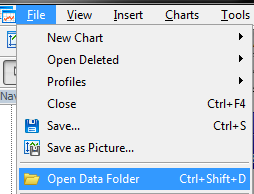
- Navigate to MQL4/Experts. Put your .ex4 file to the Experts directory.
- Back in your terminal, press Ctrl+N to open your Navigator.
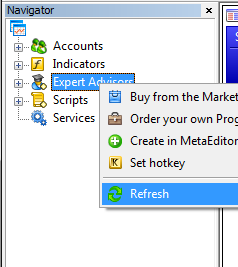
- Refresh the Expert Advisors list, and your EA should show up
- Now you can drag and drop the EA to any chart or strategy tester (Ctrl+R to open tester)
- Open your data folder with Ctr+Shift+D
