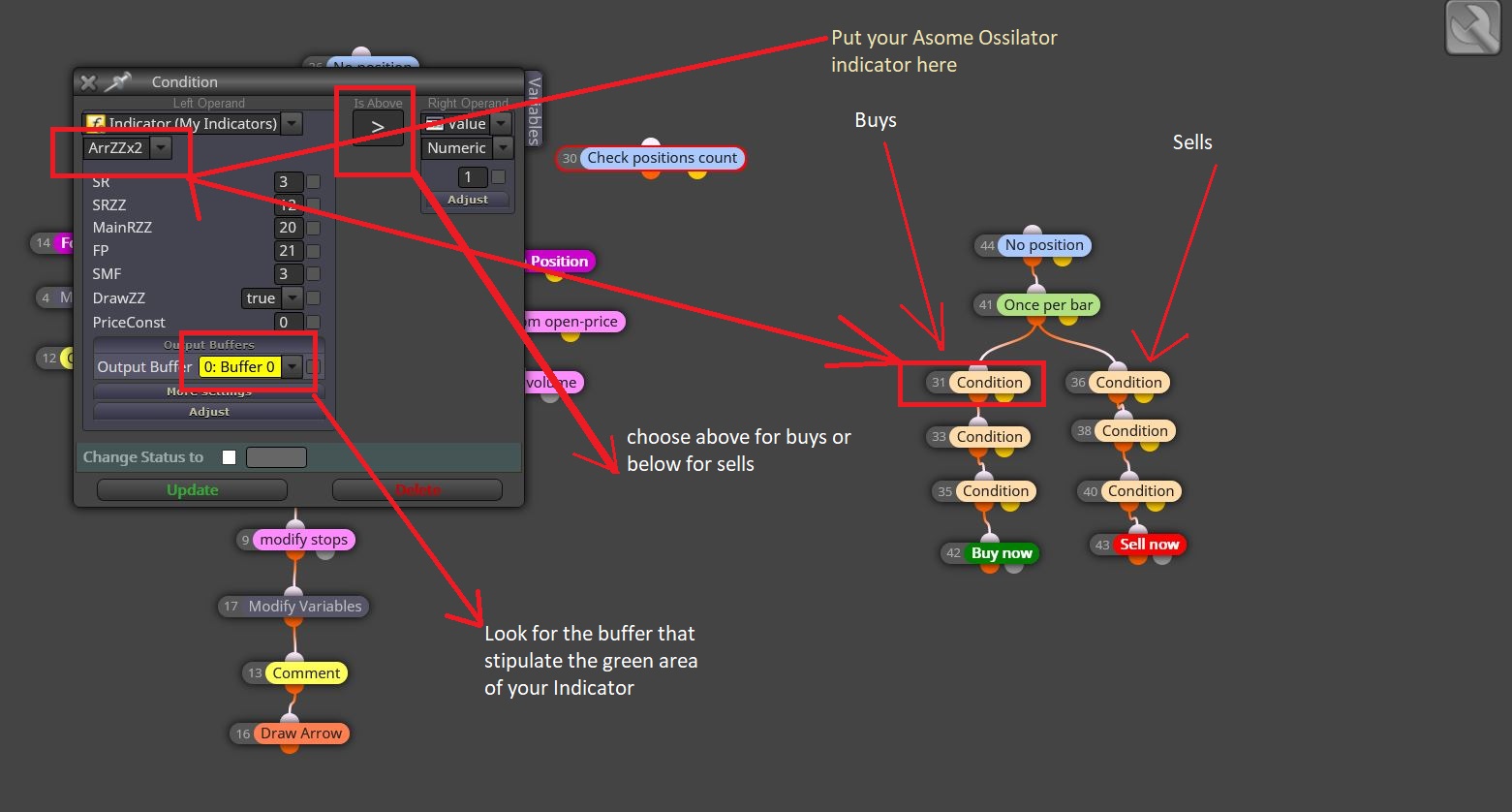
Awesome Oscillator
-
Greetings,
I am trying to create an expert advisor, where there are 3 awesome oscillator. The first awesome oscillator has the settings of period 34, 5, the second has a period of 34,7, and the third has the period of 34,9. When all 3 indicator has a green bar, then open a buy position. When all 3 indicator has a red bar, then open a selling position.
Positions are opened once per bar. Timeframe, take-profit, stop-loss, are adjustable.
Unfortunately, I do not have a project started (primarily because I am having trouble in setting the awesome oscillator parameters (34,5 - 34,7 - 34,9), and relating them to each other in fxdreema).
*Your kindly earliest response and assistance is much appreciated.
Sincerely
-
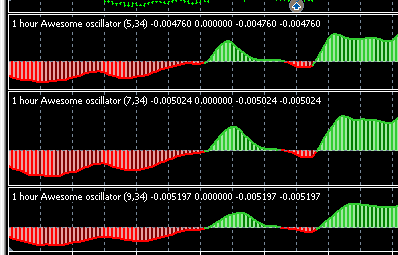
You cannot adjust the AO in the properties box, so you will have to look for a version on MQL5 or elsewhere that provides the code, then it can be adjusted. I did find a MT5 version that I was able to modify. I am not sure if you are trying to use those values you posted, in which case, there seemed to be no advantage to it.
Here is the screenshot in MT5
-
@line Greetings
I am trying to use those values in relation to the previous text.
"I am trying to create an expert advisor, where there are 3 awesome oscillator. The first awesome oscillator has the settings of period 34, 5, the second has a period of 34,7, and the third has the period of 34,9. When all 3 indicator has a green bar, then open a buy position. When all 3 indicator has a red bar, then open a selling position.
Positions are opened once per bar. Timeframe, take-profit, stop-loss, are adjustable.
Unfortunately, I do not have a project started (primarily because I am having trouble in setting the awesome oscillator parameters (34,5 - 34,7 - 34,9), and relating them to each other in fxdreema)."
-
5_1598116886751_AO_A9.mq4 4_1598116886751_AO_A9.ex4 3_1598116886750_AO_A7.mq4 2_1598116886750_AO_A7.ex4 1_1598116886748_AO_A5.mq4 0_1598116886747_AO_A5.ex4
Here are the modified indicators, these will be found under "Custom Indicators"
-
@line Greetings,
I am using mt5. do you think you can help me out
-
5_1598166644996_Awesome_oscillator_-_extended34.9.mq5 4_1598166644996_Awesome_oscillator_-_extended34.9.ex5 3_1598166644996_Awesome_oscillator_-_extended34.7.mq5 2_1598166644996_Awesome_oscillator_-_extended34.7.ex5 1_1598166644995_Awesome_oscillator_-_extended34.5.mq5 0_1598166644994_Awesome_oscillator_-_extended34.5.ex5
-
@line Greetings,
My apologies, but I do not understand, what are all these links for. If I am not mistaken, each one is an awesome oscillator with the mentioned settings. But I do not understand, what to do? Are these links indicators, or expert advisor?
My request is simply When all 3 indicator has a green bar at the same time, then open a buy position. When all 3 indicator has a red bar at the same time, then open a selling position.
Positions are opened once per bar. Timeframe, take-profit, stop-loss, are adjustable.
-
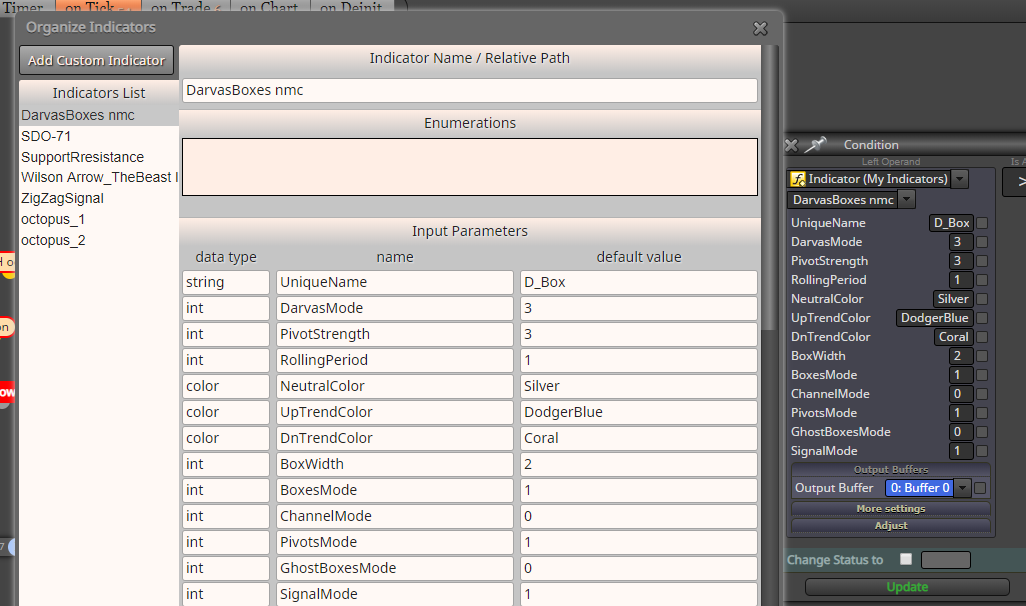
Those are files to be installed in your Data Folder in MT5 under indicators. Go to Builder and add these files to My Indicators. Once those are loaded then you can add those to the condition box. The example shows my custom indicator called DarvasBoxes nmc
-
@line I think he wants you to built the expert complete
-
@alphaomega Thanks, but I won't build this one, the strategy will not work, I have dozens of these with nothing but failures.
-
I don't want to come across being callous, but if the original poster finds an interesting strategy, I would be happy to help.
-
@line Greetings,
Since you have seen strategies that work, do you care to share some with me?
-
@line Greetings,
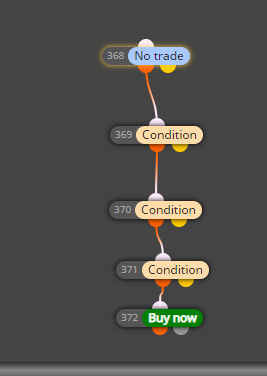
I imported all three indicators, but I do not know how to make the EA open a buy position when all three Awesome Oscillators are green and vice versa when it comes to selling.
I am not asking you build it. I just would like to learn how create the above statement; to buy when all three awesome oscillators are green and to sell when all three awesome oscillator are red.
Below you can find my Restarted project, if you can help me that would be great:
https://fxdreema.com/shared/QJAyxLHRc -
-
-
-
Greetings,
My apologize, but things got too complicated, and now I do not know how to proceed. But thanks for your help.
-
No need to quit now. Go to the builder and under Projects, there is an option to create a Shared Copy. Send this link and I will help you.
-
@line I will also help him, in my very limited knowledge but I want him to do something first... and also its a slep for me because I am using mq5
-
@line @AlphaOmega Greetings,
This all what I have.
Shared project: https://fxdreema.com/shared/JbL3P8xDd