How do I deal with price distances? Without any relation to time or candle
-
I know it is found in the pink section (pips away from open price)
Used after buying or selling as a distance
In this example I wanted to make the same thing so that the higher the price 15 pips from the closing candle 1 = buy
If the price drops 15 pips from the closing candle1 =sell
The problem here is that dealing is based on (one per bar or one per second)And I want it in the distance
Sometimes it opens deals and sometimes it opens nothing
Is there a suggestion or a solution? -
@khalids222 You should use the blue block 'Check distance'.
(English) I will try to help everyone in these fxDreema forums. But if you want to learn how to use the platform in depth or more quickly, I can help you with my introductory fxDreema course in English at https://www.theandorraninvestor.eu.
(Català) Miraré d’ajudar tothom en aquests fòrums d’fxDreema. Tanmateix, si vols aprendre a fer servir la plataforma amb més profunditat o més de pressa, t’hi puc ajudar amb el meu curs d’introducció a fxDeema en català a https://www.theandorraninvestor.eu/ca.
(Español) Intentaré ayudar a todo el mundo en estos foros de fxDreema. Sin embargo, si quieres aprender a usar la plataforma en profundidad o más deprisa, te puedo ayudar con mi curso de introducción a fxDreema en español en https://www.theandorraninvestor.eu/es.
-
@l-andorrà Is there an example of how I put it with the condition please
-
@khalids222 Sure. This is how to configure buys:
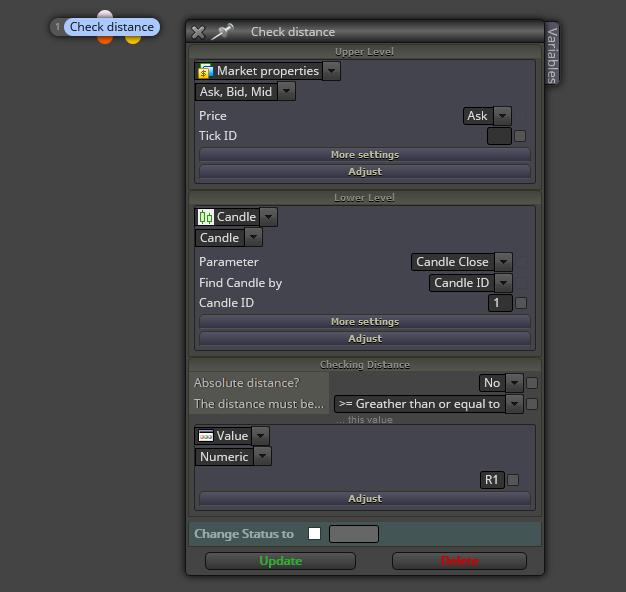
For sells, upper and lower levels should be reversed and then use R2 variable.
(English) I will try to help everyone in these fxDreema forums. But if you want to learn how to use the platform in depth or more quickly, I can help you with my introductory fxDreema course in English at https://www.theandorraninvestor.eu.
(Català) Miraré d’ajudar tothom en aquests fòrums d’fxDreema. Tanmateix, si vols aprendre a fer servir la plataforma amb més profunditat o més de pressa, t’hi puc ajudar amb el meu curs d’introducció a fxDeema en català a https://www.theandorraninvestor.eu/ca.
(Español) Intentaré ayudar a todo el mundo en estos foros de fxDreema. Sin embargo, si quieres aprender a usar la plataforma en profundidad o más deprisa, te puedo ayudar con mi curso de introducción a fxDreema en español en https://www.theandorraninvestor.eu/es.
-
@l-andorrà Could you explain where is wrong here?
I have connected CHECK DISTANCE DIRECT WITH BUY , AND i connected condition with one per bar with buy ,I tried all methods but it didn't work
https://fxdreema.com/shared/hkrkXScrc -
@khalids222 no estoy seguro, pero creo que en tick id debes poner el valor 0
ANTONIO JESUS
-
@ajmd97fx said in How do I deal with price distances? Without any relation to time or candle:
no estoy seguro, pero creo que en tick id debes poner el valor 0
Thank you. I think if not put it is zero by default
that's not the reason -
I tried another method as well, but unfortunately the results were incorrect
https://fxdreema.com/shared/UyRABbpGd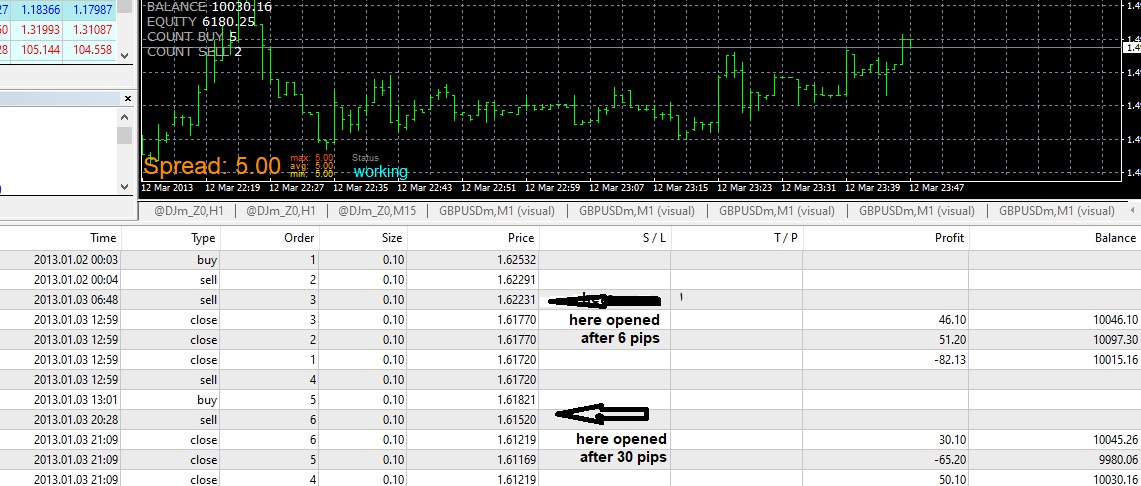
-
@khalids222 As I said in my post, you need to reverse upper and lower levels for sells. This means bid proce should be positioned as lower level and candle close as upper level. Additionally, do not select the == symbol when checking distance, but >=. Otherwise you can find many trades will not be open unless distance is exactly that amount od pipf. Many times ticks move beyond our theoretical distances.
(English) I will try to help everyone in these fxDreema forums. But if you want to learn how to use the platform in depth or more quickly, I can help you with my introductory fxDreema course in English at https://www.theandorraninvestor.eu.
(Català) Miraré d’ajudar tothom en aquests fòrums d’fxDreema. Tanmateix, si vols aprendre a fer servir la plataforma amb més profunditat o més de pressa, t’hi puc ajudar amb el meu curs d’introducció a fxDeema en català a https://www.theandorraninvestor.eu/ca.
(Español) Intentaré ayudar a todo el mundo en estos foros de fxDreema. Sin embargo, si quieres aprender a usar la plataforma en profundidad o más deprisa, te puedo ayudar con mi curso de introducción a fxDreema en español en https://www.theandorraninvestor.eu/es.
-
@l-andorrà I tried based on what you said, but unfortunately I tried without ONE PER BAR & WITH ONE PER BAR , and in all cases several deals are opened.
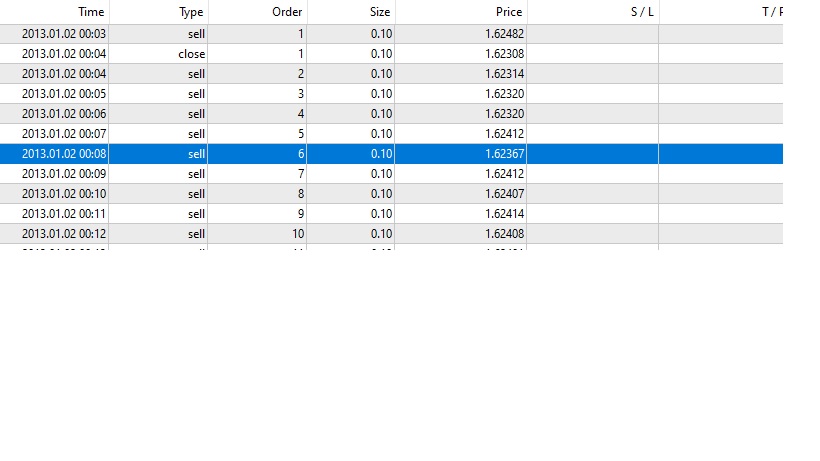
Why does the program open several deals, and not adhere to the distance
Where several deals are opened, the distance between them does not exceed one or two points
https://fxdreema.com/shared/dY5BvIkJd -
@khalids222 This is the way to select pips:
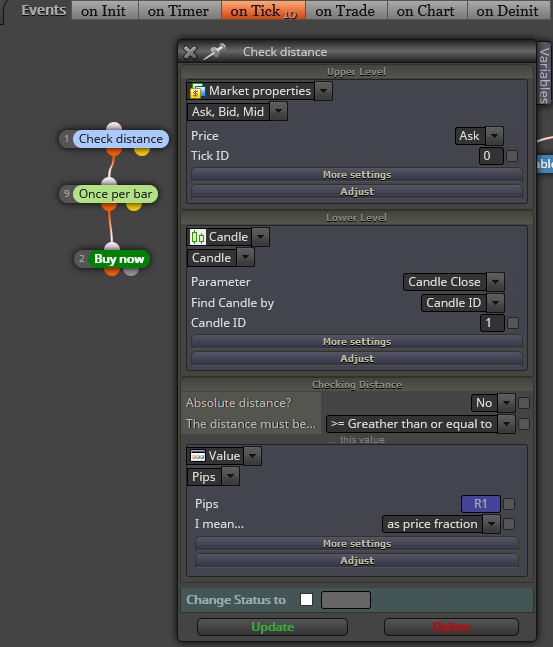
Can you please confirm that variable R1 and R2 are of a double type?
(English) I will try to help everyone in these fxDreema forums. But if you want to learn how to use the platform in depth or more quickly, I can help you with my introductory fxDreema course in English at https://www.theandorraninvestor.eu.
(Català) Miraré d’ajudar tothom en aquests fòrums d’fxDreema. Tanmateix, si vols aprendre a fer servir la plataforma amb més profunditat o més de pressa, t’hi puc ajudar amb el meu curs d’introducció a fxDeema en català a https://www.theandorraninvestor.eu/ca.
(Español) Intentaré ayudar a todo el mundo en estos foros de fxDreema. Sin embargo, si quieres aprender a usar la plataforma en profundidad o más deprisa, te puedo ayudar con mi curso de introducción a fxDreema en español en https://www.theandorraninvestor.eu/es.
-
@l-andorrà I put in the exact same image, and i have adjusted the variable to int
But still the same problem opens every point or two, and once again delete the variables and put numbers directly instead R1 TO = +15 & R2 -15 And also the same problem .
https://fxdreema.comshared/5MfAbAqme
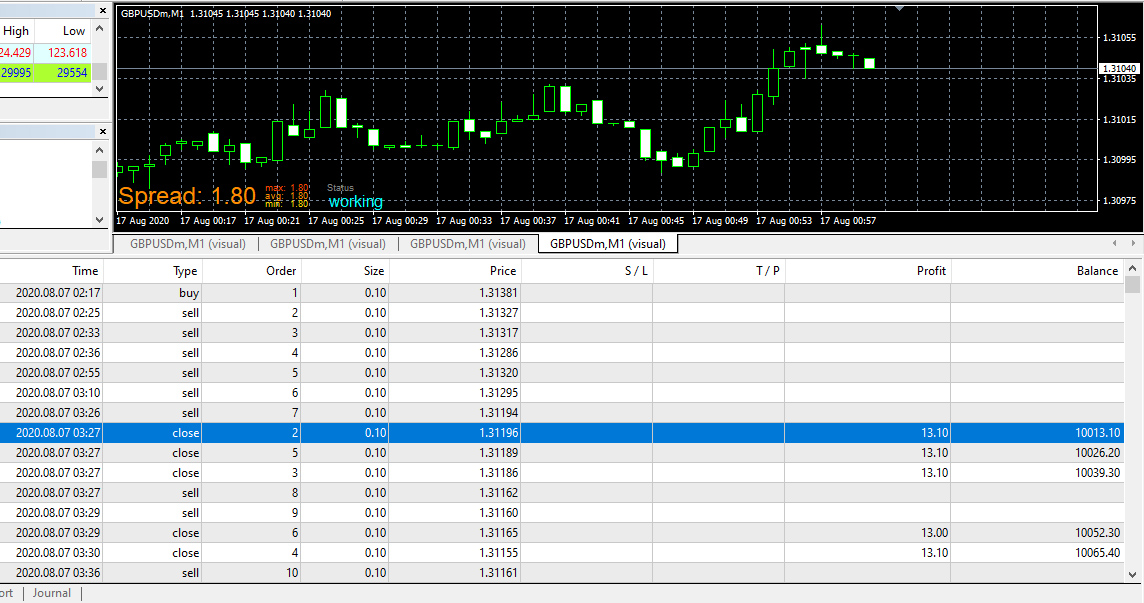
I thank you for your attempt to help me, but is it possible for you to send me the link directly after its work so that every 15 points of SELL or BUY move regardless of the variables -
Is there a suggestion or a solution to why more than one deal is opened between one or two pips?
-
@khalids222 For some reason I cannot open your link. Can you please reupload it?
(English) I will try to help everyone in these fxDreema forums. But if you want to learn how to use the platform in depth or more quickly, I can help you with my introductory fxDreema course in English at https://www.theandorraninvestor.eu.
(Català) Miraré d’ajudar tothom en aquests fòrums d’fxDreema. Tanmateix, si vols aprendre a fer servir la plataforma amb més profunditat o més de pressa, t’hi puc ajudar amb el meu curs d’introducció a fxDeema en català a https://www.theandorraninvestor.eu/ca.
(Español) Intentaré ayudar a todo el mundo en estos foros de fxDreema. Sin embargo, si quieres aprender a usar la plataforma en profundidad o más deprisa, te puedo ayudar con mi curso de introducción a fxDreema en español en https://www.theandorraninvestor.eu/es.
-
@l-andorrà This is the first method
https://fxdreema.com/shared/u2vqG1YAb
In case it didn't work, this is the second method
https://fxdreema.com/shared/UyRABbpGdAll of them open a large number of deals
-
@khalids222 The first method should specify just '15', and not '+15' or '-15'.
(English) I will try to help everyone in these fxDreema forums. But if you want to learn how to use the platform in depth or more quickly, I can help you with my introductory fxDreema course in English at https://www.theandorraninvestor.eu.
(Català) Miraré d’ajudar tothom en aquests fòrums d’fxDreema. Tanmateix, si vols aprendre a fer servir la plataforma amb més profunditat o més de pressa, t’hi puc ajudar amb el meu curs d’introducció a fxDeema en català a https://www.theandorraninvestor.eu/ca.
(Español) Intentaré ayudar a todo el mundo en estos foros de fxDreema. Sin embargo, si quieres aprender a usar la plataforma en profundidad o más deprisa, te puedo ayudar con mi curso de introducción a fxDreema en español en https://www.theandorraninvestor.eu/es.
-
@l-andorrà Unfortunately, the same result is not the cause.
Hundreds of random deals are opened
https://fxdreema.com/shared/UJfExoW1e
There is an unknown error
-
@khalids222 Block number three should have selected 'greater or equal to' instead of 'less than' as it is now.