fxDreema

    • Register
    • Login
    • Search
    • Back to the main page
    • Categories
    • Recent
    • Tags
    • Popular
    • Search

    How to use Rectangle Object from SnR Indicator?

    Questions & Answers
    3
    16
    1948
    Loading More Posts
    • Oldest to Newest
    • Newest to Oldest
    • Most Votes
    Reply
    • Reply as topic
    Log in to reply
    This topic has been deleted. Only users with topic management privileges can see it.
    • B
      biztet last edited by biztet

      Hello experts. Attached the indicator. 0_1610686788446_fxr_sr_zones.ex4
      Is it possible to use only the rectangle object on chart defined by colors only?
      Without defining the object name? The problem here is defining the Name of each object.
      Unlike @miro1360 's project, the names can be used to separate between object for Support / Resistance.
      Can I still use the Price Level from the rectangle object?
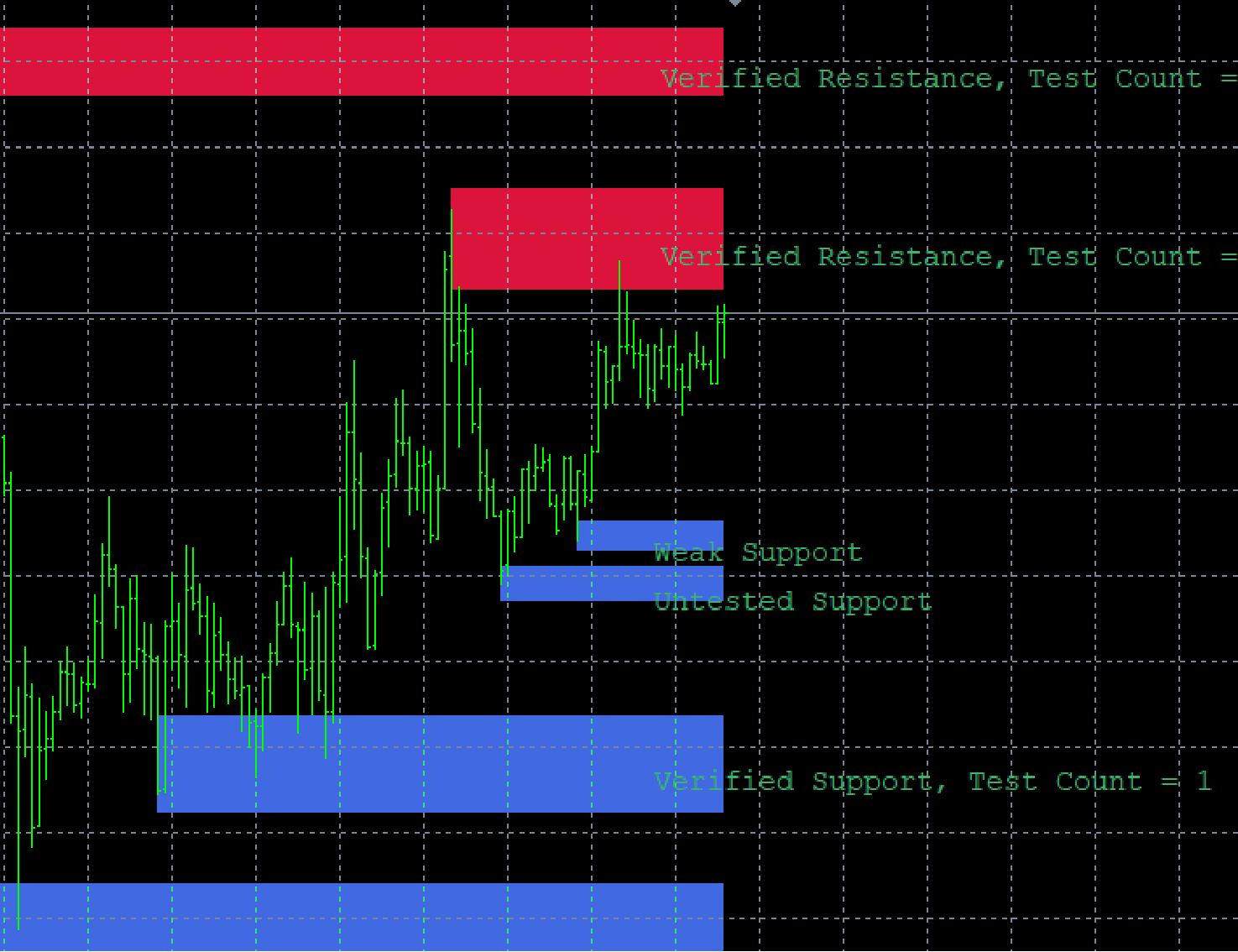
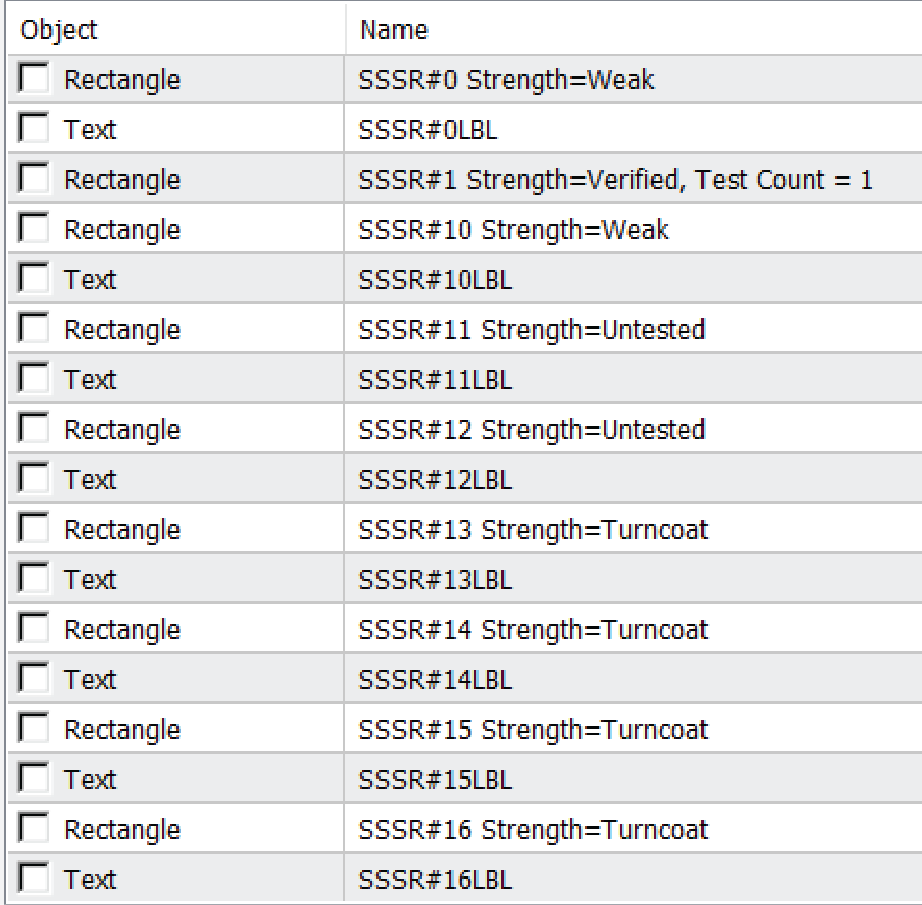
      0_1610686798800_Untitled-6-01.png

      0_1610687088607_Untitled-7-01.png

      l'andorrà 1 Reply Last reply Reply Quote 0
      • l'andorrà
        l'andorrà @biztet last edited by

        @biztet I'm not a programmer, but I'm afraid those rectagles are not bufferes but they are objects. However, I can't see how to identify them except for the number after the SSSR name. But not sure, though.

        (English) I will try to help everyone in these fxDreema forums. But if you want to learn how to use the platform in depth or more quickly, I can help you with my introductory fxDreema course in English at https://www.theandorraninvestor.eu.

        (Català) Miraré d’ajudar tothom en aquests fòrums d’fxDreema. Tanmateix, si vols aprendre a fer servir la plataforma amb més profunditat o més de pressa, t’hi puc ajudar amb el meu curs d’introducció a fxDeema en català a https://www.theandorraninvestor.eu/ca.

        (Español) Intentaré ayudar a todo el mundo en estos foros de fxDreema. Sin embargo, si quieres aprender a usar la plataforma en profundidad o más deprisa, te puedo ayudar con mi curso de introducción a fxDreema en español en https://www.theandorraninvestor.eu/es.

        1 Reply Last reply Reply Quote 0
        • B
          biztet last edited by

          Yes @l-andorrà , i can only use the object. But identifying the object is my problem right now.
          From miro's project, the objects name still can be defined, i've seen it. But now i'm trying to use this indicator for the same purpose. It looks simpler if we can just identify the rectangle object using color. Just don't know how to to it. @fxdreema-1 ? 😛

          1 Reply Last reply Reply Quote 0
          • B
            biztet last edited by

            Anybody knows this?

            l'andorrà 1 Reply Last reply Reply Quote 0
            • l'andorrà
              l'andorrà @biztet last edited by

              @biztet I guess the only persona who could help rught now is moro himself. Sadly I can't modify any indicator's code nor create the necessary custom code to it.

              (English) I will try to help everyone in these fxDreema forums. But if you want to learn how to use the platform in depth or more quickly, I can help you with my introductory fxDreema course in English at https://www.theandorraninvestor.eu.

              (Català) Miraré d’ajudar tothom en aquests fòrums d’fxDreema. Tanmateix, si vols aprendre a fer servir la plataforma amb més profunditat o més de pressa, t’hi puc ajudar amb el meu curs d’introducció a fxDeema en català a https://www.theandorraninvestor.eu/ca.

              (Español) Intentaré ayudar a todo el mundo en estos foros de fxDreema. Sin embargo, si quieres aprender a usar la plataforma en profundidad o más deprisa, te puedo ayudar con mi curso de introducción a fxDreema en español en https://www.theandorraninvestor.eu/es.

              1 Reply Last reply Reply Quote 0
              • B
                biztet last edited by

                It's okay @l-andorrà . Thanks a lot.

                A 1 Reply Last reply Reply Quote 0
                • A
                  ambrogio @biztet last edited by ambrogio

                  @biztet Hi! This old miro's tutorial can help you https://fxdreema.com/forum/topic/4209/tutorial-07-read-prices-from-indicator-objects
                  you already saw?

                  1 Reply Last reply Reply Quote 0
                  • B
                    biztet last edited by

                    Yes @ambrogio . The only problem is I couldn't differentiate between object for support and resistance because of the object name. I'm trying the indicator attached because it seems like simpler to define the SnR by the rectangular object with only two colors. Blue for support, Red for resistance.

                    A 1 Reply Last reply Reply Quote 0
                    • A
                      ambrogio @biztet last edited by ambrogio

                      @biztet I found this way, it could be useful: when the price touches the lower or upper side of the rectangle ==> do something.
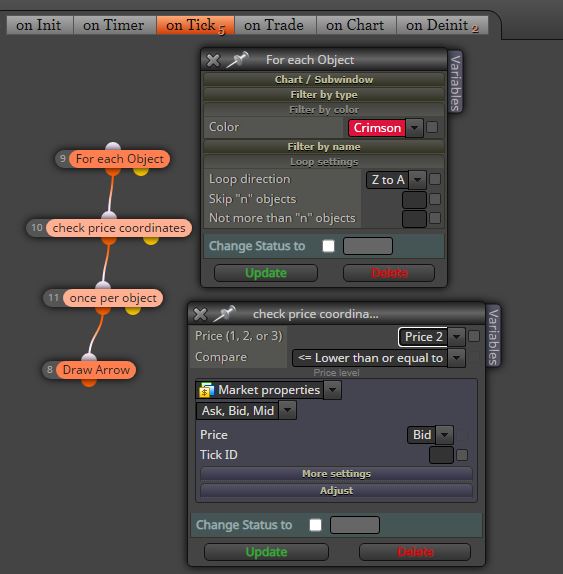
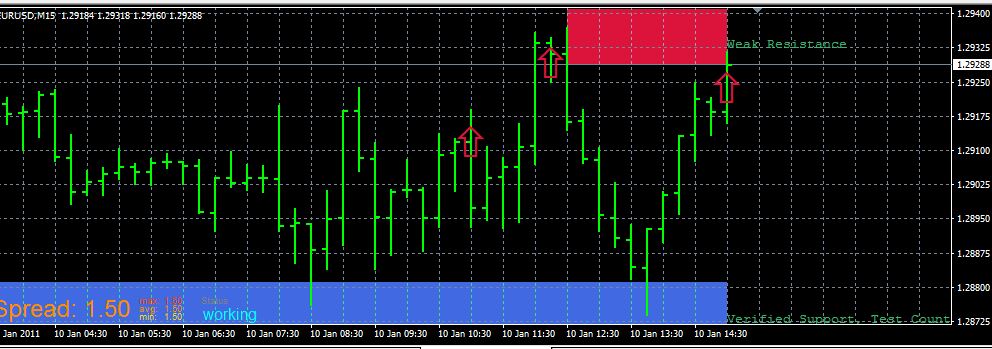
                      0_1611092017115_ma_cross.JPG

                      0_1611092311270_ma_cross.JPG

                      1 Reply Last reply Reply Quote 0
                      • B
                        biztet last edited by

                        Thanks @ambrogio , nice try. But how can we know which rectangle object? Because if you look at the indi that miro use, we can differentiate with the prefix from the object name,
                        SSSR #R for Resistance / SSSR #S for Support.

                        The one i'm trying to use is all SSSR#(numbers).
                        Yes we can use object by level but that doesn't define whether the object is Support or Resistance. If only we could use it like general object, as long the rectangle is Blue, it is a Support and Red is Resistance.

                        A 1 Reply Last reply Reply Quote 0
                        • A
                          ambrogio @biztet last edited by

                          @biztet i maked you an example "for each object" selecting by colour "crimson" for resistance (not Red). The same should be done for support "for each object" RoyalBlue (not Blue).

                          1 Reply Last reply Reply Quote 0
                          • B
                            biztet last edited by

                            Thanks @ambrogio . I'll test it after work. 😄

                            1 Reply Last reply Reply Quote 0
                            • B
                              biztet last edited by

                              Hi @ambrogio . I've been testing for few hours, quite interesting. But still a little confused with the Price 1/2/3 in the coordinates Block. Might be easier if I can use the crossing Price Level like Fibos. I see you pick the color in the input setting, not in the buffer color, and that makes it work.

                              1 Reply Last reply Reply Quote 0
                              • B
                                biztet last edited by

                                And so with the logic, i want to do like this.
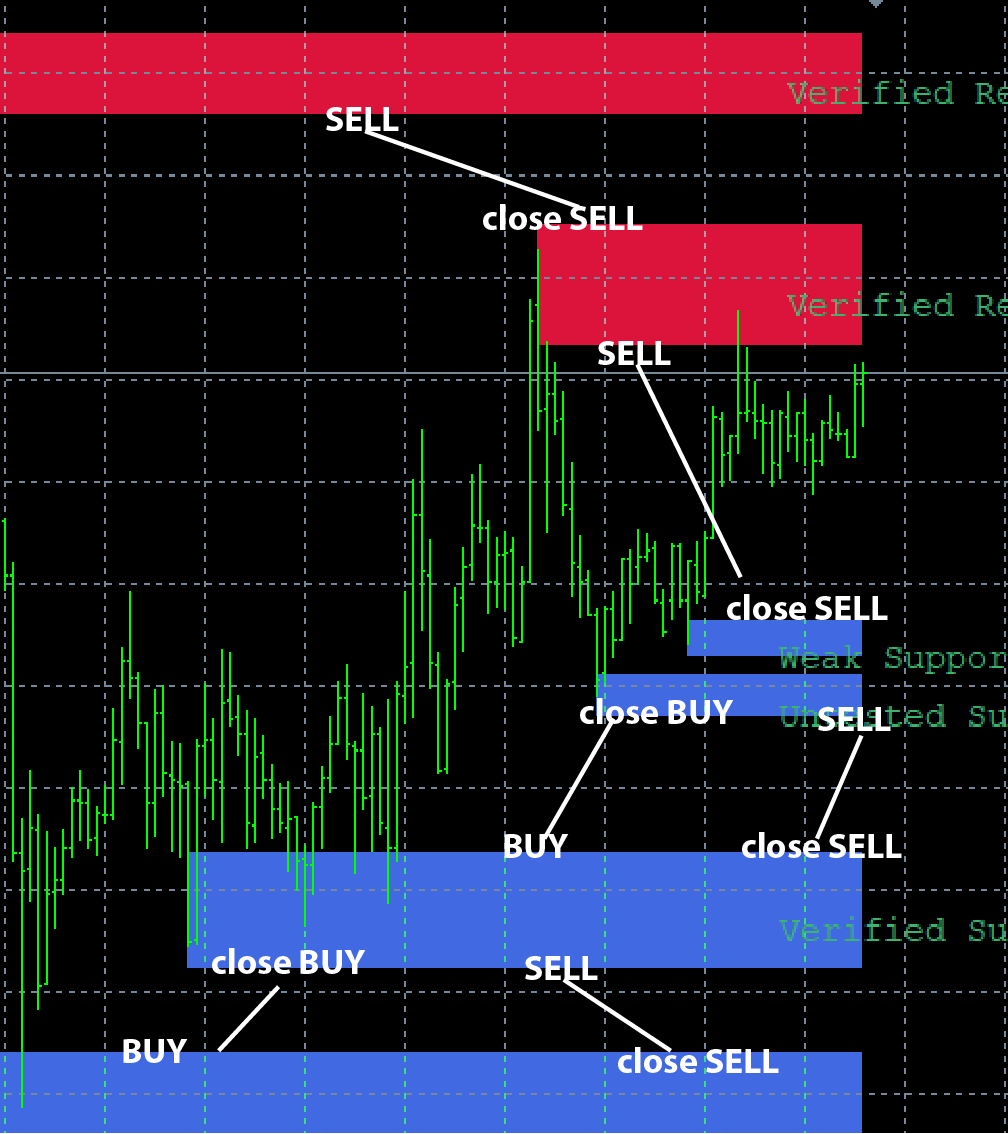
                                0_1611167902306_1610686800371-untitled-6-01-01.png

                                A 1 Reply Last reply Reply Quote 0
                                • A
                                  ambrogio @biztet last edited by

                                  @biztet We cannot detect the price level of the most distant rectangles, because we do not have the name of the objects. The system I used provides that the price touches the lower level of the rectangle based on color. It may be that someone in the forum with more knowledge can do it. Please note that these supports and resistances are always moving, I suggest you make a backtest of the indicator so you can see how it works.
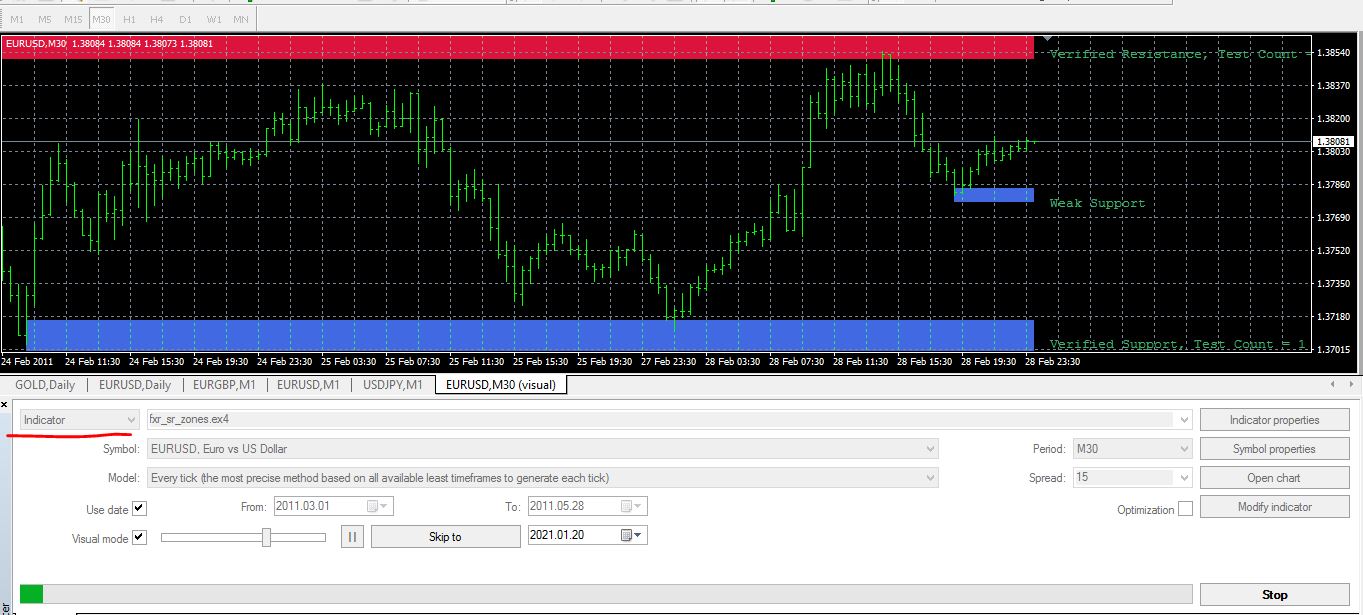
                                  0_1611172885945_ma_cross.JPG

                                  1 Reply Last reply Reply Quote 0
                                  • B
                                    biztet last edited by biztet

                                    Yes @ambrogio , i'm aware of the movement of this indicator. Since you have showed me how to use the colored object, i might have some other indicator to test. Thanks a lot. But for this indicator, i still cannot identify the level or Price 1/2/3.

                                    1 Reply Last reply Reply Quote 0
                                    • 1 / 1
                                    • First post
                                      Last post

                                    Online Users

                                    K
                                    A
                                    E
                                    N
                                    S
                                    H
                                    N
                                    E
                                    F
                                    E
                                    Y

                                    14
                                    Online

                                    146.7k
                                    Users

                                    22.4k
                                    Topics

                                    122.6k
                                    Posts

                                    Powered by NodeBB Forums | Contributors