multi symbol ea
-
Hi Guys,
After reading a few threads on here I have been able to use fxdreema on multiple symbols to some success.
I have an issue with the multi symbol function in fxdreema on mt5, I use 'set current market'. The ea runs on multiple charts at same time, taking entry signals without issues.
The issue happens when the ea needs to set a trade to break even, if there are two trades open (EURUSD & AUDUSD both short) both trades get set to break even regardless of take profit/stop values, entry time and date.
This only seems to happen when there is a similarity between the trades (usd weakness in this case).See link to share copy.
Any advise would be much appreicated.
Break even is in the on trade page.Thanks in advance,
Cameron -
@cameron hi. There's no link
-
https://fxdreema.com/shared/sychpNNDd
Sorry
Thanks -
@cameron you have set the "Break even point" block to work with any symbol, so it does exactly that.
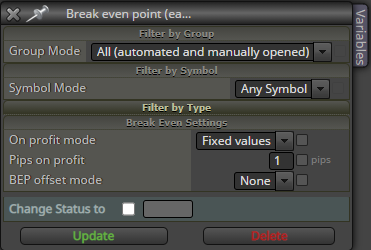
I think this is closer to what you want
https://fxdreema.com/shared/J8knolnod -
@roar Thank you for your help. I will try that out.
I am a little confused though,
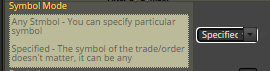 specified as described here makes me think it would set any trade to break even
 -
-
Hehe, yeah was gona say the same thing happens
-
@cameron to fix it, try setting to "Specified" in that breakeven block, and leave everything else as is.
-
okay will let you know how I get on
Thank you
-
After putting the symbol mode to specified the beak even does not work at all on the additional pairs.
I ran the ea on GBPUSD, EURUSD, AUDUSD. from the GBPUSD chart.
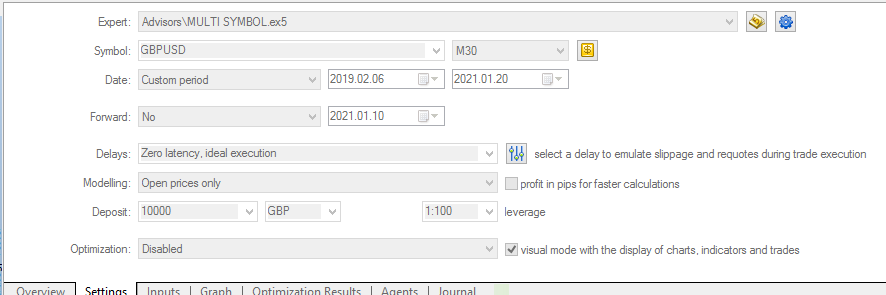
GBPUSD breaks even, EURUSD & AUDUSD do not break even.
I thinking the break even some how needs to be attached to that specific order, just not sure how.
-
@cameron ok, I thought the above blocks would convey the symbol info to the below block. Worth trying, lol.
Next option is to use the same "set current market" block in the other tab (on trade) as well. If you do this, remember to set the symbol setting to "specified" in all blocks.
-
Okay will try this
I'll keep you postedThanks again
-
@roar Blocks on both pages or just on trade?
-
@cameron all pages. Its the default setting, so you dont have to change it, if you havent touched it earlier.
-
Okay, so I have tried with and without specified as in share copy
https://fxdreema.com/shared/dsN0bnfRbSomething odd happens, it opens the second trade on gbpusd.
The break even still moves on audusd and eurusd at same time. -
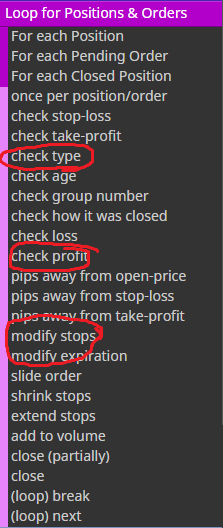
@cameron ok, now thats weird. I guess next option is to forget about the "set break even" block and reconstruct the same logic using the pink blocks...
-
It also happens when a trade is closed by break even
I will try as you have suggestedThank you
-
@roar I dont need to use all three of those blocks do i?
-
@cameron no, I think the type check has no use, actually
-
@roar
I have tried the blocks as suggested, how should I attach the block?
https://fxdreema.com/shared/FLJSXI4Fc
I have tried as is in the share link, tried without each positioned closed, and with just modify stops attached to the relevant buy or sell