fxDreema

    • Register
    • Login
    • Search
    • Back to the main page
    • Categories
    • Recent
    • Tags
    • Popular
    • Search

    I Want To Correction In My Zigzag EA

    Questions & Answers
    2
    118
    18425
    Loading More Posts
    • Oldest to Newest
    • Newest to Oldest
    • Most Votes
    Reply
    • Reply as topic
    Log in to reply
    This topic has been deleted. Only users with topic management privileges can see it.
    • jstap
      jstap @TalalKhan last edited by

      @muneeb00 You didn't put the flags in as I said, you have been using without them working, flags are an on/off switch, test without, if needed add back in, simple robots don't need. People that use learn how to use once the basic EA is working, then they are added to specify the logic.

      Learn fxDreema Without the Wait!

      My comprehensive book, available on Amazon, is packed with examples and invaluable insights to help you fast-track your learning journey.

      The paperback and hardback editions include MT4 & MT5 QR codes for easy access to all prebuilt projects and robots, including my latest gold trading robot!

      Don’t miss out

      Click here➡️ https://mybook.to/fxDreema to get your copy today!

      Enjoy! 😊

      T 1 Reply Last reply Reply Quote 1
      • T
        TalalKhan @jstap last edited by TalalKhan

        @jstap Looks like my 90% work done on this project, Now my next target is to create same EA for MT5, which looks difficult because of some custom coding. Need your help.

        jstap 1 Reply Last reply Reply Quote 0
        • jstap
          jstap @TalalKhan last edited by jstap

          @muneeb00 If you are talking about the zigzag, on the same post you got mt4 from is the information on how to use in mt5, is in the comments near the bottom.

          Learn fxDreema Without the Wait!

          My comprehensive book, available on Amazon, is packed with examples and invaluable insights to help you fast-track your learning journey.

          The paperback and hardback editions include MT4 & MT5 QR codes for easy access to all prebuilt projects and robots, including my latest gold trading robot!

          Don’t miss out

          Click here➡️ https://mybook.to/fxDreema to get your copy today!

          Enjoy! 😊

          T 1 Reply Last reply Reply Quote 1
          • T
            TalalKhan @jstap last edited by

            @jstap Oh Thanks Alot, I found it & create for MT5 & its working. The only issue is there is no tab for which side to play this bot Like: (Long, Short, Long & Short). How can i add this on MT5 EA

            jstap 1 Reply Last reply Reply Quote 0
            • jstap
              jstap @TalalKhan last edited by jstap

              @muneeb00 I think you are looking for this, the logic is if input buys = true activate next block.
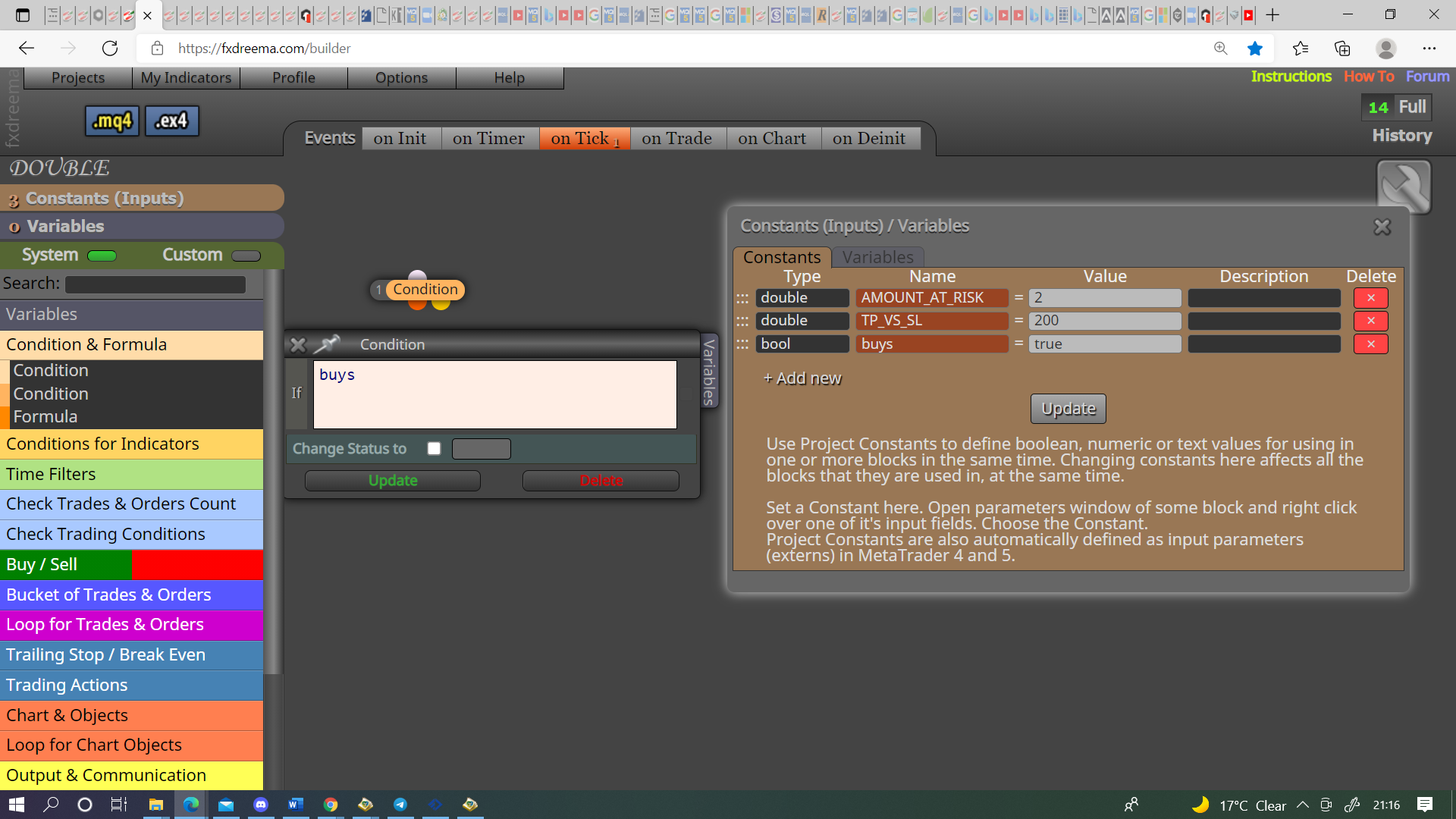
              0_1631391508919_55849b1b-d104-440c-b2ce-41c6f0c6ca4e-image.png

              Learn fxDreema Without the Wait!

              My comprehensive book, available on Amazon, is packed with examples and invaluable insights to help you fast-track your learning journey.

              The paperback and hardback editions include MT4 & MT5 QR codes for easy access to all prebuilt projects and robots, including my latest gold trading robot!

              Don’t miss out

              Click here➡️ https://mybook.to/fxDreema to get your copy today!

              Enjoy! 😊

              T 1 Reply Last reply Reply Quote 1
              • T
                TalalKhan @jstap last edited by

                @jstap
                Sit i am asking for this in MT5 EA
                Note: Screenshot taking from MT4
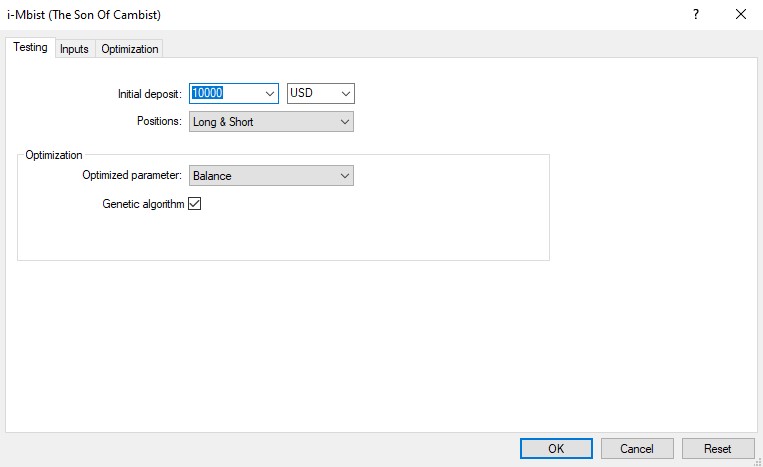
                0_1631391577541_Screenshot_116.jpg

                jstap 1 Reply Last reply Reply Quote 0
                • jstap
                  jstap @TalalKhan last edited by

                  @muneeb00 It doesn't matter it is exactly the same

                  Learn fxDreema Without the Wait!

                  My comprehensive book, available on Amazon, is packed with examples and invaluable insights to help you fast-track your learning journey.

                  The paperback and hardback editions include MT4 & MT5 QR codes for easy access to all prebuilt projects and robots, including my latest gold trading robot!

                  Don’t miss out

                  Click here➡️ https://mybook.to/fxDreema to get your copy today!

                  Enjoy! 😊

                  T 1 Reply Last reply Reply Quote 1
                  • T
                    TalalKhan @jstap last edited by

                    @jstap But there is no option of (Position) in MT5

                    jstap 1 Reply Last reply Reply Quote 0
                    • jstap
                      jstap @TalalKhan last edited by

                      @muneeb00 How do you mean?

                      Learn fxDreema Without the Wait!

                      My comprehensive book, available on Amazon, is packed with examples and invaluable insights to help you fast-track your learning journey.

                      The paperback and hardback editions include MT4 & MT5 QR codes for easy access to all prebuilt projects and robots, including my latest gold trading robot!

                      Don’t miss out

                      Click here➡️ https://mybook.to/fxDreema to get your copy today!

                      Enjoy! 😊

                      T 1 Reply Last reply Reply Quote 1
                      • T
                        TalalKhan @jstap last edited by

                        @jstap I am not seeing this option in MT5 while backtesting my bot, So i am thinking to create in fxdreema
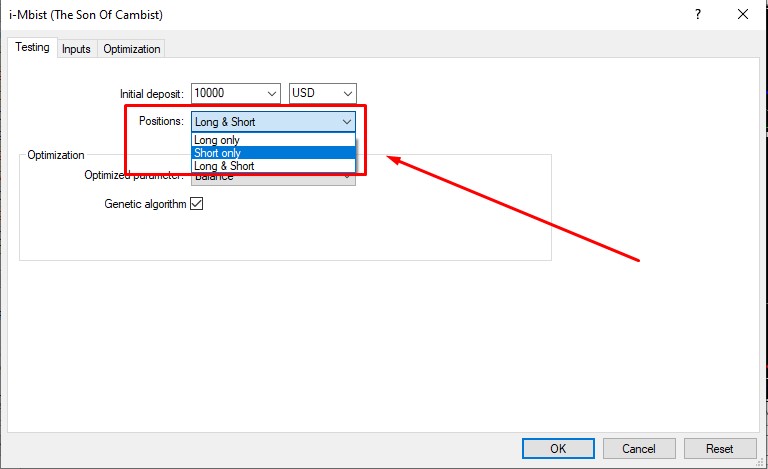
                        0_1631392150772_Screenshot_117.jpg

                        jstap 1 Reply Last reply Reply Quote 0
                        • jstap
                          jstap @TalalKhan last edited by

                          @muneeb00 Those options cannot be changed in fxdreema, but what I put above allows you to switch on/off buys and sells.

                          Learn fxDreema Without the Wait!

                          My comprehensive book, available on Amazon, is packed with examples and invaluable insights to help you fast-track your learning journey.

                          The paperback and hardback editions include MT4 & MT5 QR codes for easy access to all prebuilt projects and robots, including my latest gold trading robot!

                          Don’t miss out

                          Click here➡️ https://mybook.to/fxDreema to get your copy today!

                          Enjoy! 😊

                          T 1 Reply Last reply Reply Quote 1
                          • T
                            TalalKhan @jstap last edited by

                            @jstap how can i used above blocks, Please describe me in details. Thanks

                            jstap 1 Reply Last reply Reply Quote 0
                            • jstap
                              jstap @TalalKhan last edited by jstap

                              @muneeb00 Do as in the picture, one for buys and one for sells, put above your buy/sell tree

                              Learn fxDreema Without the Wait!

                              My comprehensive book, available on Amazon, is packed with examples and invaluable insights to help you fast-track your learning journey.

                              The paperback and hardback editions include MT4 & MT5 QR codes for easy access to all prebuilt projects and robots, including my latest gold trading robot!

                              Don’t miss out

                              Click here➡️ https://mybook.to/fxDreema to get your copy today!

                              Enjoy! 😊

                              T 1 Reply Last reply Reply Quote 0
                              • T
                                TalalKhan @jstap last edited by

                                @jstap Sorry dear can't understand. 😞

                                jstap 1 Reply Last reply Reply Quote 0
                                • jstap
                                  jstap @TalalKhan last edited by

                                  @muneeb00 0_1631393911998_f7b1c7f8-6ba0-4fca-98d5-c4ea836fec01-image.png

                                  Learn fxDreema Without the Wait!

                                  My comprehensive book, available on Amazon, is packed with examples and invaluable insights to help you fast-track your learning journey.

                                  The paperback and hardback editions include MT4 & MT5 QR codes for easy access to all prebuilt projects and robots, including my latest gold trading robot!

                                  Don’t miss out

                                  Click here➡️ https://mybook.to/fxDreema to get your copy today!

                                  Enjoy! 😊

                                  T 2 Replies Last reply Reply Quote 0
                                  • T
                                    TalalKhan @jstap last edited by

                                    @jstap You are not understanding my point

                                    1 Reply Last reply Reply Quote 0
                                    • T
                                      TalalKhan @jstap last edited by TalalKhan

                                      @jstap Sir, My question is very simple and straight forward.
                                      I want to set manually before play my EA to find Long trades, Short trades or find long & short both.

                                      Thanks in advance

                                      jstap 1 Reply Last reply Reply Quote 0
                                      • jstap
                                        jstap @TalalKhan last edited by

                                        @muneeb00 Your question is not very simple, or I don't understand what you want. What I have showed you will give you the option to use EA for just buys, just sells or buys and sells. The above picture shows exactly how to implement, just use the buy condition above your buy conditions, use the sell condition above your sell conditions.

                                        Learn fxDreema Without the Wait!

                                        My comprehensive book, available on Amazon, is packed with examples and invaluable insights to help you fast-track your learning journey.

                                        The paperback and hardback editions include MT4 & MT5 QR codes for easy access to all prebuilt projects and robots, including my latest gold trading robot!

                                        Don’t miss out

                                        Click here➡️ https://mybook.to/fxDreema to get your copy today!

                                        Enjoy! 😊

                                        T 1 Reply Last reply Reply Quote 1
                                        • T
                                          TalalKhan @jstap last edited by TalalKhan

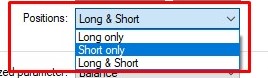
                                          @jstap Its working but sir i want these options in one constant. Like the below picture. One Drop down box for all 3 positions
                                          0_1631429228997_Screenshot_118.jpg
                                          And what is this constant with name of ______ with a value of 2 is for ??

                                          jstap 1 Reply Last reply Reply Quote 0
                                          • jstap
                                            jstap @TalalKhan last edited by

                                            @muneeb00 The 2 is nothing just an existing project, make a third constant for buys and sells, put this at top and connect to buy/sell tree, off the yellow connect the buy and sell conditions and connect to your trees as normal. I do think tis is pointless though, either way you have to open your inputs to change so, by adding both together you are add blocks to the code for no reason.

                                            Learn fxDreema Without the Wait!

                                            My comprehensive book, available on Amazon, is packed with examples and invaluable insights to help you fast-track your learning journey.

                                            The paperback and hardback editions include MT4 & MT5 QR codes for easy access to all prebuilt projects and robots, including my latest gold trading robot!

                                            Don’t miss out

                                            Click here➡️ https://mybook.to/fxDreema to get your copy today!

                                            Enjoy! 😊

                                            T 2 Replies Last reply Reply Quote 1
                                            • 1
                                            • 2
                                            • 3
                                            • 4
                                            • 5
                                            • 6
                                            • 3 / 6
                                            • First post
                                              Last post

                                            Online Users

                                            A
                                            F

                                            9
                                            Online

                                            146.7k
                                            Users

                                            22.4k
                                            Topics

                                            122.6k
                                            Posts

                                            Powered by NodeBB Forums | Contributors