fxDreema

    • Register
    • Login
    • Search
    • Back to the main page
    • Categories
    • Recent
    • Tags
    • Popular
    • Search

    How to import and use custom indicator?

    Questions & Answers
    5
    38
    7283
    Loading More Posts
    • Oldest to Newest
    • Newest to Oldest
    • Most Votes
    Reply
    • Reply as topic
    Log in to reply
    This topic has been deleted. Only users with topic management privileges can see it.
    • L
      line @slimmz last edited by

      @slimmz Send me your email in private messaging and I will send the EA.

      L 1 Reply Last reply Reply Quote 0
      • L
        line @line last edited by

        @line 0_1632186746622_e5b650d0-d79e-475d-815b-7d663699af78-image.png

        L 1 Reply Last reply Reply Quote 0
        • L
          line @line last edited by

          @line 3 blocks

          1/ No trade

          2/ condition block as you see in the screenshot

          3/ Buy block

          1 Reply Last reply Reply Quote 0
          • slimmz
            slimmz last edited by slimmz

            appreciate it mate

            1 Reply Last reply Reply Quote 0
            • jstap
              jstap @slimmz last edited by

              @slimmz This is me attempting to use but unfortunately there is not the info needed.
              0_1632215341875_23119e49-a1c8-4ae8-9c3c-5b91c888aea4-TREND L (6).ex4

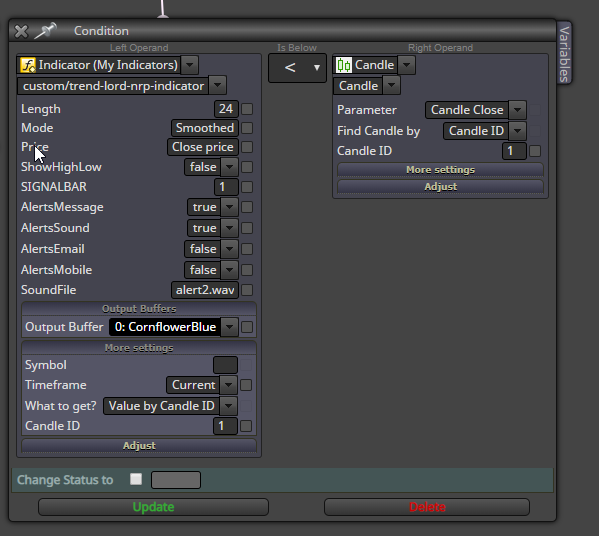
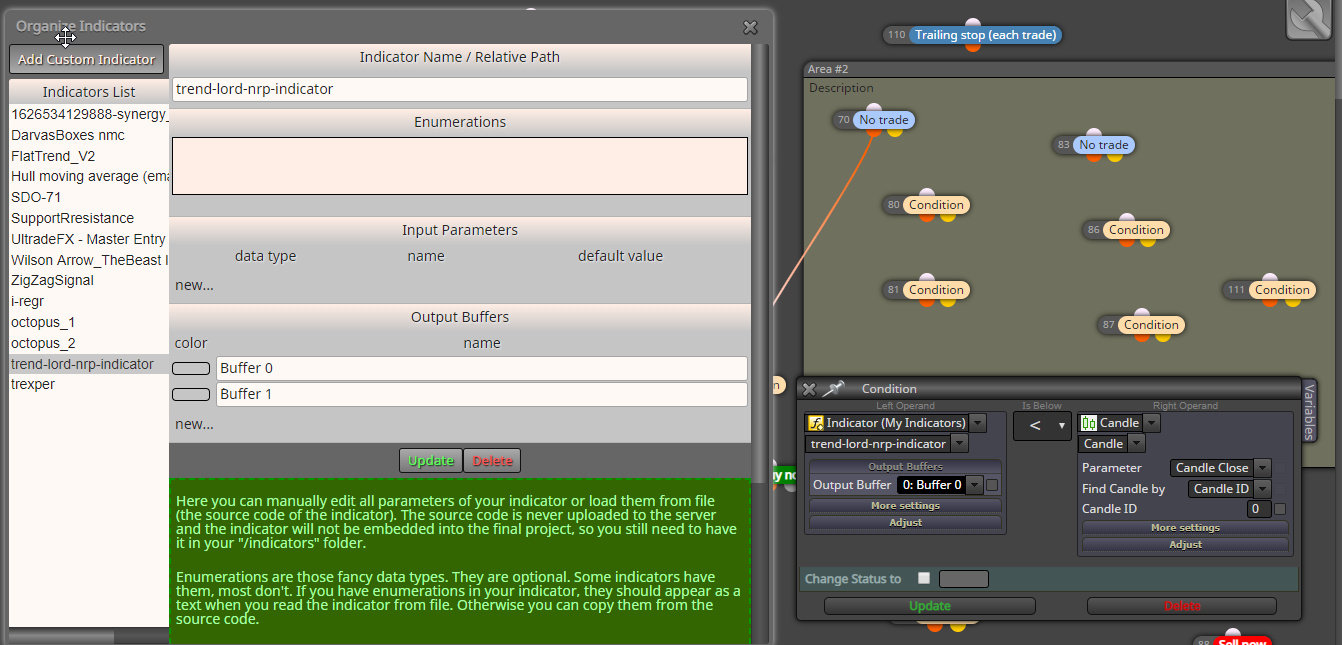
              This is how to insert indicator values.
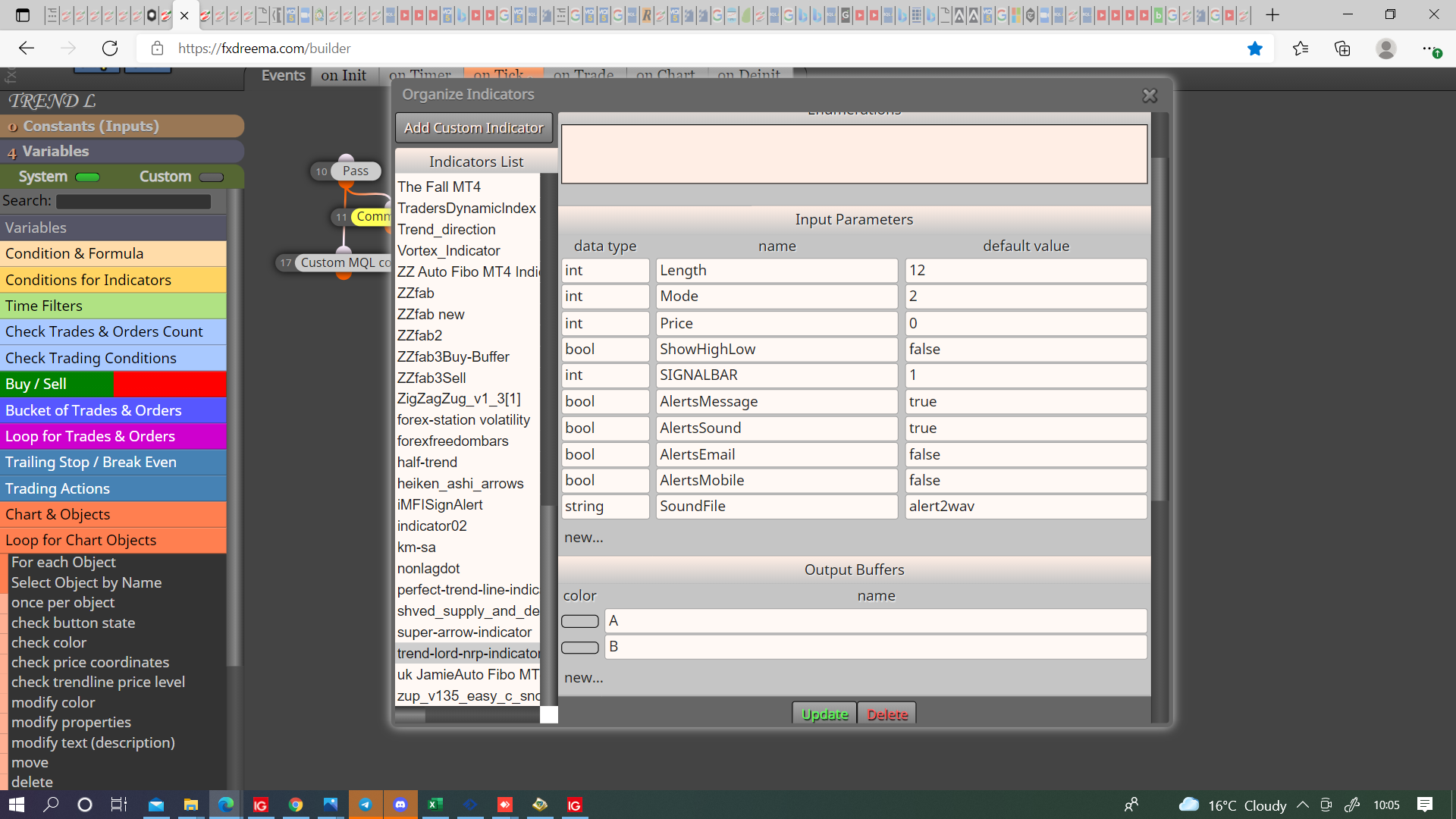
              0_1632215129862_f0adff9f-fcb0-4554-98a9-8630db17f47f-image.png

              This is the link showing how to use this indicator, buffers don't have the colours, only price levels, there is also custom code showing how to use the data window buffers.
              https://fxdreema.com/shared/N4X1dqYTb

              Learn fxDreema Without the Wait!

              My comprehensive book, available on Amazon, is packed with examples and invaluable insights to help you fast-track your learning journey.

              The paperback and hardback editions include MT4 & MT5 QR codes for easy access to all prebuilt projects and robots, including my latest gold trading robot!

              Don’t miss out

              Click here➡️ https://mybook.to/fxDreema to get your copy today!

              Enjoy! 😊

              L 1 Reply Last reply Reply Quote 0
              • L
                line @jstap last edited by line

                0_1632295596522_c5539aed-dc55-4127-af88-e749b26cb817-image.png

                jstap 1 Reply Last reply Reply Quote 0
                • jstap
                  jstap @line last edited by

                  @line I am not sure what you are trying to show, make indicator input parameters same as picture above, press above link, press ex4 and you can watch on back test the information you can get from this indicator.

                  Learn fxDreema Without the Wait!

                  My comprehensive book, available on Amazon, is packed with examples and invaluable insights to help you fast-track your learning journey.

                  The paperback and hardback editions include MT4 & MT5 QR codes for easy access to all prebuilt projects and robots, including my latest gold trading robot!

                  Don’t miss out

                  Click here➡️ https://mybook.to/fxDreema to get your copy today!

                  Enjoy! 😊

                  1 Reply Last reply Reply Quote 0
                  • slimmz
                    slimmz last edited by

                    0_1632317582913_b4c81cf2-29aa-4392-8ef5-6d5450043b3c-image.png
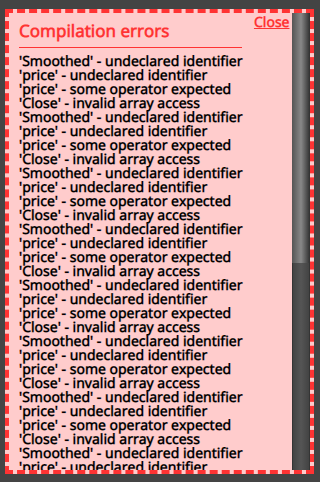
                    i am still having this, no mater what i do

                    how can i solve this?

                    jstap L 2 Replies Last reply Reply Quote 0
                    • jstap
                      jstap @slimmz last edited by

                      @slimmz Judging from the fact that your errors contain smoothed I guess you tried to add the MA as name instead of number (int), as in the picture the indicator compiles with no errors. smoothed = 2 in MT4 language.

                      Learn fxDreema Without the Wait!

                      My comprehensive book, available on Amazon, is packed with examples and invaluable insights to help you fast-track your learning journey.

                      The paperback and hardback editions include MT4 & MT5 QR codes for easy access to all prebuilt projects and robots, including my latest gold trading robot!

                      Don’t miss out

                      Click here➡️ https://mybook.to/fxDreema to get your copy today!

                      Enjoy! 😊

                      1 Reply Last reply Reply Quote 0
                      • L
                        line @slimmz last edited by

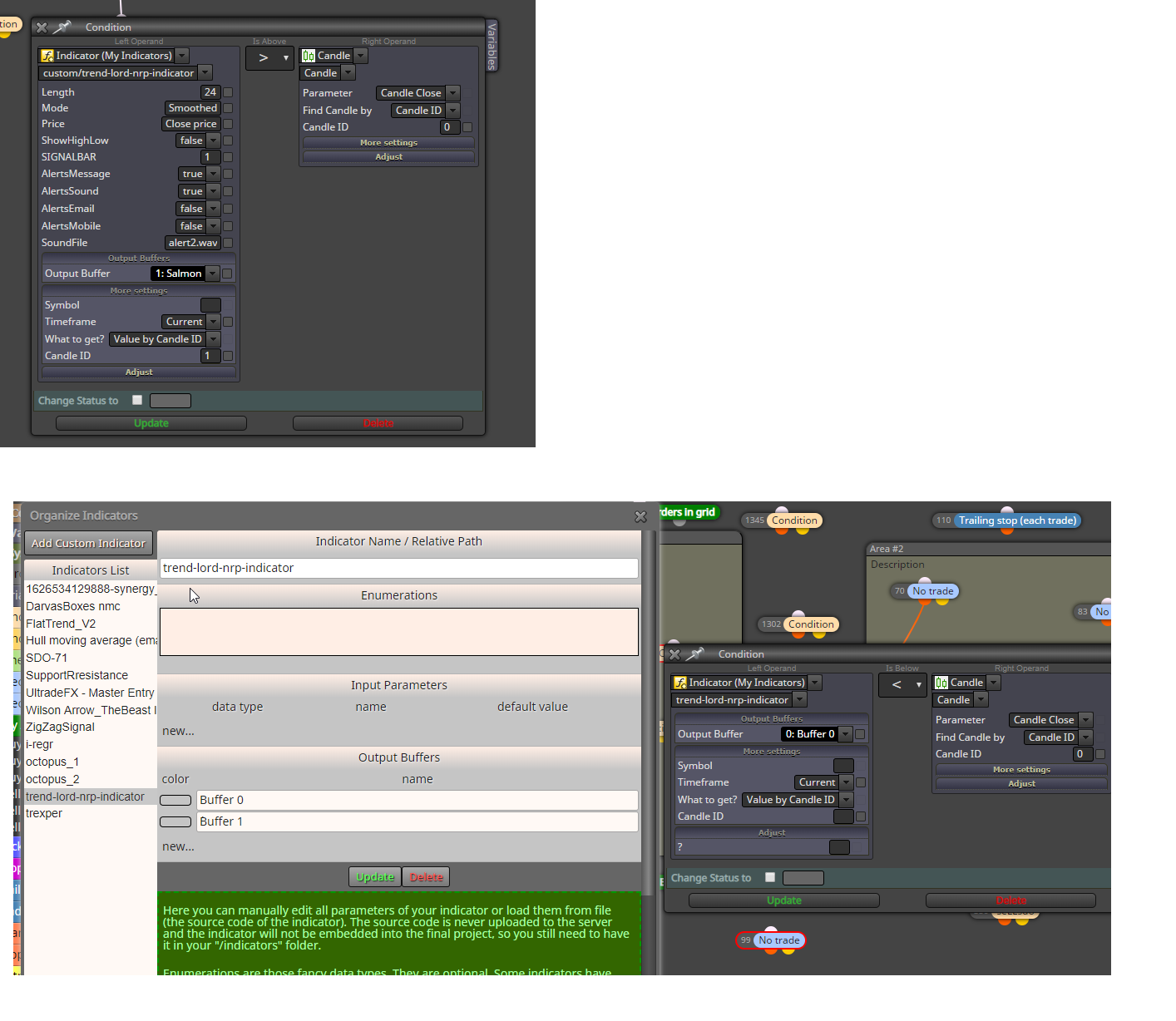
                        @slimmz I do not throw the errors which comes from how I loaded the custom indicator. Your upload is much different than mine. My ea does not throw errors and trades according to the logic. See the screenshot for the difference

                        1 Reply Last reply Reply Quote 0
                        • L
                          line last edited by

                          0_1632330859717_a3e2636e-e77f-4f73-bacf-5c51123d1f47-image.png

                          jstap 1 Reply Last reply Reply Quote 0
                          • jstap
                            jstap @line last edited by

                            @line No but my picture is your indicator, and although what's in your picture is how it is in inputs, this is what is causing the errors when you try to create EX4, change your input parameters to be the same as picture and you will no longer get errors.

                            Learn fxDreema Without the Wait!

                            My comprehensive book, available on Amazon, is packed with examples and invaluable insights to help you fast-track your learning journey.

                            The paperback and hardback editions include MT4 & MT5 QR codes for easy access to all prebuilt projects and robots, including my latest gold trading robot!

                            Don’t miss out

                            Click here➡️ https://mybook.to/fxDreema to get your copy today!

                            Enjoy! 😊

                            1 Reply Last reply Reply Quote 0
                            • slimmz
                              slimmz last edited by

                              Okay i just understand about the input, now i got no error by following you guy's suggestion.

                              So i did a backtest using MT4 strategy tester, the indicator won't show and the trade is not made. What did i do wrong?

                              Can i have more help? and also how to close existing trade if the indicator change color?

                              1 Reply Last reply Reply Quote 0
                              • slimmz
                                slimmz last edited by

                                I made a new project to make sure it's clean,
                                https://fxdreema.com/shared/r5F44T8mc

                                Can you also teach me how to use blocks? like mine is only containing 5 "things" on my project as you can see, but yours like 98, what even the hell is going on there i dont understand hahaha

                                jstap 2 Replies Last reply Reply Quote 0
                                • jstap
                                  jstap @slimmz last edited by

                                  @slimmz Nothing, as I put in the post 2 days ago, this indicator doesn't have required info for placing a trade. If you download the EA from this link, I did miss spell in the one above, you can watch on back test and see that it returns no usable data.

                                  Learn fxDreema Without the Wait!

                                  My comprehensive book, available on Amazon, is packed with examples and invaluable insights to help you fast-track your learning journey.

                                  The paperback and hardback editions include MT4 & MT5 QR codes for easy access to all prebuilt projects and robots, including my latest gold trading robot!

                                  Don’t miss out

                                  Click here➡️ https://mybook.to/fxDreema to get your copy today!

                                  Enjoy! 😊

                                  1 Reply Last reply Reply Quote 0
                                  • jstap
                                    jstap @slimmz last edited by

                                    @slimmz If you need help on a project, start and then ask specific questions on how to make work/correct.

                                    Learn fxDreema Without the Wait!

                                    My comprehensive book, available on Amazon, is packed with examples and invaluable insights to help you fast-track your learning journey.

                                    The paperback and hardback editions include MT4 & MT5 QR codes for easy access to all prebuilt projects and robots, including my latest gold trading robot!

                                    Don’t miss out

                                    Click here➡️ https://mybook.to/fxDreema to get your copy today!

                                    Enjoy! 😊

                                    1 Reply Last reply Reply Quote 0
                                    • C
                                      cup2020 last edited by

                                      How to add custom indicator listbox input

                                      1 Reply Last reply Reply Quote 0
                                      • l'andorrà
                                        l'andorrà last edited by

                                        That's not possible in fxDreema. You will need custom code from a programmer to do that.
                                        (English) I will try to help everyone in these fxDreema forums. But if you want to learn how to use the platform in depth or more quickly, I can help you with my introductory fxDreema course in English at https://www.theandorraninvestor.eu.

                                        (Català) Miraré d’ajudar tothom en aquests fòrums d’fxDreema. Tanmateix, si vols aprendre a fer servir la plataforma amb més profunditat o més de pressa, t’hi puc ajudar amb el meu curs d’introducció a fxDeema en català a https://www.theandorraninvestor.eu/ca.

                                        (Español) Intentaré ayudar a todo el mundo en estos foros de fxDreema. Sin embargo, si quieres aprender a usar la plataforma en profundidad o más deprisa, te puedo ayudar con mi curso de introducción a fxDreema en español en https://www.theandorraninvestor.eu/es.

                                        1 Reply Last reply Reply Quote 0
                                        • 1
                                        • 2
                                        • 2 / 2
                                        • First post
                                          Last post

                                        Online Users

                                        S
                                        G
                                        L
                                        K

                                        24
                                        Online

                                        146.7k
                                        Users

                                        22.4k
                                        Topics

                                        122.6k
                                        Posts

                                        Powered by NodeBB Forums | Contributors