fxDreema

    • Register
    • Login
    • Search
    • Back to the main page
    • Categories
    • Recent
    • Tags
    • Popular
    • Search

    TP following % of balance

    Questions & Answers
    2
    24
    1789
    Loading More Posts
    • Oldest to Newest
    • Newest to Oldest
    • Most Votes
    Reply
    • Reply as topic
    Log in to reply
    This topic has been deleted. Only users with topic management privileges can see it.
    • B
      bagheria last edited by

      Hello,

      I need a last thing to close my EA.

      How can I program a Take Profit following the % of balance. Example, I would like to place a TP which is 1% of balance.
      If I have 1000 dollars, I would like to place a TP which give me 10 dollars if I decide to put 1% in the parameters.

      Thanks a lot!

      jstap 1 Reply Last reply Reply Quote 0
      • jstap
        jstap @bagheria last edited by

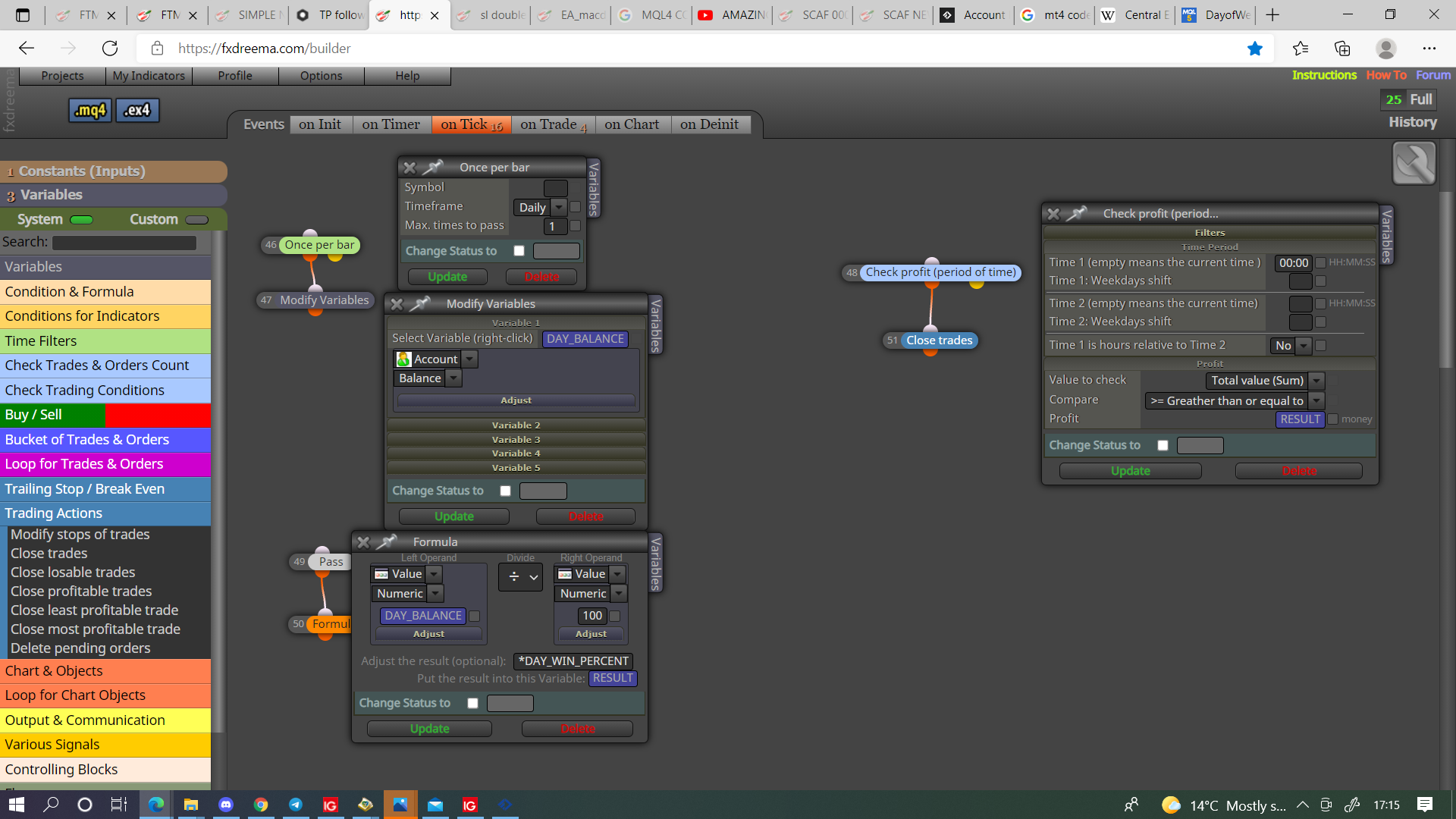
        @bagheria You can do it like this, remember to stop EA placing new trades when percent met.
        0_1633105034867_ee17ad4d-cad2-433d-94d7-97ddb18aebf6-image.png

        Learn fxDreema Without the Wait!

        My comprehensive book, available on Amazon, is packed with examples and invaluable insights to help you fast-track your learning journey.

        The paperback and hardback editions include MT4 & MT5 QR codes for easy access to all prebuilt projects and robots, including my latest gold trading robot!

        Don’t miss out

        Click here➡️ https://mybook.to/fxDreema to get your copy today!

        Enjoy! 😊

        1 Reply Last reply Reply Quote 0
        • B
          bagheria last edited by

          Thnaks. Which variables have you created? Can you show me please?

          jstap 1 Reply Last reply Reply Quote 0
          • jstap
            jstap @bagheria last edited by jstap

            @bagheria Anything that's blue in the picture, there all doubles, and DAY_WIN_PERCENT is a constant.

            Learn fxDreema Without the Wait!

            My comprehensive book, available on Amazon, is packed with examples and invaluable insights to help you fast-track your learning journey.

            The paperback and hardback editions include MT4 & MT5 QR codes for easy access to all prebuilt projects and robots, including my latest gold trading robot!

            Don’t miss out

            Click here➡️ https://mybook.to/fxDreema to get your copy today!

            Enjoy! 😊

            1 Reply Last reply Reply Quote 0
            • B
              bagheria last edited by

              Thanks a lot. The problem is the positions are immediately closed. Why?

              jstap 1 Reply Last reply Reply Quote 0
              • jstap
                jstap @bagheria last edited by

                @bagheria Not sure put a shared link here and I'll have a look.

                Learn fxDreema Without the Wait!

                My comprehensive book, available on Amazon, is packed with examples and invaluable insights to help you fast-track your learning journey.

                The paperback and hardback editions include MT4 & MT5 QR codes for easy access to all prebuilt projects and robots, including my latest gold trading robot!

                Don’t miss out

                Click here➡️ https://mybook.to/fxDreema to get your copy today!

                Enjoy! 😊

                B 1 Reply Last reply Reply Quote 0
                • B
                  bagheria @jstap last edited by

                  @jstap https://fxdreema.com/shared/HhKxSpaYc

                  jstap 1 Reply Last reply Reply Quote 0
                  • jstap
                    jstap @bagheria last edited by

                    @bagheria You want to use indicator is visible, not appear, try this and let me know if your still having problems.

                    Learn fxDreema Without the Wait!

                    My comprehensive book, available on Amazon, is packed with examples and invaluable insights to help you fast-track your learning journey.

                    The paperback and hardback editions include MT4 & MT5 QR codes for easy access to all prebuilt projects and robots, including my latest gold trading robot!

                    Don’t miss out

                    Click here➡️ https://mybook.to/fxDreema to get your copy today!

                    Enjoy! 😊

                    B 1 Reply Last reply Reply Quote 0
                    • B
                      bagheria @jstap last edited by

                      @jstap Nop. Same thing. Look at my entire project now
                      https://fxdreema.com/shared/mk064AgSc

                      And the screen

                      0_1633117716299_Capture.JPG

                      1 Reply Last reply Reply Quote 0
                      • jstap
                        jstap last edited by

                        Not sure don't see why it would delete upon open, it could be because some trees don't have a if/no trade block above, with no trade it would only allow conditions to happen once, may be completing conditions in a fraction of a second.

                        Learn fxDreema Without the Wait!

                        My comprehensive book, available on Amazon, is packed with examples and invaluable insights to help you fast-track your learning journey.

                        The paperback and hardback editions include MT4 & MT5 QR codes for easy access to all prebuilt projects and robots, including my latest gold trading robot!

                        Don’t miss out

                        Click here➡️ https://mybook.to/fxDreema to get your copy today!

                        Enjoy! 😊

                        B 1 Reply Last reply Reply Quote 0
                        • B
                          bagheria @jstap last edited by bagheria

                          @jstap Hello!
                          I managed to get the EA to work. However, I have a question:

                          When a position is closed, the same day I can't take another one. I think it is because the EA have reached the % of balance I want in 1 day but I would like he reached at each position (1% of balance at each position), not just for the unique day. How can I do?
                          You wrote me "remember to stop EA placing new trades when percent met". How?

                          Thanks!

                          jstap 1 Reply Last reply Reply Quote 0
                          • jstap
                            jstap @bagheria last edited by

                            @bagheria In this link I think you will see all you need, have a look and let me know if you don't get sothing.

                            Learn fxDreema Without the Wait!

                            My comprehensive book, available on Amazon, is packed with examples and invaluable insights to help you fast-track your learning journey.

                            The paperback and hardback editions include MT4 & MT5 QR codes for easy access to all prebuilt projects and robots, including my latest gold trading robot!

                            Don’t miss out

                            Click here➡️ https://mybook.to/fxDreema to get your copy today!

                            Enjoy! 😊

                            B 1 Reply Last reply Reply Quote 0
                            • B
                              bagheria @jstap last edited by bagheria

                              @jstap said in TP following % of balance:

                              @bagheria In this link I think you will see all you need, have a look and let me know if you don't get sothing.

                              Thank you my friend but it doesn't work. Maybe I don't really understand.
                              I have created a Variable as this (TRADE)
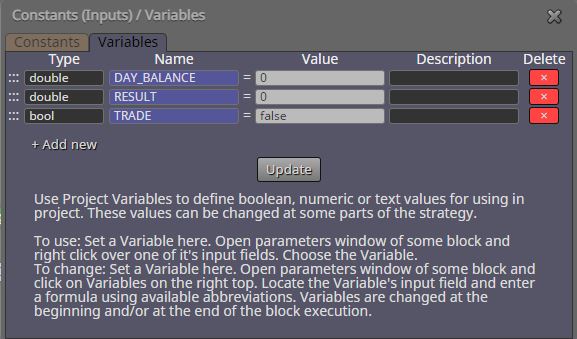
                              0_1633175140942_1.JPG

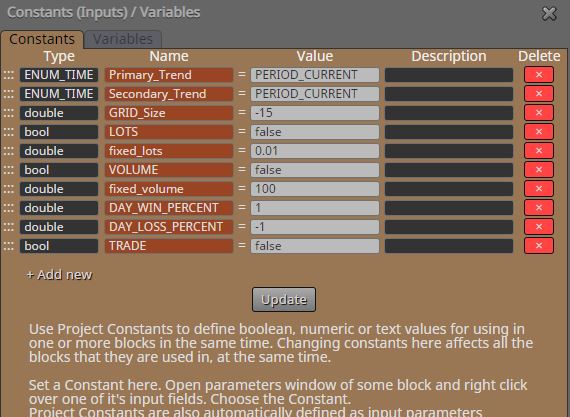
                              Then I created a Constant (TRADE)
                              0_1633175221096_2.JPG

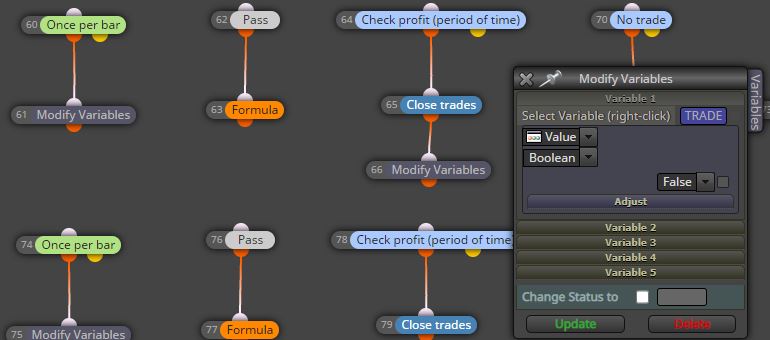
                              I added a new "Modify Variables"
                              0_1633175345189_3.JPG

                              I added the following conditions (blocks 86 & 87)
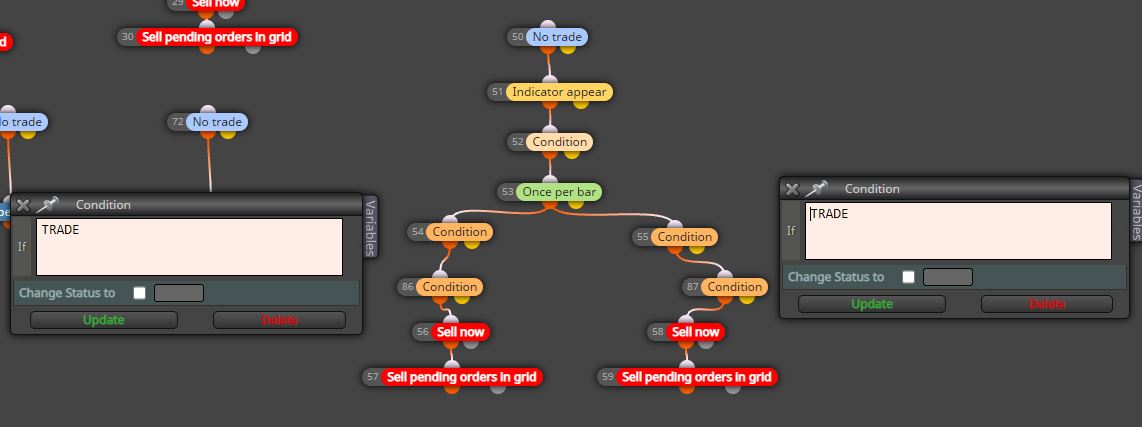
                              0_1633175434551_4.JPG

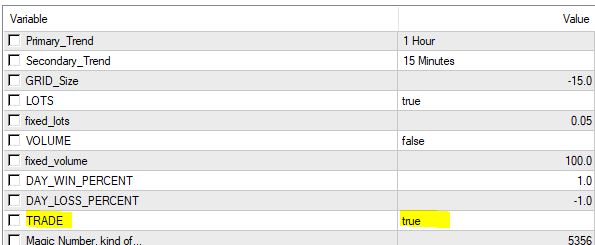
                              And I put TRUE value on my terminal
                              0_1633175581062_5.JPG

                              That's all. But maybe I forgot anything...

                              Thanks

                              jstap 1 Reply Last reply Reply Quote 0
                              • jstap
                                jstap @bagheria last edited by

                                @bagheria You can't have a variable named the same as a constant, will use the constant value above the variable value.

                                Learn fxDreema Without the Wait!

                                My comprehensive book, available on Amazon, is packed with examples and invaluable insights to help you fast-track your learning journey.

                                The paperback and hardback editions include MT4 & MT5 QR codes for easy access to all prebuilt projects and robots, including my latest gold trading robot!

                                Don’t miss out

                                Click here➡️ https://mybook.to/fxDreema to get your copy today!

                                Enjoy! 😊

                                1 Reply Last reply Reply Quote 0
                                • B
                                  bagheria last edited by

                                  Ok, so what is your advice?

                                  jstap 1 Reply Last reply Reply Quote 0
                                  • jstap
                                    jstap @bagheria last edited by

                                    @bagheria If you need to switch trade on and off in inputs change the name, if not delete the constant.

                                    Learn fxDreema Without the Wait!

                                    My comprehensive book, available on Amazon, is packed with examples and invaluable insights to help you fast-track your learning journey.

                                    The paperback and hardback editions include MT4 & MT5 QR codes for easy access to all prebuilt projects and robots, including my latest gold trading robot!

                                    Don’t miss out

                                    Click here➡️ https://mybook.to/fxDreema to get your copy today!

                                    Enjoy! 😊

                                    B 1 Reply Last reply Reply Quote 0
                                    • B
                                      bagheria @jstap last edited by bagheria

                                      @jstap said in TP following % of balance:

                                      @bagheria If you need to switch trade on and off in inputs change the name, if not delete the constant.

                                      So, if I delete the Constant, I can't add "Condition" with "TRADE" just to check before

                                      Look https://fxdreema.com/shared/i2rnaTfxb

                                      jstap 1 Reply Last reply Reply Quote 0
                                      • jstap
                                        jstap @bagheria last edited by

                                        @bagheria No the constant you change manually in your inputs, a variable is changed by the EA, this is why having a constant and variable named the same doesn't work.

                                        Learn fxDreema Without the Wait!

                                        My comprehensive book, available on Amazon, is packed with examples and invaluable insights to help you fast-track your learning journey.

                                        The paperback and hardback editions include MT4 & MT5 QR codes for easy access to all prebuilt projects and robots, including my latest gold trading robot!

                                        Don’t miss out

                                        Click here➡️ https://mybook.to/fxDreema to get your copy today!

                                        Enjoy! 😊

                                        B 1 Reply Last reply Reply Quote 0
                                        • B
                                          bagheria @jstap last edited by bagheria

                                          @jstap Ok, but where can I put "TRUE" for my variable "TRADE"? I let "FALSE" on fxdreema and when I export to MT4, when I need to put to "TRUE"? Cause I have nothing in my INPUTS

                                          jstap 1 Reply Last reply Reply Quote 0
                                          • jstap
                                            jstap @bagheria last edited by

                                            @bagheria On init tab, pass block, under modify block, this will make true when EA added to chart, your other conditions will sort as needed.


                                            Learn fxDreema Without the Wait!

                                            My comprehensive book, available on Amazon, is packed with examples and invaluable insights to help you fast-track your learning journey.

                                            The paperback and hardback editions include MT4 & MT5 QR codes for easy access to all prebuilt projects and robots, including my latest gold trading robot!

                                            Don’t miss out

                                            Click here➡️ https://mybook.to/fxDreema to get your copy today!

                                            Enjoy! 😊

                                            B 1 Reply Last reply Reply Quote 0
                                            • 1
                                            • 2
                                            • 1 / 2
                                            • First post
                                              Last post

                                            Online Users

                                            G
                                            S
                                            Z
                                            E
                                            H
                                            J
                                            S
                                            S
                                            C

                                            20
                                            Online

                                            146.8k
                                            Users

                                            22.4k
                                            Topics

                                            122.6k
                                            Posts

                                            Powered by NodeBB Forums | Contributors