fxDreema

    • Register
    • Login
    • Search
    • Back to the main page
    • Categories
    • Recent
    • Tags
    • Popular
    • Search

    Check Lot Size

    Questions & Answers
    2
    11
    1174
    Loading More Posts
    • Oldest to Newest
    • Newest to Oldest
    • Most Votes
    Reply
    • Reply as topic
    Log in to reply
    This topic has been deleted. Only users with topic management privileges can see it.
    • D
      drankman last edited by drankman

      Hello all,

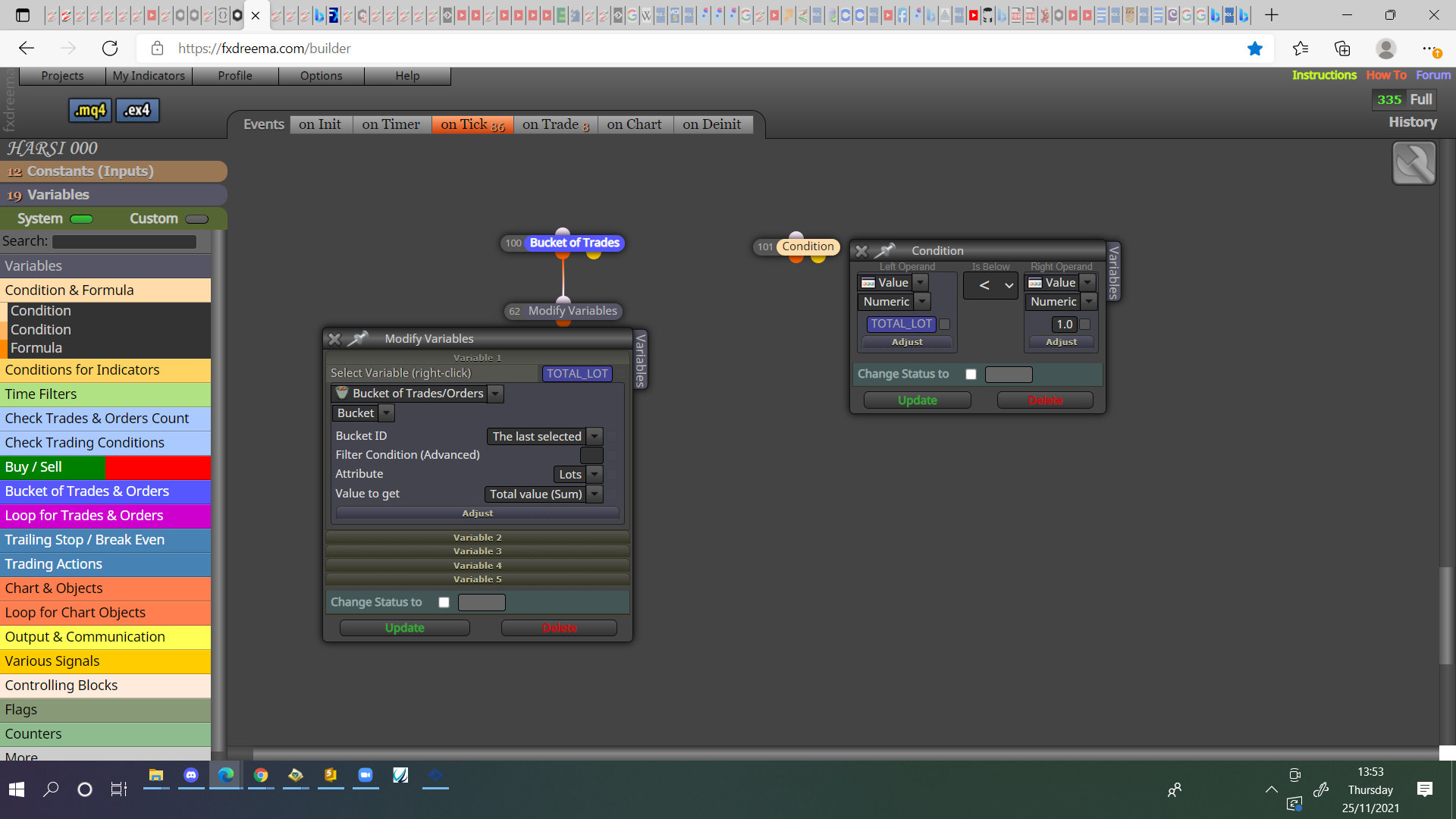
      Is there any function where I can create check lot size to open trade. It should be similar like "check trades count" block.
      So, for example. max. lot size is set to 1.0 Lot. This means, no trades should be opened if the total lot size for all opened trades already 1.0 Lot.

      Thank you in advance for any hints!

      jstap 1 Reply Last reply Reply Quote 0
      • jstap
        jstap @drankman last edited by

        @andrewfrank Something like this:

        0_1637848437109_43e71399-c5d4-4545-bcde-b7c40b2f7a11-image.png

        Learn fxDreema Without the Wait!

        My comprehensive book, available on Amazon, is packed with examples and invaluable insights to help you fast-track your learning journey.

        The paperback and hardback editions include MT4 & MT5 QR codes for easy access to all prebuilt projects and robots, including my latest gold trading robot!

        Don’t miss out

        Click here➡️ https://mybook.to/fxDreema to get your copy today!

        Enjoy! 😊

        D 2 Replies Last reply Reply Quote 0
        • D
          drankman @jstap last edited by drankman

          @jstap Thanks a lot!!

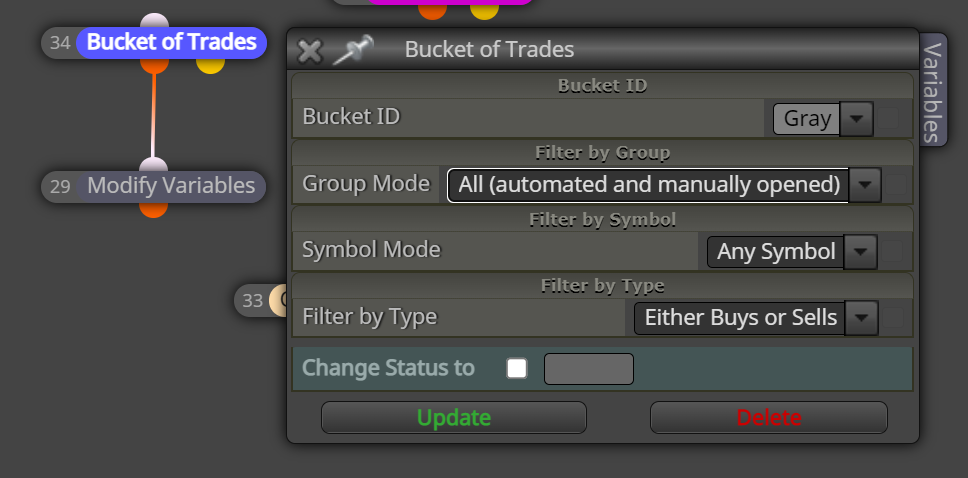
          And for the Bucket of trades should be like this?

          How the color (gray, magenta, etc.) play the role in this case?
          0_1637879264430_a9837afb-4ed4-4e70-bfd7-0d9b8562eaae-image.png

          jstap 1 Reply Last reply Reply Quote 0
          • jstap
            jstap @drankman last edited by

            @andrewfrank Am not really sure but, I think all trades that block collects gets classified as the selected colour..

            Learn fxDreema Without the Wait!

            My comprehensive book, available on Amazon, is packed with examples and invaluable insights to help you fast-track your learning journey.

            The paperback and hardback editions include MT4 & MT5 QR codes for easy access to all prebuilt projects and robots, including my latest gold trading robot!

            Don’t miss out

            Click here➡️ https://mybook.to/fxDreema to get your copy today!

            Enjoy! 😊

            D 1 Reply Last reply Reply Quote 0
            • D
              drankman @jstap last edited by

              @jstap Ok. Thank you!
              I will try it and see how the color plays in the EA..:)

              1 Reply Last reply Reply Quote 0
              • D
                drankman @jstap last edited by drankman

                @jstap
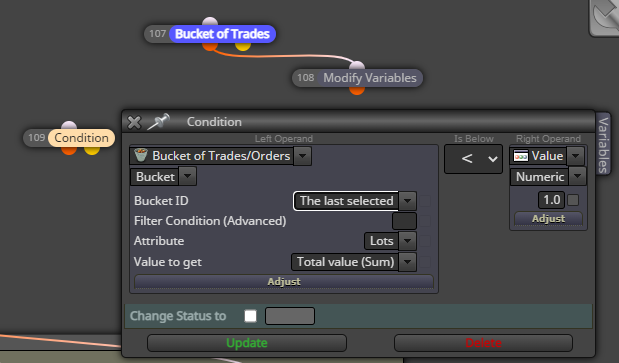
                I found out, you can also use directly the condition block with bucket of trades.. (without using modify variables)
                is this possible or using modify variables would be the best option?
                0_1637938078502_0a58452a-27fb-4453-93fc-bdec7d44f167-image.png

                jstap 1 Reply Last reply Reply Quote 0
                • jstap
                  jstap @drankman last edited by

                  @andrewfrank This depends on what you need it to do, as you don't need the result saved use the condition, if things aren't working as expected try another way. I like it in a variable because this way the result can be seen on screen via a comment block.

                  Learn fxDreema Without the Wait!

                  My comprehensive book, available on Amazon, is packed with examples and invaluable insights to help you fast-track your learning journey.

                  The paperback and hardback editions include MT4 & MT5 QR codes for easy access to all prebuilt projects and robots, including my latest gold trading robot!

                  Don’t miss out

                  Click here➡️ https://mybook.to/fxDreema to get your copy today!

                  Enjoy! 😊

                  D 1 Reply Last reply Reply Quote 0
                  • D
                    drankman @jstap last edited by drankman

                    @jstap Ok. Thanks!
                    I did the backtest and actual test on my demo, however somehow it did not take any trades...Any idea why?

                    https://fxdreema.com/shared/iwoQUi5Pd

                    jstap 1 Reply Last reply Reply Quote 0
                    • jstap
                      jstap @drankman last edited by

                      @andrewfrank I would think all would work, I would put all into a comment block to check all numbers are correct and not stoping trade.

                      Learn fxDreema Without the Wait!

                      My comprehensive book, available on Amazon, is packed with examples and invaluable insights to help you fast-track your learning journey.

                      The paperback and hardback editions include MT4 & MT5 QR codes for easy access to all prebuilt projects and robots, including my latest gold trading robot!

                      Don’t miss out

                      Click here➡️ https://mybook.to/fxDreema to get your copy today!

                      Enjoy! 😊

                      D 1 Reply Last reply Reply Quote 0
                      • D
                        drankman @jstap last edited by

                        @jstap That's what I thought..
                        I put the comment. however when it runs, the comment only show the "Comment Message" even though I put the "Total Lot" variable as a text..

                        https://fxdreema.com/shared/deghvfJUd

                        jstap 1 Reply Last reply Reply Quote 0
                        • jstap
                          jstap @drankman last edited by

                          @andrewfrank This is because the label box is empty, nothing shows until you put at least a .

                          Learn fxDreema Without the Wait!

                          My comprehensive book, available on Amazon, is packed with examples and invaluable insights to help you fast-track your learning journey.

                          The paperback and hardback editions include MT4 & MT5 QR codes for easy access to all prebuilt projects and robots, including my latest gold trading robot!

                          Don’t miss out

                          Click here➡️ https://mybook.to/fxDreema to get your copy today!

                          Enjoy! 😊

                          1 Reply Last reply Reply Quote 0
                          • 1 / 1
                          • First post
                            Last post

                          Online Users

                          F
                          W
                          C

                          8
                          Online

                          146.8k
                          Users

                          22.4k
                          Topics

                          122.6k
                          Posts

                          Powered by NodeBB Forums | Contributors