fxDreema

    • Register
    • Login
    • Search
    • Back to the main page
    • Categories
    • Recent
    • Tags
    • Popular
    • Search

    How to display number of trades

    Questions & Answers
    3
    21
    2302
    Loading More Posts
    • Oldest to Newest
    • Newest to Oldest
    • Most Votes
    Reply
    • Reply as topic
    Log in to reply
    This topic has been deleted. Only users with topic management privileges can see it.
    • D
      drankman last edited by drankman

      Hello,
      I am trying to build EA where it also displays the number of lots, number of trades, current profit and current drawdown.

      However, it didnt quite work yet, as it displays wrong data as screenshot below where I tried to use it on my demo account.
      for instance, the number of lots is not correct and the profit is also wrong.
      Could anyone help?

      0_1638975956398_313eba16-144c-4190-aee8-b53f2023358e-image.png

      Here is the project: https://fxdreema.com/shared/0z3fYx9Cd

      Thank you!

      jstap 1 Reply Last reply Reply Quote 0
      • jstap
        jstap @drankman last edited by

        @andrewfrank In here you can see how to achieve, have made a few adjustments.

        https://fxdreema.com/shared/wq5DjDkrd

        Learn fxDreema Without the Wait!

        My comprehensive book, available on Amazon, is packed with examples and invaluable insights to help you fast-track your learning journey.

        The paperback and hardback editions include MT4 & MT5 QR codes for easy access to all prebuilt projects and robots, including my latest gold trading robot!

        Don’t miss out

        Click here➡️ https://mybook.to/fxDreema to get your copy today!

        Enjoy! 😊

        D 1 Reply Last reply Reply Quote 0
        • D
          drankman @jstap last edited by drankman

          @jstap Thanks a lot!!

          I tried it on my demo account and I still found errors..

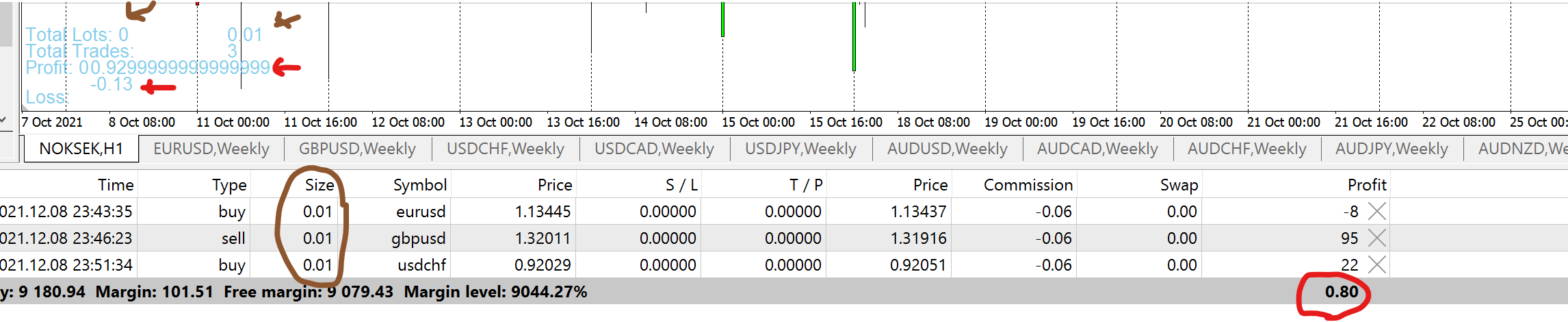
          1. The total lots does not update it as the new trades added..
            and also there is an extra "0" somehow.. I dont know where it comes from (see the brown arrow)
          2. The total profit is always updated when it adds new trades. However it has 2 lines and the total profit is basically the sum of these two lines..
            (0.93 - 0.13 = 0.80) see the red arrow
          0_1639000671054_d8f37700-b6e9-411a-a6b9-dbd99045755b-image.png

          jstap 1 Reply Last reply Reply Quote 0
          • jstap
            jstap @drankman last edited by

            @andrewfrank Possibly a number thing, try set the bucket of trade numbers 1st (go project options and normalise block numbers first), make two trees and see if this helps, never tried with profit but bucket of trades for lots I have and it works.

            Learn fxDreema Without the Wait!

            My comprehensive book, available on Amazon, is packed with examples and invaluable insights to help you fast-track your learning journey.

            The paperback and hardback editions include MT4 & MT5 QR codes for easy access to all prebuilt projects and robots, including my latest gold trading robot!

            Don’t miss out

            Click here➡️ https://mybook.to/fxDreema to get your copy today!

            Enjoy! 😊

            jstap 1 Reply Last reply Reply Quote 0
            • jstap
              jstap @jstap last edited by

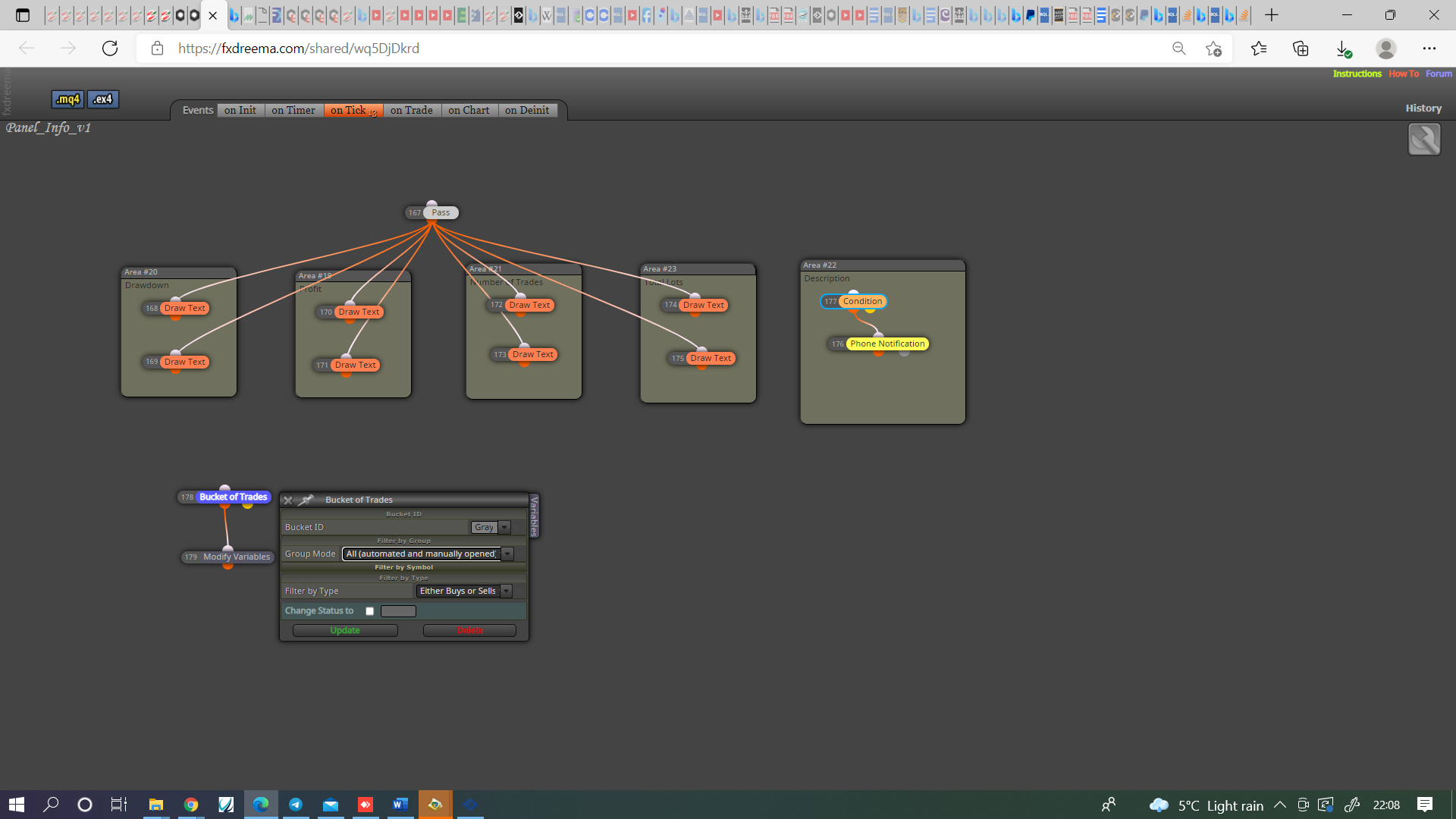
              @jstap Also something I just thought of, maybe you need to set the trades it's looking for.
              0_1639001365712_17f3424e-782e-4aad-8e88-2e768192b4ab-image.png

              Learn fxDreema Without the Wait!

              My comprehensive book, available on Amazon, is packed with examples and invaluable insights to help you fast-track your learning journey.

              The paperback and hardback editions include MT4 & MT5 QR codes for easy access to all prebuilt projects and robots, including my latest gold trading robot!

              Don’t miss out

              Click here➡️ https://mybook.to/fxDreema to get your copy today!

              Enjoy! 😊

              D 2 Replies Last reply Reply Quote 0
              • D
                drankman @jstap last edited by

                @jstap Thanks!
                it works now

                1 Reply Last reply Reply Quote 0
                • D
                  drankman @jstap last edited by

                  @jstap Thanks and since it works according to your instructions..
                  I have another question.
                  I'd like to put the profit in percentage, which I did. However, I'm wondering how to minimize the number of decimal?

                  0_1639064611532_ed7980ac-d8df-46c5-b02c-03ecbb34419f-image.png

                  jstap 1 Reply Last reply Reply Quote 0
                  • jstap
                    jstap @drankman last edited by

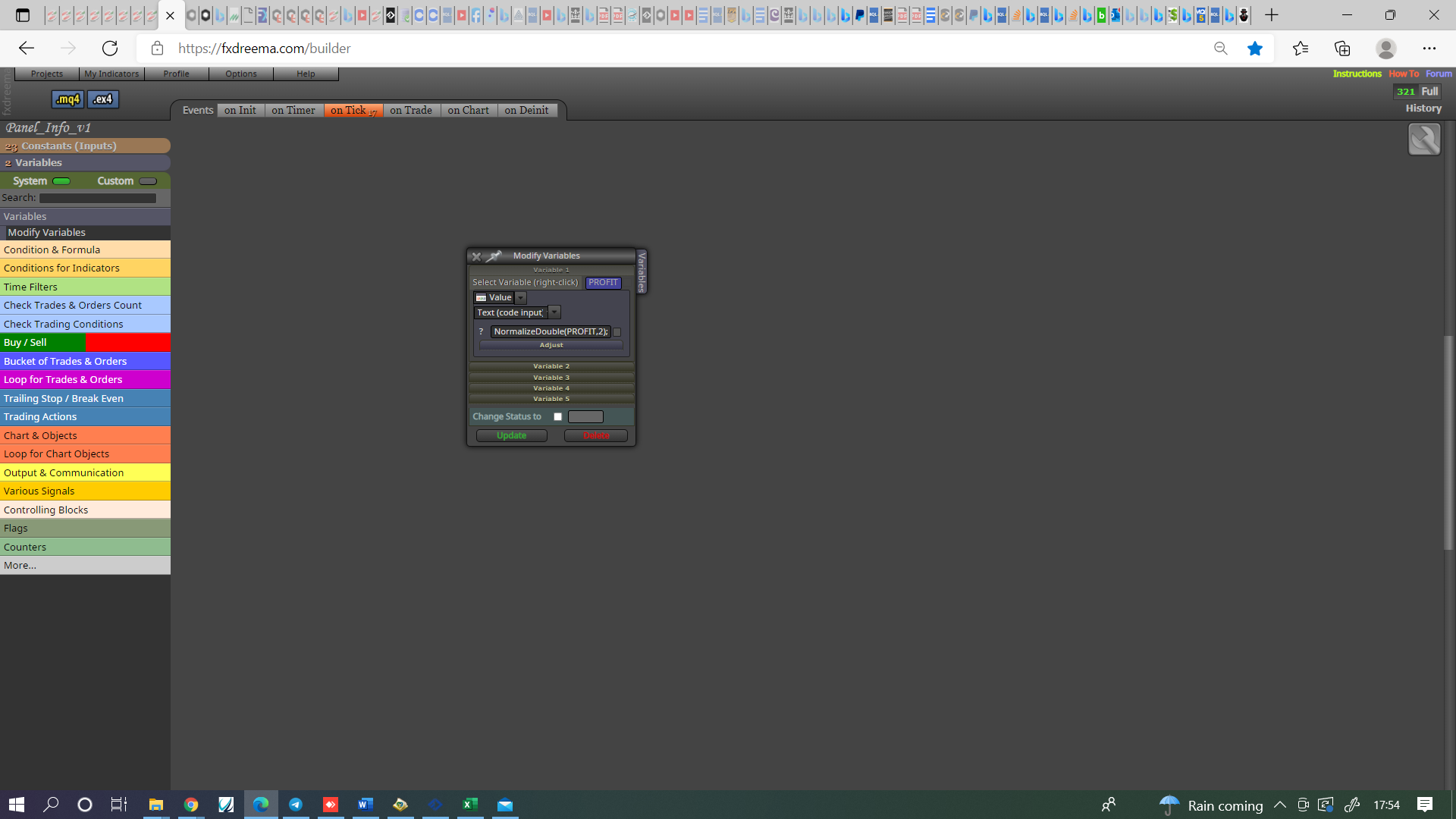
                    @andrewfrank This will do it, just make sure the block number is after, the number is how many digits past decimal point.
                    0_1639072643546_41ad3264-caa4-4b07-bbc7-b2b3d2451143-image.png

                    Learn fxDreema Without the Wait!

                    My comprehensive book, available on Amazon, is packed with examples and invaluable insights to help you fast-track your learning journey.

                    The paperback and hardback editions include MT4 & MT5 QR codes for easy access to all prebuilt projects and robots, including my latest gold trading robot!

                    Don’t miss out

                    Click here➡️ https://mybook.to/fxDreema to get your copy today!

                    Enjoy! 😊

                    D 1 Reply Last reply Reply Quote 0
                    • D
                      drankman @jstap last edited by drankman

                      @jstap Thanks!

                      Did you mean like this?
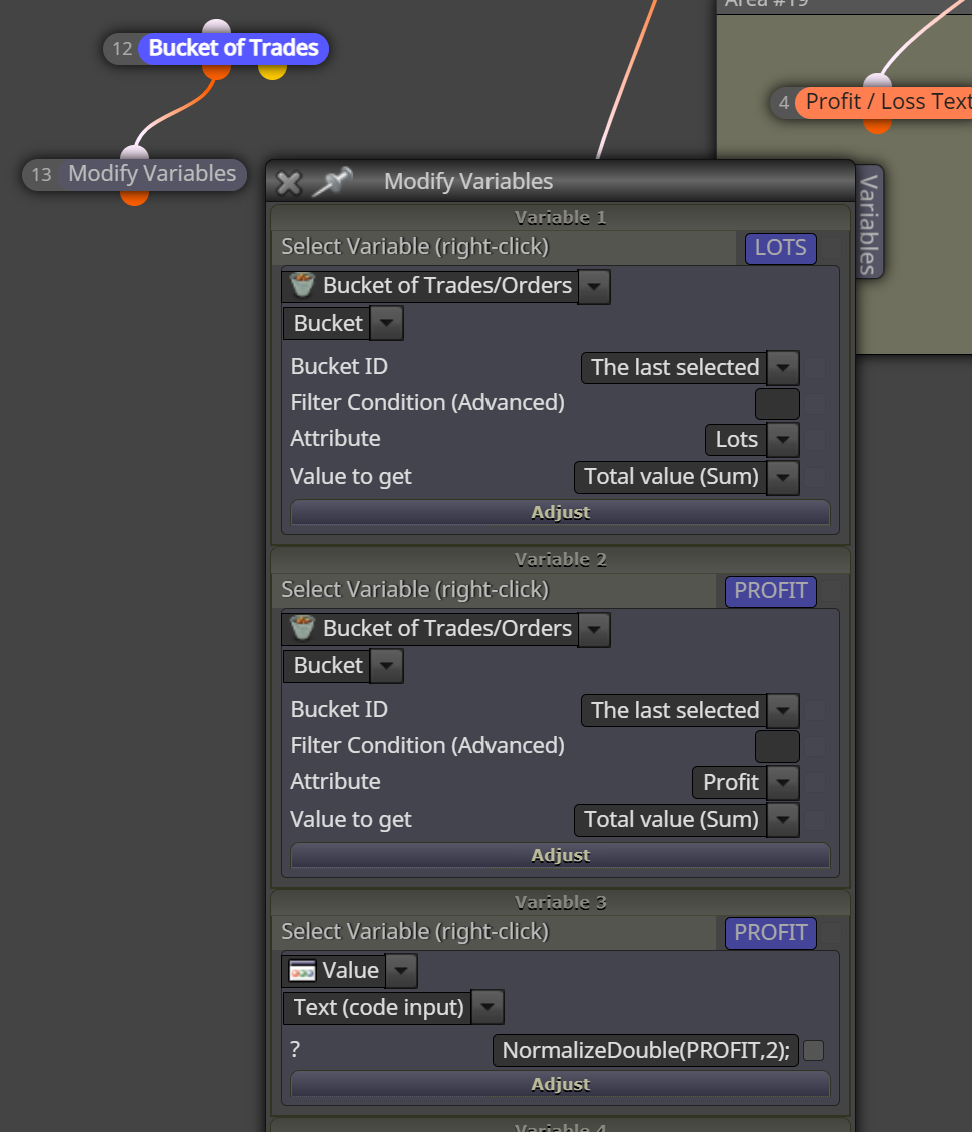
                      0_1639085705880_75808358-2deb-46c5-a355-738d27cc6012-image.png

                      or like this:

                      0_1639085890747_4d1b49eb-036b-4c01-b468-83a93b4c536b-image.png

                      But somehow both still show too many decimal points..

                      jstap 1 Reply Last reply Reply Quote 0
                      • jstap
                        jstap @drankman last edited by

                        @andrewfrank Like your first picture.

                        Learn fxDreema Without the Wait!

                        My comprehensive book, available on Amazon, is packed with examples and invaluable insights to help you fast-track your learning journey.

                        The paperback and hardback editions include MT4 & MT5 QR codes for easy access to all prebuilt projects and robots, including my latest gold trading robot!

                        Don’t miss out

                        Click here➡️ https://mybook.to/fxDreema to get your copy today!

                        Enjoy! 😊

                        D 1 Reply Last reply Reply Quote 0
                        • D
                          drankman @jstap last edited by drankman

                          @jstap
                          Somehow the first one still didnt work. it still show too many decimal points
                          Also the second one..

                          jstap 1 Reply Last reply Reply Quote 0
                          • jstap
                            jstap @drankman last edited by jstap

                            @andrewfrank Try this, not sure if will work but the NormalizeDouble normally does, use the new variable for the comment.. If not maybe @fxdreema can help.
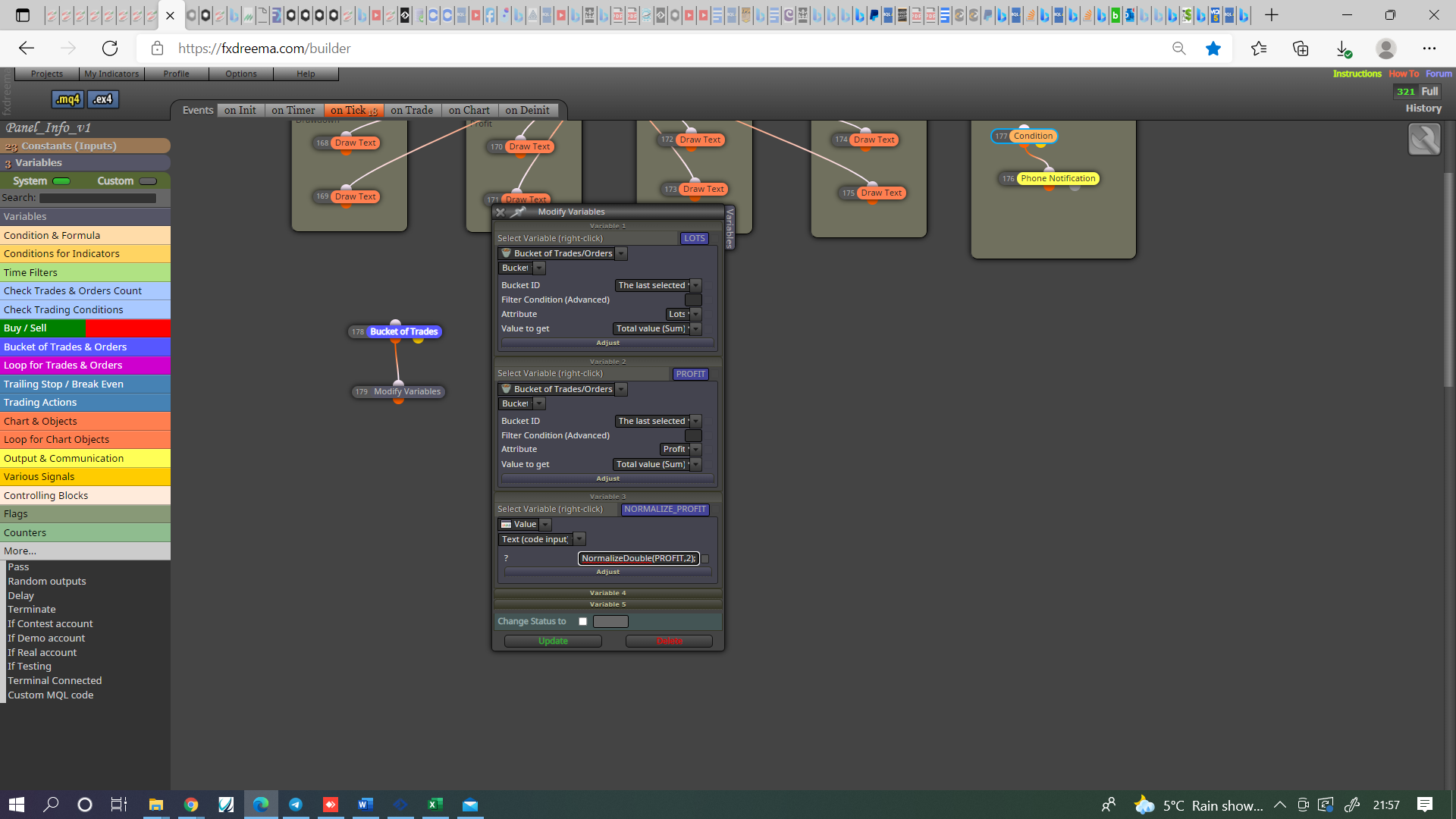
                            0_1639087156477_2282f848-3b8b-4328-9302-36f345234f6d-image.png

                            Learn fxDreema Without the Wait!

                            My comprehensive book, available on Amazon, is packed with examples and invaluable insights to help you fast-track your learning journey.

                            The paperback and hardback editions include MT4 & MT5 QR codes for easy access to all prebuilt projects and robots, including my latest gold trading robot!

                            Don’t miss out

                            Click here➡️ https://mybook.to/fxDreema to get your copy today!

                            Enjoy! 😊

                            D 1 Reply Last reply Reply Quote 0
                            • D
                              drankman @jstap last edited by

                              @jstap I tried that one.. but now it didnt show anything...

                              @fxdreema maybe can you help`?

                              jstap 1 Reply Last reply Reply Quote 0
                              • jstap
                                jstap @drankman last edited by

                                @andrewfrank The normalizedouble is working correctly,
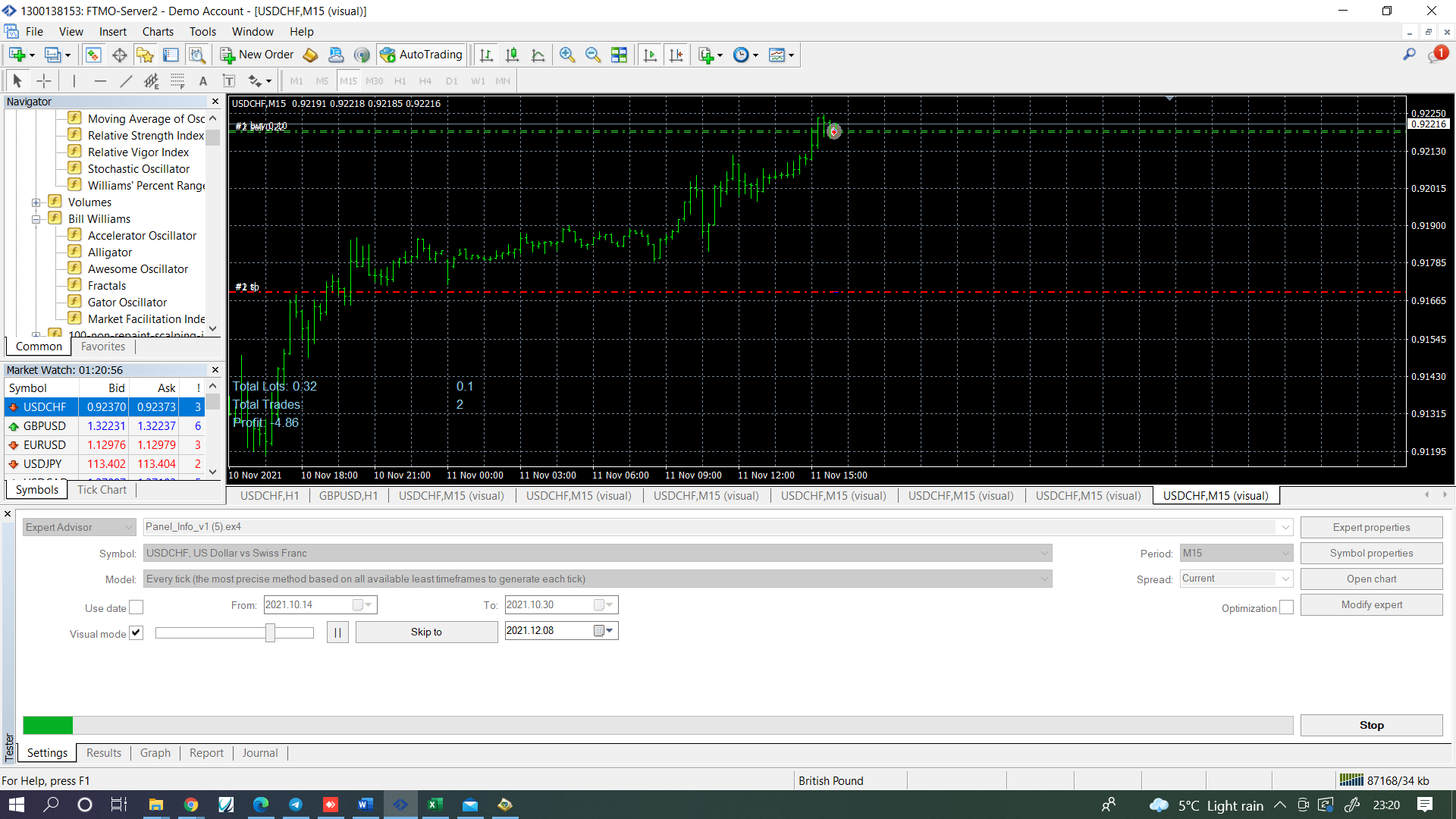
                                0_1639092164357_b16c0524-232b-4393-b634-6987e13c923c-image.png

                                blocks 168, 169 & 171 are the ones creating the other numbers https://fxdreema.com/shared/DTi8JUZjd
                                I have created a buy and sell for temporary just so on back test results can be seen. You don't need to create a new object each bar, just redraw so numbers change, create variables for the numbers with too many digits and normalize. Everything should work then.

                                Learn fxDreema Without the Wait!

                                My comprehensive book, available on Amazon, is packed with examples and invaluable insights to help you fast-track your learning journey.

                                The paperback and hardback editions include MT4 & MT5 QR codes for easy access to all prebuilt projects and robots, including my latest gold trading robot!

                                Don’t miss out

                                Click here➡️ https://mybook.to/fxDreema to get your copy today!

                                Enjoy! 😊

                                D 2 Replies Last reply Reply Quote 0
                                • D
                                  drankman @jstap last edited by

                                  @jstap Ok Thank you so much!
                                  I'll try using this ..

                                  1 Reply Last reply Reply Quote 0
                                  • D
                                    drankman @jstap last edited by drankman

                                    @jstap I have another question.
                                    How do I customize the title for each currency for alert message or phone notification?
                                    For example, if I set EA on EURUSD, it will also display the currency, such as "notification EURUSD"
                                    or if I set EA on EURGBP, it will also display the currency, such as "notification EURGBP"
                                    With the setting below, it only display the "notification" as I put the title
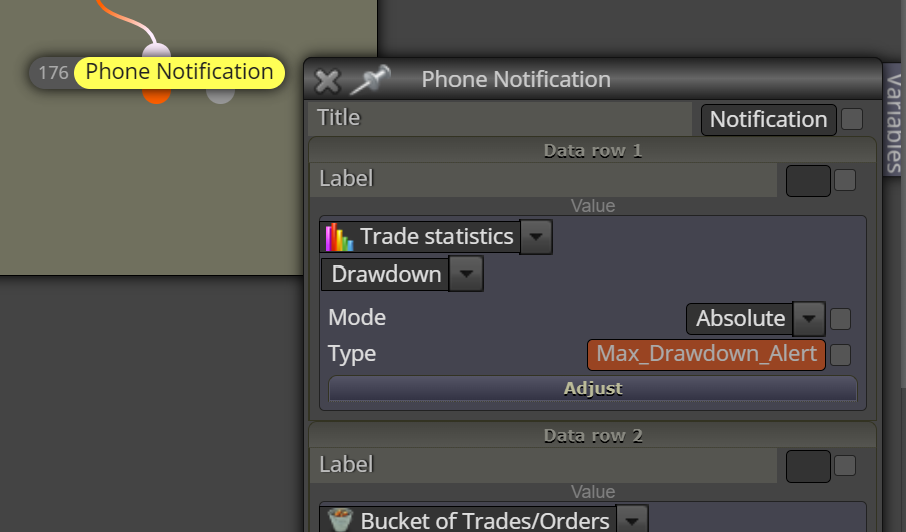
                                    0_1639348417563_487e68b9-f300-4128-ba0a-bb91258469fb-image.png

                                    Thanks in advance!

                                    jstap 1 Reply Last reply Reply Quote 0
                                    • jstap
                                      jstap @drankman last edited by

                                      @andrewfrank You need to use a combination of variables and information, use text (code input) and add like this- Symbol() in a variable will put the current asset into the variable, any text in " " can be added, so for example "TRADED PAIR "+variable 1+" "+variable 2 in text code will put this info into your notification, probably, "TRADED PAIR "+Symbol()+" "+variable 1+" "+variable 2 would also work

                                      Learn fxDreema Without the Wait!

                                      My comprehensive book, available on Amazon, is packed with examples and invaluable insights to help you fast-track your learning journey.

                                      The paperback and hardback editions include MT4 & MT5 QR codes for easy access to all prebuilt projects and robots, including my latest gold trading robot!

                                      Don’t miss out

                                      Click here➡️ https://mybook.to/fxDreema to get your copy today!

                                      Enjoy! 😊

                                      D 1 Reply Last reply Reply Quote 0
                                      • D
                                        drankman @jstap last edited by drankman

                                        @jstap Thanks!

                                        I set it as you explained it. it worked.
                                        since I put it on tick, it alerts every tick. do you know how to set it up so maybe it will alert only once (or twice..)

                                        jstap 1 Reply Last reply Reply Quote 0
                                        • jstap
                                          jstap @drankman last edited by

                                          @andrewfrank You have to decide, a condition block so you only get an alert when conditions match, once per block so every so often you get an alert, there are many options the choice is what suites you.

                                          Learn fxDreema Without the Wait!

                                          My comprehensive book, available on Amazon, is packed with examples and invaluable insights to help you fast-track your learning journey.

                                          The paperback and hardback editions include MT4 & MT5 QR codes for easy access to all prebuilt projects and robots, including my latest gold trading robot!

                                          Don’t miss out

                                          Click here➡️ https://mybook.to/fxDreema to get your copy today!

                                          Enjoy! 😊

                                          D 1 Reply Last reply Reply Quote 0
                                          • D
                                            drankman @jstap last edited by

                                            @jstap Ok. Thank you!

                                            1 Reply Last reply Reply Quote 0
                                            • 1
                                            • 2
                                            • 1 / 2
                                            • First post
                                              Last post

                                            Online Users

                                            M
                                            A
                                            F

                                            6
                                            Online

                                            146.8k
                                            Users

                                            22.4k
                                            Topics

                                            122.6k
                                            Posts

                                            Powered by NodeBB Forums | Contributors