fxDreema

    • Register
    • Login
    • Search
    • Back to the main page
    • Categories
    • Recent
    • Tags
    • Popular
    • Search

    Using constants with 'Adjust'

    Questions & Answers
    4
    8
    358
    Loading More Posts
    • Oldest to Newest
    • Newest to Oldest
    • Most Votes
    Reply
    • Reply as topic
    Log in to reply
    This topic has been deleted. Only users with topic management privileges can see it.
    • Wijnant
      Wijnant last edited by

      With the function 'Adjust' it is possible to tweak a certain value. When I use text: '+5 pips' it is working fine. Now I want to use a Constant in stead of the text. I made a string constant with the value'+5 pips' but this time the EA does not add 5 pips to the original value. What am I doing wrong here?
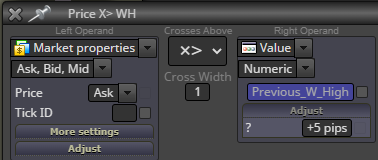
      e981d89b-e794-42c7-a33a-cc61fb80d289-image.png
      a898ed26-7d0d-4cda-adec-e5377fab3400-image.png
      70982fe6-58f4-437b-81b5-5833ca6449ec-image.png

      A 1 Reply Last reply Reply Quote 0
      • A
        ambrogio @Wijnant last edited by

        @Wijnant it's not a string, it is a "int"

        Wijnant B 2 Replies Last reply Reply Quote 0
        • Wijnant
          Wijnant @ambrogio last edited by

          @ambrogio Thank you for you answer but I tried ´int´. Then the + sign won't appair and the EA won't even open trades at all.

          A jstap 2 Replies Last reply Reply Quote 0
          • A
            ambrogio @Wijnant last edited by

            @Wijnant remove + sign and pips also, leave 5 only
            In case of negative number put the - sign before past the constant

            1 Reply Last reply Reply Quote 0
            • jstap
              jstap @Wijnant last edited by jstap

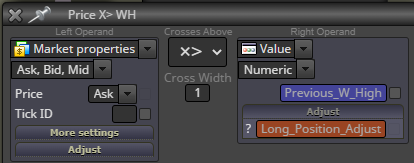
              @Wijnant as @ambrogio has said it's an int, in adjust you need something like this +Long_Position_Adjust pips

              Learn fxDreema Without the Wait!

              My comprehensive book, available on Amazon, is packed with examples and invaluable insights to help you fast-track your learning journey.

              The paperback and hardback editions include MT4 & MT5 QR codes for easy access to all prebuilt projects and robots, including my latest gold trading robot!

              Don’t miss out

              Click here➡️ https://mybook.to/fxDreema to get your copy today!

              Enjoy! 😊

              Wijnant 1 Reply Last reply Reply Quote 2
              • Wijnant
                Wijnant @jstap last edited by

                @jstap @ambrogio Thank you very much, problem solved!

                A 1 Reply Last reply Reply Quote 0
                • A
                  ambrogio @Wijnant last edited by

                  @Wijnant you're welcome!

                  1 Reply Last reply Reply Quote 0
                  • B
                    buttlicker @ambrogio last edited by

                    @ambrogio thx u

                    1 Reply Last reply Reply Quote 0
                    • 1 / 1
                    • First post
                      Last post

                    Online Users

                    J
                    H
                    E
                    C
                    M
                    O

                    12
                    Online

                    146.7k
                    Users

                    22.4k
                    Topics

                    122.6k
                    Posts

                    Powered by NodeBB Forums | Contributors