fxDreema

    • Register
    • Login
    • Search
    • Back to the main page
    • Categories
    • Recent
    • Tags
    • Popular
    • Search

    A mistake in my SL moving EA

    Questions & Answers
    4
    10
    321
    Loading More Posts
    • Oldest to Newest
    • Newest to Oldest
    • Most Votes
    Reply
    • Reply as topic
    Log in to reply
    This topic has been deleted. Only users with topic management privileges can see it.
    • S
      SirLuk last edited by

      Hi,

      This is my project: https://fxdreema.com/shared/RM20FS7S

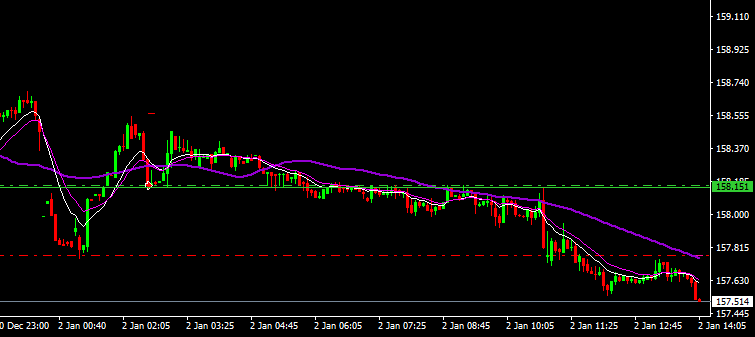
      It opens trades and creates a green Line right above/below entry price. Once in profit and price closes above the 15MA (in a short setup) and then makes a new low, the SL should move to the last swing high that was above the 15MA.

      In my backtest on GbpJpy, you can see that it worked here. That's the way it should be: 453aa9f0-d211-44c4-9ed9-18cbbbf6bf9e-image.png
      Now, somehow when the trade goes longer, the EA seems to not work properly. I can not find out why the EA doesn't move the stop in this case: 1ebd3985-59b7-40b4-8f54-4b2d4e596826-GbpJpy.png
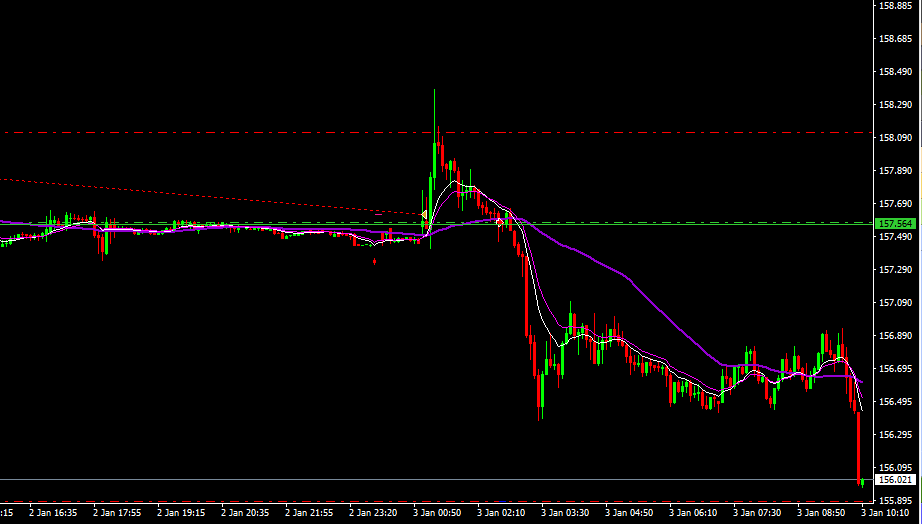
      Can anybody see the mistake in the part of the EA that moves the stops? Really greatful for the support!

      1 Reply Last reply Reply Quote 0
      • S
        SirLuk last edited by

        Also to note: On the pullback like in the second picture, price has to always stay beneath the green line. I don't want to move stops if price hit my entry level again.

        1 Reply Last reply Reply Quote 0
        • S
          SirLuk last edited by

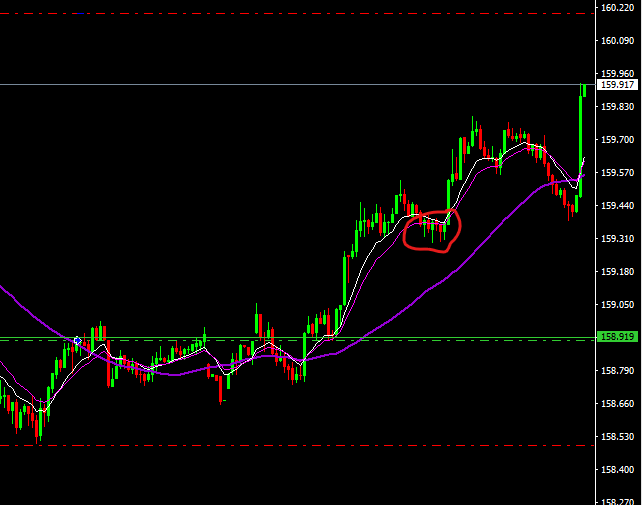
          image.png Like here, I don't understand why my stop is not moved below the pullback in the red circle, when price later makes a new high!

          1 Reply Last reply Reply Quote 0
          • l'andorrà
            l'andorrà last edited by

            The problem as I see it is how the bot is defining what you call 'the last swing high'. The Ea is moving the SL to what those blocks are telling it to do. That is not a trivial thing to do.

            (English) I will try to help everyone in these fxDreema forums. But if you want to learn how to use the platform in depth or more quickly, I can help you with my introductory fxDreema course in English at https://www.theandorraninvestor.eu.

            (Català) Miraré d’ajudar tothom en aquests fòrums d’fxDreema. Tanmateix, si vols aprendre a fer servir la plataforma amb més profunditat o més de pressa, t’hi puc ajudar amb el meu curs d’introducció a fxDeema en català a https://www.theandorraninvestor.eu/ca.

            (Español) Intentaré ayudar a todo el mundo en estos foros de fxDreema. Sin embargo, si quieres aprender a usar la plataforma en profundidad o más deprisa, te puedo ayudar con mi curso de introducción a fxDreema en español en https://www.theandorraninvestor.eu/es.

            1 Reply Last reply Reply Quote 0
            • S
              SirLuk last edited by

              Lets just look at the "Stopp Loss mover long setups" part of my EA: https://fxdreema.com/shared/nIhcYABLd

              The string starting with block 52 looks for a close of candle 1 below the 15EMA but in profit, meaning above the buy line. This closes the string and starts the string starting with block 62. This looks for a new candle high while making sure, price always stays above the buy line...and then activates the modify stops. The barcounter_long variable counts the bars since that break below the 15EMA and so SL should be below the lows since then.

              I just don't see where I made the mistake...

              1 Reply Last reply Reply Quote 0
              • S
                SirLuk last edited by

                Maybe @jstap sees the mistake? I tested it with GbpJpy from 01.01.2023 till today. It works fine with the first trade...then from the second one on it doesn't work. Would that suggest a probleme with the counters?

                1 Reply Last reply Reply Quote 0
                • jstap
                  jstap last edited by

                  What counters? To me any blocks under 1 that's switched off won't work? I may be wrong but would stay away from doing so.

                  Learn fxDreema Without the Wait!

                  My comprehensive book, available on Amazon, is packed with examples and invaluable insights to help you fast-track your learning journey.

                  The paperback and hardback editions include MT4 & MT5 QR codes for easy access to all prebuilt projects and robots, including my latest gold trading robot!

                  Don’t miss out

                  Click here➡️ https://mybook.to/fxDreema to get your copy today!

                  Enjoy! 😊

                  1 Reply Last reply Reply Quote 0
                  • S
                    SirLuk last edited by

                    @jstap did you look at the project? https://fxdreema.com/shared/nIhcYABLd

                    Only the two areas I created. (The turn on boxes after the sell or stop start the process). The upper one is for moving stops in a buy trade, the lower one for a sell trade. Why is it not working?

                    VHV-Profit-Masters 1 Reply Last reply Reply Quote 0
                    • jstap
                      jstap last edited by

                      I did the best thing to do is create a simple project just doing what you want, once working you can add others, this is how I do it, use process of elimination. from what I see the only blocks turning blocks off are under red blocks. In your journal you will see what blocks turn on and off.

                      Learn fxDreema Without the Wait!

                      My comprehensive book, available on Amazon, is packed with examples and invaluable insights to help you fast-track your learning journey.

                      The paperback and hardback editions include MT4 & MT5 QR codes for easy access to all prebuilt projects and robots, including my latest gold trading robot!

                      Don’t miss out

                      Click here➡️ https://mybook.to/fxDreema to get your copy today!

                      Enjoy! 😊

                      1 Reply Last reply Reply Quote 0
                      • VHV-Profit-Masters
                        VHV-Profit-Masters @SirLuk last edited by

                        @SirLuk Hola, me gusta tu proyecto, crees que se pueda adaptar este EA tuyo para operar solo en rangos de horarios de Killzone?


                        1 Reply Last reply Reply Quote 0
                        • 1 / 1
                        • First post
                          Last post

                        Online Users

                        H
                        R
                        A

                        18
                        Online

                        146.7k
                        Users

                        22.4k
                        Topics

                        122.6k
                        Posts

                        Powered by NodeBB Forums | Contributors