Save .csv file to a different location.
-
Hello friends, I can save the file generated by fxdreema in a subfolder inside the files folder just by placing foldername\filename
But i want to save the file in a file folder of another metatrader how can i do this?
-
@fabiobioware Not sure what you mean. Can't you install the mq4 file on one specific MT4 platform? All files are ti be installed in the 'expert' folder.
-
@l-andorrà Excuse me friend, I was wrong.
You are working with that block "Write to file" that is inside the menu "Output and Communication"This block has submitted files to the .csv extension that are to be excelled.
I realized that this file can only be saved within the "Files" paste or then I can create a sub-pasture within this "Files" paste to be able to work with it.
I want to save the file that was generated by this block in a local file for "File".
-
@l-andorrà Sorry buddy, I think I expressed myself badly.
I am working with that "Write to file" block that is inside the "Output and Communication" menuThis block works only with files in the .csv extension which is from excel.
I realized that this file can only be saved inside the "Files" folder or else I can create a subfolder inside this "Files" folder to be able to work with it.
I want to save the file that is generated by this block in a location outside the "File" folder.
-
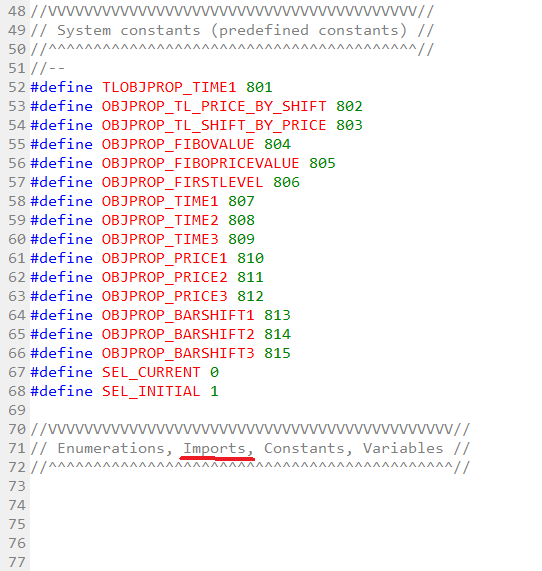
@fabiobioware if you want save file in other location on your pc , on the header of mql5 file you must add these lines:
#import "shell32.dll"
int ShellExecuteW(int hwnd,string operation,string file,string parameters,string directory,int showCmd);
#importand when you want to copy, in the project:
string strFrom = "C:\\Path\\you\\want\\copy\\namefile.csv";
string strTo = "C:\\Path\\where\\copy;
string strParameters = "/c copy " + strFrom + " " + strTo;int result = ShellExecuteW(0, "open", "cmd.exe", strParameters, NULL,1);
if (result <= 32) Alert("Shell Execute Failed: ", result);Important double backslash in the path.
-
@miki thank you, sorry i'm very lay programming.
Let's see if I understand ...
- First step is to generate my .mq5 source code file, open it and insert the codes below at the beginning before all the programming it already has.
#import "shell32.dll"
int ShellExecuteW (int hwnd, string operation, string file, string parameters, string directory, int showCmd);
#import- Second step is to generate within my project 3 constants all as data type "string" and insert in the first 2 the paths of origin and destination and in the third insert the data as you wrote.
Place a block of fxdreema's mql code and place this code below it in one piece linked to a "pass" in ONTICK.
string strFrom = "C: \ Path \ you \ want \ copy \ namefile.csv";
string strTo = "C: \ Path \ where \ copy;
string strParameters = "/ c copy" + strFrom + "" + strTo;int result = ShellExecuteW (0, "open", "cmd.exe", strParameters, NULL, 1);
if (result <= 32) Alert ("Shell Execute Failed:", result);can you confirm that I got it right?
-
@fabiobioware first step is open a custom mql code block, copy past the second part of code and use it in your project when you want copy file. If for example you want copy at start put the block in OnInit tab otherwise in OnTick tab.
Download source file .mql5 open it and add first part of code on the top after #define section. Stop.