fxDreema

    • Register
    • Login
    • Search
    • Back to the main page
    • Categories
    • Recent
    • Tags
    • Popular
    • Search

    Set a stoploss to breakeven after the next trade execute.

    Questions & Answers
    2
    20
    423
    Loading More Posts
    • Oldest to Newest
    • Newest to Oldest
    • Most Votes
    Reply
    • Reply as topic
    Log in to reply
    This topic has been deleted. Only users with topic management privileges can see it.
    • T
      tyutwo last edited by

      Can anyone tell me how to set a move a stop loss of the first trade to break even when the 2nd trade appears and do the same for the 2nd trade when the 3rd trade is opened? So on and so on until they either hit TP or SL. I have trouble doing this because I don't know how to make them check the previous trade.

      jstap 1 Reply Last reply Reply Quote 0
      • jstap
        jstap @tyutwo last edited by

        @tyutwo purple trade closed on trade tab BE block beneath, you will have to use groups to get the correct SL to move when the correct trade is opened, alternatively use pink for each trade, when a trade is created move all stop's to the trade created SL.

        Learn fxDreema Without the Wait!

        My comprehensive book, available on Amazon, is packed with examples and invaluable insights to help you fast-track your learning journey.

        The paperback and hardback editions include MT4 & MT5 QR codes for easy access to all prebuilt projects and robots, including my latest gold trading robot!

        Don’t miss out

        Click here➡️ https://mybook.to/fxDreema to get your copy today!

        Enjoy! 😊

        T 1 Reply Last reply Reply Quote 0
        • T
          tyutwo @jstap last edited by

          @jstap Can you show me an example, I'm not used to using the those tools

          jstap 1 Reply Last reply Reply Quote 0
          • jstap
            jstap @tyutwo last edited by

            @tyutwo Try this https://fxdreema.com/shared/rHwS0ma5c check the event tabs, place your buy/sell trees on on tab.

            Learn fxDreema Without the Wait!

            My comprehensive book, available on Amazon, is packed with examples and invaluable insights to help you fast-track your learning journey.

            The paperback and hardback editions include MT4 & MT5 QR codes for easy access to all prebuilt projects and robots, including my latest gold trading robot!

            Don’t miss out

            Click here➡️ https://mybook.to/fxDreema to get your copy today!

            Enjoy! 😊

            T 1 Reply Last reply Reply Quote 0
            • T
              tyutwo @jstap last edited by

              @jstap I don't get it, do I have to input any data or do I just copy this and place it above my order condition?

              jstap 1 Reply Last reply Reply Quote 0
              • jstap
                jstap @tyutwo last edited by

                @tyutwo As long as you put it on the right tabs, ensure you create the variables.

                Learn fxDreema Without the Wait!

                My comprehensive book, available on Amazon, is packed with examples and invaluable insights to help you fast-track your learning journey.

                The paperback and hardback editions include MT4 & MT5 QR codes for easy access to all prebuilt projects and robots, including my latest gold trading robot!

                Don’t miss out

                Click here➡️ https://mybook.to/fxDreema to get your copy today!

                Enjoy! 😊

                T 1 Reply Last reply Reply Quote 0
                • T
                  tyutwo @jstap last edited by tyutwo

                  @jstap https://fxdreema.com/shared/TJZEHzi7

                  Could you help me, I don't understand.

                  jstap 1 Reply Last reply Reply Quote 0
                  • jstap
                    jstap @tyutwo last edited by jstap

                    @tyutwo Go back to what I sent and copy/past what is on the on trade tab. Also the pink blocks shouldn't be connected to anything else.

                    Learn fxDreema Without the Wait!

                    My comprehensive book, available on Amazon, is packed with examples and invaluable insights to help you fast-track your learning journey.

                    The paperback and hardback editions include MT4 & MT5 QR codes for easy access to all prebuilt projects and robots, including my latest gold trading robot!

                    Don’t miss out

                    Click here➡️ https://mybook.to/fxDreema to get your copy today!

                    Enjoy! 😊

                    T 2 Replies Last reply Reply Quote 0
                    • T
                      tyutwo @jstap last edited by tyutwo

                      @jstap https://fxdreem

                      1 Reply Last reply Reply Quote 0
                      • T
                        tyutwo @jstap last edited by tyutwo

                        @jstap

                        I do copy and paste it on the on-trade tab, what's the next step?

                        https://fxdreema.com/shared/QhLEnGMeb

                        jstap 1 Reply Last reply Reply Quote 0
                        • jstap
                          jstap @tyutwo last edited by

                          @tyutwo If you look at the top where it says events the grey tabs next to it is where to find, the event tabs, go to on trade and past blocks from what I sent.

                          Learn fxDreema Without the Wait!

                          My comprehensive book, available on Amazon, is packed with examples and invaluable insights to help you fast-track your learning journey.

                          The paperback and hardback editions include MT4 & MT5 QR codes for easy access to all prebuilt projects and robots, including my latest gold trading robot!

                          Don’t miss out

                          Click here➡️ https://mybook.to/fxDreema to get your copy today!

                          Enjoy! 😊

                          T 1 Reply Last reply Reply Quote 0
                          • T
                            tyutwo @jstap last edited by

                            @jstap
                            Okay it's done, what's the next step
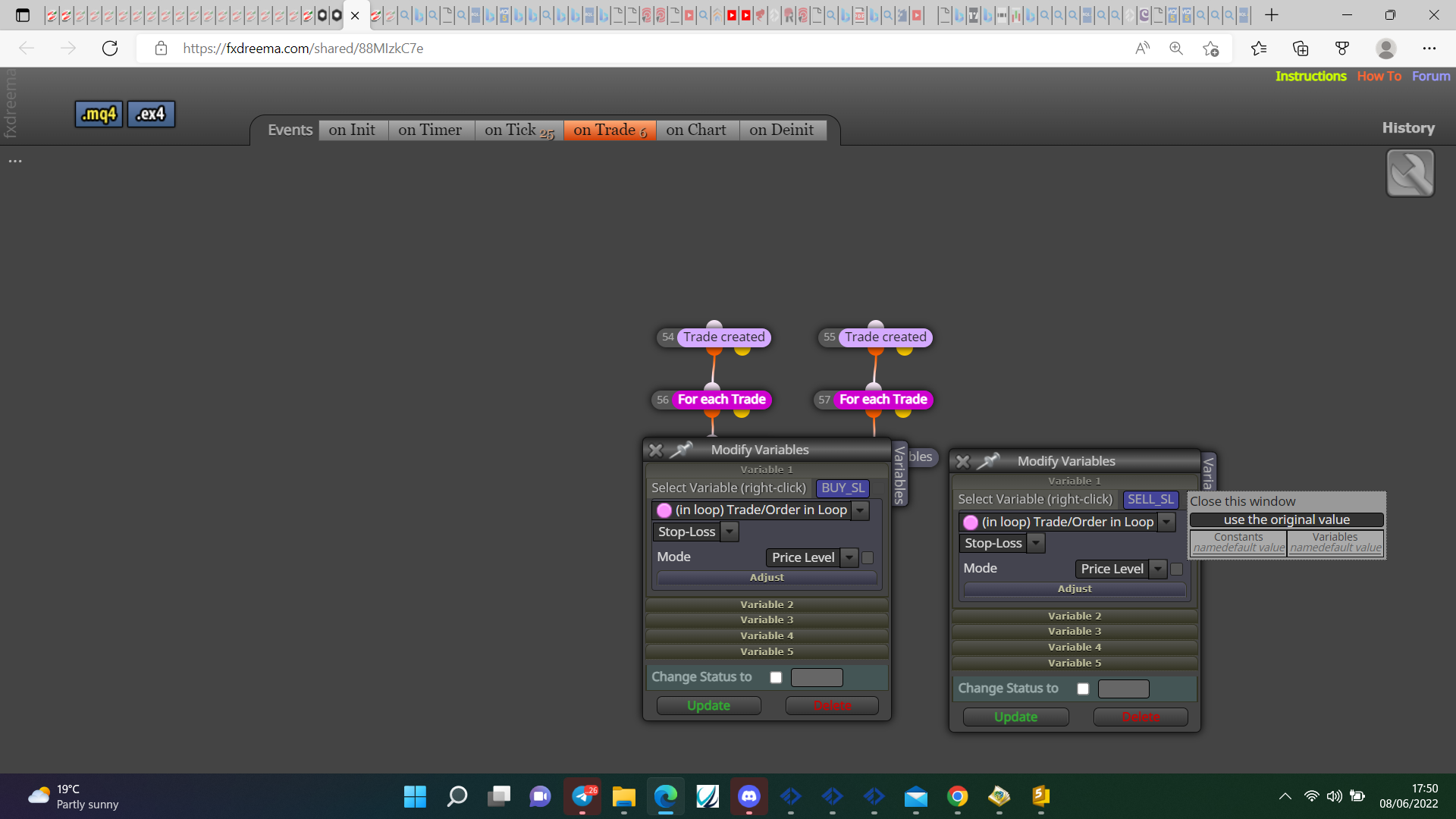
                            https://fxdreema.com/shared/88MIzkC7e

                            jstap T 2 Replies Last reply Reply Quote 0
                            • jstap
                              jstap @tyutwo last edited by jstap

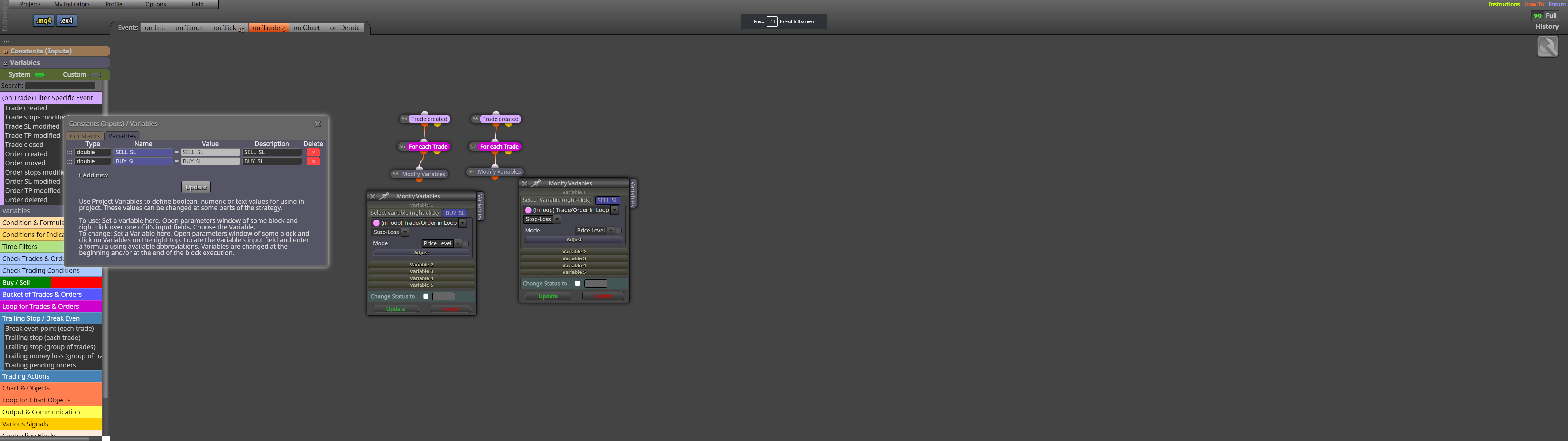
                              @tyutwo Did you add the variables? On the upper left you have the variables link add with the same spellings as picture, once added all should work, test on back test and let me know if not.
                              0_1654707279756_b42e6ca0-4099-488e-81cb-8b0f34dbd24e-image.png

                              Learn fxDreema Without the Wait!

                              My comprehensive book, available on Amazon, is packed with examples and invaluable insights to help you fast-track your learning journey.

                              The paperback and hardback editions include MT4 & MT5 QR codes for easy access to all prebuilt projects and robots, including my latest gold trading robot!

                              Don’t miss out

                              Click here➡️ https://mybook.to/fxDreema to get your copy today!

                              Enjoy! 😊

                              1 Reply Last reply Reply Quote 0
                              • T
                                tyutwo @tyutwo last edited by tyutwo

                                @jstap 0_1654707869866_b36c8235-fc9f-4cc3-ba73-985ee4ec6da4-image.png

                                I did not, Can you tell me how to add the variables

                                jstap 1 Reply Last reply Reply Quote 0
                                • jstap
                                  jstap @tyutwo last edited by

                                  @tyutwo Is in the post above.

                                  Learn fxDreema Without the Wait!

                                  My comprehensive book, available on Amazon, is packed with examples and invaluable insights to help you fast-track your learning journey.

                                  The paperback and hardback editions include MT4 & MT5 QR codes for easy access to all prebuilt projects and robots, including my latest gold trading robot!

                                  Don’t miss out

                                  Click here➡️ https://mybook.to/fxDreema to get your copy today!

                                  Enjoy! 😊

                                  T 1 Reply Last reply Reply Quote 0
                                  • T
                                    tyutwo @jstap last edited by

                                    @jstap

                                    What do you mean?

                                    jstap 1 Reply Last reply Reply Quote 0
                                    • jstap
                                      jstap @tyutwo last edited by

                                      @tyutwo In your picture you have the variables, as long as in your project it's saved like that all should work.

                                      Learn fxDreema Without the Wait!

                                      My comprehensive book, available on Amazon, is packed with examples and invaluable insights to help you fast-track your learning journey.

                                      The paperback and hardback editions include MT4 & MT5 QR codes for easy access to all prebuilt projects and robots, including my latest gold trading robot!

                                      Don’t miss out

                                      Click here➡️ https://mybook.to/fxDreema to get your copy today!

                                      Enjoy! 😊

                                      T 1 Reply Last reply Reply Quote 0
                                      • T
                                        tyutwo @jstap last edited by

                                        @jstap Yes it's saved like that but when I download I got a different type of file. I got

                                        Type of file: File

                                        But normally it should've been

                                        Type of file: MQ Source File (.mql4)

                                        T 1 Reply Last reply Reply Quote 0
                                        • T
                                          tyutwo @tyutwo last edited by

                                          @jstap I don't know why I got this type of file, it can not run on MT4

                                          0_1654758731619_db3e013e-df1f-4ecb-bc96-27ff0b217008-image.png

                                          jstap 1 Reply Last reply Reply Quote 0
                                          • jstap
                                            jstap @tyutwo last edited by

                                            @tyutwo Put the latest shared project, this way what's (not)happening can be assesed.

                                            Learn fxDreema Without the Wait!

                                            My comprehensive book, available on Amazon, is packed with examples and invaluable insights to help you fast-track your learning journey.

                                            The paperback and hardback editions include MT4 & MT5 QR codes for easy access to all prebuilt projects and robots, including my latest gold trading robot!

                                            Don’t miss out

                                            Click here➡️ https://mybook.to/fxDreema to get your copy today!

                                            Enjoy! 😊

                                            1 Reply Last reply Reply Quote 0
                                            • 1 / 1
                                            • First post
                                              Last post

                                            Online Users

                                            P
                                            A
                                            K
                                            Z
                                            1
                                            E
                                            J
                                            F

                                            15
                                            Online

                                            147.0k
                                            Users

                                            22.4k
                                            Topics

                                            122.6k
                                            Posts

                                            Powered by NodeBB Forums | Contributors