Lot Size is Risk % of Balance
-
Good day everyone!
I'm curious if there's a way to write this formula into 1 line instead of using what is existing in the FXDreema. The reason being is that I have this 'Money Management' setting operational but it randomly maxes out the lot size on some pending orders. Very dangerous and not as easily repeatable.

I've tried a few different arrangements but I cannot get a formula to work in this field instead;
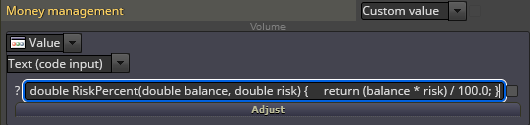
Does anyone know how to manually write the formula I'm trying to achieve correctly?
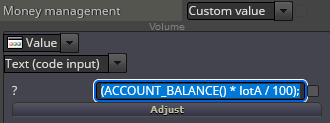
This is what I think it should be (lotA is my variable input for %)
Thanks in advance!!
-
Never mind, open parenthesis wasn't needed behind (ACCOUNT_BALANCE)
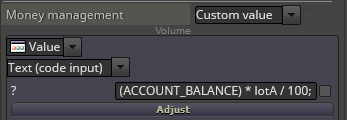
I'll have to wait for market open to see if this corrected the weird glitch I experienced.
-
Calculation operates but it doesn't calculate a correct volume. Am I missing a pip multiplier for the asset? Like a ' * Digits()' or something? Does anybody know?
-
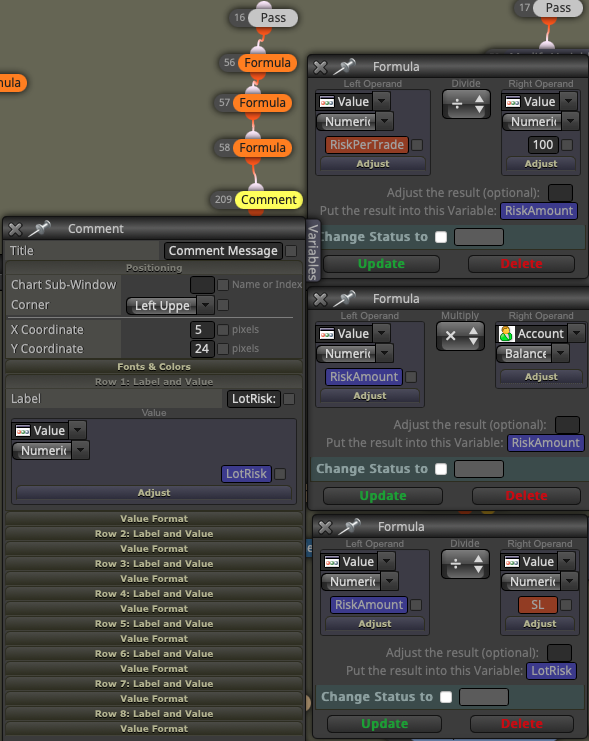
@bbmess I used this as a comment in the past, mainly to check if the Risk%... option worked. For me the lot sizes were approx the same so I didn't use my variable, I went with the option. But if it doesn't work, and maybe until the issue is fixed, as a workaround, you can do the calculations with formula blocks, then use Lot size variable in the buy/sell blocks.
-
@CPxiom
That’s an awesome Idea. The way I have it setup using this Fomula Block work around doesn’t work correctly so I’m most likely tying these blocks together incorrectly. My variable placement my be incorrect but I’ve tried a few arrangements and they all end up calculating the same and using maximum volume. I have 75 sets of parameters and I may have to expand the formula grouping and tie them to the constants to start. Which is what I wanted to try and avoid. -
@bbmess I have to constants which show up as input in the EA. One is RiskPerTrade, the other is the SL. They can be simple variables, maybe calculated, that depends on the strategy. But I would do this in a separate tree, leaving the formula tree only to calculate lot size. The formula is simple so it shouldn't give errors. (Desired risk percentage * Balance) / 100, or.... (desired risk percentage / 100) * Balance. This amount is then divided by SL = LotSize. I hope this formula in itself is correct, but I see you tried the same with the parentheses, and this is what I found on the web when I did this.
I suspect that this SL amount is what is making the problems... because of broker's decimals, as you said in a previous comment. 100 pips on EUR/USD is something, and on the indices is something different, and maybe that's why you get maximum lotsize possible. So it's necessary first to establish correct SL, and you can do this in a different formula blocks tree, then get the SL. And use comments along the formula blocks (each step maybe?) to see what is happening, and where is the place where it miscalculates.
