MT5 Close All Fast
-
@jstap I followed your instructions, but got that error
-
When trying to use what code exactly?
Learn fxDreema Without the Wait!
My comprehensive book, available on Amazon, is packed with examples and invaluable insights to help you fast-track your learning journey.
The paperback and hardback editions include MT4 & MT5 QR codes for easy access to all prebuilt projects and robots, including my latest gold trading robot!
Don’t miss out
Click here➡️ https://mybook.to/fxDreema to get your copy today!
Enjoy! 😊
-
@jstap i tested the code in different ways its working fine , but for faster execution remove all the performance measurement, like below:
000000000000000000000000000000000000000000000000for CloseAllPositions:-
{
sTrade.SetAsyncMode(true); // Enable asynchronous trade operations
CloseAllPositions(); // Call function to close all positions
}In the global variables section:
#include <Trade/Trade.mqh>
CTrade sTrade; // Trade object used for operationsIn the custom function section:
void CloseAllPositions() {
for (int cnt = PositionsTotal() - 1; cnt >= 0 && !IsStopped(); cnt--) {
if (PositionGetTicket(cnt)) {
sTrade.PositionClose(PositionGetInteger(POSITION_TICKET), 100);
uint code = sTrade.ResultRetcode();
Print("Close result code: ", IntegerToString(code));
}
}
}000000000000000000000000000000000000000000000000
for close all buy:-
{
sTrade.SetAsyncMode(true); // Enable asynchronous trade operations
CloseBuyPositions(); // Call function to close only buy positions
}// Global variables section:
#include <Trade/Trade.mqh>
CTrade sTrade; // Trade object used for operations// Custom function section:
void CloseBuyPositions() {
for (int cnt = PositionsTotal() - 1; cnt >= 0 && !IsStopped(); cnt--) {
ulong ticket = PositionGetTicket(cnt);
if (ticket > 0) {
// Check if the position is a BUY
if (PositionGetInteger(POSITION_TYPE) == POSITION_TYPE_BUY) {
sTrade.PositionClose(ticket, 100);
uint code = sTrade.ResultRetcode();
Print("Close BUY result code: ", IntegerToString(code));
}
}
}
}000000000000000000000000000000000000000000000000
for close all sell:-
// On tick section:
{
sTrade.SetAsyncMode(true); // Enable asynchronous trade operations
CloseSellPositions(); // Call function to close only sell positions
}// Global variables section:
#include <Trade/Trade.mqh>
CTrade sTrade; // Trade object used for operations// Custom function section:
void CloseSellPositions() {
for (int cnt = PositionsTotal() - 1; cnt >= 0 && !IsStopped(); cnt--) {
ulong ticket = PositionGetTicket(cnt);
if (ticket > 0) {
// Check if the position is a SELL
if (PositionGetInteger(POSITION_TYPE) == POSITION_TYPE_SELL) {
sTrade.PositionClose(ticket, 100);
uint code = sTrade.ResultRetcode();
Print("Close SELL result code: ", IntegerToString(code));
}
}
}
}000000000000000000000000000000000000000000000000
thanks again for the code

-
@KLG ...
Learn fxDreema Without the Wait!
My comprehensive book, available on Amazon, is packed with examples and invaluable insights to help you fast-track your learning journey.
The paperback and hardback editions include MT4 & MT5 QR codes for easy access to all prebuilt projects and robots, including my latest gold trading robot!
Don’t miss out
Click here➡️ https://mybook.to/fxDreema to get your copy today!
Enjoy! 😊
-
@jstap but there is a problem , this code will close every thing regardless the "Magic number" and the "Symbol" !
is there a way i can make it specified ?
-
@jstap i found this ( https://www.mql5.com/en/forum/116395 ) but I'm not a coding expert, do you know how i can use it with your code ?
-
FX uses a int variable called "MagicStart" this contains your current project magic number, check magic == MagicStart in the function code, symbol() will show the current chart symbol, so check this in the code as well, both of these should mean the code will only use current chart and EA magic number. If you paste this code into AI (like chat GPT) and ask to add all this it should give you the correct code. && is the code for and.
-
@KLG
Final codes that follows the "Magic number" and the "Symbol" the EA started with and very fast execution for the benefit of the community ,///////////////////////////////////////////////////////////////////////////////////////////////////////////////////////
CloseAllPositions :-
**In the main area**
{
sTrade.SetAsyncMode(true); // Enable asynchronous trade operations
CloseAllPositions(); // Call function to close all positions
}~next~
**In Global variables, includes :**
#include <Trade/Trade.mqh>
CTrade sTrade;
**In the custom functions:**
void CloseAllPositions()
{
sTrade.SetAsyncMode(true);int total = PositionsTotal();
for (int i = total - 1; i >= 0; i--)
{
ulong ticket = PositionGetTicket(i);
if (ticket == 0) continue;string symbol = PositionGetString(POSITION_SYMBOL); long magic = (long)PositionGetInteger(POSITION_MAGIC); if (symbol == _Symbol && magic == MagicStart) { sTrade.PositionClose(ticket); }}
}///////////////////////////////////////////////////////////////////////////////////////////////////////////////////////
CloseBuyPositions
**In the main area**
{
sTrade.SetAsyncMode(true); // Enable asynchronous trade operations
CloseBuyPositions(); // Call function to close only buy positions
}~next~
**In Global variables, includes :**
#include <Trade/Trade.mqh>
CTrade sTrade;
**In the custom functions:**
void CloseBuyPositions()
{
sTrade.SetAsyncMode(true);int total = PositionsTotal();
for (int i = total - 1; i >= 0; i--)
{
ulong ticket = PositionGetTicket(i);
if (ticket == 0) continue;string symbol = PositionGetString(POSITION_SYMBOL); long magic = (long)PositionGetInteger(POSITION_MAGIC); int type = (int)PositionGetInteger(POSITION_TYPE); if (symbol == _Symbol && magic == MagicStart && type == POSITION_TYPE_BUY) { sTrade.PositionClose(ticket); }}
}///////////////////////////////////////////////////////////////////////////////////////////////////////////////////////
CloseSellPositions
**In the main area**
{
sTrade.SetAsyncMode(true); // Enable asynchronous trade operations
CloseSellPositions(); // Call function to close only sell positions
}
~next~
**In Global variables, includes :**
#include <Trade/Trade.mqh>
CTrade sTrade;
**In the custom functions:**
void CloseSellPositions()
{
sTrade.SetAsyncMode(true);int total = PositionsTotal();
for (int i = total - 1; i >= 0; i--)
{
ulong ticket = PositionGetTicket(i);
if (ticket == 0) continue;string symbol = PositionGetString(POSITION_SYMBOL); long magic = (long)PositionGetInteger(POSITION_MAGIC); int type = (int)PositionGetInteger(POSITION_TYPE); if (symbol == _Symbol && magic == MagicStart && type == POSITION_TYPE_SELL) { sTrade.PositionClose(ticket); }}
}///////////////////////////////////////////////////////////////////////////////////////////////////////////////////////
I would love to know how i can add a parameter to assign the blocks to specific group number like the normal blocks of FXdreema, if any one knows how please let me know.

-
@KLG Well in mate, good to see code changed and put out for the community to use.
My bad || means or and && means and..
Learn fxDreema Without the Wait!
My comprehensive book, available on Amazon, is packed with examples and invaluable insights to help you fast-track your learning journey.
The paperback and hardback editions include MT4 & MT5 QR codes for easy access to all prebuilt projects and robots, including my latest gold trading robot!
Don’t miss out
Click here➡️ https://mybook.to/fxDreema to get your copy today!
Enjoy! 😊
-
@jstap Thanks to you,
I think i found out how to make a group parameter for the custom block,
not tested yet but i think it will work,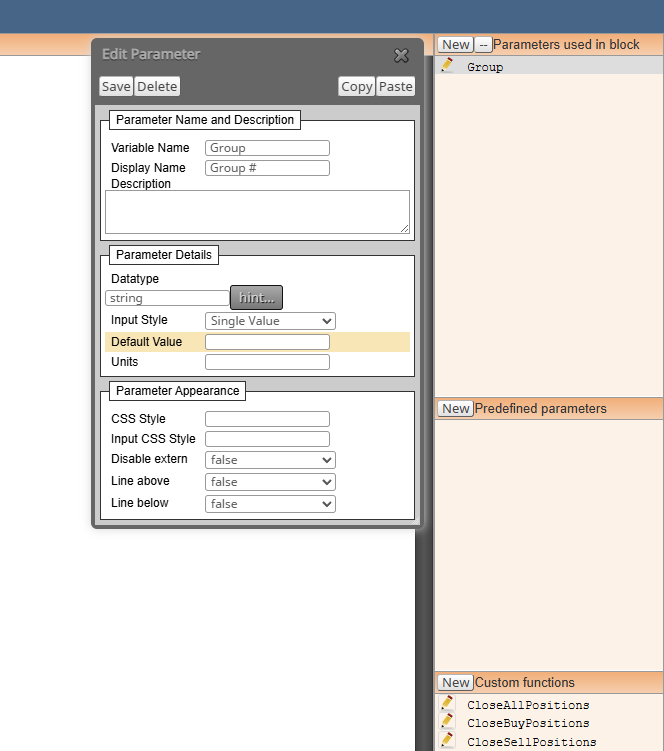
-
Well in keep this updated, messed about with this a long time ago, don't really have time at the minute (and was never vary good) but, in there you can add different options for the block, in this something like, limit by magic, or limit by symbol, etc, like what is in other standard FX, blocks. also
According to ChatGPT this is also used in FX custom code, but I wouldn't trust it all, some I have see used over the years of looking though. AI didn't know this when I was originally working with this code but now...
Commonly Used Tokens in FX Dreema
| | |
| ~next~ | | Refers to the next block in the execution chain
| ~prev~ | | Refers to the previous block
| ~value~ | | Used to fetch the current value of a variable or indicator
| ~custom~ | | Placeholder for user-defined values or expression
| ~time~ | | Refers to the current time or timestamp of a candle
| ~price~ | | Gets the current price (can be open, close, high, low depending on context)
| ~index~ | | Used in loops or array-like structures to refer to the current iteration index
| ~symbol~ | | Refers to the current trading symbol
| ~magic~ | | Refers to the magic number assigned to trades
| ~spread~ | | Gets the current spread valueThese tokens are often used inside blocks like:
- Modify Variables
- Condition
- Buy/Sell
- Custom Code
- Loops and Filters
 ️ Why They're Useful
- Modularity: You can reuse logic across multiple blocks without rewriting values.
- Dynamic behavior: They adapt to changing market conditions or block sequences.
- Cleaner logic: Avoids hardcoding and makes debugging easier.
If you're building session-aware or event-driven logic (like your NY session breakout detection), these tokens can help you create reusable, adaptive structures. Want to see how to use ~index~ or ~value~ in a looped candle scan or variable comparison? I can mock up a block chain or walk through a use case.