fxDreema

    • Register
    • Login
    • Search
    • Back to the main page
    • Categories
    • Recent
    • Tags
    • Popular
    • Search

    Block id

    Questions & Answers
    2
    7
    106
    Loading More Posts
    • Oldest to Newest
    • Newest to Oldest
    • Most Votes
    Reply
    • Reply as topic
    Log in to reply
    This topic has been deleted. Only users with topic management privileges can see it.
    • J
      jpsam last edited by

      Does every block, but mainly the "buy now" or "sell now" blocks, have a block ID? If yes, how do I find the buy now or sell now ID?

      1 Reply Last reply Reply Quote 0
      • jstap
        jstap last edited by

        The block ID's are on the front of the block, you can switch on/off with on/off blocks, what exactly are you trying to do?

        Learn fxDreema Without the Wait!

        My comprehensive book, available on Amazon, is packed with examples and invaluable insights to help you fast-track your learning journey.

        The paperback and hardback editions include MT4 & MT5 QR codes for easy access to all prebuilt projects and robots, including my latest gold trading robot!

        Don’t miss out

        Click here➡️ https://mybook.to/fxDreema to get your copy today!

        Enjoy! 😊

        1 Reply Last reply Reply Quote 0
        • J
          jpsam last edited by

          I want to switch off both buy now and sell now blocks when i lose certain amount, so that I can stop trading for the day.
          Thanks very much for always answering my questions

          1 Reply Last reply Reply Quote 0
          • jstap
            jstap last edited by

            There are blocks that do this, just activate with your reason.
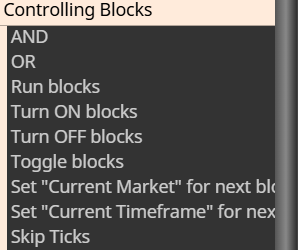
            image.png

            Learn fxDreema Without the Wait!

            My comprehensive book, available on Amazon, is packed with examples and invaluable insights to help you fast-track your learning journey.

            The paperback and hardback editions include MT4 & MT5 QR codes for easy access to all prebuilt projects and robots, including my latest gold trading robot!

            Don’t miss out

            Click here➡️ https://mybook.to/fxDreema to get your copy today!

            Enjoy! 😊

            1 Reply Last reply Reply Quote 0
            • J
              jpsam last edited by

              Still, I can't find the block ID. Is it the number of the blocks, which are assigned according to when you drag them to the work area? It would be better if you could direct me with a screenshot arrow pointing at it. Thanks

              1 Reply Last reply Reply Quote 0
              • jstap
                jstap last edited by

                Every block has ID numbers, comment is 1
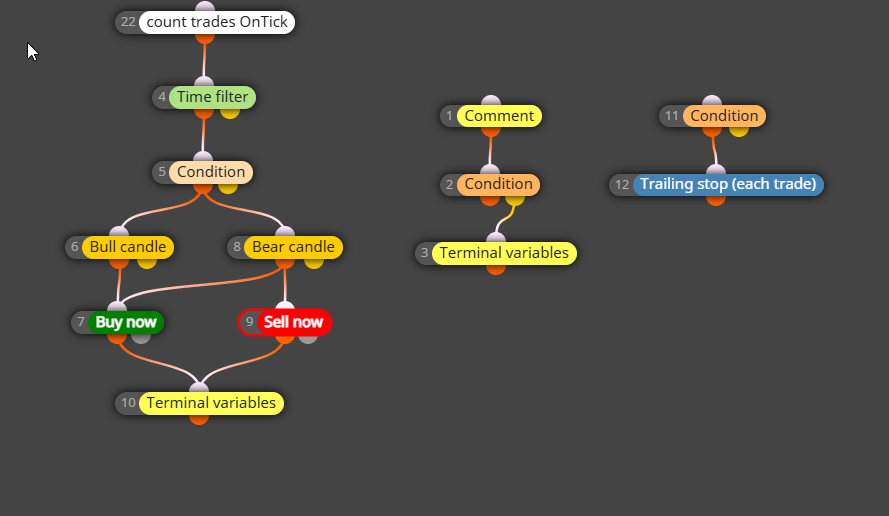
                image.png

                Learn fxDreema Without the Wait!

                My comprehensive book, available on Amazon, is packed with examples and invaluable insights to help you fast-track your learning journey.

                The paperback and hardback editions include MT4 & MT5 QR codes for easy access to all prebuilt projects and robots, including my latest gold trading robot!

                Don’t miss out

                Click here➡️ https://mybook.to/fxDreema to get your copy today!

                Enjoy! 😊

                1 Reply Last reply Reply Quote 0
                • J
                  jpsam last edited by

                  Thanks, and God bless! It's now clear

                  1 Reply Last reply Reply Quote 0
                  • 1 / 1
                  • First post
                    Last post

                  Online Users

                  A
                  E

                  11
                  Online

                  146.7k
                  Users

                  22.4k
                  Topics

                  122.6k
                  Posts

                  Powered by NodeBB Forums | Contributors
