Price now - prev close price
-
I want to ask about the conditional block about the difference in price. if I use the condition Price Now - Prev close Candle (TF1 M) = this shows the direction of the price in 60 seconds. but how do I measure the price direction in the past 3 seconds. thx in advence
-
I didn't tried this, I only connected those blocks in few minutes, but I think that they are logically correct: http://prntscr.com/hca6di
-
@fxdreema tq , i will try

-
Hello I'm new here and I have already discovered the forum for my qustion but do not find the correct answer.
I have build a little EA an the problem is that after it is closing one Trade it openes a new trade directly again (because all conditions are true) . I'd like to know, how it is possible to do that:
Example (what I excpect):
Chart: M1
Buy Trade was closes with 20 pips profit.Open new Trade in same Candle should only be possible if the Market price is 10 pips below Closed Price
This condition should only impact to the current candle.Thank You in advance
-
@4tronic You have few projects edited lately, for which one we are talking about
I don't particularly understand this "Open new Trade in same Candle should only be possible if the Market price is 10 pips below Closed Price". You open a trade on the current candle only, because opening a trade happens in the current moment. But the current candle doesn't have "Closed Price", because it is not closed yet. Technically it has "Close Price" that is the current Bid, but Bid is also the current market price. So how can the market price be 10 pips below itself... -
@fxdreema Hi, thanks for response. When I am in a long position and riding a bullish Minute Candle, it is going up and down very impulsive. In this Situation my trailstop closes the trade with a little profit and quite after then a new position opens at the same point where the TrailStop closed it before. But now the Price moves in the wrong direction (Pullback) and closes the second Position by StopLoss. I earn 10$ and lost 8$. And now my idea was to make a rule, that does not allow to open a new positon in the same candle before the Price does a Pullback. So I need to get the "close Price" of the last Trade to calculate a little difference for the possibility of a new position or buy order.
https://fxdreema.com/shared/DbvZQipne
An by the way, is there a way to make something like a dynamic Trailing stop. It was also very helpful in this situation.
High Profit on Trade > Trailing stop Value grows. Something we can combine the value of an Indicator or Oscilator with the Trailing stop.regards
-
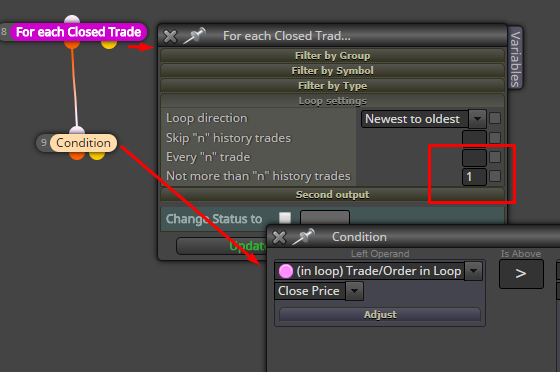
So you mean Close Price of the last closed trade. Something like this, I guess:
I don't know if this helps:
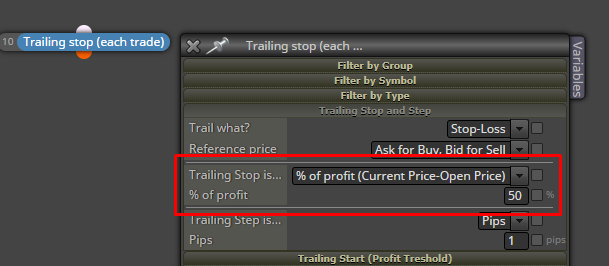
... but remember that when the profit is still small, % of it is even smaller, so if you want to do something like this you should use the Trailing Start parameters to prevent the block to put too small stops in the beginning. Or, if you have some formula, you can also use those "Custom..." options of "Trailing stop is...". -
@fxDreema
Hello fx, thank you for your reply.I see two problems:
How can I start to trade if the 1. Condition is to check last closed trades Price, if there was no trade before
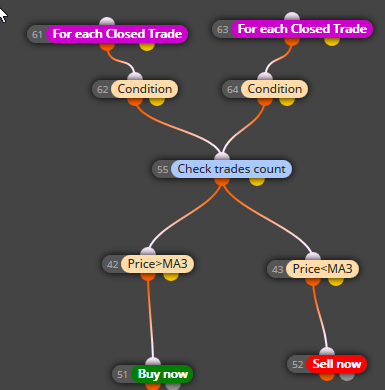 Here I am using 2 x ForEachTrade (One for the Sell and the other One for the Buy positions) May I have a mistake by the connections?
- How can I realize that this condition will only effect for X-seconds. After X-seconds it should be able to buy again (wether the price is higher or lower)
If I set this condition without time limit, it will never ever open new Position before the price changes below (or like it is set in this condition)
Regards
- How can I realize that this condition will only effect for X-seconds. After X-seconds it should be able to buy again (wether the price is higher or lower)
-
"For each Closed Trade" can go to the yellow output if no trade has been selected, there are also some "Second output" settings in the block, you will see them. After that maybe place "Pass once" block, just in case.
I don't like how block 55 is connected. You can imagine that you still have 2 separate paths, but when 55 is connected like that those 2 paths are now merged. I'm also not sure why you have this block somewhere under "For each..." block. If the blue block can be above "For each...", I think it's better to put it there.
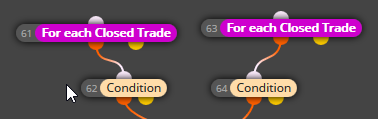
What is inside blocks 62 and 64?

