3x MA - Odd Crossing Tolerance
-
Hi Guys,
I'm trying to put together a 3x MA strategy but I've come across a situation that requires it to have some tolerance of odd crossings.
The base concept is:
Buy: Red x> Yellow
Sell: Red x< Yellow
Close: Red > OR < Orange (I originally had Closes set to x> OR x< but changed it to > OR < to try and work around the '???' bump and execute a Close earlier so the last Sell can still execute as an x<).
The issue I'm now trying to solve is to make it so that Red will Close when crossing (> OR <) Orange OR Yellow so it can still be able to execute it's normal Buy or Sell conditions.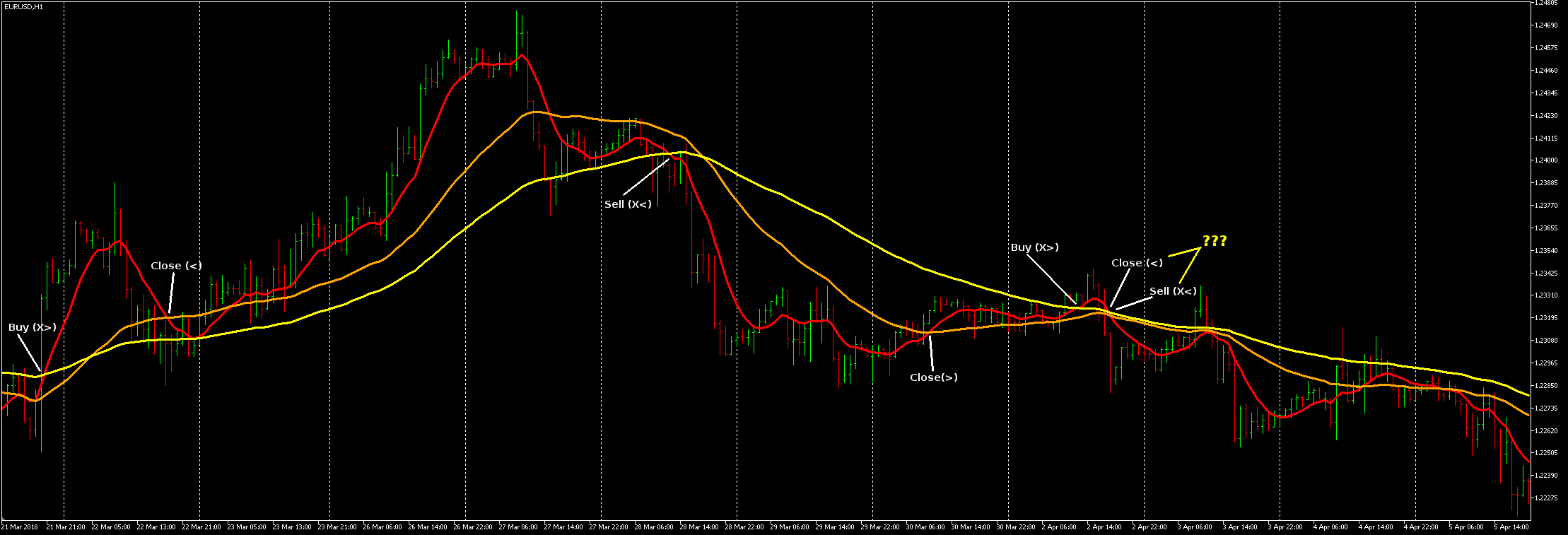
I've got this so far, having tried many different ways but continually running in to problems with it opening 100's of trades or none.
It's still opening 100's under certain circumstances and I don't know why, I think I'm keeping it halted unless there's no trades open but there's something sneaking through somewhere and it goes crazy...?
https://fxdreema.com/shared/348jQub2ethanks.

-
Your EA runs every tick, and moving averages also update every tick. That causes problems when the moving averages are somewhat flat.
Solution: put "once per bar" somewhere, probably best just before the buy/sell blocks.
I prefer to put the "once per bar" as the first block, and then use candle ID 1 in all conditions. That way you are always looking at the completed bar, and not the current, changing one. Of course that makes your bot a bit slower to react, but I think a winning strategy must be able to withstand that slowness anyway. Also boosts backtesting a lot.
-
Well I gave up trying to work around the above 'bump', I'll come back to that once I'm more experienced with the intricacies of this...
I thought I was getting the hang of this and set about making a 2x3 EMA cross: https://fxdreema.com/shared/zZQ8HTZRb (EXAMPLE OF WHAT NOT TO DO - bad usage of 'Once per bar')
Only I've found that in visual testing it's not executing some trades and I can't figure out why.
I thought it might be magic related as I didn't have Groups set, but it still misses the potential trades marked with white lines even after adding Groups.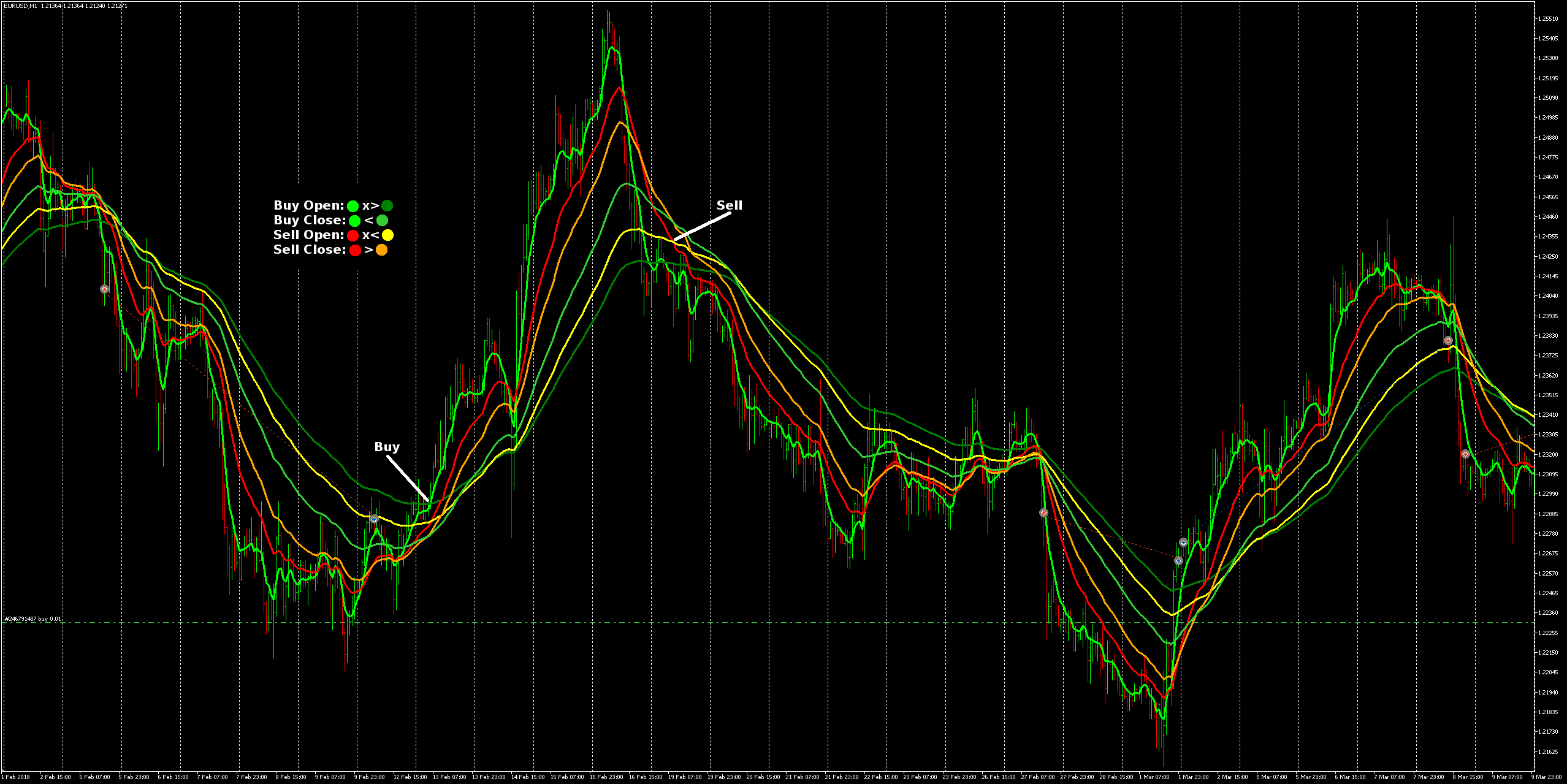
As for concept, I'm wanting buys and sells to behave like two independent 3-way EMA's, which I think I've got a reasonably good logical and simple setup for, but I'd be interested if anyone has a better way to do it...
cheers guys!

-
So you want multiple moving average crosses before trade? By default, you can only work with a one "slice" of time, be that the bar open, one tick, etc... The thing is, these multiple crosses rarely appear together on that exact moment. So you need a system to "remember" those older crosses, or alternatively, a loop that can go through multiple candles to find the older crosses. Variables will become handy anyway.
Need small help? Tag me in your post
Need big help? https://www.fiverr.com/big_algo/automate-your-winning-strategy-in-mql4-or-mql5 -
No, it's still just a single cross per trade action. I guess it looks a bit like I'm trying to trigger with multiple crosses due to their separation, but I just put in dummy settings so all the lines would be easily visible.
I've got the 6 EMA's so that I can optimise Opens and Closes for Buys and Sells separately.
I broke the setup in to the two 'Once per bar' sections so that it's possible for a buy and a sell to co-exist, while unlikely most of the time, I thought there could be conditions where an overlap occurs or it could even be that the open & close of a breif buy trade could occur within the open & close periods of a lengthy sell trade (or the inverse), it all depends how the optimisation for pair/timeframe comes out I guess.
Might never happen but I figure it's better to have it able to manage buys and sells separately just in case.
The legend I put on the image details the possible trade types, so there would only ever be at most one buy and one sell open at any given time.The issue is just that it hasn't opened trades where I've marked Buy and Sell in the image with white lines, and there's no other trades nearby that would have caused any conflicts.
- UPDATE: I updated the link with pre-configured EMA settings that match the image. When I first posted both buy and sell had the same settings so could not be seen as in the image.
-
ok, so turns out it was just me thinking 'Once per bar' is smarter than it actually is.
My thanks to @fxDreema for taking the time to explain it to me.
I was thinking that it would continue processing until something connected to it passed, instead of the actuality of it being a 'dumb' block that just passes on the first available tick and doesn't care what happens after that.
Rebuilt to this https://fxdreema.com/shared/s8DnMJDKb ... and everything is right in the world again!
It's actually surprising it worked as well as it did with the incorrect setup...