Trouble with opening buys with a custom indicator (arrows)
-
Hi: I am trying to get a buy or sell when an arrow shows up on a custom indicator. There are 2 buffers (red and blue). Issue a buy when blue arrow is true, sell on the red arrow.
I have attempted a number of tries and this link shows the condition as being a boolean statement which of course does not work. I would appreciate the help!
https://fxdreema.com/shared/wcSFO9WpbIndicator:
https://www.mql5.com/en/code/viewcode/23938/217295/zigzagsignal.mq4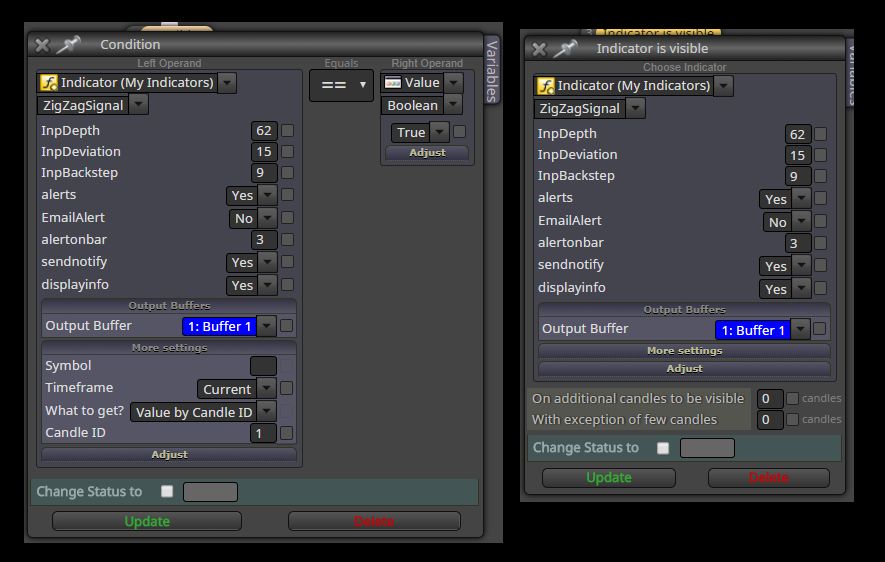
-
It appears that I have solved this problem. The arrows only show up when the condition is true and you will see these in the buffers (you can see these in the data window (under View/Data Window). They do not show up as objects (see fxdreema's tutorial on this below).
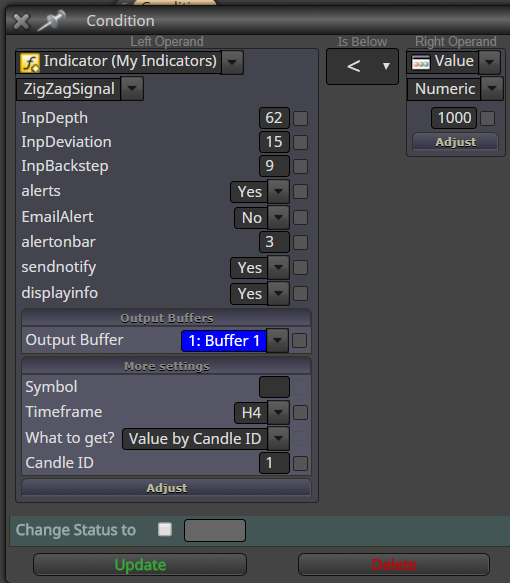
The correct way to do this is to load the indicator under "my indicators". Then this dialog box was the correct way to do it
-
The tutorial says this:
......................................................................................********#Arrows In Indicators (Interrupted Signals)
Some indicators don't print continuous lines. You have probably seen indicators with arrows placed here and there. How do they do that?
In the indicator's code there are instructions of how MetaTrader should draw the data from the buffers on the chart. Whether that data will look like a line, or like a histogram, or some kind of arrows or dots. Here are the possible drawing styles:
Drawing Styles for MetaTrader 4
Drawing Styles for MetaTrader 5
But we already know that each output buffer has as many elements (values) as many candles exist on the chart, and this is always true. So how do we show something only on certain candles? It's pretty simple, there is a special value that we can put in the buffer and when MetaTrader sees that value, it doesn't show anything on the chart for that candle. This value it called EMPTY_VALUE. This is a predefined constant and its actual value is the biggest possible integer value:
32 bit (MetaTrader 4): EMPTY_VALUE is equal to 2,147,483,647
64 bit (MetaTrader 5): EMPTY_VALUE is equal to 9,223,372,036,854,775,807
You can now imagine that if the output buffer is filled with EMPTY_VALUE all the way, you will not see anything on the chart.
Hint 1: In fxDreema, the Condition block would not pass if one of its operands equals to EMPTY_VALUE. This is because EMPTY_VALUE should be treated as something that does not exists, its name contains the word "empty" after all.
Hint 2: If you expect signals from an indicator who draws arrows and you don't have any, try to set Candle ID parameter to something bigger than 0. These indicators are normally giving you signals on an older candle, not in the current one. Try with Candle ID = 1.********
..................................................................................Since there is an empty value when the arrow does not display which means the value is > 1000 (actually 2,147,483,647 32bit), so when the arrow shows up, the value is < 1000. Hope that helps.
-
< 100 should be the same as > 0 in this case, because if any of the sides of Condition equals to EMPTY_VALUE, the block doesn't pass.
-
Thanks for the clarification!
