Help with Pending orders
-
Greetings,
I've been working with getting a pending order created that for buys, will place an entry order 4 pips below the close price of candle 01 and sells, 4 pips above the closing price for EUR/USD. I'm having trouble because I think I'm creating these properly but so far it's not entering any trades even though the orders are being created. Here are some images of my pending order setups for buy and sell. Please let me know if I'm doing something wrong for this to not open orders properly. Thank you so much!
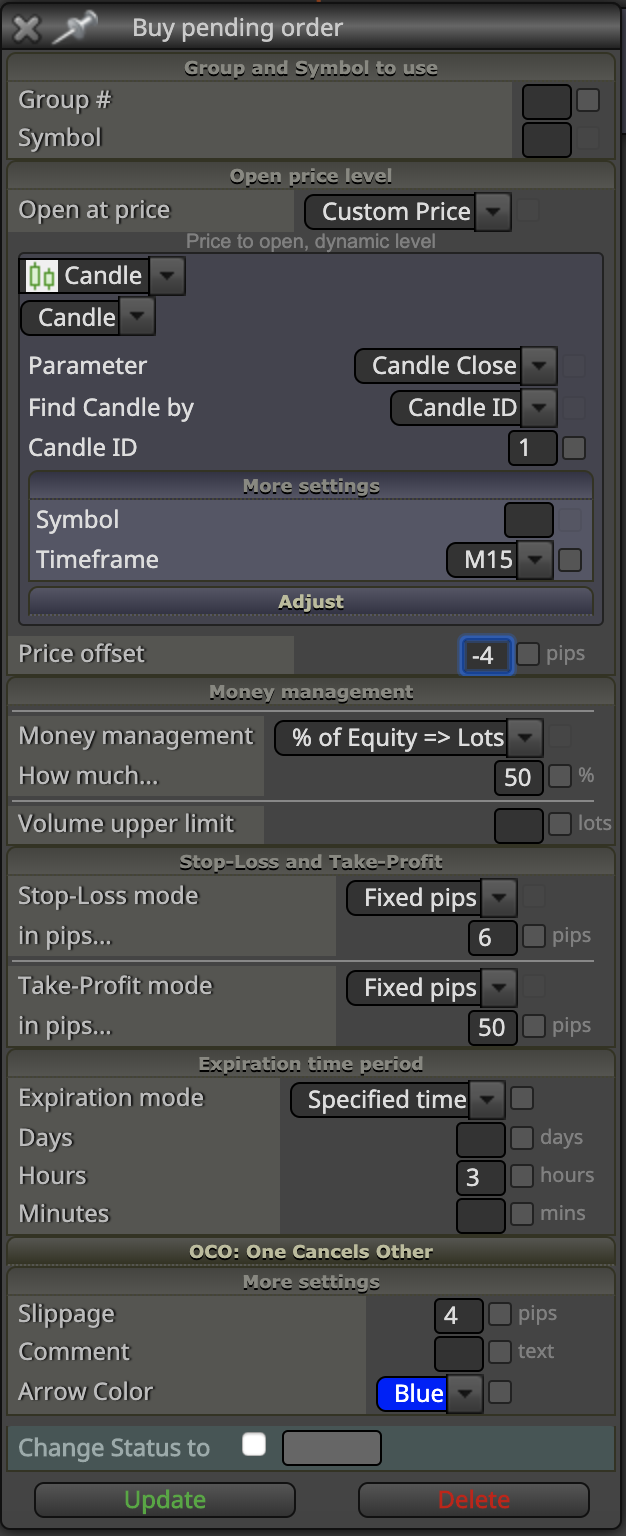
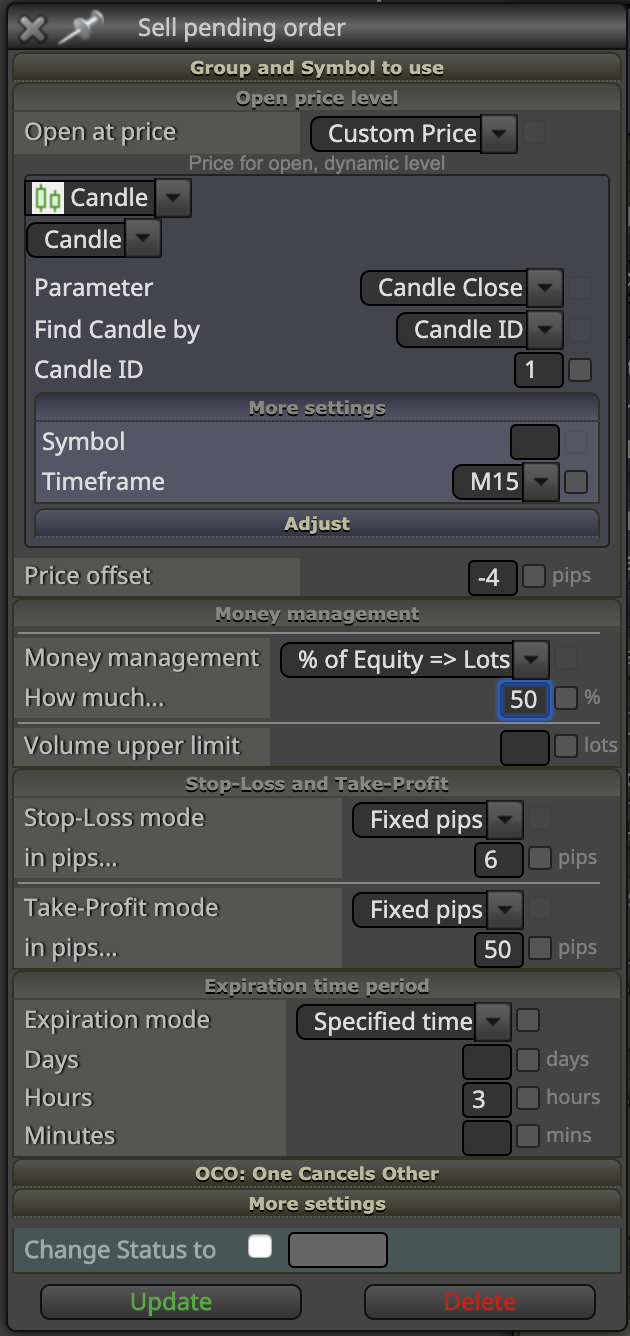
-
Open your terminal and go to the journal tab. There you will see the errors. I think it has to do with your brokers minimum pending order distance requirement.
-
Thanks for the quick reply. I'm with Oanda and I'm not seeing a minimum order distance with them from a google search. My Journal isn't going back far enough to show any errors. Something here isn't jiving with Oanda or I've built the pending order wrong, since there's been many opportunity for the orders to open but they haven't been.
If there's any other ideas, I'm greatly appreciative of the input. Otherwise I might abondon this idea since debugging it further is beyond my expertise.
-
Could you please share your project? Maybe there are other blocks interferring them.
-
Thank you so much for taking the time to look, here is a link to the project:
-
I don't think "Block 1" and "block 2" work. You'll need to name them first and second or simply 1, 2
-
Understood, when I have buy now blocks placed it works fine and opens trades. That's why I think the issue is with the pending order setup and not with anything above it. You guys have more experience and skill with fxdreema blocks than I do so if I need to change the block names, not problem, but previous trading shows me that the block switching seems to work even if named "Block1" instead of "1".
I really appreciate you taking the time to look and see if there's an issue, all the input I get is greatly appreciated. Thank you so much.
-
It seems that your "Once Per Bar" is messing up. You should put a "Once Per Bar" Block BEFORE every pending order.
I took it off and it was doing the trades. Reason it's not working, some of your conditions are working on the 0 candle so the chances of the condition being met at the beginning of your chosen bar will be rare.
-
Ok, I will put it right before the pending order instead of on top and try that out. Thank you!
-
If you also get a chance to look at the blocks I would greatly appreciate your feedback. Thank you!
-
I agree with what TitanGeirge says. Additionally, I do not recommend to use letters on the block ID number position. That can hinder the order in which trees are executed. Use numbers only. Looking at your project I'm not sure which one would be the first one to be executed.
Finally, blocks 2 and 3 are specified on candle ID 0 whereas many other condition blocks are working on candle ID 1, is it intended?
-
Thank you for taking a look! I'll make the block naming adjustment. Do the rest of the numbers matter as long as the lines are linked up in terms of numbering? I don't want to confuse the logic process by having a block numbered 131 after a block numbered 5.
The the reason I have the top condition blocks is that I want to change from buy to sell trees as the price is moving. This might not be necessary but I didn't want to track closed blocks but live prices. Hopefully that helps answer your question.
-
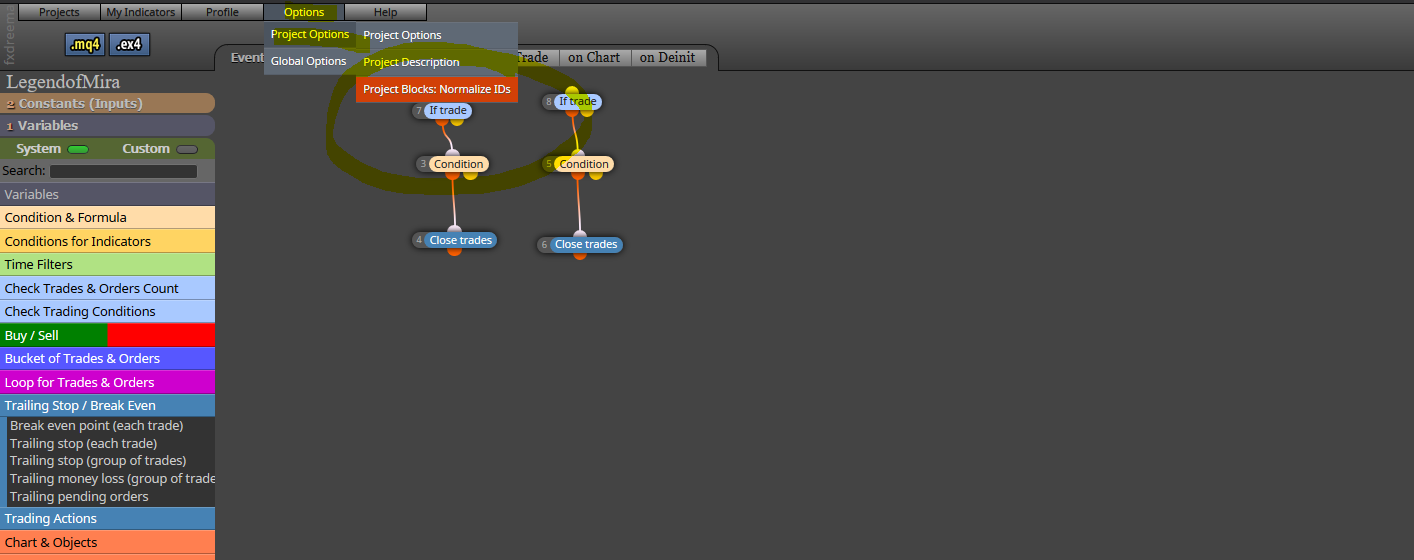
Choose this and it will do it for you. Then just make sure the top ones are in the correct order
-
Thank you for the help, very much appreciated! I'll let you all know how it pans out :))
-
I still recommend you to use candle ID 1 on ALL your blocks.
-
@l-andorrà great suggestion, I'll make that change as well. Thank you so much!