Multiple conditions in parallel (OR condition) for BUY orders
-
Hi there,
I've been struggling with this for quite a while and just couldn't get my head around what's going on here. I'm building an EA which is using the CCI indicator. When a BUY trade is opened, my EA should continuously monitor the values of the CCI: when CCI falls below a specified constant, the trade should be closed.
Let's suppose these constants are 75, 50, and 25. This means the EA would close the BUY trade the very moment CCI falls below 75, 50, or 25 the first time. If the upward trend is strong, CCI will rush up to approximately 100 and as the bullish momentum is fading away, CCI will reach 75 from above, thus activating the exit condition. In the case of a somewhat weaker bullish trend, CCI might rebound around 65 and reaching 50 from above, thus activating the second exit condition. The third exit condition (for CCI=25) is analogous.
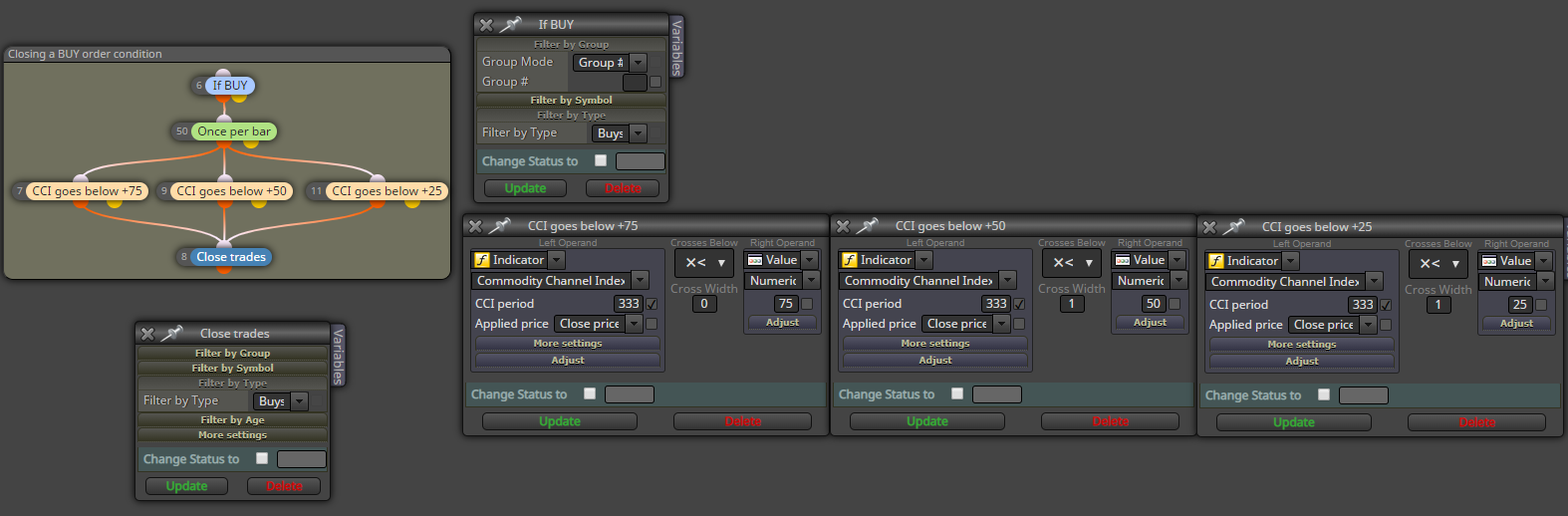
As you can see in the attached image, my idea was setting up an If Trade condition on top which is set to only detect if the trade is a BUY order, and then having the three conditions in parallel, i.e. as OR conditions. However, to my surprise, this didn't work out as I expected. Instead, only the rightmost (third) condition was activated to close the trades every time. Thus the EA doesn't seem to detect CCI passing through +75 from above and CCI passing through +50 from above.
I included the settings of each of my blocks too to give you a better understanding of what I'm facing.
Have you encountered this before? Am I wrong in my logic somewhere? Is there any other way you would solve this?
Thank you so much for your help!
-
You will have to see if you have set the CANDLE ID in the "Condition" block in order to specify in which candle the condition must to be checked out.
-
Thank you for your answer. Honestly, I don't see how that might affect my conditions and result in only the last one out of the three being evaluated but I'm yet a beginner in fxdreema so it might be that I overlooked something.

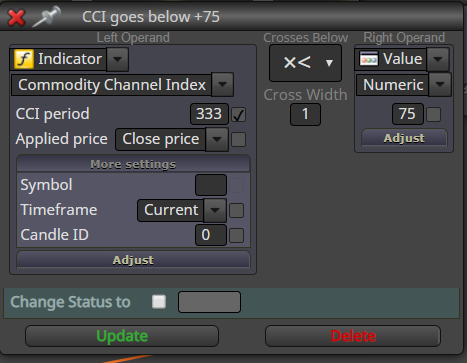
Here's a screenshot of the Condition block's settings. All the others are identical except for the threshold values (75, 50, 25).
-
Well, I was tinkering quite a bit by now and when I change all Candle ID values to 1, it does work. However, this implementation now differs from my original objective. I want to close the trade immediately when the CCI falls below 75 (or 50 or 25). Forcing the EA to only exit the trade after the candle is closed involves an unnecessary risk and an increase in drawdowns.
Here's an example to best describe why I wanted the Candle ID = 0, and how setting its value to 1 might hurt my trade:
Let's imagine a bullish trend gradually building up. My EA joins the bullish trend at some point, the value of the CCI is constantly increasing and is now somewhere in the range 80-90. Then, a sudden bearish sentiment breaks the trend and a long bearish candle appears, pushing down the CCI from, say, 85 to a mere 70. Ideally, I would want to exit the very moment CCI reaches 74.999 as that's my signal that the bearish momentum has weakened. However, with Candle ID set to 1, my EA is forced to wait until the end of the candle and face an already-too-low CCI and an already-too-low price value when closing the trade.
I hope it is clear. Does anyone have any suggestions on how to overcome this?
@fxdreema, is this implemented?
-
Candle 0 is still being formed. So the indicators values might change as well.
-
@leventecsibi
This is one of the simplest way : https://fxdreema.com/shared/MxS8fjy5 -
Yes, I know that. But that's the point. If the currently forming indicator falls below 75 at any point, I want out of the trade because that's enough signal for me that the trend has probably weakened.
It seems this can't be done via the terminal though. I'm wondering what else options I might have to solve this.
-
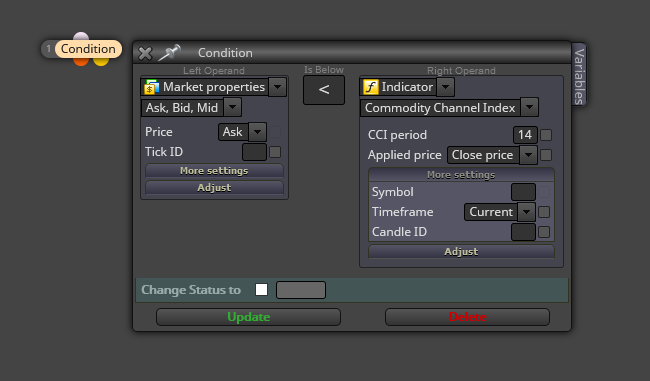
You can alway try this, but results can be very weird:
-
@l-andorrà
Are you sure the CCC indicator isn't plotted on the main window
 -
Ooops, you're right! XD
-
Hi @seb-0 , thanks a ton, I finally had time to check it out and it works perfectly. I also learned some new practices from your code (I'm still a newbie), so thank you for that as well!

