@Fadiodeh :+1
A
Posts made by ambrogio
-
RE: Total loss reached - close tradesposted in Questions & Answers
please, show what's inside the blocks
-
RE: Unable to enter variable in formula block, when I click update it says must insert variableposted in Questions & Answers
right click inside the box, then click on variable name
-
RE: Convert MQL4 to MQL5posted in Questions & Answers
compile it directly by clicking on .ex5 button on the builder page
-
RE: %50 Candleposted in Questions & Answers
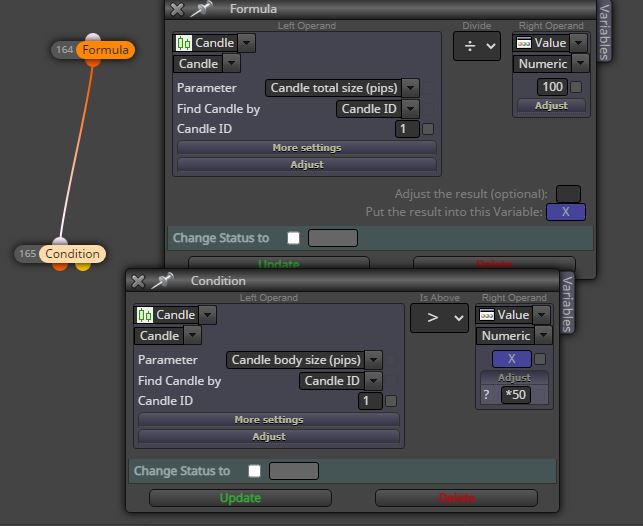
@Mehran91 dividing by 100 the total size and put the condition for body size
-
RE: NOT ENOUGH MONEYposted in Bug Reports
"Not enough money" is not a bug.
You are drained your margin. -
RE: BUY+SELL Break Even Pointposted in Questions & Answers
@Pheaktra-Capo said in BUY+SELL Break Even Point:
Sell Volume is bigger than Buy Volume.
The range Sell price is 1855 to 1860
and the range Buy price is 1845 to 1850.
How can 1871 that is higher than the sell bucket can make a BEP?Since the highest Sell price is 1860, so the more price rise, the more drawdown will be made
Let me make an example this way: when we are at the level of the first sell, the bucket of buys is very positive, this is because the buys trade starting at lower price of sells and as the price rises these buys increase more and more, in the meantime the sells you find along the way erode this gain up to zero profit /loss. Just below 1871 you will be positive, just above 1871 you will be negative.
-
RE: Check consecutive lossesposted in Questions & Answers
@alok said in Check consecutive losses:
@PhiLykia Hello friend this way ta checking the 3 errors >>>>>without making the entries,?<<<<< and entering the next sign,? and resetting after 1 gain? Thanks! The entries of my Robot are computed in 5 minutes expiry
I enter here only for a suggestion: I understand that you want to "simulate" three consecutive losses. I think it can be done like this for example:
1- when buy opening condition is triggered, get the time and the price
2- after 5 minutes (your expiration time) take the current price, if it is lower than the entry price we increase the loss variable +1
3- if the second simulation will be in profit, then reset the loss variable
4- after three consecutive loss increments you open the trade you want and reset the loss variable -
RE: Drawing lines at specific round numbersposted in Questions & Answers
@tec-nacks exactly
Be sure that the "pass n times" must be executed AFTER the "pass once" block
And remember to reset these blocks somewhere -
RE: expert propertiesposted in Bug Reports
compilation error. Click on the .ex4 button of the builder and probabily you get some mistake
-
RE: Drawing lines at specific round numbersposted in Questions & Answers
@cyberspace this is a little example to draw 4 lines, you have to play around depend on your needs
-
RE: Drawing lines at specific round numbersposted in Questions & Answers
@cyberspace you have to move "draw line" from "on chart" to "on tick" section.
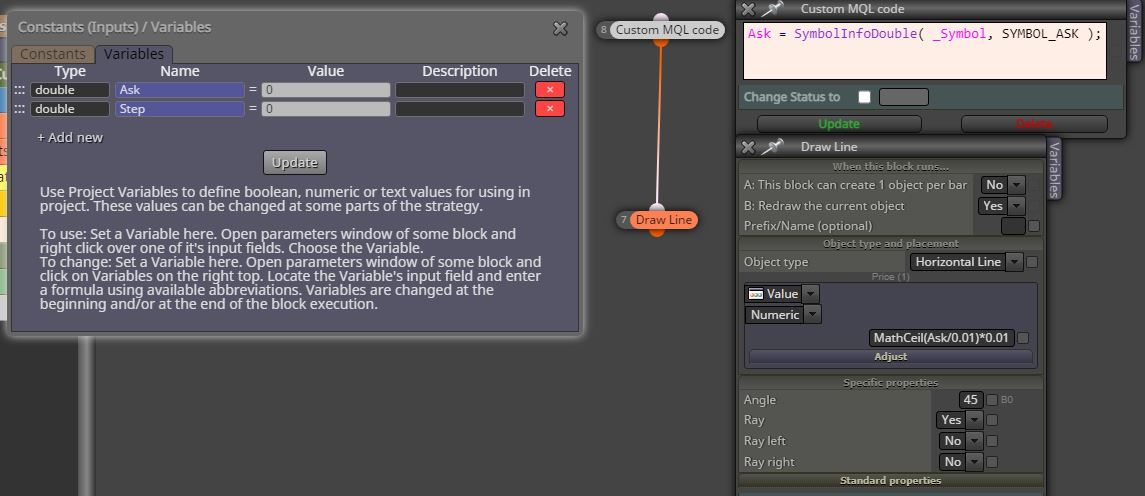
And yes, you are right, it doesn't work because we are on MT5 and not on MT4. I found something on the mql5 site, you have to assign the ask and bid value in MT5, like thishttps://www.mql5.com/en/forum/372442/page2#comment_33008806
-
RE: Drawing lines at specific round numbersposted in Questions & Answers
It works for me, otherwise I wouldn't have posted. Please share your attempt that doesn't work
-
RE: How to use the If Condition for Lines?posted in Questions & Answers
@tec-nacks you can use something in "on chart" section, or loop for object in "on tick"