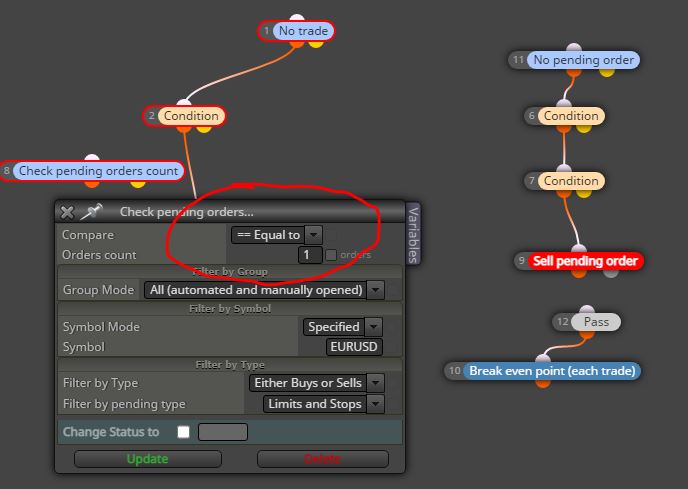
@bussy add a "no trade" block at the top. When this trade will be closed, another one pending order will be placed
A
Posts made by ambrogio
-
RE: fxdreema EA not workingposted in Questions & Answers
-
RE: fxdreema EA not workingposted in Questions & Answers
@bussy said in fxdreema EA not working:
Your blocks #4 and #8 are searching for a pending order, so does'nt pass to next block. Try this way (example for sells side)
-
RE: AWESOME OSCILLATORposted in Questions & Answers
@sonnybatet-0 said in AWESOME OSCILLATOR:
@ambrogio so how do one achieve what he wants bade on your explanation?
Here is how Awesome Oscillator is calculate and some suggestion to use it.
https://currency.com/how-to-read-and-use-the-awesome-oscillator-trading-indicator
https://www.ig.com/uk/trading-strategies/a-traders-guide-to-using-the-awesome-oscillator-200130 -
RE: Fractal fake out / breakposted in Questions & Answers
@aydnthorley-0 this happens because the fractal works on candle ID2, rarely on candle ID3 also, so you should change the value of fractal candle ID 1 to candle ID 2
-
RE: How to upload Tradingview Indicators for Custom Indicatorsposted in General Discussions
@burakthesecond you can't load Tradingview indicators in Fxdreema because they are written in the proprietary Pinescript language, you should convert them to mql language first, is it worth it?
-
RE: Buy when the indicator is green and sell when the indicator redposted in Questions & Answers
@lekan4forex sorry there was an oversight on my part, the right buffers are #4 and #5
https://fxdreema.com/shared/F2BEo08Fc -
RE: Buy when the indicator is green and sell when the indicator redposted in Questions & Answers
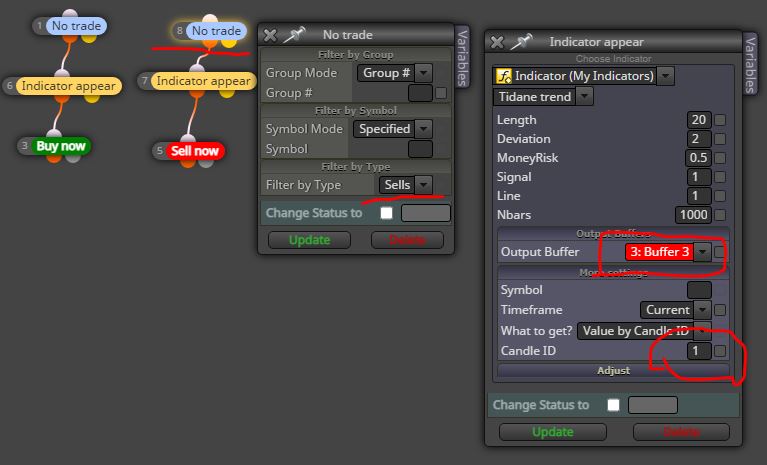
@lekan4forex this is for sells side. For buys side use buffer #2
-
RE: Buy when the indicator is green and sell when the indicator redposted in Questions & Answers
@lekan4forex use "indicator appear" block, buffer #2 for buy, buffer #3 for sell
-
RE: Why am I getting loss trades because trades are not closing at 2 MAs crossing?posted in Bug Reports
@veetee sorry if i disturb, have you tried the project that i linked above?
-
RE: Drawing Line from Candle High to Candle Highposted in Questions & Answers
@pipologist you are using candle ID 0 , this is wrong. Try candle ID 1 to candle ID 2
-
RE: Nothing shows up when I import my Indicatorposted in Questions & Answers
@fix i'm sorry, doesn't work
-
RE: Nothing shows up when I import my Indicatorposted in Questions & Answers
@fix nothing to do for me (i'm not a coder), this indicator doesn't show on chart and get error in MT5 backtest also.
-
RE: Nothing shows up when I import my Indicatorposted in Questions & Answers
@fix have you follow the guide? https://fxdreema.com/documentation/builder/indicators
Otherwise please upload your indicator here, i'll take a look at it
-
RE: new next trade open after close candle...posted in Questions & Answers
@hiten7405 put a "once per bar" at the top
-
RE: Trouble with setting up the RSI signal?posted in Questions & Answers
@piotras10000 change above/below with cross up and cross down x> x< ?
-
RE: Buy stopposted in Questions & Answers
@tree-0 pending orders and stop losses do not work on spikes of Boom & Crash. You will always find the entry price of your pending order at the end of the spike
-
RE: BOT making any trades on trades on metatrader 5posted in Questions & Answers
@khuliso22 otherwise share here your project or a simple part of it
-
RE: BOT making any trades on trades on metatrader 5posted in Questions & Answers
@khuliso22 it is very difficult for the admin to notice your topic. Check if there are any error messages in the journal tab or expert tab
-
RE: EA doesn't workposted in Bug Reports
@abbas25 Ok, in fact now I seem to remember that all the products of the market work only on the terminal on which they were downloaded.