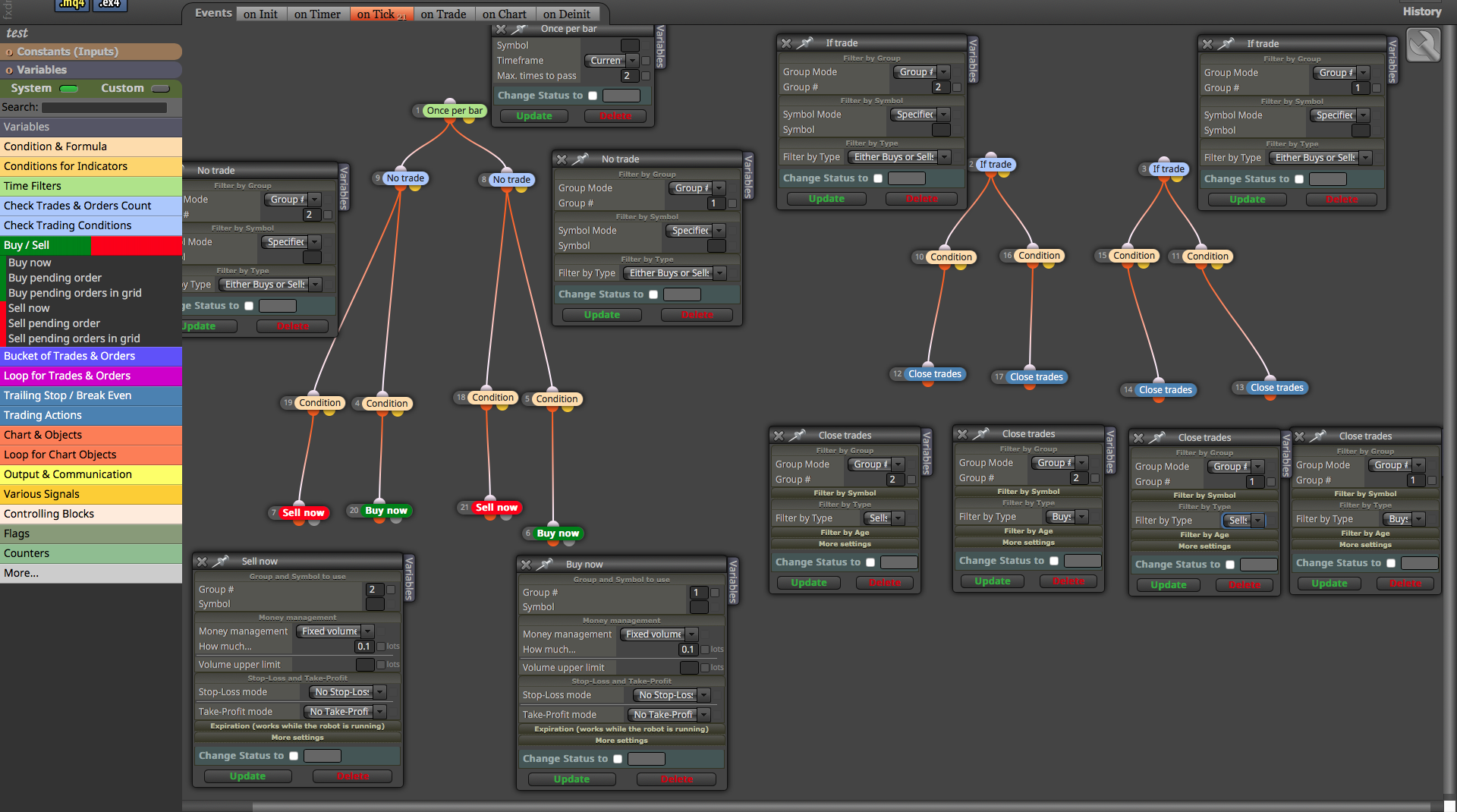
@biztet You are right, in fact this problem does not happen often, but it does happen. It probably happens that you have the closure active on the candle ID1 X < while the opening is already active > (maybe on long candles), so it opens and closes infinitely many times
A
Posts made by ambrogio
-
RE: Simple Condition. Is there a bug? Or did i missed anything?posted in Questions & Answers
-
RE: Simple Condition. Is there a bug? Or did i missed anything?posted in Questions & Answers
@biztet (already happened to me long time ago) in case you use the indicators, it is always better to put the same type of sign for the opening and for the closing of trades (same but opposite signs: < and > , or x< and x>), as roar suggested. This avoids these types of problems.
-
RE: Gridding systemposted in Questions & Answers
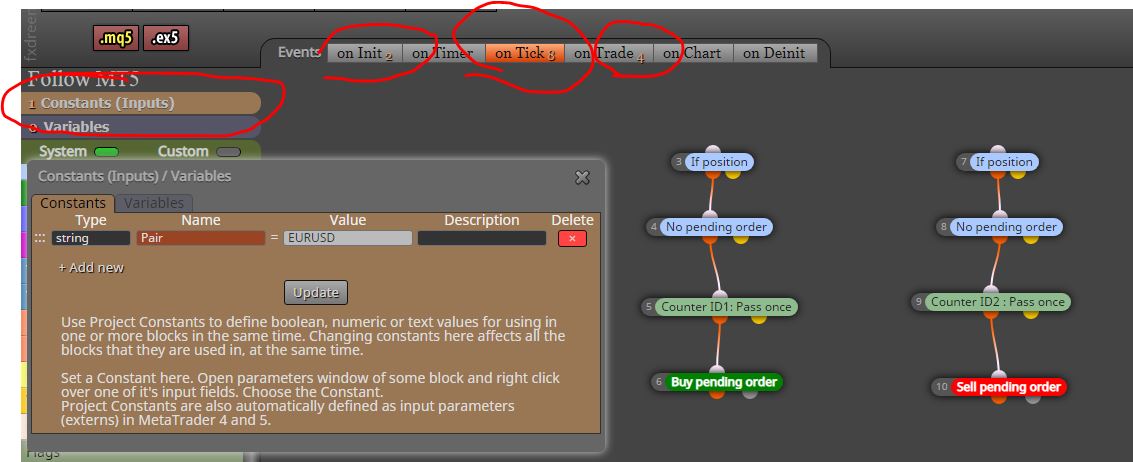
@ramimoujaes No matter what chart you attack it on, it will handle the trades of the pair you put in the input table.
For example : if you put the new EA on AUDCAD chart and you select Pair = EURJPY like your picture above, it will checking the trades on EURJPY.
Please, try it on demo. -
RE: How to open a new trade if existing one still active ?posted in Questions & Answers
@saeed-2 Oh this kind of things are a little complicated for me, sorry
 , maybe someone like andorrà or roar definitely solves it.
 -
RE: Gridding systemposted in Questions & Answers
@ramimoujaes Hello, here's what I would do
https://fxdreema.com/shared/g4rybnvYCheck all blocks to understand and let me know
-
RE: fxDreema Last Update Errorposted in Bug Reports
@cheaponreay01 It seems to me that you have attempted to insert the news filter by following this topic, it's right? Then read it well, maybe there are some mistakes.
https://fxdreema.com/forum/topic/5866/finally-integration-of-news-filter-mt4-only?page=1
-
RE: How to open a new trade if existing one still active ?posted in Questions & Answers
@saeed-2 please, can you share your project?
-
RE: How to open a new trade if existing one still active ?posted in Questions & Answers
@saeed-2 said in How to open a new trade if existing one still active ?:
so by using once per bar the connections between blocks will be like this .. correct ? Maximum times to pass ( 2 ) because i need only two active trades
If you put one per candle and specify passes 2 times, he puts two orders on the same candle, and then another two on another candle if the condition is met. Is that what you want?
also a question sir .. i want to specify 12 pair currency only .. each with different parameters .. so in this scenario two things i need to follow:
- If trade / buy now & sell now / no trade .. Symbol mode ( specified ) and i fill in the specified symbol ( lets say EURUSD )
Note ... if the account is standard and using "m" like EURUSDm .... if i specified in symbol (EURUSD) the EA will recognize the pair ? or i need to add "m" ?
I don't know, just try
- i need to have 12 different structure combination connection same as the attached picture .. each with different parameters and specified symbol ?
Note .... Group # ... since i will have 12 difference structure and each with specified symbol .. do i need to have 24 Group# in total since each structure needs two .. or since each structure is specified by certain symbol i can use only group# (1) and group #(2) ?
I've never worked on multipairs, I think there are some blocks to simplify the project like "set current market" or something like that
-
RE: My Best Result Ever, Check this out guys.posted in Questions & Answers
@miki oh yes, they have recently launched new name and products from binary.com
-
RE: My Best Result Ever, Check this out guys.posted in Questions & Answers
@miki said in My Best Result Ever, Check this out guys.:
I don't have that index on my platform

Hi, it's a synthetic index of Deriv broker
-
RE: My Best Result Ever, Check this out guys.posted in Questions & Answers
@lanrayy good! wich indicator are you using?
-
RE: How to open a new trade if existing one still active ?posted in Questions & Answers
@saeed-2 it is not correct, also the "if trade" block must recognize the trades by group number.
Anyway, may be that we are complicating things, what is your strategy? if you have only one strategy that repeats you can use "ounces per bar" block. -
RE: Gridding systemposted in Questions & Answers
@ramimoujaes 1. you can use a "pass once" block before "buy pending order" block. This "pass once" should be reset somewhere.
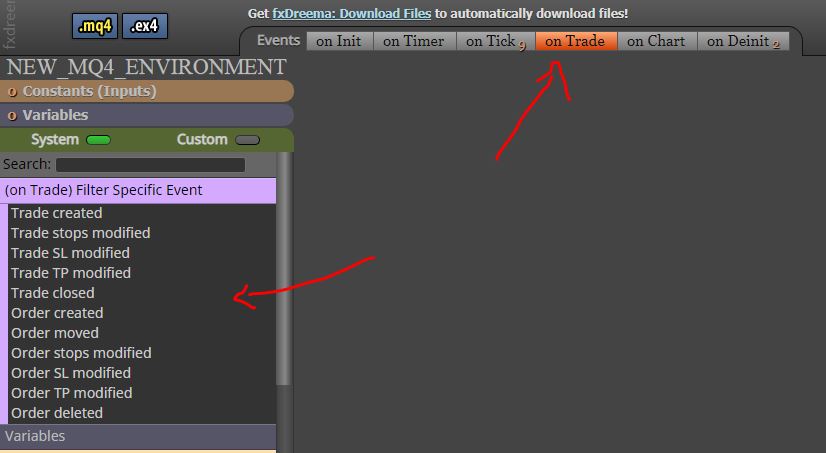
2. in "on trade" sheet .........."trade closed" (by tp or sl ) ===>>delete pending order -
RE: Password protect an EA, or Work only for 1 MT4 ID. HoW?posted in Questions & Answers
@jsauter86 The answer is this: if you need to protect your job (your EA) you have to share the executable file .ex4 password protected only (the one you put in the source code), maybe I'm explaining badly. Let me know..
-
RE: How to open a new trade if existing one still active ?posted in Questions & Answers
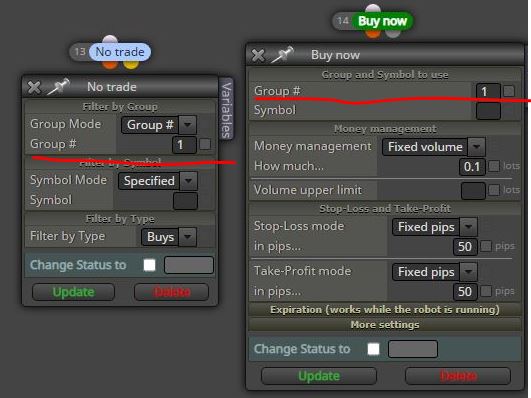
@saeed-2 you can use the "group" and you have to handle them separately for each strategy
-
RE: Password protect an EA, or Work only for 1 MT4 ID. HoW?posted in Questions & Answers
@jsauter86 If you are able to import the file into fxdreema or metaeditor, it means that you have the .mq4 file (the source code), so you have already passed an unnecessary password.
-
RE: Gridding systemposted in Questions & Answers
@ramimoujaes said in Gridding system:
Greetings @ambrogio ,
Thank you for your response. I just have two small questions:
- Based on the image above, the "New EA" will open only one single pending order, correct?
- In the image above, if I did not specify EUR/USD, will it then work on all currencies?
Shared Project:
https://fxdreema.com/shared/sdp0Q2itb
Sincerely
- Yes, one pending order only. If the pending order will be triggered another pending order will be opened
- If you do not specify the market, the new EA will only check the symbol on which it is attached (it's not what you need)