fxDreema

    • Register
    • Login
    • Search
    • Back to the main page
    • Categories
    • Recent
    • Tags
    • Popular
    • Search
    1. Home
    2. Bogdaiki
    B
    • Profile
    • Following 0
    • Followers 0
    • Topics 12
    • Posts 32
    • Best 0
    • Controversial 1
    • Groups 0

    Bogdaiki

    @Bogdaiki

    -2
    Reputation
    394
    Profile views
    32
    Posts
    0
    Followers
    0
    Following
    Joined Last Online

    Bogdaiki Unfollow Follow

    Best posts made by Bogdaiki

    • Automatic Stop for the day and Restart next day

      Hello,

      Is there a way to automatically stop the EA for the day (say at a percentage of profit hit) then restart next day?

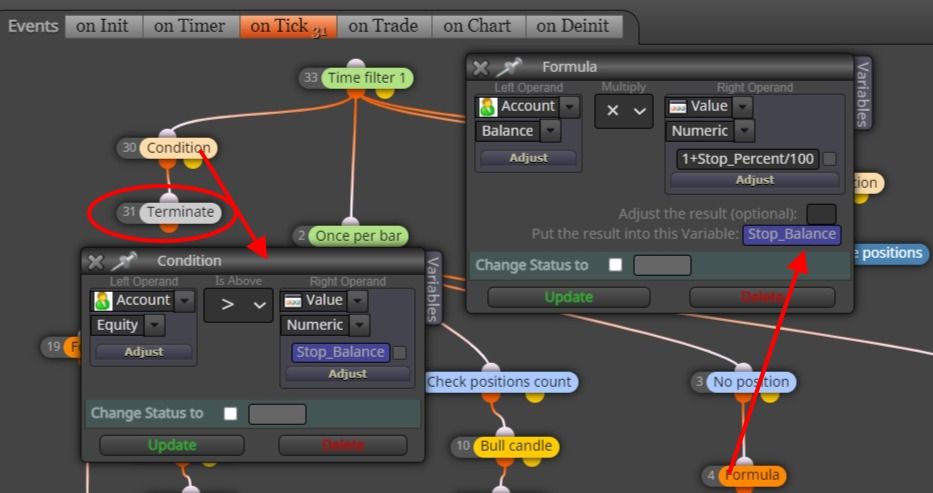
      I can only do this with the Terminate function (with a Variable setup and a Once a Day condition to close all trades when Variable value is hit) - but would have to restart manually next day.

      The problem is we can't backtest this..

      Any suggestion would help. Thank you!

      B

      screenshot-fxdreema.com-2023.09.18-14_46_26.jpg

      posted in Questions & Answers
      B
      Bogdaiki

    Latest posts made by Bogdaiki

    • RE: CLOSE ALL TRADES AT A PARTICULAR TARGET

      @Bogdaiki said in CLOSE ALL TRADES AT A PARTICULAR TARGET:

      @jstap said in CLOSE ALL TRADES AT A PARTICULAR TARGET:

      @Bogdaiki of cause you can... buy why...

      To stop trading for the day then resume next day.
      Because I'm thinking in your example above all trades would close when profit is hit, then continue trading during the same day.
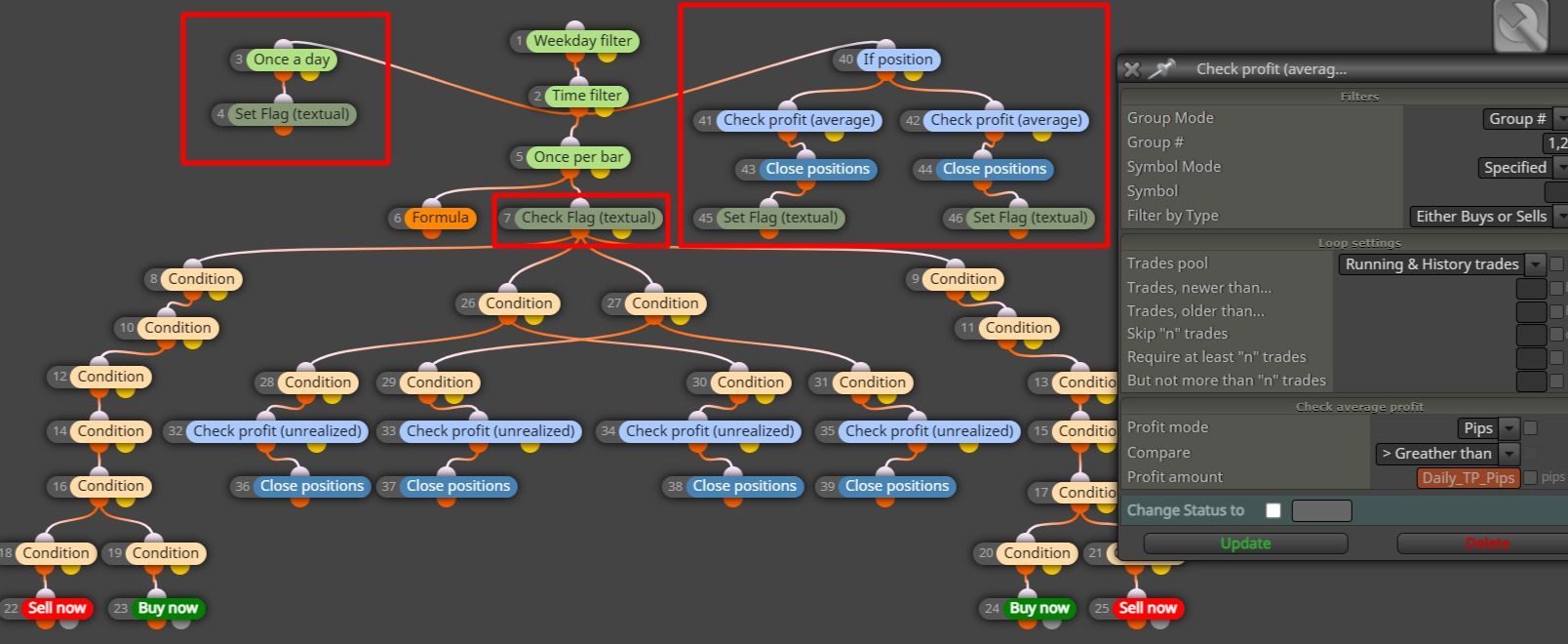
      I also need to count TP and SL in pips, so I use Check profit (average), because Check profit (period of time) is doing it in Money only..
      But maybe I'm wrong in my assumptions ๐Ÿ™‚

      In that case your solution it's much cleaner and shorter - thank you ๐Ÿ‘ ! Wondering how to make the Profit target for the day in pips instead of money though..!
      I have it like in the imgage but have to test if the Profit resets to 0 next day.. (I'm not sure).
      Bo-StoTactics-Cond-Day--01-11-2026_06_25_PM.jpg

      posted in Questions & Answers
      B
      Bogdaiki
    • RE: CLOSE ALL TRADES AT A PARTICULAR TARGET

      @jstap said in CLOSE ALL TRADES AT A PARTICULAR TARGET:

      @Bogdaiki of cause you can... buy why...

      To stop trading for the day then resume next day.
      Because I'm thinking in your example above all trades would close when profit is hit, then continue trading during the same day.
      I also need to count TP and SL in pips, so I use Check profit (average), because Check profit (period of time) is doing it in Money only..
      But maybe I'm wrong in my assumptions ๐Ÿ™‚

      posted in Questions & Answers
      B
      Bogdaiki
    • RE: CLOSE ALL TRADES AT A PARTICULAR TARGET

      @NZEFILI you can also "terminate the bot for the day, then resume the following day" with Set Flag and Check Flag.

      • Once a day you Set Flag (textual) to ON
      • Then Check Flag to be ON to run your system
      • If your Take Profit target is met, Close all Positions and set a separate flag Set Flag to OFF. Trading will stop and resume next day when the flag is reset to ON again.
      posted in Questions & Answers
      B
      Bogdaiki
    • RE: Optimization speed improvements

      Thank you all for your inputs!
      @l-andorrร  how much would one charge to rebuild something like I show in the screenshot? Everything is based on an indicator native to MT5, with some candle conditions and calculates the balance every day, taking profits or stopping losses using a variable set percentage.

      posted in Questions & Answers
      B
      Bogdaiki
    • RE: What is executed first, "On Tick" code or "On Trade" code when trade happens?

      The number of each block might determine what goes first.
      (At least that's how it works under the same tab)
      You can edit those.

      screenshot-fxdreema_com-2024_10_15-16_42_17.jpeg

      posted in Questions & Answers
      B
      Bogdaiki
    • Optimization speed improvements

      Hi everyone,

      I've wrote and been using this EA successfully for the past year, but large optimizations take v long time, even on a 24 cores, 32 threads i9 new laptop. Although it's a huge improvement (over 10 times faster, so now I can do 24h instead of 10 days!), I'm looking for ways to improve the code.

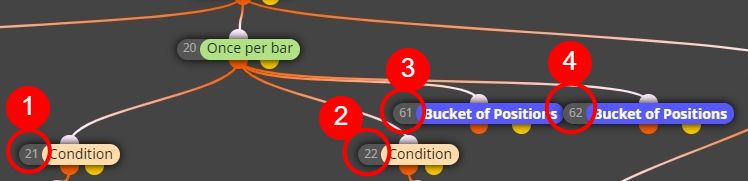
      I saw a recommendation to edit the code and take out of the onTick stuff like once a bar conditions, do labels instead of comments, etc. I'm not sure about what goes where in the code, that's why I'm using this awesome fxdreema platform.

      So I'm wondering if I could change around some pieces of my project and place them under different events (tabs) other than onTick.

      Can you advise on what could go under onInit or onTimer or onTrade, etc...? Would that make a difference, or, since they are under Once per bar / Once a day blocks, they would not be called every single tick?

      Thank you!

      ![alt text](screenshot-fxdreema_com-2024_10_15-16_08_48.jpeg image url)

      posted in Questions & Answers
      B
      Bogdaiki
    • RE: EA Optimization pass result is different when I backtest it

      I experienced the same issue with the optimization results showing different (more) profits than the actual single tests and different drawdown, sharpe ratio and all the other values.
      For me the problem was starting the optimization on a Saturday, when the markets are closed and it looks like my broker is feeding different tick values into MT5 over the weekend. Once the market opened I reoptimized and then the single test are showing the same profits and values as the optimization list.
      I don't know why the tick data is different though, maybe someone has more knowledge and can shed some light on this issue..

      posted in Questions & Answers
      B
      Bogdaiki
    • RE: undo function

      How far back can we go though?.. I made a bunch of bad changes, would like to go back to yesterday's version, but I'm limited to only about 15 steps back :(...

      posted in Questions & Answers
      B
      Bogdaiki
    • Can we code custom criteria for optimization using fxDreema?

      Hi,

      I'm looking to get the Equity Drawdown Relative (in % and $) in my optimization report (or include it in a custom optimization criteria), instead of the Equity Drawdown Maximal that MT5 is using by default. So can we code this using fxDreema?

      The reason is I'm using dynamic lot sizes (which increase based on Balance) and so the Drawdown % and Recovery Factor become irrelevant for my EA optimization, because they are based on the Maximal DD.

      Thanks.

      posted in Questions & Answers
      B
      Bogdaiki
    • RE: Check Profit and Stop EA a Day

      With a formula for checking Equity > Balance Take Profit Target and flags for trading (only if ON).
      Set the flag to ON once a day and to OFF when you hit the target (it will reset next day).

      posted in Questions & Answers
      B
      Bogdaiki