@jstap I also tried to use the average profit but by setting a negative value, the operations are closed immediately (as a loss), as the first operation is negative for ex. 50 pips opens the second trade and when it is +30 pips it should close both trades.
C
Posts made by Crisfx
-
RE: Same TP multiple tradesposted in Questions & Answers
-
RE: Same TP multiple tradesposted in Questions & Answers
@jstap In the same chart, when one operation is negative and one positive, how do I set up a closing of both with average profit?
-
RE: Same TP multiple tradesposted in Questions & Answers
@jstap Since I can't find a solution, how should I follow my first screenshot posted to close the 2 trades when X pips profits from the second trade? (The old is negative and the new is positive)
-
RE: Same TP multiple tradesposted in Questions & Answers
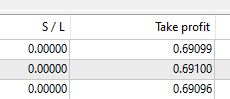
@paiz @jstap Unfortunately the trailing stop is not good because it continues to move the tp. It seems absurd to me that a TP cannot be set for all trades from the price of the new trade (opened thanks to pips away) and not from the market price, which can change in an instant, in fact the TP is not always the same for all trades opened. As you can see from the photo in this case the values are different, sometimes it changes even by 1 pips, it can happen that one of the trades takes the Tp and others don't, it doesn't have to happen.
-
RE: Same TP multiple tradesposted in Questions & Answers
@cedietradermax What setting should i have to select next?
-
RE: Same TP multiple tradesposted in Questions & Answers
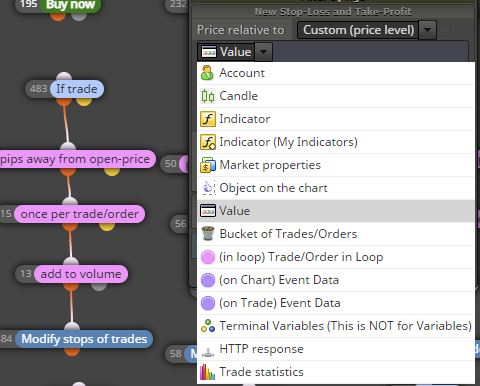
@jstap Set as in the picture, everything already works correctly. If it opens at 1.10000 in buy, the price drops and opens at 1.09300 with another buy with the photo blocks. However, when the TP of both is changed (modify stops of trades) it is not always set at the same price. It happens 1-2 times out of 5. Do you know why?
-
RE: Same TP multiple tradesposted in Questions & Answers
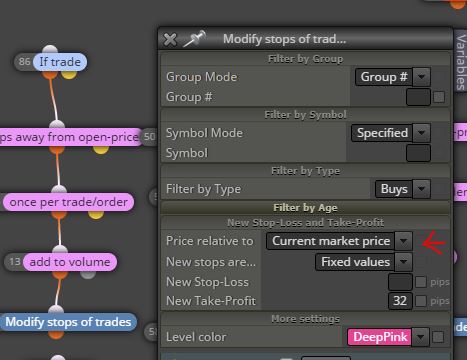
@jstap The problem is the market price, the pink modify stops also uses it. Is there a way to open the second trade (with pips away) using the new TP from the opening price and not the market price? Sometimes it happens that the TP is not the same for both trades, probably because in that thousandth of a second the price moves and the block takes the new market price and not the opening price of the trade!
-
RE: Same TP multiple tradesposted in Questions & Answers
If you have another solution to do the same it is welcome
-
Same TP multiple tradesposted in Questions & Answers
Hello, I'm having trouble getting the take profit of 1 or more trades set at the same price. The logic is this: when the condition is right, the expert opens a buy or sell trade. If the trade goes negative after x pips opens another trade and adds volume (not exactly martingale), then the TP of the new and parent trade is changed to a preset number at this point. The problem is that "the new TP" is not always the same for both trades, I don't know if it depends on the spread or the volatility of that moment, I think the problem is the "market price" setting, you cannot set to change the new take profit FROM the new trade opening price?
-
RE: Set stop loss on equity %posted in Questions & Answers
@jstap That's to restart the expert right? For the equity stop loss with bucket condition is constantly updated? (with profit sum)
-
RE: Set stop loss on equity %posted in Questions & Answers
@jstap Perfect now works, instead of putting a positive number from 1 to 100 as a percentage I have to insert a complete negative number (ex. -1000). For information, how is the logic of the set flags I see?
-
RE: Set stop loss on equity %posted in Questions & Answers
@jstap Forgive me but I really can't figure out what exactly I have to do. I've been using fxdreema for 10 days , isn't there an easier way to do what I asked? Or maybe show me? Thanks
-
RE: Set stop loss on equity %posted in Questions & Answers
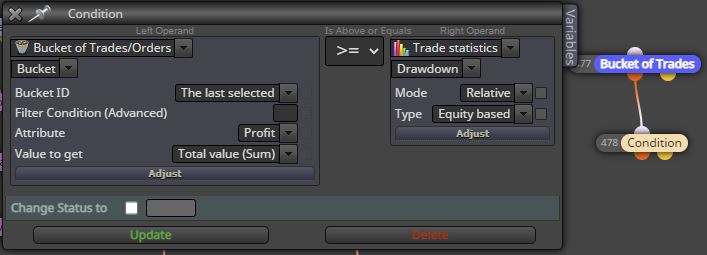
@jstap And how i can set a number to close all trades in this way?
-
RE: Set stop loss on equity %posted in Questions & Answers
@jstap Thanks, if possible i want the more simple way. Client can set his % of equity SL with a constants like my first photo.
My idea is: the customer write a number from 1 to 100 for the stop loss in the input parameters, when the balance take SL, the expert (with terminate blocK) will stop and an alert will appear. How do you get the expert to restart and calculate the new equity and set a new stop loss based on the new equity?
Ex. balance 10k, he put 20 in stop loss input. At 8k it close all trades and stop the expert. But what is stopped? Autotrading button? Or is the expert removed from the chart directly? How to restart it and how to set a new drawdown stop loss with a new equity? -
Set stop loss on equity %posted in Questions & Answers
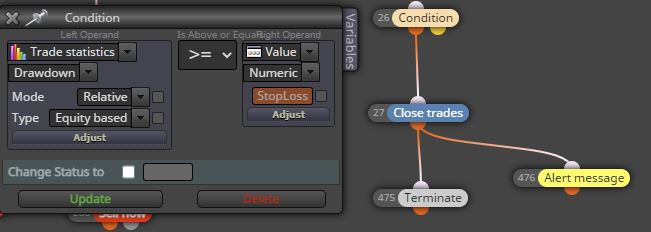
Hello, I would like to understand how to close all trades once a Drawdown% is reached. Using the formula you see in the attached photo it works but for the first time, as soon as the stop loss is touched, all next operations are closed immediately. How do you get the expert to update the equity?