fxDreema

    • Register
    • Login
    • Search
    • Back to the main page
    • Categories
    • Recent
    • Tags
    • Popular
    • Search
    1. Home
    2. Darrow
    D
    • Profile
    • Following 0
    • Followers 0
    • Topics 2
    • Posts 20
    • Best 0
    • Controversial 0
    • Groups 0

    Darrow

    @Darrow

    0
    Reputation
    256
    Profile views
    20
    Posts
    0
    Followers
    0
    Following
    Joined Last Online

    Darrow Unfollow Follow

    Latest posts made by Darrow

    • RE: Modify pending order after condition met once

      @l-andorrà Thanks for your recommendation. I have changed the MA_cross variable to two boolean variables, namely 'MA_cross_buy' and 'MA_cross_sell'.
      This is the updated project:
      https://fxdreema.com/shared/WjmtonxDb

      For point 2, I have tested the EA and I get the same outcome.
      0_1601816811312_Pic 21.PNG
      I believe this is because variable 'MA_cross_sell' is not able to be reset back to 'false' after the 'if trade' condition is met.

      The EA bought at 03:00 and closed with SL at 03:12. There is a 12 mins window for the EA to detect any trade (the 'if trade' condition) and then reset the 'MA_cross_sell' to false.
      This is quite odd. What do you think could be causing the error here?

      posted in Questions & Answers
      D
      Darrow
    • RE: Modify pending order after condition met once

      @l-andorrà The logic seems alright but it still did not work out the way i want it. My project:
      https://fxdreema.com/shared/ZPsLbKjAb

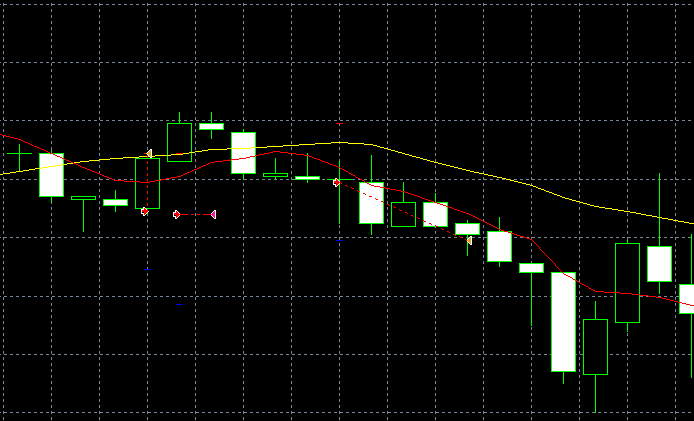
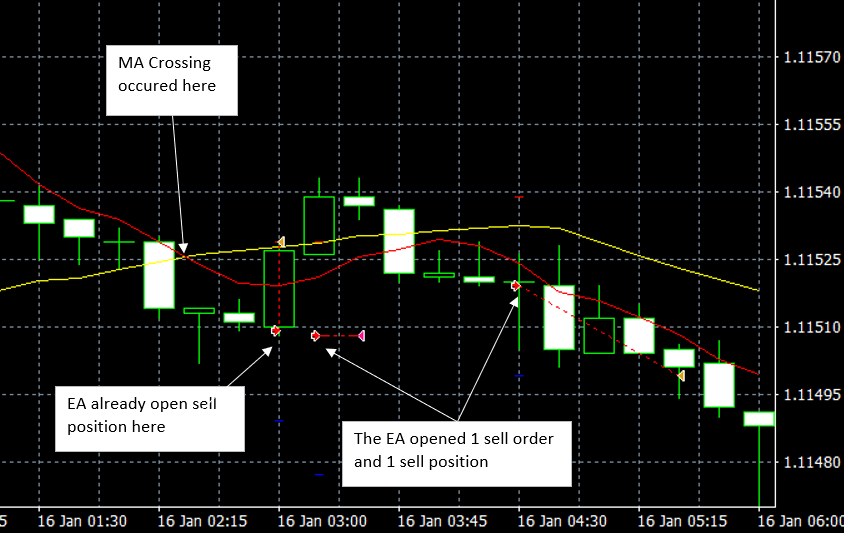
      In this example: Selling signal detected at 2020.01.16, time 03:00

      1. Expectation: The EA to open an sell stop order based on previous low.
        Reality: The EA opened an sell position instead.
        0_1601690279660_Pic 17.png

      2. Expectation: There should not be any more sell order to be created after the sell position at 03:00. According to 'If trade' logic, the variable 'MA_cross' would have been turned to 0.
        Reality: The EA still opened a sell stop order/sell position as if 'MA_cross' is still in value 2.
        2 sell order/sell position opened, as shown.
        0_1601695024968_Pic 19.PNG
        0_1601695066046_Pic 20.png

      posted in Questions & Answers
      D
      Darrow
    • RE: Modify pending order after condition met once

      @l-andorrà All the while, I am using a buy setup as an example. The reason I set 'MA_cross' to 2 because I am going to use the same variable for selling signal.
      This is the updated project:
      https://fxdreema.com/shared/5sVJ5wWeb

      0_1601607617783_Pic 16.PNG
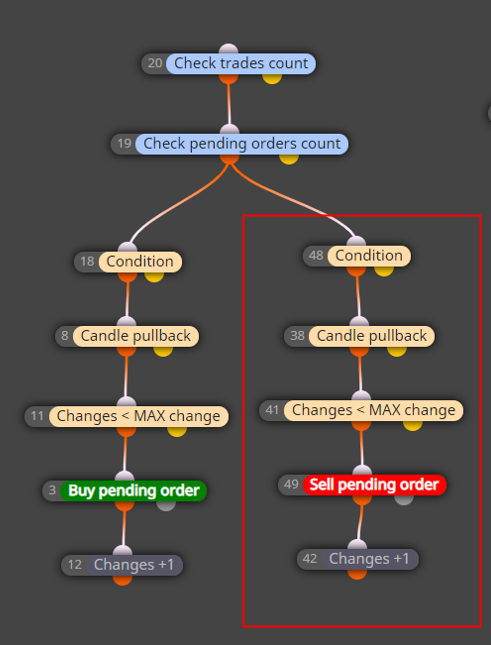
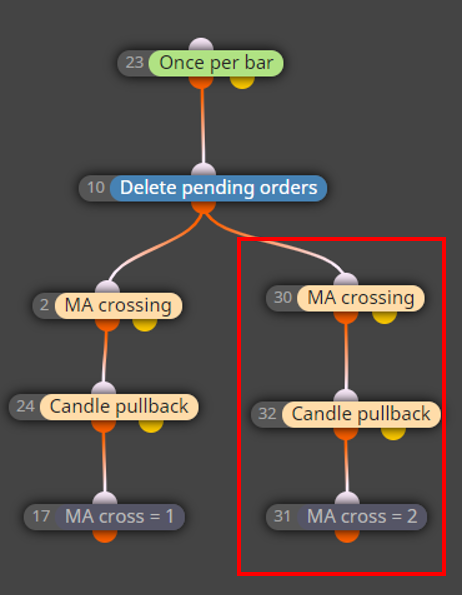
      I have added mirrored condition for sell setup.
      So when 'MA_cross' = 1, buy signal triggered
      When 'MA_cross' = 2, sell signal triggered
      When 'MA_cross' = 0, waiting for waiting to MA cross to happen (either buy or sell)
      I should have added this portion in my previous project. I apologize for the confusion.

      posted in Questions & Answers
      D
      Darrow
    • RE: Modify pending order after condition met once

      @l-andorrà This is my updated project:
      https://fxdreema.com/shared/oKcYdYsQc

      Is this what you mean by reverse crossing? For my case, I set the variable 'MA cross' to 2 when 20 MA crosses below 5 MA (the opposite condition for selling setup).
      Or do I have to set it to 0?

      0_1601542508357_Pic 15.PNG

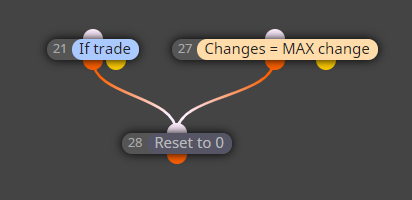
      As for the connection between block 27, 21, 28, I only need one of the conditions to be true to reset the variable:

      1. When there is trade
      2. When 'change' = 'max change'

      Note both variables 'change' and 'MA cross' are reset to zero here

      For example, buy stop may have been triggered before the 'max change' is reached.
      Or buy stop is not triggered but 'max change' reached
      Please correct me if I am wrong here.

      posted in Questions & Answers
      D
      Darrow
    • RE: Modify pending order after condition met once

      @l-andorrà Thank you for the solution. I am definitely on the right track now.
      This is my current project, with boolean variable implemented:
      https://fxdreema.com/shared/uDRvr9Fzb

      When MA cross + pullback occurred, variable 'MA cross' gets modified to 1
      When there is a trade detected or more than 3 modification of pending order occurred, variable 'MA cross' gets modified back to 0

      It works now, at least it did what I wanted this time.
      Result:
      0_1601456652788_Pic 12.PNG
      0_1601456968258_Pic 13.PNG

      However, there are 2 hiccups:

      1. From the table of results, the next buy order was opened at timing 09:18. I was expecting it open the buy stop order at timing 09:15.
      2. After the trade was closed due to hitting SL at timing 09:28, the EA immediately opened another buy stop order at that same timing. I thought variable 'MA cross' would be turned 0 when there is a trade detected.
        0_1601457226859_Pic 14.PNG
      posted in Questions & Answers
      D
      Darrow
    • RE: Modify pending order after condition met once

      @l-andorrà Sorry, it seems that I am back to circle again. I noticed this problem back then and I said in below post.

      The MA crossing is dynamic. This means that, for every new bar is formed, the occurrence of crossing is shifted back. How do I make it such that the crossing is fixed as reference? I want that the condition (crossing) to be met once then take action (either open new order or modify order).

      @darrow said in Modify pending order after condition met once:

      @l-andorrà Below is the updated project. I only changed the buy pending order offset to zero for easier visualization.
      https://fxdreema.com/shared/TyrVeu5ub

      Example:
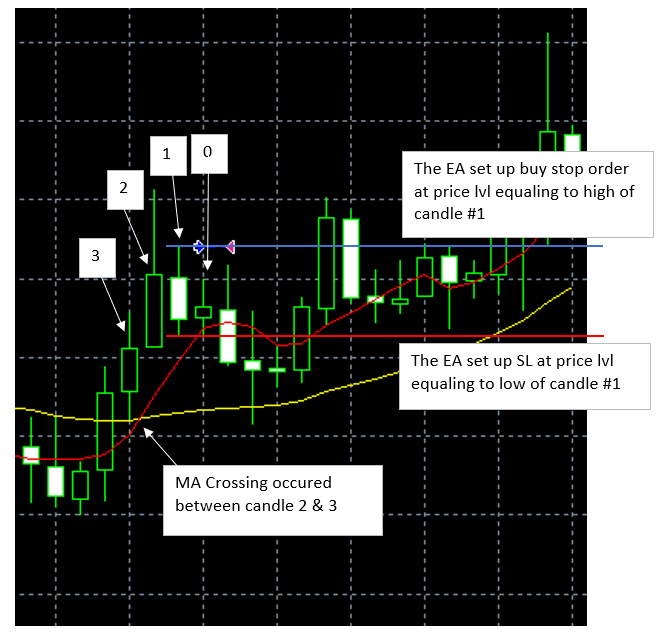
      0_1600425807734_Pic 5.PNG
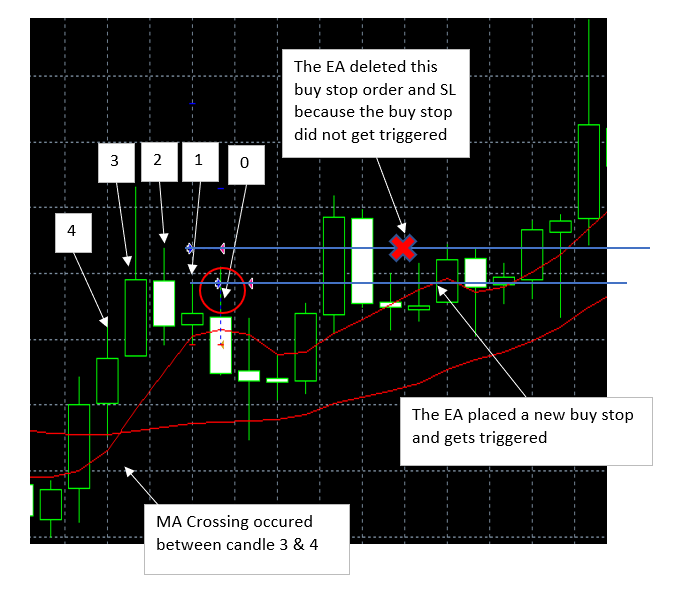
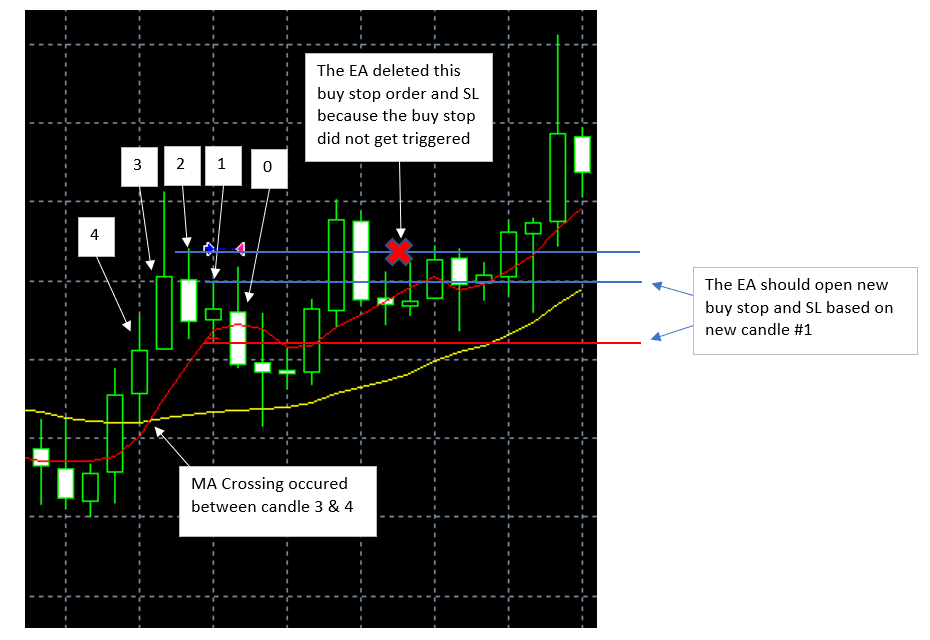
      The EA is placing the buy stop order and SL correctly after it detects the MA crossing between candle #2 and 3 as well as a followup pullback candle #1.

      After 1 candle bar later:
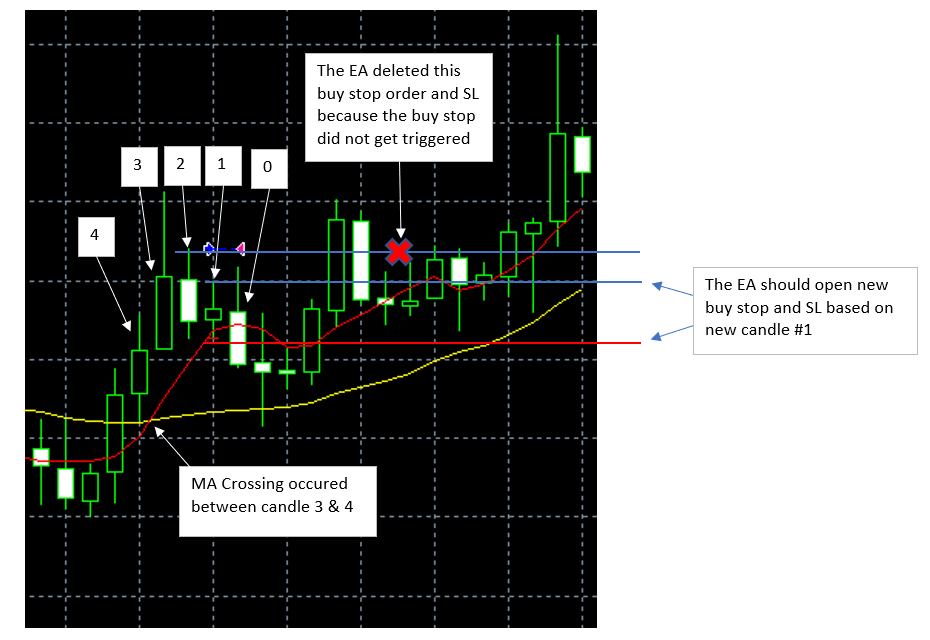
      0_1600426454964_Pic 6.PNG
      After 1 candle bar later, the buy stop order did not get triggered and was then removed. The EA should place a new buy stop and SL to the new candle #1. However, the EA did not place any order.

      I believe this is because the MA crossing condition is not met. After 1 bar later, the MA crossing now occurred between candle #3 & 4 while the EA is tasked to check if there is MA crossing occurring between candle #2 & 3.

      More info:
      Currency pair: EURUSD
      Timeframe: 15 min
      Time occur: 2020/01/16, between 9 - 9.15AM
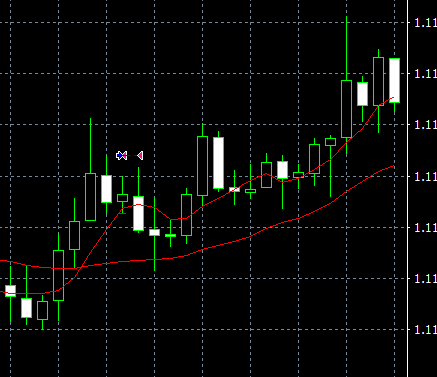
      Below shows that there is no new order after the deletion.

      0_1600426987918_Pic 7.PNG

      I hope this helps explaining my obstacle 😃

      posted in Questions & Answers
      D
      Darrow
    • RE: Modify pending order after condition met once

      @l-andorrà This is my project:
      https://fxdreema.com/shared/t5kgu1DId

      posted in Questions & Answers
      D
      Darrow
    • RE: Modify pending order after condition met once

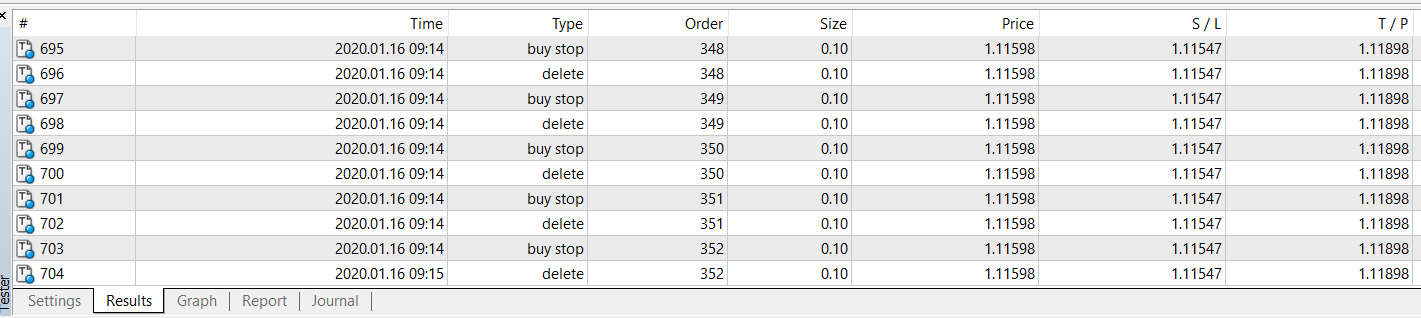
      @l-andorrà Sorry to get back to you late. I have tried the 'check trade count' method. What happened is that the EA opens and deletes the orders within candle #1 timeframe until the beginning of candle ID#0. It supposed to keep on opening and deleting in candle #0 timeframe.

      Candle #1 timeframe: 9:00 - 9:15
      Candle #0: 9:15 - 9:30

      I am reusing this picture to indicate which candle is candle ID #1 and #0
      0_1601025349803_Pic 6.PNG

      Actual screenshot:
      0_1601025602993_Pic 8.PNG

      The result:
      The result shows that the ‘opening & deleting' process ended at the beginning of candle #0
      0_1601025653103_Pic 9.PNG

      posted in Questions & Answers
      D
      Darrow
    • RE: Modify pending order after condition met once

      @l-andorrà Thank you for getting back. I would not want to have many trades on the same bar either. Is there another way around? or perhaps that is out of the capability of this builder.

      posted in Questions & Answers
      D
      Darrow
    • RE: Modify pending order after condition met once

      @l-andorrà I wish to clarify and align again. I want the pullback candle to occur right after the cross, not somewhere after the cross happened.

      For example, cross occurred at candle ID #2, if pullback candle occurred at candle ID #1 then place pending order. If they are not connected, then it’s not a valid setup.

      Are we on the same page? 😃

      posted in Questions & Answers
      D
      Darrow