Did not fixed it yet
I will try your solution
Thanks for helping me out
Did not fixed it yet
I will try your solution
Thanks for helping me out
HI
Thanks for the reply
Do you mean "if trade"? Coz i cant tfind the "on trade" tab
What i have now is,
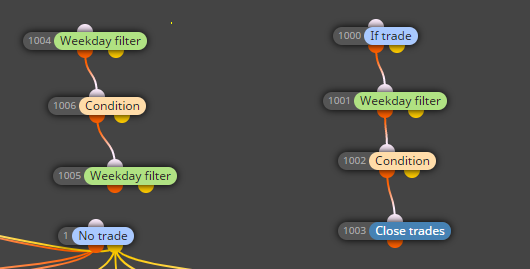
If trade --> cond --> cond --> Close trade --> send email
It is sending every time when this cond is met and not only once when trade is actually closed
Dear forum members,
Hope someone can help me with this
My EA is email bombing me LOL
i open sell and buy position based on certain conditions
I made the EA to send me email when a trade is closed
When the conditions are right the sell will close and the buy will open
The open sell and buy block is sending me 1 email at a time but since the conditions to close my sell and open a buy are met every tick the close sell block is sending me 1 email per tick LOL
How can i make the EA that is will only send me 1 email when the trade is closed and not on every tick?
My broker uses complete different point system for there charts depending on the currency of indices you choosed
Kinda confusing but in the end you can work it out
Only thing i hope is that it would be the same for a live account
Now testing on Demo
That is correct
I was able to fix the issue and now all is working fine
Top left of screen you can upload your own using the button 'my indicators'
Do you want a total number of trades to be 1?
Or only 1 trade for *USD?
and i assume then also 1 trade for *EUR / *GBP etc etc
Does it also save as how i describe?
Coz when i try to save the file it does not save in the expert folder.
As mentioned before when i have lesser inputs enabled it will save directly in the expert folder
Above a certain number not
isnt this a way for Metaeditor to say that the EA or indicator you made contains errors?
Thanks for your answer
I already tested it with multiple designs (and it does not seems to be a design issue)
As soon as you enable to much INP this will happen
See attached project
Compile this one open it in metaeditor and press save as
It goes directly into the expert folder
Now open comment block 12 and enable just 1 extra inp and repeat step above
As you can see metaeditor (at least on my side) will not save the file in the expert folde
Hope you can mimic this
Dear forum members,
Does any of you also ran into the issue when having to much inp (input box enabled) when making an EA?
I made a EA with over 180 inp variables.
Less then 180 inp selected the EA works fine.
More then 180 inp selected it seems to mallfunction
Is there a specific limit for the use of inp when making an EA?
Please read the BUG report i made
Thanks in advance
https://fxdreema.com/forum/topic/7166/to-many-inp-options-enabled
EDIT,
The bug written below does not has anything to do with copying to many block O.I.D
I am a little bit of control "freak" lol and want to enable as much as INP as possible
I just found the limit of this LOL
When you enable to many of these "manual" input options then MT4 does not reconize the EA as EA anymore
Can someone confirm this?
When saving the file using Metaeditor it does not save in the expert forlder
When i remove a few of these INP and save the file it goes directly into the Expert folder
Atm i have 180 INP boxes checked for manual input
Can someone confrm that 180 is the limit?
Coz with 181 it does not want to save in the expert folder
<180 seems to be a limit
Ps,
Is this a bug or just a limit of MT4?
Dear @FXdreema
Can you please ceck if there is a bug with the copy option
When i make a block for an condition to open a trade and i want to re-use this block for closing the opposite trade i just copy the block
what i noticed is that when you do this multiple times it goes wrong with compiling
MT4 does not reconise the EA anymore as EA (when you open an EA in the Metaeditor and press save as it should open the correct folder (i.e. Experts or indicators) When i copy a block multiple times it "corrupts" the compiled outcome and the EA does not work on these blocks though it will be loaded in MT4
Above only happens wen you copy more then app. 3 or more block at one time
Hope i informed you enough
If you wish more info please let me know
Kind reagrds
Thanks a lot
Off topic question if you dont mind
I have a time filter that will close all my trades at friday after 9:30PM servertime
After that i dont want my EA to trad anymore until let say sunday evening or monday morning
I have the first part of closing after 9:30PM on friday
But how do i prevent my EA from opening a new trade after 9:30PM?
See pic for what i have up to now
Finally got it to work
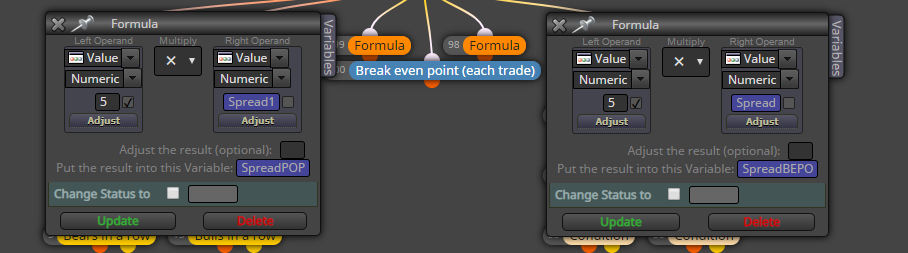
Now i have a single input box that will multiply the spread
See pic below
Working like a charm 
Hi @fxzen
Thanks for your answer
Its working atm but not exactly on how i like
MarketInfo(0,MODE_SPREAD) is giving me back the spread wich is good
I can multiply it also but i want to multiply it with an INPUT BOX
I made 3 variables in my project
1 is var1 = MarketInfo(0,MODE_SPREAD)
2 is var 2 = Test (test is getting a value from the formula block)
3 is var 3 that should be var1 * var2
When loading the EA it only places the stoploss at the value of var1 and not var3
What i like to do is getting the current spread and then multply this with a input number using the input box
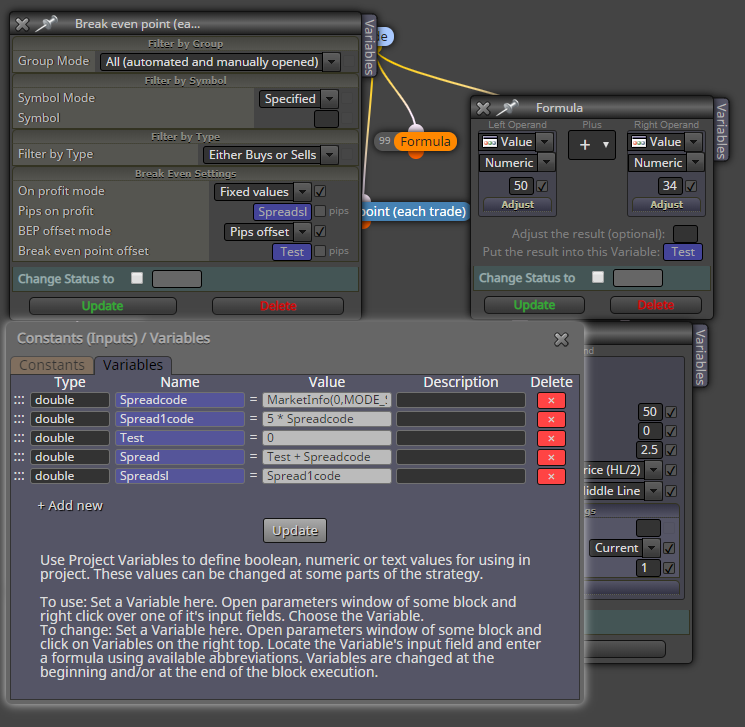
maybe the picture makes things clear
As you can see in the variable i am getting the spread (and i can multiply it hardcoded)
But what i like to archive is that i multiply this using an input block ( can be any as long as it works)
So basicly i want the break even point offset to be multiplied X times the current spread
Is this possible?
Thanks a lot for helping out