fxDreema

    • Register
    • Login
    • Search
    • Back to the main page
    • Categories
    • Recent
    • Tags
    • Popular
    • Search
    1. Home
    2. drayzen
    3. Posts
    • Profile
    • Following 4
    • Followers 3
    • Topics 14
    • Posts 56
    • Best 4
    • Controversial 0
    • Groups 0

    Posts made by drayzen

    • Custom Indicator - False Crossing

      Hi Guys,
      I'm using the i_Trend indicator in this simple Buy/Sell cross: https://fxdreema.com/shared/XzuETISDc
      Indicator Download: i_Trend.mq4

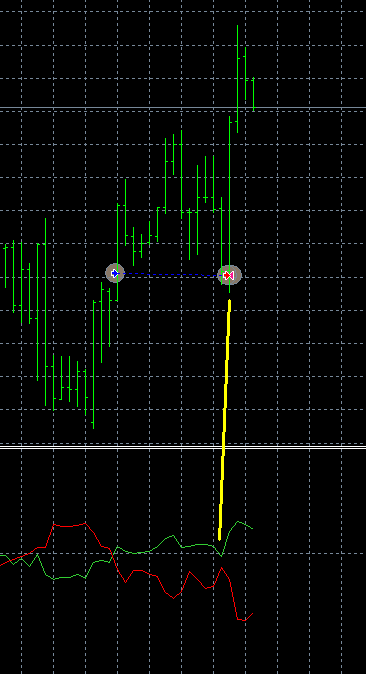
      The issue I'm having is it's executing without there actually being a crossing of the indicator, visually at least, obviously it's happening mathematically somewhere...

      0_1525690972681_i_Trend Cross - False Crossing.png

      I've tried increasing the Cross Width to 2, 3 and even 4 but it makes no difference, it executes exactly the same every time.
      It's closed the buy and then opened a sell which runs off in to a large loss.

      Is there any way I can get it to behave to match what is visually seen with the indicator?

      posted in Bug Reports
      drayzen
      drayzen
    • RE: Backtesting

      Until you can provide more information about your backtesting we can't help.
      There's no point trying to get your system to give better results if your testing is low quality, you need to get 99% testing quality with genetic options disabled.

      First thing is to get quality tick data.
      If you're using MT4 look at getting Tick Data Suite:
      https://eareview.net/tick-data-suite
      Then get some tick data, if you can get it from your broker then do that, otherwise you can get Dukascopy data using StrategyQuant Tick Downloader:
      https://strategyquant.com/tickdownloader/

      If you're using MT5 then you can download tick data on the platform in the Symbols section, though I've heard some brokers only provide a limited history range.
      If you can't download enough history (2+ years would be recommended) you might have to create a Custom Symbol then import the data for testing:
      https://www.mql5.com/en/articles/3540

      If you're trading on MT4, consider making a copy of your EA design for MT5 as it supports multi-threaded backtesting so is much faster for optimisation, provided you have a CPU with many cores... 😉

      If you share a link to your EA here you might find that others will also test it and possibly suggest improvements...

      posted in Questions & Answers
      drayzen
      drayzen
    • RE: Backtesting
      • Can you describe your strategy? (What is it trying to achieve)
      • What is the Modelling Quality of your backtest report?
      • What timeframe are you actually wanting to trade?

      If you're expecting your system to only place 1-2 orders/month then you wight as well just trade on a higher timeframe like H1. Trading M5 for so few trades/month will produce too much "noise".
      As @miro1360 tried to link for you, the Forex Factory Forums are a great information resource. 😉

      posted in Questions & Answers
      drayzen
      drayzen
    • RE: Does your fxDreeema work properly for both Live and Demo accounts?

      Not certain if it will help, the MT5 Strategy Tester has an 'Execution' option where you can simulate an execution delay.
      I think I'd only trust this though if you're also using the 'Every tick based on real ticks' setting.

      From the documentation:
      Execution
      The strategy tester allows you to emulate network delays during an Expert Advisor operation in order to bring testing closer to real conditions. A certain time delay is inserted between placing a trade request and its execution in the strategy tester. From the moment of sending a request till its execution, the price can change. This allows you to evaluate how trade processing speed affects the trading results.
      In case of the instant execution mode, users can additionally check the EA's response to a requote from the trade server. If the difference between requested and execution prices exceeds the deviation value specified in the order, the EA receives a requote.
      Please note that delays work only for trades performed by an EA (placing orders, changing stop levels, etc.). For example, if an EA uses pending orders, delays are only applied to placing an order but not to its execution (in real conditions, execution occurs at the server without a network delay).
      No delay
      In this mode, all orders are executed at requested prices with no requotes. The mode is used to check an EA in "perfect" conditions.
      Random delay
      This mode allows testing an EA in conditions that are close to real ones. The delay value is generated as follows: a number from 0 to 9 is selected randomly - this is the number of seconds for a delay; if a selected number is equal to 9, another number from the same range is selected randomly and added to the first one.
      Thus, the possibility of a delay for 0-8 seconds is 90%, possibility of a 9-18 second delay is 10%.
      Fixed delay
      You can select one of the predefined delay values or set a custom one. The platform measures the ping to the trade server and allows you to set that value as a delay in the tester so that you are able to test a robot in the conditions that are as close to the real ones as possible.

      posted in General Discussions
      drayzen
      drayzen
    • RE: 3x MA - Odd Crossing Tolerance

      ok, so turns out it was just me thinking 'Once per bar' is smarter than it actually is.
      My thanks to @fxDreema for taking the time to explain it to me.
      I was thinking that it would continue processing until something connected to it passed, instead of the actuality of it being a 'dumb' block that just passes on the first available tick and doesn't care what happens after that.
      Rebuilt to this https://fxdreema.com/shared/s8DnMJDKb ... and everything is right in the world again! 😄
      It's actually surprising it worked as well as it did with the incorrect setup...

      posted in Questions & Answers
      drayzen
      drayzen
    • RE: 3x MA - Odd Crossing Tolerance

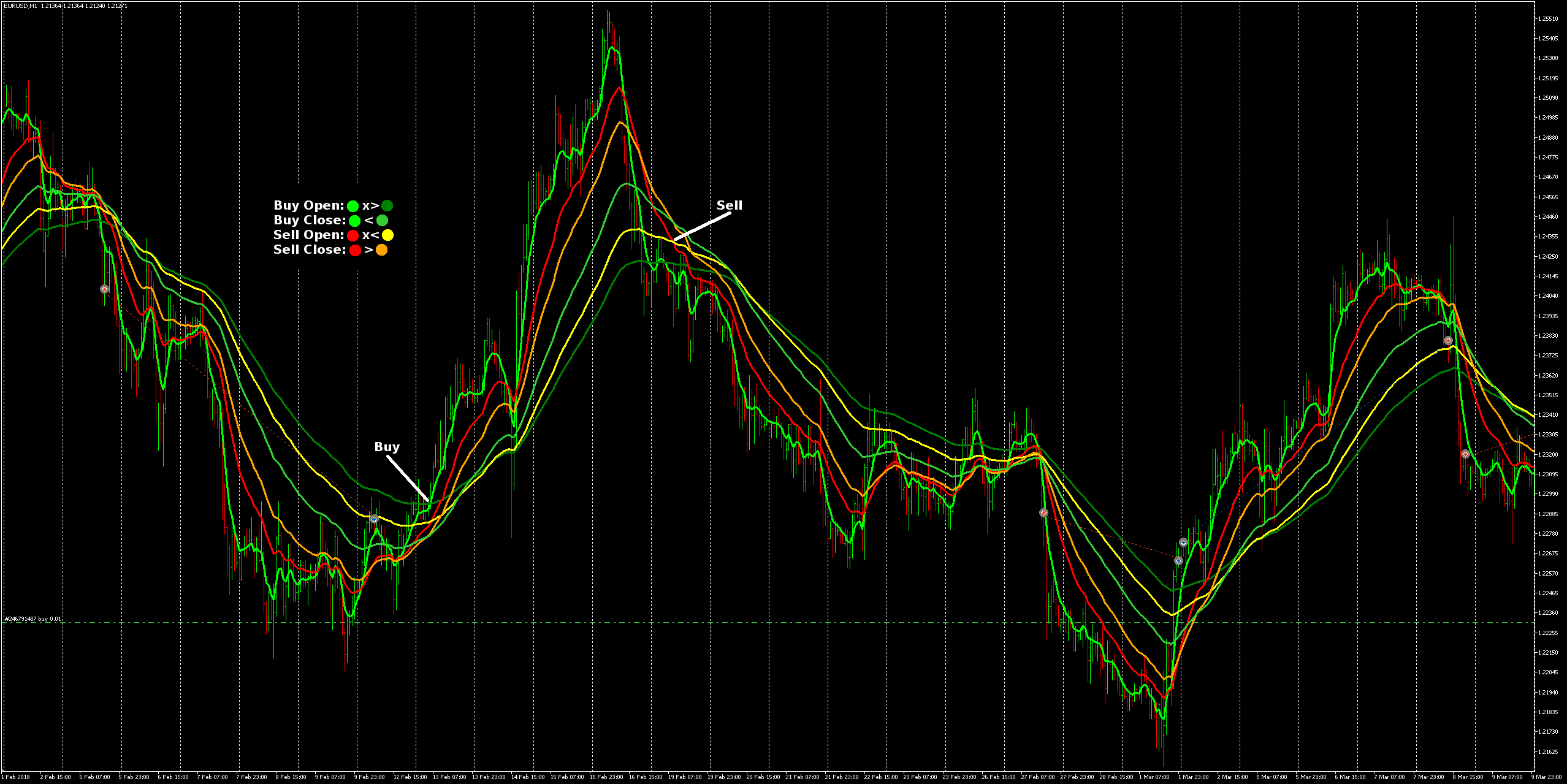
      No, it's still just a single cross per trade action. I guess it looks a bit like I'm trying to trigger with multiple crosses due to their separation, but I just put in dummy settings so all the lines would be easily visible.

      I've got the 6 EMA's so that I can optimise Opens and Closes for Buys and Sells separately.
      I broke the setup in to the two 'Once per bar' sections so that it's possible for a buy and a sell to co-exist, while unlikely most of the time, I thought there could be conditions where an overlap occurs or it could even be that the open & close of a breif buy trade could occur within the open & close periods of a lengthy sell trade (or the inverse), it all depends how the optimisation for pair/timeframe comes out I guess.
      Might never happen but I figure it's better to have it able to manage buys and sells separately just in case.
      The legend I put on the image details the possible trade types, so there would only ever be at most one buy and one sell open at any given time.

      The issue is just that it hasn't opened trades where I've marked Buy and Sell in the image with white lines, and there's no other trades nearby that would have caused any conflicts.

      • UPDATE: I updated the link with pre-configured EMA settings that match the image. When I first posted both buy and sell had the same settings so could not be seen as in the image.
      posted in Questions & Answers
      drayzen
      drayzen
    • RE: 3x MA - Odd Crossing Tolerance

      Well I gave up trying to work around the above 'bump', I'll come back to that once I'm more experienced with the intricacies of this...

      I thought I was getting the hang of this and set about making a 2x3 EMA cross: https://fxdreema.com/shared/zZQ8HTZRb (EXAMPLE OF WHAT NOT TO DO - bad usage of 'Once per bar')
      Only I've found that in visual testing it's not executing some trades and I can't figure out why.
      I thought it might be magic related as I didn't have Groups set, but it still misses the potential trades marked with white lines even after adding Groups.

      0_1525071752148_EMA2x3.png

      As for concept, I'm wanting buys and sells to behave like two independent 3-way EMA's, which I think I've got a reasonably good logical and simple setup for, but I'd be interested if anyone has a better way to do it...

      cheers guys! 😉

      posted in Questions & Answers
      drayzen
      drayzen
    • 3x MA - Odd Crossing Tolerance

      Hi Guys,
      I'm trying to put together a 3x MA strategy but I've come across a situation that requires it to have some tolerance of odd crossings.
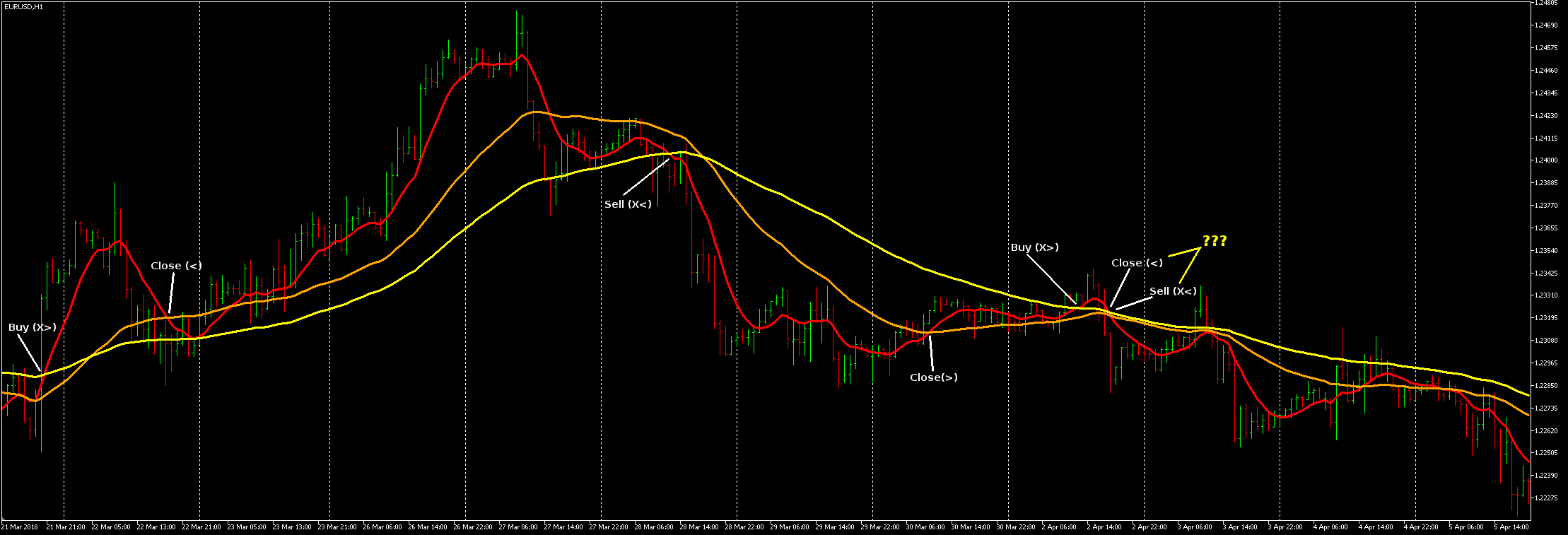
      The base concept is:
      Buy: Red x> Yellow
      Sell: Red x< Yellow
      Close: Red > OR < Orange (I originally had Closes set to x> OR x< but changed it to > OR < to try and work around the '???' bump and execute a Close earlier so the last Sell can still execute as an x<).
      The issue I'm now trying to solve is to make it so that Red will Close when crossing (> OR <) Orange OR Yellow so it can still be able to execute it's normal Buy or Sell conditions.

      0_1524852865545_MA x3.png

      I've got this so far, having tried many different ways but continually running in to problems with it opening 100's of trades or none.
      It's still opening 100's under certain circumstances and I don't know why, I think I'm keeping it halted unless there's no trades open but there's something sneaking through somewhere and it goes crazy...?
      https://fxdreema.com/shared/348jQub2e

      thanks. 🙂

      posted in Questions & Answers
      drayzen
      drayzen
    • RE: Custom Indicator - Value Inputs Shifted

      I just tried deleting and reloading the custom indicator again, and now it's loading the same as for you.
      I don't know why it was like that, I previously tried re-adding it a few times but it was always the same.
      I notice I've also got a colour for the Output Buffer while it was blank before.

      Just ran in in MT4 and worked perfectly, matching exactly against manually inserted indicators.
      While still a bit slow, much faster than before. 😉

      btw, my optimised backtesting so far gives Periods 16 & 48 as good for EUR/USD H1 (Though 48 was the maximum).
      I'm going to add a 3rd McGinley and optimise with wider parameters...

      • I was thinking some more about the custom indicator issue and it could be that I was using Firefox before and have now switched to Chrome as recommended.
      posted in Bug Reports
      drayzen
      drayzen
    • User Interface - Working Status Title

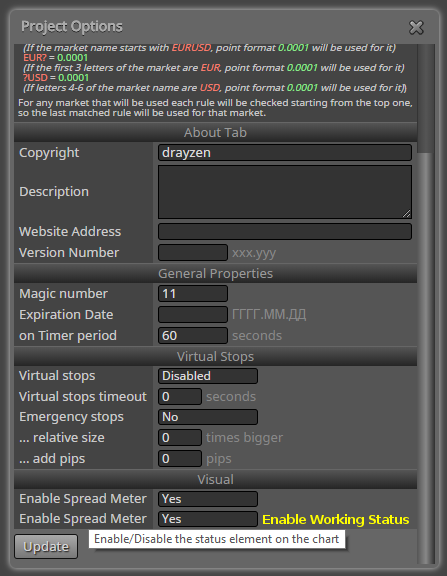
      Not really a bug, just UI housekeeping, but didn't know where else to put this. 🙂

      0_1524599000839_fxDreema - Working Status Title.png

      btw, This is a really nice forum! 😄

      posted in Bug Reports
      drayzen
      drayzen
    • Custom Indicator - Value Inputs Shifted

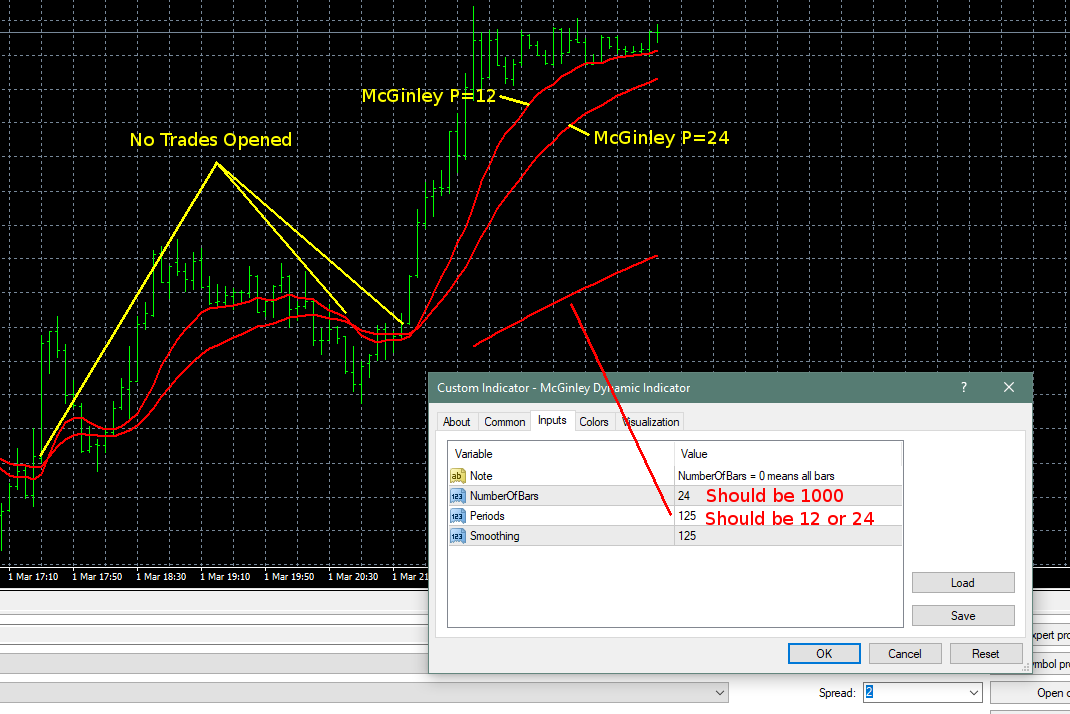
      I was pulling my hair out trying to work out why trades weren't opening until I ran this (https://fxdreema.com/shared/PnTkbrvic) in visual mode with my indicators manually added to the chart and noticed once testing completed a small section of indicator out of place. Upon inspection it's input values have been shifted.

      MT4 Testing in Visual Mode w/2x Indicators added manually
      0_1524596884125_Indicator Crossover - Value Inputs Shifted.png

      This is the indicator I'm using: https://www.forexfactory.com/showthread.php?t=204858
      Download File: McGinley Dynamic Indicator.ex4

      0_1524597304040_Custom Indicators.png

      Given the indicator was only drawn once automatically (the one with shifted values) in MT4, I'm wondering if maybe I need to have it loaded twice in fxDreema custom indicators so it can use it twice?
      Note that I'm also pulling the Periods values for the two indicators from Constants.
      I also noticed that this ran very slow during MT4 testing, even on a Ryzen 1800X, seemed like it was doing a lot of work for some reason...

      Hoping I can get this working as I'd like to add a 3rd one for trade closes... 😉
      Thanks guys! 😄

      posted in Bug Reports
      drayzen
      drayzen
    • RE: Is this ok?

      Hi @roar
      I'd been thinking about the way you daisy-chained those Condition blocks, do you know if they both execute on the same tick, or does the false output on the first only become active on the following tick?

      Also after thinking about my logic it was pretty stoopid. xD
      I'm doubling trades when I could just increase exposure, or even better diversify!

      I found I was able to cut it right back to just four blocks, Once per bar > Condition > Buy / Sell.
      It does mean that one side of the condition also hits on an == status but made it extremely simple!

      posted in Questions & Answers
      drayzen
      drayzen
    • RE: % profit for all trades...

      Thanks again @roar ,
      I was hoping Constants would be addressable like that, awesome! 🙂
      Be good to add a note about this being possible here: https://fxdreema.com/help/working-with/constants-and-variables

      posted in Questions & Answers
      drayzen
      drayzen
    • RE: % profit for all trades...

      @fxdreema said in % profit for all trades...:

      There is no % option, but the option is in money... dollars. As you probably know, you can use native MQL functions in all input fields. So the default value is 0, but you can put something like:

      AccountBalance() * 3 / 100.
      

      AccountBalance() gives you the current Balance, the amount of money you had before opening the trades. Let's say that the balance is 1000, then 1000*3/100 equals to 30 (dollars) 🙂

      Hi @fxDreema ,
      Is there any way to do this so that the percentage figure is a Constant? (or some other method so it's available for optimisation)

      posted in Questions & Answers
      drayzen
      drayzen
    • RE: Is this ok?

      Hi @roar ,
      Thanks for your help, I realise it seems a bit nonsensical but the idea was to accumulate as many valid trades as possible, without going completely bananaz and opening one for every tick, so two/bar seemed reasonable... 😉
      I'd forgotten that 'Close 1 = Open 0' and it was only after I ran a visual backtest and saw it opening two trades on Open I had that 'duhhh' moment, but no biggie it's doing near enough to what I was thinking.

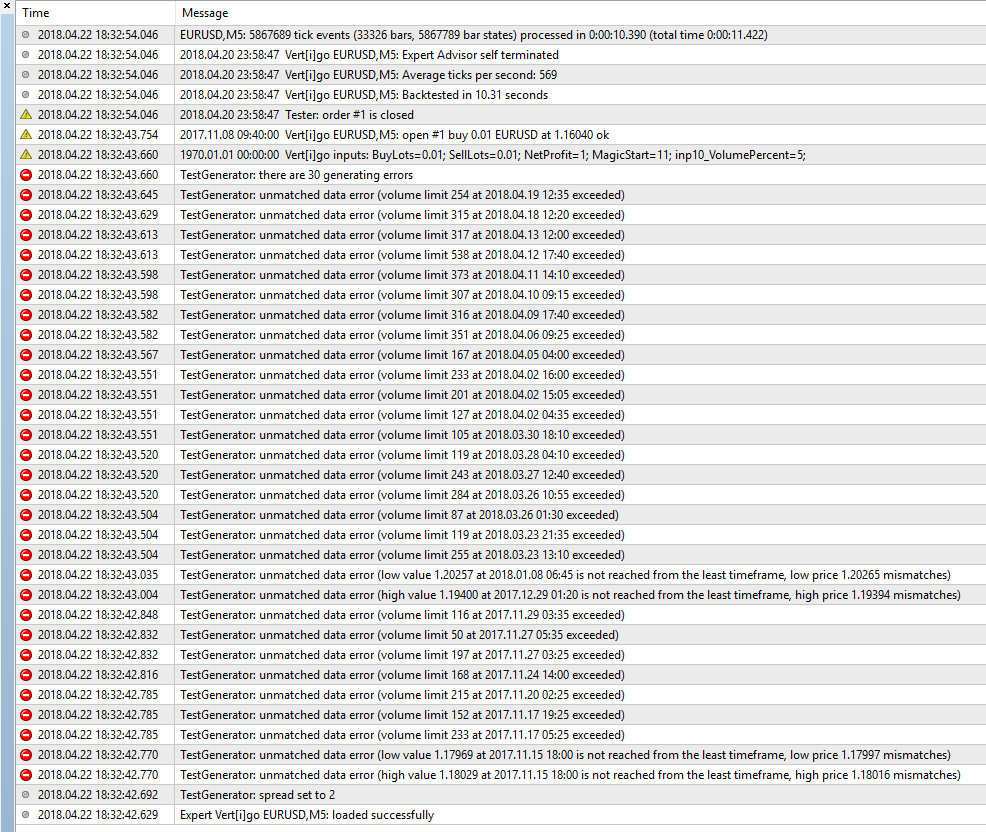
      I had a go rebuilding it from scratch and it no longer had the inp10_VolumePercent value in MT4 and it then traded as I expected instead of sitting there doing nothing. So I think that was the root cause my confusion.
      I think it might be some sort of fxDreema UI bug where I clicked next to a value somewhere that has no tick box and it was added as a variable anyway. I've been using FF so I'll switch to Chrome for working with this which will hopefully avoid weirdness like that.

      So should I just ignore all those errors?

      posted in Questions & Answers
      drayzen
      drayzen
    • Is this ok?

      Just put together my first EA and wondering if this should work?
      https://fxdreema.com/shared/va8vDDqFc
      I know I don't have any close functions, just did this with <10 connections so I could export it and test prior to getting a subscription.

      The logic is:
      If Indicator > Open and/or Indicator > Close on current bar then Buy (then inverse for Sells)
      I've got the two 'Once per bar' so that there can be two trades opened per bar, one for Open and one for Close.
      I'm expecting this will open multiple trades in both directions.
      The close condition once applied would be to close all trades when 'x' profit reached.

      I get a lot of errors in the Journal which I have no idea what they're meaning, and for some reason it's got a Variable in MT4 inp10_VolumePercent that I have no idea where it's come from...?

      0_1524386655152_Tester Journal.png

      thanks guys 🙂

      posted in Questions & Answers
      drayzen
      drayzen
    • 1
    • 2
    • 3
    • 3 / 3