fxDreema

    • Register
    • Login
    • Search
    • Back to the main page
    • Categories
    • Recent
    • Tags
    • Popular
    • Search
    1. Home
    2. Ipod
    3. Posts
    I
    • Profile
    • Following 2
    • Followers 2
    • Topics 18
    • Posts 121
    • Best 7
    • Controversial 0
    • Groups 0

    Posts made by Ipod

    • RE: News EA

      @l-andorrà If you were refering to my "indicator is visible" post yes I am sure it will work, i confirmed this with a simple comment test block on the true or false side of the block.

      I dont fully understand @s00071609 's solution but it looks good also.

      Nice to know I can implement a basic news filter though into my EA and avoid some big events.

      posted in Questions & Answers
      I
      Ipod
    • RE: News EA

      @s00071609 There is a really simple way to implement this if you so wish.

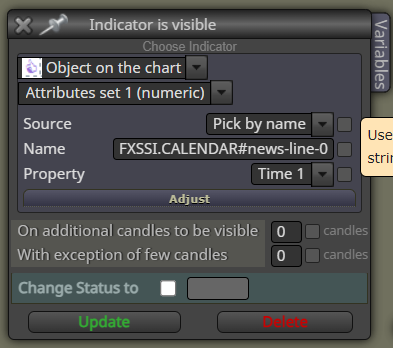
      You can simply use Indicator is Visible box and change it to object, if only one news event is on the chart it will always be FXSSI.CALENDAR#news-line-0 so taking that information you can set the parameters inside the indicator and let the indicator manage the lines. 2 hours before and after for example, if any lines are visible trading can be stopped simply on one condition block.

      acc03e65-fbd7-4f05-b2d0-7c5b2189082c-image.png

      posted in Questions & Answers
      I
      Ipod
    • RE: How to make a drop-down menu of options in my ea settings?

      image.png

      ENUM_TIMEFRAMES

      image.png

      ENUM_MA_METHOD

      posted in Questions & Answers
      I
      Ipod
    • RE: Variables + Constants inside Custom MQL code block?

      Ahhhhhhh

      It does work! It turns out I had not spelled something correctly and it was trying to check a custom enum rather than the output of the enum. Now I can remove about 50 unrequired blocks in my ea, yikes.

      Thanks 🙂

      posted in Questions & Answers
      I
      Ipod
    • Variables + Constants inside Custom MQL code block?

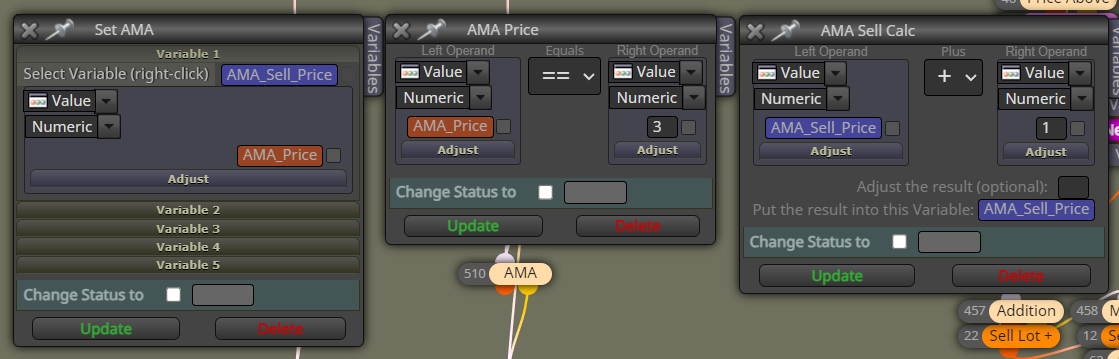
      Im trying to use less blocks in my ea, and want to use Custom MQL blocks to reduce the block count, as below I am trying to turn this sequence which goes from left to right.

      95aa99d9-366e-4819-97ee-5d054a54c0cd-image.png

      I have tried this code snippet in a custom block but it does not seem to work, it compiles fine but does not function.

      int AMA_SellPrice = AMA_Price;
      
      if(AMA_Price == 3)
      {
          // If AMA_Price equals 3, increment AMA_SellPrice by 1
          AMA_SellPrice += 1; 
      }
      
      posted in Questions & Answers
      I
      Ipod
    • RE: I AM GETTING FUSTRATED, PLEASE HELP I BEG.

      Please go to youtube and look up boxxocode, he has many videos you can follow and learn how to code many things.

      It will help you a lot and it is all free, video only, you can pause and copy everything he does.

      posted in Questions & Answers
      I
      Ipod
    • RE: show indicator

      Sadly you cannot "show indicator" with FxDreema, this is a feature that I would very much like and frankly surpriseed its not a default block.

      posted in Questions & Answers
      I
      Ipod
    • RE: Modify TP of all trades

      Try this, I am not 100% sure what you are aiming for but I think this is it.

      https://fxdreema.com/shared/kjapxiS3

      11a576cd-8ca8-48b0-801e-8a061902fdd6-image.png

      posted in Questions & Answers
      I
      Ipod
    • RE: My robot gets the volumes wrong, please help

      Can you share the project so we can double check properly please.

      posted in Questions & Answers
      I
      Ipod
    • RE: Please Help Me Replicate This EA.

      @DragonZueloTrends no sorry, i cannot.

      You would really need to know the specifics of the strategy to get an accurate model of this ea. General information is not enough.

      posted in General Discussions
      I
      Ipod
    • RE: Please Help Me Replicate This EA.

      @DragonZueloTrends There is no question, just an overview of the strategy.

      posted in General Discussions
      I
      Ipod
    • RE: Please Help Me Replicate This EA.

      The Expert Advisor (EA) described in the provided script uses a combination of technical analysis and certain conditions for its entry and exit strategies. Here's a breakdown of the entry and exit conditions as inferred from the script:

      Entry Conditions

      1. Price Moving Averages (MAs): The EA calculates two moving averages (MAs) based on the MAPeriod and MAMethod settings, one applied to the PRICE_LOW and another to the PRICE_HIGH. Entry signals are generated based on the current bid price's position relative to these MAs:

        • Buy Signal: Generated if the bid price is above the MA calculated on PRICE_HIGH.
        • Sell Signal: Generated if the bid price is below the MA calculated on PRICE_LOW.
      2. ATR Threshold: The script uses the Average True Range (ATR) to determine market volatility. A trade is considered only if the ATR is greater than a certain threshold (Filter parameter), indicating sufficient market movement.

      3. Spread and Commission Conditions: The EA checks the average spread and adds any commission to ensure it does not exceed a predefined maximum (MaxSpreadPlusCommission). This condition helps in avoiding entry into trades during times of high spread which can negatively impact trade outcomes.

      4. Time Filter: Trades are restricted to specific times of the day, controlled by StartHour, StartMinute, EndHour, and EndMinute parameters. This allows the EA to trade only during potentially more profitable market hours.

      5. Position Opening: Based on the signal (buy or sell), the EA attempts to open a position by sending a buy or sell stop order. The lot size for the order can be determined either by a fixed lot size (FixedLots) or dynamically based on the account balance and a risk percentage (Risk parameter) if UseMM (Use Money Management) is TRUE.

      Exit Conditions

      1. Trailing Stop: The script adjusts stop loss levels for open trades to implement a trailing stop mechanism. This is done by moving the stop loss to a certain distance (Distance parameter) away from the current bid (for sell orders) or ask (for buy orders) price, thus locking in profits as the trade moves in favor of the position.

      2. Stop Loss Adjustment for Pending Orders: The EA also modifies the stop loss for pending buy or sell stop orders based on the current price and a predefined stop loss value (StopLoss parameter).

      3. No specific Take Profit: The script does not explicitly define a take profit condition within the provided segments. Instead, it relies on the trailing stop mechanism to secure profits and exit the trade.

      4. No Explicit Exit Signal: The script does not include a clear exit signal based on technical indicators or price patterns. The primary mechanism for exiting a trade is the trailing stop loss adjustment.

      Additional Notes

      • The EA includes mechanisms for handling spread and commission, visualizing trading information on the chart, and dynamically adjusting orders based on market conditions.
      • It's essential to note that the actual implementation of these entry and exit strategies can depend on additional factors not covered in the provided segments, such as specific parameter settings and market conditions.

      This breakdown provides an overview of the trading strategy's core mechanics based on the provided script. However, without running the EA in a test environment or having more detailed documentation, some nuances or additional conditions implemented in the code may not be fully captured here.

      posted in General Discussions
      I
      Ipod
    • RE: nugget size

      0.01 = 0.1

      image.png

      posted in Questions & Answers
      I
      Ipod
    • RE: Fractal + rsi + cci who can help Please

      You want to pay someone or what? you need to explain more no one can read your mind.

      posted in Questions & Answers
      I
      Ipod
    • RE: risk based volume (OrderCalcProfit) ?

      I created a script, so if you are using Equity, Balance, or Free Margin risk based lot size as per the below picture and block. So if you export your code to mq5, then load my script it will automatically replace the necessary code to give accurate volume size on pairs like gold that never used to calculate correctly.

      You still need tp specify your Risk in %, Max lot and Stop loss either in distance or price level but other than that it should work.
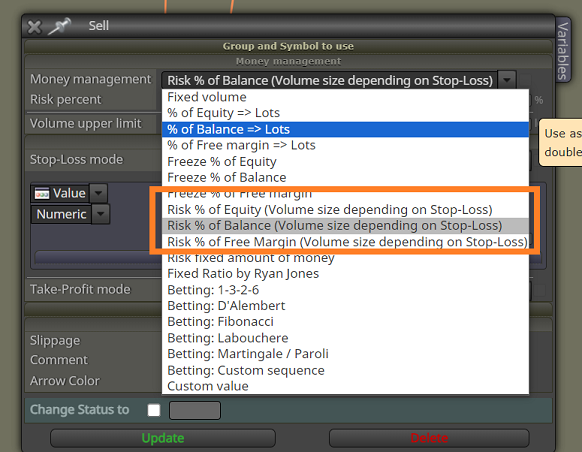
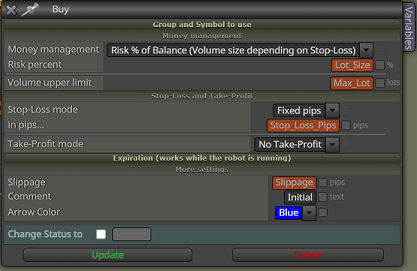
      ddaa0d30-bdb1-4f1a-ad13-49f70af868e3-image.png

      827226b0-d430-46b1-b198-6510e50de034-image.png

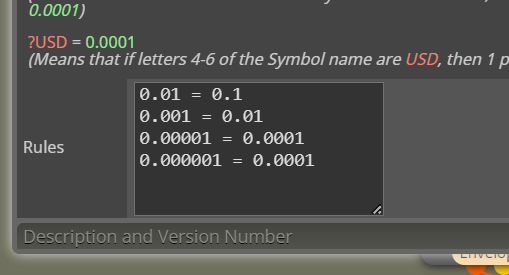
      Also a warning I do run these project options, 0.01 = 0.1 is an extra addition.
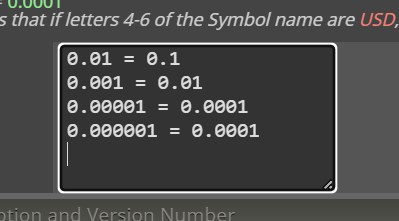
      88883779-5c7b-4f12-a985-ac3ad8f44e3d-image.png

      Below is a Python script, so make a text file and put this code into it and then change the file etension to .py when you run the code it will request a file to open, select desired mql5 and it will change the code internally automatically. Python is required on your pc for script to work.

      import tkinter as tk
      from tkinter import filedialog
      
      def replace_and_add_code(file_path):
          try:
              # Open the file with UTF-16 Little Endian encoding
              with open(file_path, 'r', encoding='utf-16-le') as file:
                  content = file.read()
      
              # Replace the size calculations
              old_code = [
                  'else if (mode=="equityRisk") {size=((value/100)*AccountEquity())/(sl*TickValue*PipValue(symbol));}',
                  'else if (mode=="balanceRisk"){size=((value/100)*AccountBalance())/(sl*TickValue*PipValue(symbol));}',
                  'else if (mode=="freemarginRisk") {size=((value/100)*AccountFreeMargin())/(sl*TickValue*PipValue(symbol));}'
              ]
              new_code = [
                  'else if (mode=="equityRisk") {size = VolLongPoints(symbol,(value/100)*AccountEquity(),10*sl);}',
                  'else if (mode=="balanceRisk"){size = VolLongPoints(symbol,(value/100)*AccountBalance(),10*sl);}',
                  'else if (mode=="freemarginRisk") {size = VolLongPoints(symbol,(value/100)*AccountFreeMargin(),10*sl);}'
              ]
      
              for j in range(len(old_code)):
                  content = content.replace(old_code[j], new_code[j])
      
              # Define the new function to add
              function_to_add = '''
      double VolLongPoints(string pSymbol, double pMoney, double pSlp)
        {
         double Volstep       = SymbolInfoDouble(pSymbol,SYMBOL_VOLUME_STEP);
         double Volmax        = SymbolInfoDouble(pSymbol,SYMBOL_VOLUME_MAX);
         double Volmin        = SymbolInfoDouble(pSymbol,SYMBOL_VOLUME_MIN);
         pMoney               = floor(pMoney);
         double tickSize      = SymbolInfoDouble(pSymbol,SYMBOL_TRADE_TICK_SIZE);
         double freeMargin    = AccountInfoDouble(ACCOUNT_MARGIN_FREE);
         double point         = SymbolInfoDouble(pSymbol,SYMBOL_POINT);
         double Price         = SymbolInfoDouble(pSymbol,SYMBOL_ASK);
         Price                = round(Price/tickSize)*tickSize;
         double slPrice       = Price - pSlp * point;
         slPrice              = round(slPrice/tickSize)*tickSize;
         double dbProfit      = 0;
         double riskLots      = 0;
         double OrderLots     = 0;
         double reqMarg       = 0;
      
         if(OrderCalcProfit(ORDER_TYPE_BUY, pSymbol, Volmax, Price, slPrice, dbProfit) == true)
           {
            OrderLots = fmin(fmax(round(pMoney * Volmax / (MathAbs(dbProfit) * Volstep))
                                  * Volstep, Volmin), Volmax);
           }
         else
            if(!OrderCalcProfit(ORDER_TYPE_BUY, pSymbol, Volmax, Price, slPrice, dbProfit))
              {
               Print("Volume calc Failed: ", GetLastError());
              }
      //------
         if(OrderCalcMargin(ORDER_TYPE_BUY,pSymbol,OrderLots,Price,reqMarg) == true)
           {
            double R = MathAbs(floor(freeMargin) / round(reqMarg)); // Calculate the ratio
            double OrderLotsAdjusted = 0;
            if(R < 1) // Check if the free margin is less than the required margin
              {
               OrderLotsAdjusted =  OrderLots * R; // Reduce the order volume proportionally
               Print("Not enough money to execute trades with : ",DoubleToString(OrderLots)," Volume adjusted based on free margin to required margin ratio to : ",DoubleToString(OrderLotsAdjusted));
               OrderLots = OrderLotsAdjusted;
              }
           }
         if(OrderLots < Volmin)
           {
            OrderLots = Volmin;
           }
         riskLots  = floor(OrderLots/Volstep)*Volstep;
         return riskLots;
        }
      
      '''
              # Insert the new function above 'double AccountBalance()'
              insert_index = content.find('double AccountBalance()')
              if insert_index != -1:
                  content = content[:insert_index] + function_to_add + content[insert_index:]
      
              # Write the changes back to the file
              with open(file_path, 'w', encoding='utf-16-le') as file:
                  file.write(content)
      
              print("File updated successfully.")
          except Exception as e:
              print(f"An error occurred: {e}")
      
      def main():
          root = tk.Tk()
          root.title("File Selector")
          root.geometry('300x150')
      
          def select_file():
              file_path = filedialog.askopenfilename(
                  title="Select the .mq5 file",
                  filetypes=[("MQL5 files", "*.mq5")]
              )
              if file_path:
                  replace_and_add_code(file_path)
                  label.config(text="File Processed")
              else:
                  label.config(text="No file selected.")
      
          label = tk.Label(root, text="Please select your .mq5 file")
          label.pack(pady=10)
      
          btn = tk.Button(root, text="Select File", command=select_file)
          btn.pack(pady=10)
      
          root.mainloop()
      
      if __name__ == "__main__":
          main()
      
      
      posted in Questions & Answers
      I
      Ipod
    • RE: risk based volume (OrderCalcProfit) ?

      I have a solution but for now it requires adjusting the code internally before compiling in the metaeditor. But it does allow accurate risk based volume calculations on all pairs, including metals etc.

      You have to modify this part of the code from the // to the code below it:

                              if(mode=="equityRisk")
                                {
                                 //size=((value/100)*AccountEquity())/(sl*TickValue*PipValue(symbol));
                                 size = VolLongPoints(symbol,(value/100)*AccountEquity(),10*sl);
                                }
                              else
                                 if(mode=="balanceRisk")
                                   {
                                    //size=((value/100)*AccountBalance())/(sl*TickValue*PipValue(symbol));
                                    size = VolLongPoints(symbol,(value/100)*AccountBalance(),10*sl);
                                   }
                                 else
                                    if(mode=="freemarginRisk")
                                      {
                                       //size=((value/100)*AccountFreeMargin())/(sl*TickValue*PipValue(symbol));
                                       size = VolLongPoints(symbol,(value/100)*AccountFreeMargin(),10*sl);
                                      }
      

      Then insert this code below the Functions Box, "System and Custom functions used in the program".

      double VolLongPoints(string pSymbol, double pMoney, double pSlp)
        {
         double Volstep       = SymbolInfoDouble(pSymbol,SYMBOL_VOLUME_STEP);
         double Volmax        = SymbolInfoDouble(pSymbol,SYMBOL_VOLUME_MAX);
         double Volmin        = SymbolInfoDouble(pSymbol,SYMBOL_VOLUME_MIN);
         pMoney               = floor(pMoney);
         double tickSize      = SymbolInfoDouble(pSymbol,SYMBOL_TRADE_TICK_SIZE);
         double freeMargin    = AccountInfoDouble(ACCOUNT_MARGIN_FREE);
         double point         = SymbolInfoDouble(pSymbol,SYMBOL_POINT);
         double Price         = SymbolInfoDouble(pSymbol,SYMBOL_ASK);
         Price                = round(Price/tickSize)*tickSize;
         double slPrice       = Price - pSlp * point;
         slPrice              = round(slPrice/tickSize)*tickSize;
         double dbProfit      = 0;
         double riskLots      = 0;
         double OrderLots     = 0;
         double reqMarg       = 0;
      
         if(OrderCalcProfit(ORDER_TYPE_BUY, pSymbol, Volmax, Price, slPrice, dbProfit) == true)
           {
            OrderLots = fmin(fmax(round(pMoney * Volmax / (MathAbs(dbProfit) * Volstep))
                                  * Volstep, Volmin), Volmax);
           }
         else
            if(!OrderCalcProfit(ORDER_TYPE_BUY, pSymbol, Volmax, Price, slPrice, dbProfit))
              {
               Print("Volume calc Failed: ", GetLastError());
              }
      //------
         if(OrderCalcMargin(ORDER_TYPE_BUY,pSymbol,OrderLots,Price,reqMarg) == true)
           {
            double R = MathAbs(floor(freeMargin) / round(reqMarg)); // Calculate the ratio
            double OrderLotsAdjusted = 0;
            if(R < 1) // Check if the free margin is less than the required margin
              {
               OrderLotsAdjusted =  OrderLots * R; // Reduce the order volume proportionally
               Print("Not enough money to execute trades with : ",DoubleToString(OrderLots)," Volume adjusted based on free margin to required margin ratio to : ",DoubleToString(OrderLotsAdjusted));
               OrderLots = OrderLotsAdjusted;
              }
           }
         if(OrderLots < Volmin)
           {
            OrderLots = Volmin;
           }
         riskLots  = floor(OrderLots/Volstep)*Volstep;
         return riskLots;
        }
      
      posted in Questions & Answers
      I
      Ipod
    • RE: risk based volume (OrderCalcProfit) ?

      So custom code works different from custom blocks in terms of the global scope error?

      I have put an advert now on mql5 so I will see how that goes.

      posted in Questions & Answers
      I
      Ipod
    • RE: risk based volume (OrderCalcProfit) ?

      TBH jstap I have been busy with work, made almost no progress at all but this is the code I intend to implement which is taken from the following link. I am going to pay someone on mql5 to attempt to implement the OrderCalcProfit to bypass my lack of ability then build it into my ea after if it works.

      functions the volume calc code is in.
      https://www.mql5.com/en/code/28029

      https://fxdreema.com/shared/23f7DkLVd

      posted in Questions & Answers
      I
      Ipod
    • RE: risk based volume (OrderCalcProfit) ?

      I can't get past this issue for now

      image.png

      posted in Questions & Answers
      I
      Ipod
    • RE: risk based volume (OrderCalcProfit) ?

      @jstap I’m not very good at understanding how the code works tbh, I’ll give it another go tomorrow.

      If we could get this code working it theoretically should give us a working percent lot call on all pairs including metals and index’s. As only fx pairs are reliable in fxdreema risk based lot size.

      Unless you know of another way to have a reliable gold percent lot calc?

      posted in Questions & Answers
      I
      Ipod
    • 1
    • 2
    • 3
    • 4
    • 5
    • 6
    • 7
    • 2 / 7