@rodrigo-ortuzar You were close.  You can do it on the 'on trade' tab. This way:
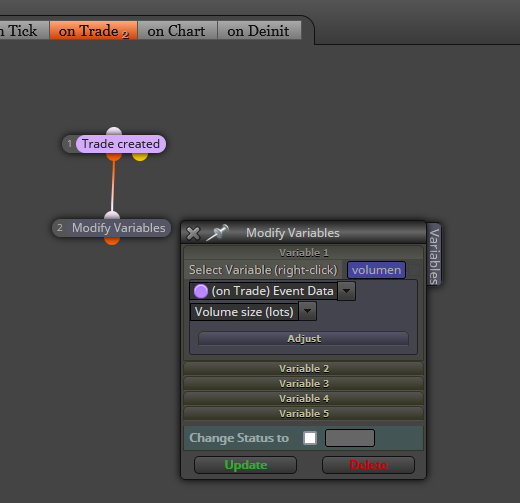

@rodrigo-ortuzar You were close. You can do it on the 'on trade' tab. This way:
@loopytt Can you please share the link to your project?
@e-so That depends on the maximum number of open trades you want. You should definitely use the second block 'hours filter'. The you should decide if any open trade withing that period should be closed at 17:00 or not.
@gtoat777 I mean you will have to use a 'comment' block with the variables you want to see on chart in it.
@pablofx You need to substitute that 'for each trade' block on the 'on trade' tab by a purple 'trade closed' one.
@jamesdaly Don't get me wrong but, if you have the code why don't you simply paste it into a 'custom mql code' block yourself?
@aspecpower Then I hope a real programmer can help you, sorry.
@tulefi Blocks 41 and 42 are using an oprion on the right operand that is only functional on the 'on trade' tab. You should use the 'pink dot' equivalent for the 'on tick' tab. On the opther hand you connected block 44 below block 4. You should separate it from there and conect it below a 'pass' block independently.
@mr-lenny Technically you can select specific objects as listes on the objects tab. However, considering there are so many, you should need a powerful loop searching for them. How many objects would the EA need?
@quantengineer He meant the highest close and the highest open within a period of candles.
@pablofx What I mean is that you will need a 'modify variables' block with the variables being reinitialized there.
@mcarl42 Can you please be more specific? Can you upload an image?
@tulefi Can you please share the link to the whole project? Probably it is a problem with block ID order of execution.
@yovayova Porque el enlace que ha colgado es el acceso general al último proyecto que se tiene activo. No es que haya pirateado su cuentas. El problema es que ha copiado mal el enlace y ha colocado el general. Si yo selecciono el mismo enlace, accedo a mi último proyecto también.
@schmoedl I guess that is an indicator for MT5 right? They cannot be used in fxDreema that way. Each buffer need to be separated from all other. You will need a programmer to do that.
@fxbam Is this the whole project? Except for the first block on top, the logic is correct. Both blocks on top are limiting buys and sells when they should be separated.
@winson Here you have a fully functional martingale project: