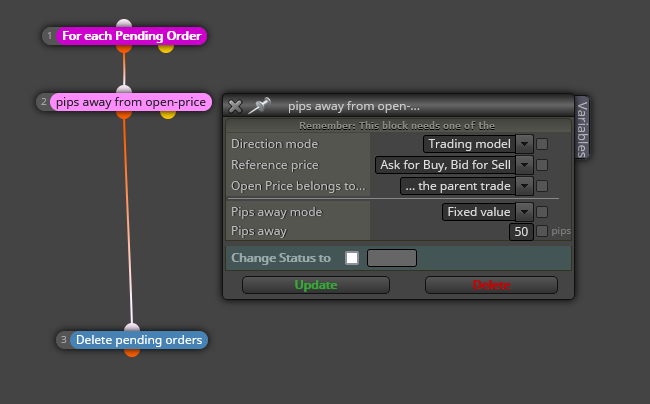
@stantham You should use this block instead with the name of the button inside:
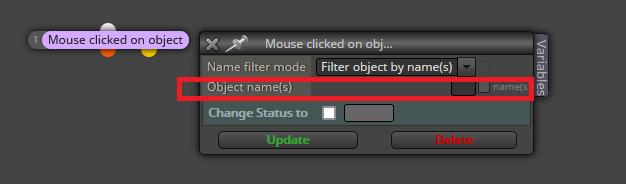

@stantham You should use this block instead with the name of the button inside:
@stantham This is the second thread dedicated to the same question. Please don't replicate threads and focuns in just one.
@hebe I'm afraid this is a clear case of repainting. Using custom indicators like that is always risky for that reason. You should check if it repaints.
@baxishparmar Can you please share the link to your project?
@kriordan I cannot import it. Are you sure this the the correct version?
@trpssrv The logic is correct if you are running it on the daily timeframe. You will get one buy and one sell only per day.
@stantham You will need to use variables to stor the value of both ends of the wick. Then you can use a formula block to calculate the middle point and finally you can plot the line there.
@gggvvvv Please stop posting the same question on different threads. This is Off topic here.
@gggvvvv You alredy asked this question in another thread. I replied there.
@ontradingx Thank you very much for sharing. 
@ecowith This the second thread you opened for the same question. I replied to the previous one. Please don't duplicate threads.
@pinoa Your fisrt option was correct and you definitely ned the 'For each trade' block on top to make it work.
@od Yes, you can do it with a loop like that. The problem is that there is no limit in the search of past candles and it is suposed to work on the 'on tick' tab. Do you really need do that search every tick? Why not limiting the past candles to be checked?
@sauce Thanks for your support!  I recommend to substitute both condition blocks by 'indicator is visible' blocks instead. That way no comparisons are necessary. However, did you check the indicator doesn't repaint? because if it does, the EA will destroy you balance!
@gggvvvv Not sure what you exactly mean. Apparently you already created it. Once a variable is created you can use it as per your screenshot on any block with the 'variables' tab on itis top right corner.
@chattahooche You can create a loop structure by using a 'For each trade' on top. Then yuo can use as many 'condition' blocks as necessary to create your trailing stop move. At the bottom of it all you should use the 'modify stops' block.
@wadz91 I meant this:
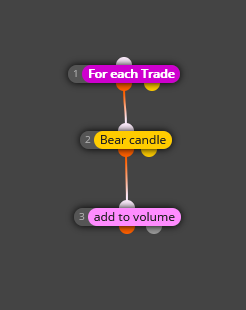
But probably you will need to limit how many times or when that additiona is happening. That will depend on the whole strategy.
@tashab You need to use variables to get what you want. When the first condition has happened, then a boolean variable can be 'true' for example. The you require this condition as 'conditioning' the second one later.
@ecowith You can specify that 'add volume' cannnot be applied to candle ID 0, for example.