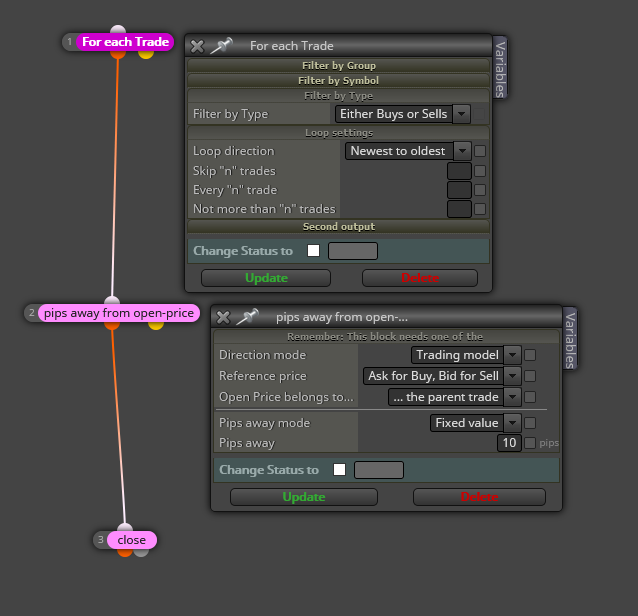
@tintman7 Is that part the only one that doesn't work? Are all those objects on the 'on chart' tab working correctly?

@tintman7 Is that part the only one that doesn't work? Are all those objects on the 'on chart' tab working correctly?
@marianomartinez That delete pending orders block is wrongly positioned. It should be connected below a 'Trade created' block on the 'on Trade' tab.
@kiwi789 It is windows and I have no idea how to change it, sorry.
@pipsacoin Don't get me wrong but I don't fully understand, you sorry. I speak Catalan and Spanish if you prefer to choose any of them.
@alfredinho50 That is a partial close, and yes, it is possible. You will find it here:
https://fxdreema.com/forum/topic/6046/can-i-use-close-trade-and-close-partially-in-the-same-ea/4
@bluemoon Are working the condition blocks on candle ID 0? If so I recommend you to change them to candle ID 1.
@pippusher618 Doing that is a whole project in itself. That cannot be done with one block only. If that is what you need I recommend you to find a custom indicator doing that and then import it to your fxDreema account.
@fuad-2 Well, talking about variables is a whole world in itself. What do you exactly need?
@vishnu I'm not sure I fully understand problem 1. Can you please upload an image showing what you need? For problem 2 please find the solution here:
@jjot fxDreema is good, but nor perfect, my friend!  I alway recommend to store that information into a variable. Then use it normally in a condition block.
@osasono Another option can be 'redrawing' it every single time a tick is arriving to your MT4 if you draw it ib the 'on tick' tab.
You need to create two trade groups. Group 1 is for the first open trade and group 2 for all the future open trades. I created this for buys only:
https://fxdreema.com/shared/PZmZg67rd
Please notice that I didn't include the 'buy now' block creating the Group 1 trade. I assume you already have in your project.
@raiderspaz You need to dismount the current structure of blocks 81, 82 and 83. Firstly, substitute block 81 by a 'Pass' block. Then connect block 82 below it.
Then move to the 'on Trade' tab a do this (for buys, for example):
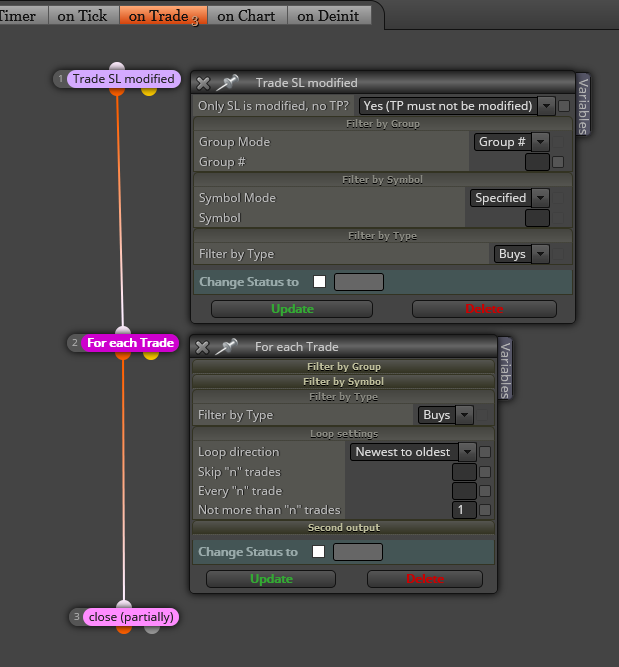
Connecting pink block to Break even blocks is not a good idea, in general.
@oluwaseyifunmi Is that question realted to this topic? If not, please create a new thread.
@traderline Can you confirm you are working on cabdle ID 1 everywhere? Are you sure you didn't miss some operand withs candle ID 0?
@tintman7 Wow, that is a project! I will be honest to you. Looking for the way to embed more variables into your project can be exhausting. I suggest to create a completely new project just dedicated to do what you asked for in your first post and then mayble you will have some ideas to incorporate it into your project. More than that is asking for a lot of free help, I'm afraid! 
@edwin-2 I need to see the whole project to answer that question, sorry.