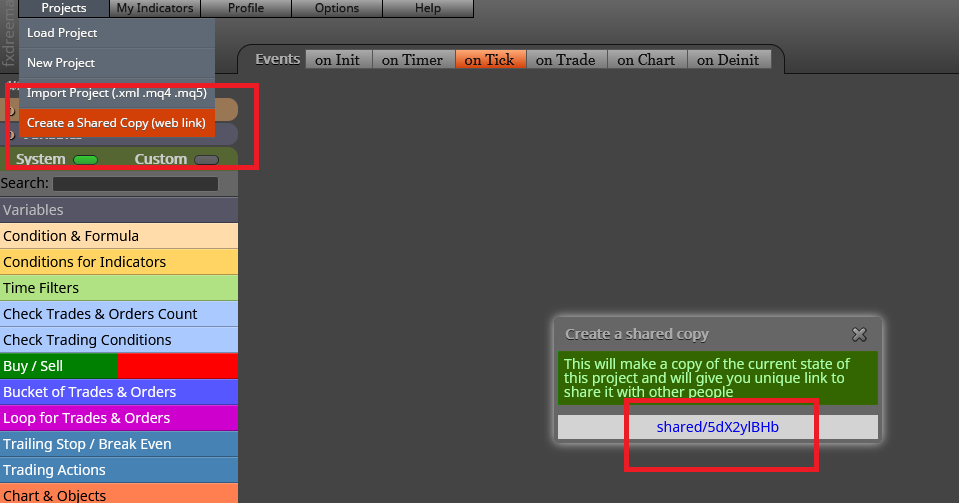
Please share it this way:

I don't think retaking a 3 years old thread guarantees an answer now. 
Never connect any block below buy/sell now unless it it for storing info into a variable. All blocks nelow them now need to be positioned in different block trees below a 'For each trade' block.
You cannot change any optimizable parameter called "inp..." They cannot be modified. As I said in my previous post, you will have to create a Constant, put it into that parameter and then unclock the box.
Believe me, martingales do not work in the long term. However, if you insisit to develop one, I recommend you to use the search tool of the forum. There you will get many threads dedicated to it. And good luck! 
I created this simple testing EA (please ignore the custom indicator) and I find a weird behaviour I can't explian.
https://fxdreema.com/shared/VBpv0qycb
I need to calculate te distance for the initial stop loss of my pending orders. I created a formula to include the spread in the calculation that works well for the pending buys but it doesn't for the pending sells (blocks 12, 13 and 23).
I need the initial SL to be 10 pips plus spread above the high of the current Heiken Ashi candle ID 0. When backtesting it. That distance is not added and the HA's high is considered only. I can't see why. Could someone plesse help?
Easy. You can use a 'Formula' block. Create a variable to store the final result and then do this:
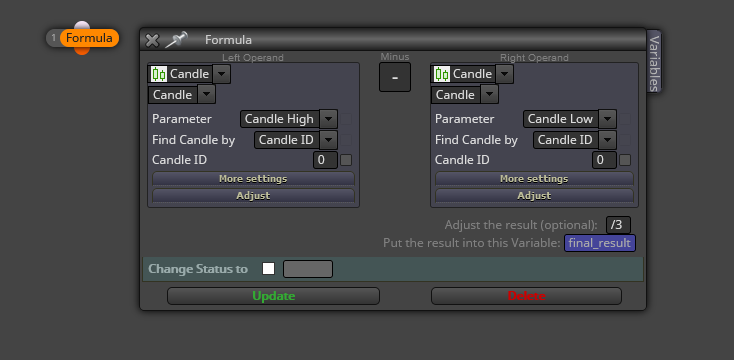
You can do the same for a min/max values within a period of candles.
This the first time I hear something like that. I cannot be of any help here, sorry.
There is nothing that a good custom block can't fix.
Don't worry. I will help you. Could you plesase share your current project to begin with?
Me temo que la imagen no se puiede ver. En principio, hay que conectarlo allá donde sólo necesites un chequeo por vela. Quizás si se pudiese ver la imagen te podría ayudar más.
The SL level in your buy/sell now blocks is defined as 'Custom(price level)', whereas in your trailing stop it is as 'Custom(proce fraction)'. They are differemt calculations. All of them should be the same everywhere.
I'm afraid thats i snot possible with the current blocks. But hey, drawing objects in fxDreema is not my field of expertise. 
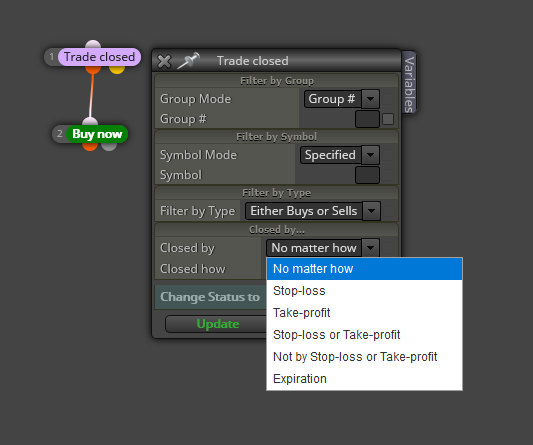
You need to use the 'On trade' tab and choose between these options:
Amborgio is right. Your screenshot is not enough.
Obviously, the block needs to be turned On again. I assumed you already knew that part. I just modified the second block tree as it should be. Now you need to specify the conditions for the block to be turned on again.
Substitute the 'For each trade' blcok for a 'Pass' one.
Do not use the 'offset' box. Instead, click on the 'Adjust' tab and there type '+5pips' or '-5 pips'.
This is my fourth year here, mate. Time and error after error are the best teachers.