I know TitanGeorge is. I recommend you to ask for their help.

I know TitanGeorge is. I recommend you to ask for their help.
I'm not an expert on objects, but yeah, you can create all those buttons and make them selectable/deselectable. It's a lot of work, though!
Could you please share you project to take a look at it?
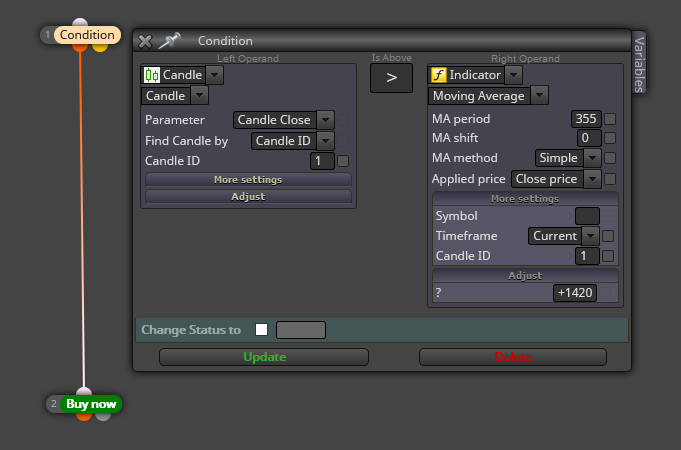
That 355 period value is to be inserted on the 'MA Period' box. That 1420 level is to be inserted in the place shown at my screenshot. A positive value will mean a parallel line above the current MA value and a negative one below it.
What you are looking for is:
Can you please upload a screenshot of it? Are you using MT5?
No, the only way to do it is to actively reinitiating it, I'm afraid. You will have to create the block resetting its initial value.
It depends on your current conditions. Can you please share your project to take a look at it?
Sounds weird. Are you sure that's the reason? Could you please share your project to take a look at it?
I recommend you to read this info here:
https://fxdreema.com/instructions/builder/money-management
I guess you will find what multi trade option is the one you are looking for.
You can do both things with variables. For point 1 you can use a boolean one (true-false) in a 'Modifiy Variables' block immediately below your EMA 50 crossing condition block. For point 2 you can create a double variable in which you can store that price the same way. Try it and let us know! 
There are several way to do it. Assuming thate will only be one buy and one sell only, you can do this:
Man, that was a very old post. I don't remember what I uploaded. What do you exactly need?
Wow, this is for real programmers! Anyone here?
I recommend you to remove all blocks headed by block 107 and then substitute this option in your 'buy now' block:
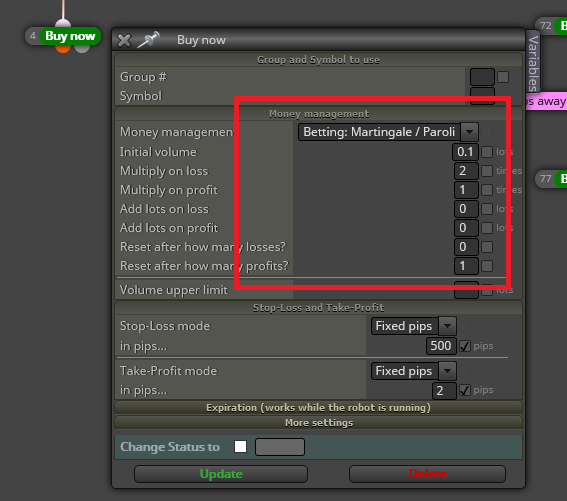
Here you can find info about that Martingale option:
Exactly in the same way variables are selected in fxDreema. Right click on the blank space you want the variable to be inserted and then slect it from the pop up window.
No. You will need a combination of blocks. If I understand you correctly there will be a combination of manually and automaticalluy open trades, right?