Nande. Sharing your current project would be way more useful than that screenshot. Can you please share it? Just do this:
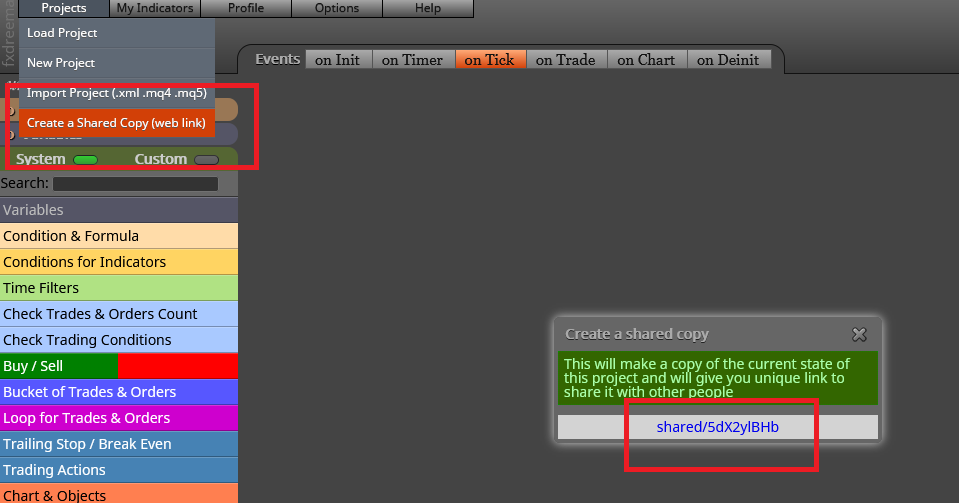

Nande. Sharing your current project would be way more useful than that screenshot. Can you please share it? Just do this:
I know there are many fine coders here. Not me sadly. 
You can use this loop configuration for your closed trades:
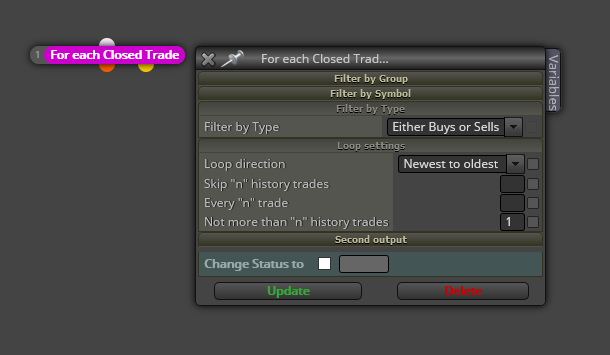
You can also filter there if you are looking for bouys or sells only. Don't forget to insert that number '1' on the bottom. That is the way for the block to look for the last closed trade and ignore all the previous ones.
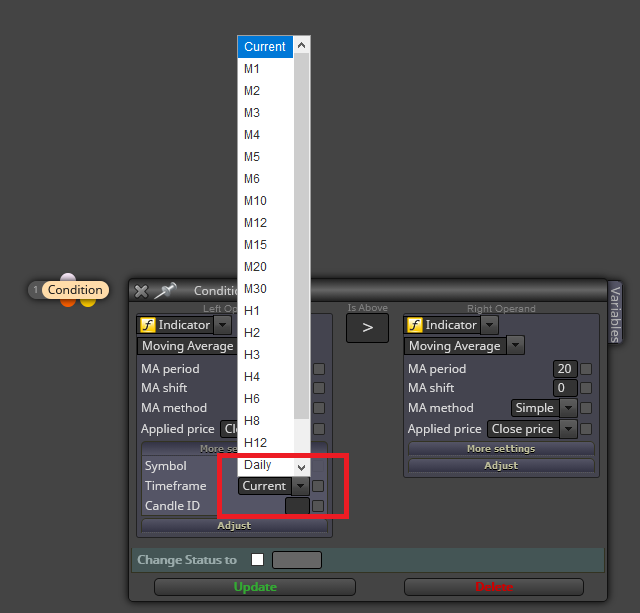
Easy. You can specify what timeframe is required for every condition by slecting it on the 'More settings' display menu. Here:
@titangeorge said in Multigraficos:
Si ya te contestaron, para de joder.
Tranqui, tio. Tampoco hace falta ponerse así. 
Ok. Here you have it:
https://fxdreema.com/shared/AzfI6zu0c
This is what you will have to do for each chart:
Try it and let me know.
Ya te he contestado eso mismo en otro hilo. Eso sólo es posible en MT5.
Unfortunately fxDreema cannot do that. You will need a custom indicator and then upload it to your account.
Could you please include a screenshot showing the exact requirement? I can't fully understand what you need.
Can you please share you project? I can't know what's the issue right now.
Honestly I have no idea how to insert an image on the chart, sorry. On buttons, I recommend you to read the following threads:
https://fxdreema.com/forum/topic/6518/button-on-chart-to-toggle-blocks-off-and-on
https://fxdreema.com/forum/topic/6505/how-to-work-with-the-buttons
Excelente. Si tienes alguna otra duda más, ya sabes dónde encontrame. 
You need to use this combo:
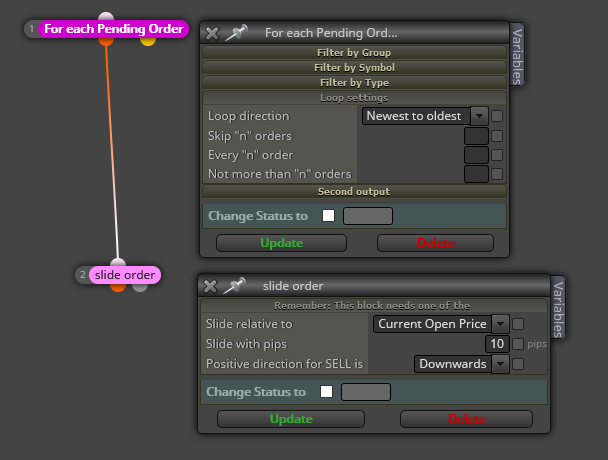
I recommend you to read the help section of the 'slide order' block for further detail.
You can use this block on top of all your project:
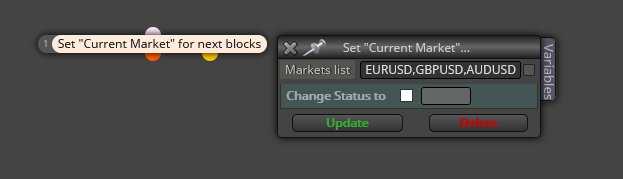
There you will have to manually write all symbols you want comma separated. That should do the work on real and backtesting for MT5, but only for real on MT4.
Your current distribution of blocks means that when ANY condition on blocks 10, 5 and 12 are true, a buy will be open. So yes, positioning them on parallel has that effect. Did you try to choose cond 1, cond 2 and cond 3 as false when setting your input parameters? That is the only way not a single trade should be open.
If you can get those rates from a custom advisor, theoretically it is possible. Otherwise you will need hardcoding them into your EA and that can be tough!
@fabiobioware Don't you think the solution provided by roar can be more efficient?
Both blocks on the 'On tick tab' are unnecessary. That tab is already working on a tick basis so the fisrt one is redundant. The second one could be useful if all open trades had the same behavior, but you said it was not the case. Each trade will have its own TS.
So please can you confirm you would accept trading on 6 charts (same symbol) but with just one open trade per chart?
Con respecto a la primera parte, eso es muy diferente. Si estás trababando con distintas divisas, no deberías tener problema. A cada EA en cada par/cruce le asignas manualmente un magic number distinto y de ese modo no interferirán nagativamente entre ellos. Eso lo puedes hacer sin ningún problema. Puedes usar exactamente el mismo EA per con distinto magic number. Así puedes operar tantos pares/cruces como magic numbers puedas crear.
Con respecto a la segunda pregunta, no trabajo con los bloques en español. Lo hago directamente en inglés y por cuanto dices no acabo de estar seguro sobre el bloque al que te refieres. ¿Te importaría subir una imagen para que lo pueda identificar, por favor?