fxDreema

    • Register
    • Login
    • Search
    • Back to the main page
    • Categories
    • Recent
    • Tags
    • Popular
    • Search
    1. Home
    2. l'andorrà
    3. Posts
    • Profile
    • Following 0
    • Followers 415
    • Topics 76
    • Posts 16843
    • Best 1072
    • Controversial 44
    • Groups 0

    Posts made by l'andorrà

    • RE: Change position of pending order

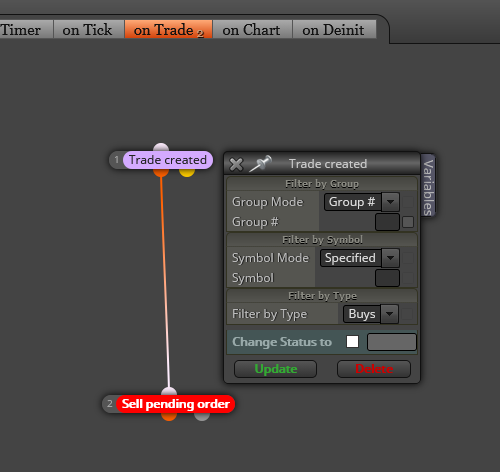
      My first suggestion is erasing every pending order and then opening a new one as price moves as you want. You don't need to 'move' the same pending order. Just make it evolve. Obviously that would be more efficient on a 'Once per bar' basis. Is that the case?

      posted in Questions & Answers
      l'andorrà
      l'andorrà
    • RE: Manual Trailing stop loss

      Will all trades be opened manually? If so your EA will have to use number zero as Magic Number. Otherwise, it will not work. On the other hand, I guess the common 'Modify stops' block would do the job. As trader philipps said, it should be put on the 'On trade' tab.

      posted in Questions & Answers
      l'andorrà
      l'andorrà
    • RE: Unreliable onTrade filter events on MT5

      MT5 if FAR less efficient than MT4 in fxDreema. Unfortunately it's very buggy :(.

      posted in Bug Reports
      l'andorrà
      l'andorrà
    • RE: CUSTOM INDICATOR IN SEPERATE WINDOW

      No problem. We will help you. Some more visual info would be much appreciated. Could you please upload some screenshots showing what you need exactly? That would clarify a lot your request.

      posted in Questions & Answers
      l'andorrà
      l'andorrà
    • RE: How/what blocks can i use the blocks to structure this problem?

      Use this on the 'On trade' tab:

      0_1579725415975_01.png

      posted in Questions & Answers
      l'andorrà
      l'andorrà
    • RE: Which button for total profit and total loss?

      Isn't this the third thraed you are opening with the same question?

      posted in Questions & Answers
      l'andorrà
      l'andorrà
    • RE: Entry after receiving an alert from custom indicator.

      Put a 'No trade' block on top of them all if you want just one open trade. You can also put a 'Once per bar' block on top if you just want one trade per candle. Obviously, you can combine both.

      posted in Questions & Answers
      l'andorrà
      l'andorrà
    • RE: Unreliable onTrade filter events on MT5

      The logic is correct. I'm afraid there must be another bug here. MQ5 is less than perfect in fxDreema, sadly. 😞

      posted in Questions & Answers
      l'andorrà
      l'andorrà
    • RE: Mql4 to mql5 Indicators Jan 2020.

      Some times...

      posted in Questions & Answers
      l'andorrà
      l'andorrà
    • RE: CUSTOM INDICATOR IN SEPERATE WINDOW

      fxDreema is not designed to make indicators, sorry. You can create an EA behaving like one, though. To do that you will need to run it on a separate chart. On the other hand, the 'Pass' block on top is not necessary at all.

      posted in Questions & Answers
      l'andorrà
      l'andorrà
    • RE: How do I stop the basic conditions when losing 300$?

      On your first issue, you should put this block ABOVE blocks 216 and 217 at the sam time.

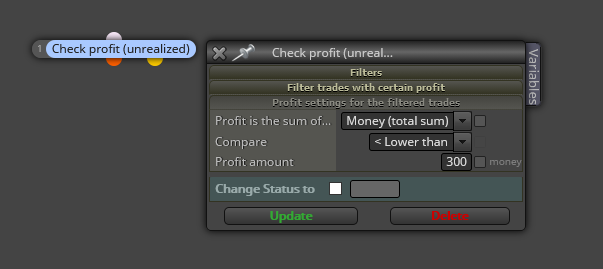
      0_1579724544537_01.png

      Additionally, you will need a time period for this block to be unchecked. I would recommens a variable to do it.

      On your second issue, you are looking for the holy grial! Not sure what to recommend, honestly. Maybe decreasing your money target?

      posted in Questions & Answers
      l'andorrà
      l'andorrà
    • RE: Manual Trailing stop loss

      I'm afraid I don't fully understand you.Do you men changing the trail step within the same open order? If so, what's the point of that?

      posted in Questions & Answers
      l'andorrà
      l'andorrà
    • RE: Testing Historical Trades with a new Strategy

      I'm afraid I'm not your man, sorry. I'm not a programmer. 😕

      posted in Questions & Answers
      l'andorrà
      l'andorrà
    • RE: Delete text objects from EA MT4

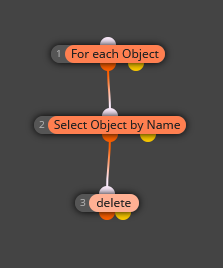
      For the first issue you will need to look for the name of that object on your chart and then use these blocks to delete it:

      0_1579634797370_01.png

      You will have to specify the name of the object on the 2nd block. But be aware when to do it. Will you need it later?

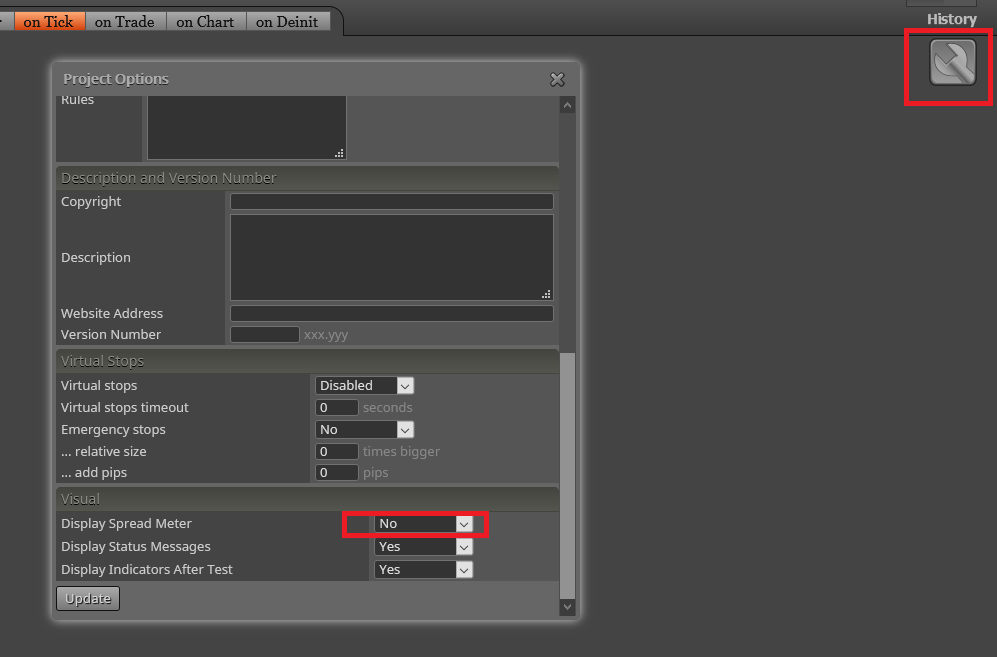
      On your second issue, go to Project options (wrench icon on top right) and then:

      0_1579634888300_02.png

      posted in Questions & Answers
      l'andorrà
      l'andorrà
    • RE: Help on Trailing stop block appreciated (SOLVED)

      Thank you very much for your help. I need to study it and will be back with my results.

      posted in Questions & Answers
      l'andorrà
      l'andorrà
    • RE: wait after closing trade

      If I understand it correctly, once the sell pending ordered has been launched it will be active for 3 days. Is that correct?

      posted in Questions & Answers
      l'andorrà
      l'andorrà
    • RE: Condition limit loss and Limit Profit

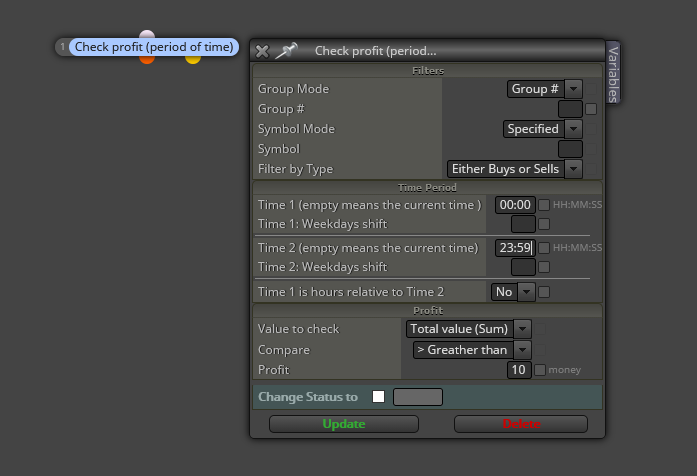
      This is the block you can use for both cases:

      0_1579634176017_01.png

      The last box 'Profit' can accept positive or negative values. That way you can condition how much can you win or lose every day or every trade. Once this condition is true, a boolean variable can be used to block your buy/sell launchers.

      posted in Questions & Answers
      l'andorrà
      l'andorrà
    • RE: How do I stop the basic conditions when losing 300$?

      @khalids222 said in How do I stop the basic conditions when losing 300$?:

      300$

      Blocks 120 and BUY are redundant. You can remove them. On your issue., could you please specify a bit more where do you think the problem can be?

      posted in Questions & Answers
      l'andorrà
      l'andorrà
    • RE: HELP REALLY NEED WITH MT5 EA

      @roar Ok. Thanks.

      posted in Questions & Answers
      l'andorrà
      l'andorrà
    • RE: My Blocks wont connect

      Didin't know that. Good to know now. 😉

      posted in Questions & Answers
      l'andorrà
      l'andorrà
    • 1
    • 2
    • 766
    • 767
    • 768
    • 769
    • 770
    • 842
    • 843
    • 768 / 843