fxDreema

    • Register
    • Login
    • Search
    • Back to the main page
    • Categories
    • Recent
    • Tags
    • Popular
    • Search
    1. Home
    2. OntradingX
    3. Best
    • Profile
    • Following 1
    • Followers 7
    • Topics 120
    • Posts 427
    • Best 28
    • Controversial 1
    • Groups 0

    Best posts made by OntradingX

    • RE: Finally, News Filter for MT5 in 1 easy to use Block !!

      @Dre
      93f3d555-a286-4948-95eb-fb142b7f30d7-image.png

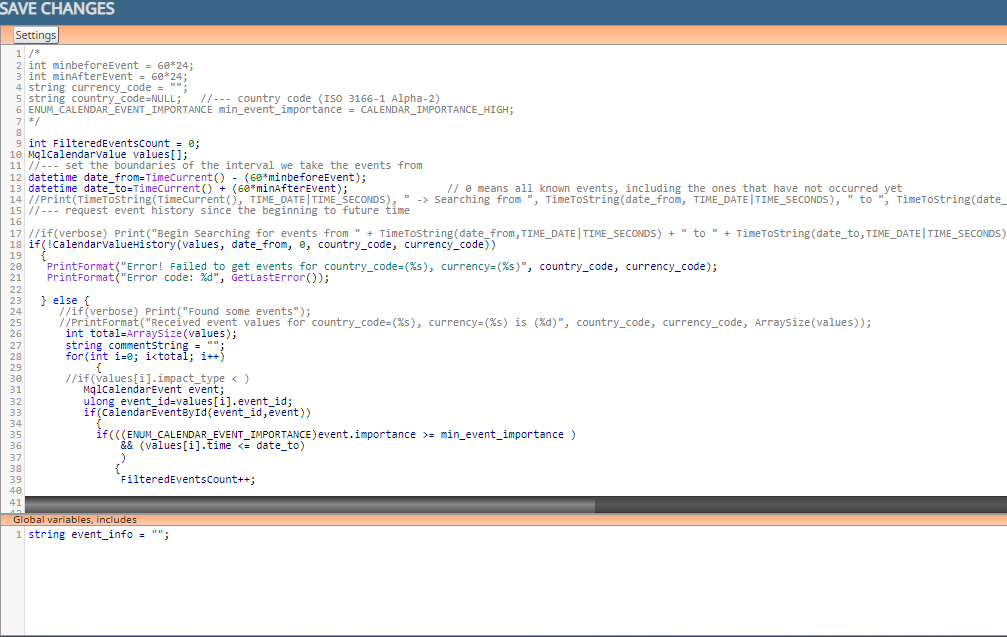
      below complete code:
      /*
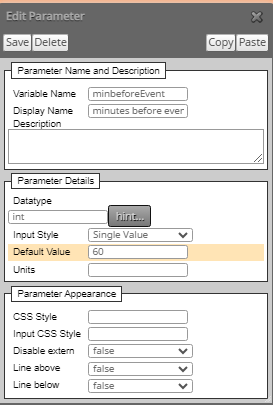
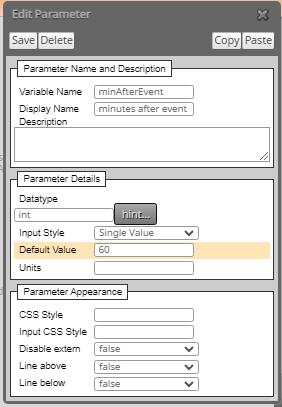
      int minbeforeEvent = 6024;
      int minAfterEvent = 60
      24;
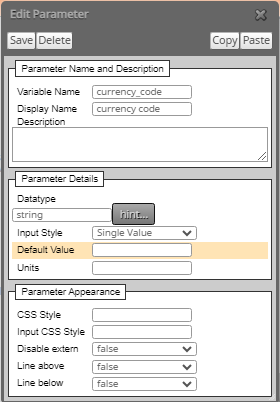
      string currency_code = "";
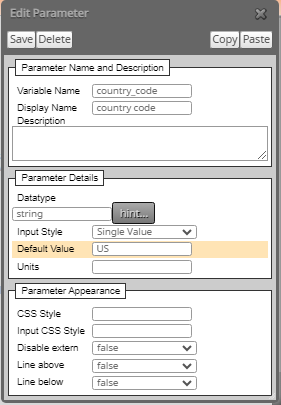
      string country_code=NULL; //--- country code (ISO 3166-1 Alpha-2)
      ENUM_CALENDAR_EVENT_IMPORTANCE min_event_importance = CALENDAR_IMPORTANCE_HIGH;
      */

      int FilteredEventsCount = 0;
      MqlCalendarValue values[];
      //--- set the boundaries of the interval we take the events from
      datetime date_from=TimeCurrent() - (60minbeforeEvent);
      datetime date_to=TimeCurrent() + (60
      minAfterEvent); // 0 means all known events, including the ones that have not occurred yet
      //Print(TimeToString(TimeCurrent(), TIME_DATE|TIME_SECONDS), " -> Searching from ", TimeToString(date_from, TIME_DATE|TIME_SECONDS), " to ", TimeToString(date_to,TIME_DATE|TIME_SECONDS));
      //--- request event history since the beginning to future time

      //if(verbose) Print("Begin Searching for events from " + TimeToString(date_from,TIME_DATE|TIME_SECONDS) + " to " + TimeToString(date_to,TIME_DATE|TIME_SECONDS) + " For Country " + country_code + ", currency " + currency_code );
      if(!CalendarValueHistory(values, date_from, 0, country_code, currency_code))
      {
      PrintFormat("Error! Failed to get events for country_code=(%s), currency=(%s)", country_code, currency_code);
      PrintFormat("Error code: %d", GetLastError());

      } else {
      //if(verbose) Print("Found some events");
      //PrintFormat("Received event values for country_code=(%s), currency=(%s) is (%d)", country_code, currency_code, ArraySize(values));
      int total=ArraySize(values);
      string commentString = "";
      for(int i=0; i<total; i++)
      {
      //if(values[i].impact_type < )
      MqlCalendarEvent event;
      ulong event_id=values[i].event_id;
      if(CalendarEventById(event_id,event))
      {
      if(((ENUM_CALENDAR_EVENT_IMPORTANCE)event.importance >= min_event_importance )
      && (values[i].time <= date_to)
      )
      {
      FilteredEventsCount++;

                 commentString = commentString + TimeToString(values[i].time,TIME_DATE|TIME_SECONDS) + " " + event.name + " " + EnumToString((ENUM_CALENDAR_EVENT_IMPORTANCE)event.importance ) + "\n";
                }
             }
       }
      

      commentString = "MQL5 returned " + FilteredEventsCount + " events from " + TimeToString(date_from,TIME_DATE|TIME_SECONDS) + " to " + TimeToString(date_to,TIME_DATE|TIME_SECONDS) + " For Country " + country_code + ", currency " + currency_code + "\n" + commentString;
      if(verbose) Comment(commentString);
      }
      if( FilteredEventsCount > 0 )
      {~next~}
      else
      {~inext~}

      BELOW, CODE TO INSERT IN GLOBAL VARIABLES:
      string event_info = "";

      AND, NEED CREAT THIS:
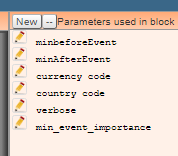
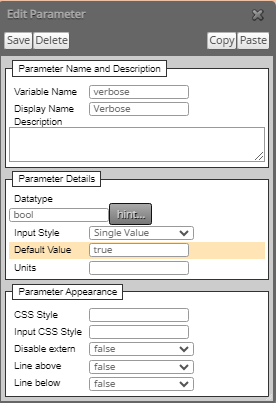
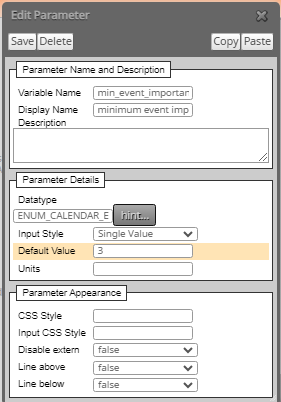
      6bad9574-7abd-4cfd-8ef7-368a01118425-image.png

      BELOW CONFIGURATIONS:
      c006a5b5-7efe-41f3-b3a4-267acfd3158c-image.png

      88d0f952-396c-4196-b1b3-aeb1b05206d7-image.png

      29a5e1b5-3ef1-4baa-b840-cf0b23b73eba-image.png

      a72c1d18-5785-41dc-a2bb-092f2aabc32c-image.png

      396f9b31-4609-4b30-85b7-4e9b6a01f796-image.png

      f238acaf-dc82-469f-8fc2-f24c848b87e8-image.png

      AND TO FINISH INSERT THIS BUTTON CREATED IN ON TICK OR ON TIMER
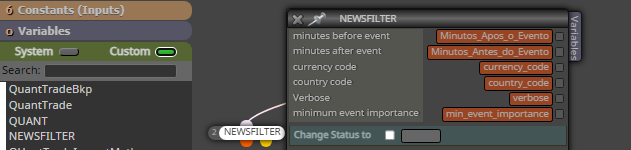
      b7ad49ce-b0e2-48d8-88a4-9af2efdb2148-image.png

      Hope this helps someone.

      posted in Tutorials by Users
      OntradingX
      OntradingX
    • RE: Changes

      @fxdreema Dear, good to hear from you.
      I've been reading your posts around here and in a way I don't know if I understood it well, maybe because of language issues.

      I managed to withdraw YES money from both the Forex and Brazil market and I still withdraw it with the EA's that I developed on your platform and also with the improvement of my strategies.
      I particularly use Fxdreema to generate extra income.
      I've already developed EA's and sold them.
      I've already developed EA's and provided them for free.
      And I also develop tools to help with negotiations.
      Currently I have more than 500 EA's and tools already created thanks to your tool.
      What I actually learned with my knowledge of Fxdreema is that "Risk management" is in my opinion much more important than the entry and exit strategy of a trade, without knowing the size of the risk, daily, monthly you can take or leave it proportional to the size of your entire capital and any account will be cleared quickly.
      I believe the % increase you aim to do is fair from the point of view that you mention that you are proposing to be more participatory, one of the things that is actually necessary once you've turned it into a (corporate business) and this really goes generate costs for you and you will have to pass them on.
      I know that life as a developer is not easy but in your place I would be proud, you developed something that is brilliant and helps a lot of people around the world, there are few who have ideas like that and have the knowledge, you went far and put it into practice, I suggest that you invest some time in this business because the snowball INCREASES when worked. Good luck.

      posted in Questions & Answers
      OntradingX
      OntradingX
    • RE: BackTesting different from live trading

      @ZakTrading
      I will share my experience with you.
      I've seen and tested a lot of things, dukas copy tick data, even paid data and nothing worked perfectly.
      What worked for me to have more quality in the tests and even prove the quality was "Develop an EA, with a wealth of control details".
      What types of controls:
      Timetable filters.
      1st market tick filtering to identify when the market opened.
      Spread filter and spread monitoring over time. (Some brokers, for example, Tickmil, had very varied spread years, which completely alters trading results between one period and another). The same happens with negotiations that depend on the market start time, some brokers change the start of market trading without prior notice.
      Limitation of trades (Some brokers allow a maximum number of simultaneous trades).
      Limitation on trading hours, always trade in a time window that you know the broker can have liquidity.
      Removal of Stop Loss and Take Profit by (virtual) options, as many brokers unfortunately (create non-existent prices) and this generates stop losses that make no sense at all.
      Lastly, the ideal is to do a small test, put your robot to operate day after day for at least 1 full week and in the following week perform a backtest on all models, tick, real tick and ohlc and compare the inputs to see if they are very close to what actually happened in the real market, if this is happening then you can find out which is the best backtest modeling and most appropriate for your trading style.

      posted in General Discussions
      OntradingX
      OntradingX
    • Trailling Stop (How to use)

      I will try to explain to you how I understand it and also with a project where I draw lines to see the stopping points of each one.

      Trailling Start - It just asks you:
      (How many profit points above the opening price do you want me to move your Stop Loss?)
      If you enter 300, it will do the following:
      Open order at price 1000 when market price reaches 1300 stop movements.

      Here comes another question, (where should I move the Stop Loss?)
      To answer this question, you must fill in the (Trailing Stop)
      Trailling Stop - Does it ask you?
      How many points below the price of (Trailling Start (1300)) do you want me to put yours (Stop Loss)?
      If you enter 300, it will do the following:
      Trailling Start is at 1300, when the price touches it I will put my Stop Loss at the price of 1000, ie 0x0.
      If you put 250, for example, the StopLoss will be moved to 1050.

      Here comes the final question, the
      that you want (Trailling Step), I understand this as a delay.
      Why delay?
      Answer: If you notice that there is sequence logic, if in (Trailling Step you keep (0), then you're talking about, don't be late, whenever the price makes a new higher price, drag my StopLoss next to each point, that is.
      If my current price is 1300 and I have already secured my 0x0 to the price of 1000, when the price reaches 1301 drag my StopLoss to 1001, go point to point giving me profit.
      Now, if you put a value on Trailling Step (50), you're saying:
      After leaving me at 0x0, when the price is far from the sum of the points of (Trailling Start + TraillingStop, ie (300 + 50 = 350) 350 points above the price where my (Stop Loss) is, immediately move me giving 50 points of gain and I walk like that always.

      I tried to detail it because I see a lot of doubts about this, I hope it helps a lot of people around here, I like to put lines in the chart to unravel how it works and I do this for everything in all my EAs.

      Follow the project link, if anyone has a better idea, share it too.
      https://fxdreema.com/shared/2QD4rMMtd

      posted in Tutorials by Users
      OntradingX
      OntradingX
    • RE: URGENT Fxdreema too slow.

      @sktsec yess, i add 8.8.8.8 and 4.4.4.4 and work fine now.

      posted in Bug Reports
      OntradingX
      OntradingX
    • RE: every tick based on real ticks - MT5, huge variance in results

      I don't know what type of market you are operating in, but I will give some examples of Forex as an example of some observations and opinions:
      Opinion ---> When you obtain similar results (similar and not precisely the same, closer both in capital curvature and in values and quantity of operations) in OHLC, EACH TICK and EACH REAL TICK, then you can be sure that your next step is to put it on a REAL account for at least 1 week, and the following week you compare whether the backtest entries are similar to those on the real account. After carrying out these tests, if the information is close then you have an EXCELLENT EA. Other than that, the rest is a waste of time.

      Observation ---> Most EA's Scalpers (who look for very few TP points or who use a short Trailling give positive results in OHLC and a super-negative result in each real tick, because OHLC as mentioned above by someone else It does not have slippage and a series of delays and particularities that brokers have, so for quick Scalpers, always try to follow the rules in testing (Each Real tick) do not waste your time with OHLC.

      OHLC is more used for non-scalper strategies, or Day trade, it is more used for Swing Trade, strategies that can be positioned for days and have a TP and a Fixed SL without Trailling and size in long pips, in these cases it is worth testing in OHLC because Spread or Slippage and all the brokers' nonsense will not interfere.

      Finally, always keep in mind that before developing your EA, think about the entire context in which it should work and even think and study the characteristics of brokers, for example, Scalpers work very well at ICMARKETS, TICKMIL, EXNESS , but on FBS, ROBOFOREX or FTMO proprietary tables Scalpers catch high slippages, so there is a need to know very well what you are planning and (where to plan to run).
      Study about Market Makers, Plugin, Slippage, Hyperactivity, Physical distance from liquidity provider to broker and Spread and with this, try to find out which factors most harm your strategy and avoid brokers that make it easier for these factors to hinder you.

      I have helped in something.

      posted in Questions & Answers
      OntradingX
      OntradingX
    • Good practices for Optimizing EAs made in Fxdreema

      Hello friends, I come here to share a little of my experience on Good practices for carrying out EA Optimizations made in Fxdreema.

      1. Before you want to believe that your strategy is winning and develop an EA that allows you to actually test it by strictly following all the entry, exit and management rules in (real account).

      2. Test the effectiveness of your strategy in trending, lateral and high volatility markets especially during news of 2 and 3 bulls.
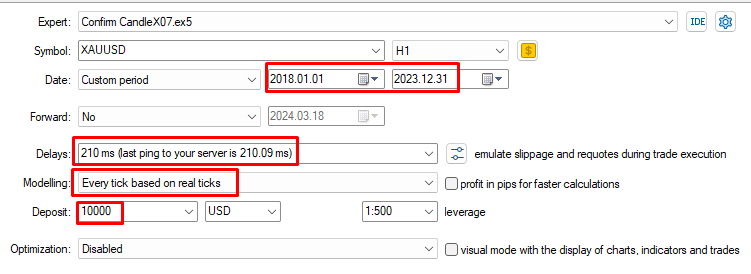
        Always test your EA's in an environment that is as close to reality, there is no point in fooling yourself with OHLC tests to accelerate the results, (with each real tick) it is most of the time what comes closest to the real market, so if To optimize your EA, use this mode even if it is slow and time-consuming, because if you find good results there is a huge chance of replicating the same result in a real account in the future.
        Choose Mixed periods (Covid, Wars, Flash Crash) to carry out backtests of your EA's, because if you seek to profit in the long term, your strategy must be able to withstand these periods.
        49cefdf6-4ca3-44a9-b7d9-7fa0458b24d3-image.png
        d6a1b319-e0f1-4a6c-a729-c4dbb39d3bf6-image.png

      3. Establish some gain and loss management standards, many people choose to think that a strategy with TP 2x greater than SL fits most markets, but in reality I realize that this can all be a mistake, in good times leverage and In bad times, close negotiations as quickly as possible, preserving capital means staying alive in the financial market.
        Dilute your Trading Capital into % that will make it last longer instead of risking all your capital in a few trades, be organized in establishing precise numbers of daily or even monthly trades including balanced profit and loss limits.

      4. Be simple and objective in your ideas, too many analyzes (filters) can make you miss countless opportunities.

      5. Don't sabotage yourself, many EA's that I see in MQL are clearly showing perfection in the backtest curvature due to the famous (Overfit) or skipping specific dates (days) where the downgrade happened, I suggest not getting excited about seeing EA backtest ´s from third parties because only they know what they did within the coding.

      6. Many indicators (if not most of them) are delayed and some were even coded on purpose to appear profitable, so know how to analyze the exact signal trigger moment given by them so that you are not fooled by the (visual) but by the possible result it can give you. Why not develop your own calculation or market vision and replicate it directly in your EA? I suggest not getting attached to any miraculous indicator without first having proof of real gain from at least the developer, otherwise they are just indicators like many others out there.

      Just like you, I've been in Fighting for a few years and increasingly maturing in this market.
      If you disagree or agree, I would like to know what your opinion is on this text.
      Below I share a video talking more about the items I mentioned above.

      Youtube Vídeo --> https://youtu.be/tkOw7TPOehk?si=msVejlRra7YCHTXx

      Thanks All.

      posted in Tutorials by Users
      OntradingX
      OntradingX
    • RE: Block"for each trade"Affects backtesting speed

      91761db6-c1a0-4fb2-b806-fcb6eb6073c2-image.png

      I resolved most of the slowdowns in my EA's on Fxdreema when I started organizing the blocks better, but each person may have a different logic, I'll try to give some tips based on what you mentioned about (orders).

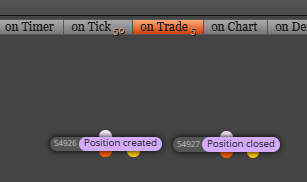
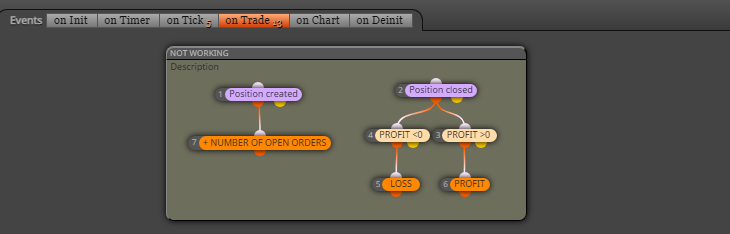
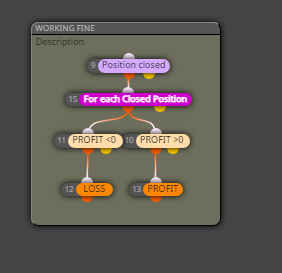
      In this case I use the On trade tab and turn on position create and position close blocks to bring me the loops I request, these blocks will act (only when such actions happen).

      Just like in Ontick I put the once per bar where the rules or analyzes really need to happen at the candle closes and I only leave in Ontick directly what really needs to be handled at each tick of the market happening, so I believe that fxdreema has its limitations but it is also possible to use the custom mql code block with the help of AI to make things that are slow in fxdreema work faster.

      posted in Bug Reports
      OntradingX
      OntradingX
    • RE: Help - Custom MQL Code

      @jstap
      I wanted to say in the message some solution for MT5 that does not need to use (libraries) and that is (similar) to the MT4 solution where it works to compile directly in Fxdreema without having to generate the .mq5 file and include it manually within the code.
      But it's okay if there is no such solution and I'll check if I can make it work and post the solution here for everyone when I find it.

      posted in Questions & Answers
      OntradingX
      OntradingX
    • RE: Easy way to make ENUM

      Great, work here with numeric https://fxdreema.com/shared/Msfdavdbe

      posted in Tutorials by Users
      OntradingX
      OntradingX
    • RE: "Add volume" block not Working

      @l-andorrà I don't know if you noticed but, I first created a question in "questions and answer" where there really was an answer, but after my tests it didn't work, so after numerous tests I understood that it may be a possible problem existing in the tool.
      So, believing that this is a problem in the tool, I created a new topic in "bug reports" which I believe is something just to deal with problems with the tool and not with doubts.
      I believe that the best way to avoid duplication would be for the developer to have some mechanism to transform topics that were "issues" into "problems", thus avoiding duplication of topics.

      posted in Bug Reports
      OntradingX
      OntradingX
    • RE: I dont understand trailing stop

      @William-1 @jstap @AlphaOmega
      I'll try to explain it to you as I understand it and also with a project where I drew lines so I could see the stopping points of each one.

      Trailling Start - He just asks you:
      (How many profit points above the opening price do you want me to move your Stop Loss from?)
      If you enter 300, then it will do the following:
      Open order at price 1000, when market price reaches 1300 move Stop.

      Here comes another question, (Where should I move the Stop Loss?)
      To answer this question you must fill in the (Trailing Stop)
      Trailling Stop - He asks you?
      How many points below the price of (Trailling Start(1300)) do you want me to put yours (Stop Loss)?
      If you enter 300, then it will do the following:
      Trailling Start is at 1300, when the price touches it, I will put my Stop Loss at price 1000, that is, 0x0.
      If you put for example 250 the StopLoss would be moved to 1050.

      Here comes the final question,
      What is (Trailling Step) you want, I understand this as a delay.
      Why delay?
      Answer: If you observe there is a sequence logic, if in (Trailling Step you keep (0) then you are talking about, don't be late, whenever the price makes a new higher price, drag my StopLoss next to each point, that is.
      If my current price is at 1300 and I've already secured my 0x0 at the 1000 price, when the price hits 1301 drag my StopLoss to 1001, go point by point giving me profit.
      Now if you put Trailling Step a value (50), you're saying:
      After you have left me at 0x0, when the price is at a distance from the sum of points of (Trailling Start+TraillingStop, ie (300+50=350) 350 points above the price of where my (Stop Loss) is, move it immediately giving me 50 points of gain and walk like that always.

      I tried to detail it because I see a lot of doubts about this, hopefully it helps a lot of people around here, I like to put lines in the graph to unravel the workings and I do this for everything in all my EA's.

      Follow the project link, if anyone has a better idea please share it too.
      https://fxdreema.com/shared/2QD4rMMtd

      posted in Questions & Answers
      OntradingX
      OntradingX
    • RE: Easy way to make ENUM

      @roar I tested it here and it worked perfectly.
      Thanks for this valuable tip.

      posted in Tutorials by Users
      OntradingX
      OntradingX
    • Is Fxdreema being updated or something similar or BUG?

      I notice slowdowns in the middle of project development, crashes that last for seconds and then I have to refresh the browser screen for the project to work again.
      Currently I got a problem where I was in an mql5 project and it simply turned into mql4 without prior notice, even with small and unreadable blocks.
      Notice in the picture, my project is not MQL4, I never made it in MQL4.
      And now how to solve this in such a big project??

      85f85e81-a68a-4c85-86e9-e6cedae0c903-image.png

      posted in Bug Reports
      OntradingX
      OntradingX
    • RE: I dont understand trailing stop

      @alphaomega
      Thank you my friend, let's unravel this Fxdreema as much as we can, now I'm working on something custom, as I like Trailling Stop Técnico, I don't believe in anything other than breakpoints or technical balance, I suggest you study more the asset that is operating and try to create trailling stop with strong structures, Trailling stop is great to ensure profit, but the best is you put your stop in the right place and the right place is always behind strong barriers.
      Follow the link to the tutorial already posted.
      https://fxdreema.com/forum/topic/13829/trailling-stop-how-to-use

      posted in Questions & Answers
      OntradingX
      OntradingX
    • RE: Position closed block not working correctly.

      @mariussun Unfortunately, I'm encountering many problems even in ONCHART too and most of them didn't exist before, even in mt4 it happens too. I would like the administrator to be more attentive, because we pay for the service and we deserve to have a minimum of attention, as the days are deducted from our plans, but we were unable to move forward due to the lack of correction.

      posted in Bug Reports
      OntradingX
      OntradingX
    • RE: K2 robot (multi-currency) - Free !

      @amincgi I run this test on EURUSD H1, default setup you left on your EA, what was the best result this year you got, or does it not work well on backtest?

      posted in Questions & Answers
      OntradingX
      OntradingX
    • ISSUES in the "On Trade" tab blocks are possible TEMPORARY SOLUTION!

      PROJECT --> https://fxdreema.com/shared/YO9s8vEBc

      Attention, all conditions that contain rules similar to these (They used to work, and now they no longer work).
      c39d507a-c9de-4a95-a6f0-65a4fa326071-image.png

      Here below is how I managed to get it working again:
      a2f56e8d-bb09-46c5-84e0-c0cc9d7a30b7-image.png

      I hope it helps someone.

      posted in Bug Reports
      OntradingX
      OntradingX
    • RE: I dont understand trailing stop

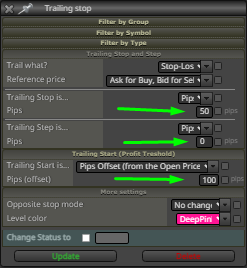
      @william-1 0_1638883813539_Trail 100-50.png

      I'll try to explain to you why I set it up like this:

      Trailling Start set 100, but why?
      Answer: I want when the price reaches 100 points away from (order opening price) it triggers and moves my Stop Loss.

      Trailling Stop set 50, but why?
      Answer: I want that when there is the triggering of Trailling Start, my Stop moves to 50 points away from where the triggering happened, that is, if the triggering happened in 1100, move to 1050.

      Trailling Step I set 0, but why?
      Answer: I want that when the price is above the point where Trailling Start 1100 was triggered, it moves the StopLoss at each point, the 0 means no (delay), every point that walks it will walk together, visibly you are not seeing but there is a level where every time he gets a new point and and pulls the stoploss together also a new point, they go together, if you put for example (5) on the trailling step, you are talking ( delay 5 points to move the Stop Loss The higher the value, the more delay you are putting, the closer to 0 the shorter therefore the movement is faster.

      posted in Questions & Answers
      OntradingX
      OntradingX
    • RE: Function for ifractal not working

      @ontradingx sorry, correct is @FXDREEMA

      posted in Questions & Answers
      OntradingX
      OntradingX
    • 1
    • 2
    • 1 / 2